
The Quantum L3 router and floating IPs
This post shows how the Quantum L3 Agent uses the Linux IP stack to implement the Quantum L3 Routing and NAT API extensions. It explains in detail how external access with floating IP works and how it can be debugged.
The setup is from the Grizzly on Ubuntu 12.04 installer script where the OVS (Open vSwitch) plugin is used and IP namespaces are enabled. This post focuses on the quantum-l3-agent and assumes you are already familiar with Quantum - if not see the doc here. How the quantum-ovs-plugin-agent provides layer-2 connectivity for instances and agents was briefly described in this post.
First setup some networks and boot an instance - see the doc for more details. Note: you can use the web dashboard (Horizon) for this instead.
$ quantum net-create net1

Created a new network:

+---------------------------+--------------------------------------+

| Field                     | Value                                |

+---------------------------+--------------------------------------+

| admin_state_up            | True                                 |

| id                        | a7e512cf-1ca0-4ec7-be75-46a8998cf9ca |

| name                      | net1                                 |

| provider:network_type     | gre                                  |

| provider:physical_network |                                      |

| provider:segmentation_id  | 1                                    |

| router:external           | False                                |

| shared                    | False                                |

| status                    | ACTIVE                               |

| subnets                   |                                      |

| tenant_id                 | 1b1590f268f548a2afff003aa00292b8     |

+---------------------------+--------------------------------------+

$ quantum subnet-create net1 172.17.17.0/24 \

>     --name sub1 --dns-nameserver 8.8.8.8

Created a new subnet:

+------------------+--------------------------------------------------+

| Field            | Value                                            |

+------------------+--------------------------------------------------+

| allocation_pools | {"start": "172.17.17.2", "end": "172.17.17.254"} |

| cidr             | 172.17.17.0/24                                   |

| dns_nameservers  | 8.8.8.8                                          |

| enable_dhcp      | True                                             |

| gateway_ip       | 172.17.17.1                                      |

| host_routes      |                                                  |

| id               | cec6d941-369c-49da-8fdd-450900e2a218             |

| ip_version       | 4                                                |

| name             | sub1                                             |

| network_id       | a7e512cf-1ca0-4ec7-be75-46a8998cf9ca             |

| tenant_id        | 1b1590f268f548a2afff003aa00292b8                 |

+------------------+--------------------------------------------------+

$ quantum net-create ext-net --provider:network_type local \

>     --router:external true

Created a new network:

+---------------------------+--------------------------------------+

| Field                     | Value                                |

+---------------------------+--------------------------------------+

| admin_state_up            | True                                 |

| id                        | ba37130b-366d-4ded-a768-aad92a1e6ed2 |

| name                      | ext-net                              |

| provider:network_type     | local                                |

| provider:physical_network |                                      |

| provider:segmentation_id  |                                      |

| router:external           | True                                 |

| shared                    | False                                |

| status                    | ACTIVE                               |

| subnets                   |                                      |

| tenant_id                 | 1b1590f268f548a2afff003aa00292b8     |

+---------------------------+--------------------------------------+

$ quantum subnet-create ext-net 192.168.101.0/24 \

>     --enable_dhcp false --gateway_ip 192.168.101.1

Created a new subnet:

+------------------+------------------------------------------------------+

| Field            | Value                                                |

+------------------+------------------------------------------------------+

| allocation_pools | {"start": "192.168.101.2", "end": "192.168.101.254"} |

| cidr             | 192.168.101.0/24                                     |

| dns_nameservers  |                                                      |

| enable_dhcp      | False                                                |

| gateway_ip       | 192.168.101.1                                        |

| host_routes      |                                                      |

| id               | fe59f3db-11af-4848-82e8-d482c48c64e1                 |

| ip_version       | 4                                                    |

| name             |                                                      |

| network_id       | ba37130b-366d-4ded-a768-aad92a1e6ed2                 |

| tenant_id        | 1b1590f268f548a2afff003aa00292b8                     |

+------------------+------------------------------------------------------+

$ quantum router-create router1

Created a new router:

+-----------------------+--------------------------------------+

| Field                 | Value                                |

+-----------------------+--------------------------------------+

| admin_state_up        | True                                 |

| external_gateway_info |                                      |

| id                    | 4cdb0354-7732-4d8f-a3d0-9fbc4b93a62d |

| name                  | router1                              |

| status                | ACTIVE                               |

| tenant_id             | 1b1590f268f548a2afff003aa00292b8     |

+-----------------------+--------------------------------------+

$ quantum router-gateway-set router1 ext-net

Set gateway for router router1

$ quantum router-interface-add router1 sub1

Added interface to router router1

$ nova boot --flavor micro --image cirros-030-x86_64 \

>    --nic net-id=a7e512cf-1ca0-4ec7-be75-46a8998cf9ca \

>    --security-groups test-vms test1

...
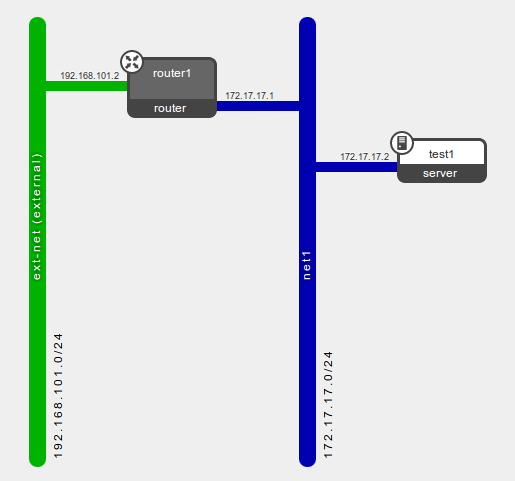
Now the logical diagram in Horizon looks like:
Next create a floating IP and associate it with the instance's port:
$ quantum floatingip-create ext-net

Created a new floatingip:

+---------------------+--------------------------------------+

| Field               | Value                                |

+---------------------+--------------------------------------+

| fixed_ip_address    |                                      |

| floating_ip_address | 192.168.101.3                        |

| floating_network_id | ba37130b-366d-4ded-a768-aad92a1e6ed2 |

| id                  | 31069cae-e210-4de5-9c6f-cc0719c7f057 |

| port_id             |                                      |

| router_id           |                                      |

| tenant_id           | 1b1590f268f548a2afff003aa00292b8     |

+---------------------+--------------------------------------+

$ nova list

+--------------------------------------+-------+--------+------------------+

| ID                                   | Name  | Status | Networks         |

+--------------------------------------+-------+--------+------------------+

| cedf9919-8271-422f-b07c-da9f1e8c9eee | test1 | ACTIVE | net1=172.17.17.2 |

+--------------------------------------+-------+--------+------------------+

$ quantum port-list --fields id \

>     -- --device_id cedf9919-8271-422f-b07c-da9f1e8c9eee

+--------------------------------------+

| id                                   |

+--------------------------------------+

| 6bb3d372-e920-451f-9f2d-855aec5dd6d7 |

+--------------------------------------+

$ quantum floatingip-associate \

>    31069cae-e210-4de5-9c6f-cc0719c7f057 \

>    6bb3d372-e920-451f-9f2d-855aec5dd6d7

Associated floatingip 31069cae-e210-4de5-9c6f-cc0719c7f057

$ quantum floatingip-show 31069cae-e210-4de5-9c6f-cc0719c7f057

+---------------------+--------------------------------------+

| Field               | Value                                |

+---------------------+--------------------------------------+

| fixed_ip_address    | 172.17.17.2                          |

| floating_ip_address | 192.168.101.3                        |

| floating_network_id | ba37130b-366d-4ded-a768-aad92a1e6ed2 |

| id                  | 31069cae-e210-4de5-9c6f-cc0719c7f057 |

| port_id             | 6bb3d372-e920-451f-9f2d-855aec5dd6d7 |

| router_id           | 4cdb0354-7732-4d8f-a3d0-9fbc4b93a62d |

| tenant_id           | 1b1590f268f548a2afff003aa00292b8     |

+---------------------+--------------------------------------+
Now the setup is all done, its time to look at what the quantum-l3-agent did on the network node. First the OVS config:
root@netnode:/# ovs-vsctl show

368a5610-6586-428f-a238-ecbae1c4f561

    Bridge br-int

        Port patch-tun

            Interface patch-tun

                type: patch

                options: {peer=patch-int}

        Port "qr-9f1fa61e-1e"

            tag: 1

            Interface "qr-9f1fa61e-1e"

                type: internal

        Port "tap1470cfd3-a6"

            tag: 1

            Interface "tap1470cfd3-a6"

                type: internal

        Port br-int

            Interface br-int

                type: internal

    Bridge br-ex

        Port "qg-1423ba35-7c"

            Interface "qg-1423ba35-7c"

                type: internal

        Port "eth3"

            Interface "eth3"

        Port br-ex

            Interface br-ex

                type: internal

    Bridge br-tun

        Port br-tun

            Interface br-tun

                type: internal

        Port patch-int

            Interface patch-int

                type: patch

                options: {peer=patch-tun}

        Port "gre-2"

            Interface "gre-2"

                type: gre

                options: {in_key=flow, out_key=flow, remote_ip="10.0.20.12"}

    ovs_version: "1.4.0+build0"
The OVS bridge br-int (integration bridge) has two ports. The port named tap1470cfd3-a6 was added by the dhcp-agent. More relevant to this post is the port named qr-9f1fa61e-1e which was added by the quantum-l3-agent for router1's interface on net1. Both ports in br-int have the same tag as they belong to the same Quantum network (net1).
The OVS bridge br-ex (external bridge) was created manually at install time with "physical" nic eth3 bridged in - seedoc. Now the quantum-l3-agent has added port qg-1423ba35-7c to it in order to uplink router1 to the external network.
The names for the OVS ports and interfaces are made from a prefix (qr-, qg- or tap) followed by the first 11 chars of the Quantum port they represent.
$ quantum router-port-list router1

+--------------------------------------+------+-------------------+--------------------------------------------------------------------------------------+

| id                                   | name | mac_address       | fixed_ips                                                                            |

+--------------------------------------+------+-------------------+--------------------------------------------------------------------------------------+

| 1423ba35-7c78-44b1-9a1a-319e8133a6ca |      | fa:16:3e:3a:97:7b | {"subnet_id": "fe59f3db-11af-4848-82e8-d482c48c64e1", "ip_address": "192.168.101.2"} |

| 9f1fa61e-1e3b-4091-a8cb-59651eab214d |      | fa:16:3e:ea:80:95 | {"subnet_id": "cec6d941-369c-49da-8fdd-450900e2a218", "ip_address": "172.17.17.1"}   |

+--------------------------------------+------+-------------------+--------------------------------------------------------------------------------------+
The router gets its own IP namespace that is separate from the DHCP namespace and the main host operating system namespace. And within it are the interfaces that are plugged into the OVS bridges:
root@netnode:/# ip netns

qdhcp-a7e512cf-1ca0-4ec7-be75-46a8998cf9ca

qrouter-4cdb0354-7732-4d8f-a3d0-9fbc4b93a62d

root@netnode:/# ip netns exec qrouter-4cdb0354-7732-4d8f-a3d0-9fbc4b93a62d ip address

10: lo: <LOOPBACK,UP,LOWER_UP> mtu 16436 qdisc noqueue state UNKNOWN

    link/loopback 00:00:00:00:00:00 brd 00:00:00:00:00:00

    inet 127.0.0.1/8 scope host lo

    inet6 ::1/128 scope host

       valid_lft forever preferred_lft forever

11: qg-1423ba35-7c: <BROADCAST,MULTICAST,PROMISC,UP,LOWER_UP> mtu 1500 qdisc noqueue state UNKNOWN

    link/ether fa:16:3e:3a:97:7b brd ff:ff:ff:ff:ff:ff

    inet 192.168.101.2/24 brd 192.168.101.255 scope global qg-1423ba35-7c

    inet 192.168.101.3/32 brd 192.168.101.3 scope global qg-1423ba35-7c

    inet6 fe80::f816:3eff:fe3a:977b/64 scope link

       valid_lft forever preferred_lft forever

12: qr-9f1fa61e-1e: <BROADCAST,MULTICAST,PROMISC,UP,LOWER_UP> mtu 1500 qdisc noqueue state UNKNOWN

    link/ether fa:16:3e:ea:80:95 brd ff:ff:ff:ff:ff:ff

    inet 172.17.17.1/24 brd 172.17.17.255 scope global qr-9f1fa61e-1e

    inet6 fe80::f816:3eff:feea:8095/64 scope link

       valid_lft forever preferred_lft forever
The agent has bound IP addresses 192.168.101.2 (for gateway SNAT) and 192.168.101.3 (the floating IP) to the gateway interface qg-1423ba35-7c.
It has also bound 172.17.17.1 (sub1's gateway_ip) to qr-9f1fa61e-1e (router1's interface for sub1). DHCP pushes this IP to instances connected to sub1 for their default gateway.
The agent has also enabled IP forwarding within the namespace:
root@netnode:/# ip netns exec qrouter-4cdb0354-7732-4d8f-a3d0-9fbc4b93a62d sysctl net.ipv4.ip_forward

net.ipv4.ip_forward = 1

root@netnode:/# ip netns exec qrouter-4cdb0354-7732-4d8f-a3d0-9fbc4b93a62d route -n

Kernel IP routing table

Destination     Gateway         Genmask         Flags Metric Ref    Use Iface

0.0.0.0         192.168.101.1   0.0.0.0         UG    0      0        0 qg-1423ba35-7c

172.17.17.0     0.0.0.0         255.255.255.0   U     0      0        0 qr-9f1fa61e-1e

192.168.101.0   0.0.0.0         255.255.255.0   U     0      0        0 qg-1423ba35-7c
If additional interfaces were added to router1 for other Quantum subnets, then their qr-xxxxxxxx-xx interfaces and routes would be added to the namespace.
Note in this case the default gateway 192.168.101.1 is an IP on the laptop running the VirtualBox VM netnode.
NAT
The quantum-l3-agent configures rules in the iptables nat table for floating IPs and the snat gateway. See here for iptables packet flow diagrams.
root@netnode:/# ip netns exec qrouter-4cdb0354-7732-4d8f-a3d0-9fbc4b93a62d iptables-save

# Generated by iptables-save v1.4.12 on Wed May 15 16:20:07 2013

*nat

:PREROUTING ACCEPT [175:53900]

:INPUT ACCEPT [175:53900]

:OUTPUT ACCEPT [0:0]

:POSTROUTING ACCEPT [1:84]

:quantum-l3-agent-OUTPUT - [0:0]

:quantum-l3-agent-POSTROUTING - [0:0]

:quantum-l3-agent-PREROUTING - [0:0]

:quantum-l3-agent-float-snat - [0:0]

:quantum-l3-agent-snat - [0:0]

:quantum-postrouting-bottom - [0:0]

-A PREROUTING -j quantum-l3-agent-PREROUTING

-A OUTPUT -j quantum-l3-agent-OUTPUT

-A POSTROUTING -j quantum-l3-agent-POSTROUTING

-A POSTROUTING -j quantum-postrouting-bottom

-A quantum-l3-agent-OUTPUT -d 192.168.101.3/32 -j DNAT --to-destination 172.17.17.2

-A quantum-l3-agent-POSTROUTING ! -i qg-1423ba35-7c ! -o qg-1423ba35-7c -m conntrack ! --ctstate DNAT -j ACCEPT

-A quantum-l3-agent-PREROUTING -d 169.254.169.254/32 -p tcp -m tcp --dport 80 -j REDIRECT --to-ports 9697

-A quantum-l3-agent-PREROUTING -d 192.168.101.3/32 -j DNAT --to-destination 172.17.17.2

-A quantum-l3-agent-float-snat -s 172.17.17.2/32 -j SNAT --to-source 192.168.101.3

-A quantum-l3-agent-snat -j quantum-l3-agent-float-snat

-A quantum-l3-agent-snat -s 172.17.17.0/24 -j SNAT --to-source 192.168.101.2

-A quantum-postrouting-bottom -j quantum-l3-agent-snat

COMMIT

# Completed on Wed May 15 16:20:07 2013

# Generated by iptables-save v1.4.12 on Wed May 15 16:20:07 2013

*filter

:INPUT ACCEPT [260:56620]

:FORWARD ACCEPT [4:336]

:OUTPUT ACCEPT [0:0]

:quantum-filter-top - [0:0]

:quantum-l3-agent-FORWARD - [0:0]

:quantum-l3-agent-INPUT - [0:0]

:quantum-l3-agent-OUTPUT - [0:0]

:quantum-l3-agent-local - [0:0]

-A INPUT -j quantum-l3-agent-INPUT

-A FORWARD -j quantum-filter-top

-A FORWARD -j quantum-l3-agent-FORWARD

-A OUTPUT -j quantum-filter-top

-A OUTPUT -j quantum-l3-agent-OUTPUT

-A quantum-filter-top -j quantum-l3-agent-local

-A quantum-l3-agent-INPUT -d 127.0.0.1/32 -p tcp -m tcp --dport 9697 -j ACCEPT

COMMIT

# Completed on Wed May 15 16:20:07 2013
So a connection initiated from our instance to the outside will hit this rule in the nat table (post routing):
-A quantum-l3-agent-float-snat -s 172.17.17.2/32 -j SNAT --to-source 192.168.101.3
And connection initiated from the outside to the instance's floating IP will hit this rule:
-A quantum-l3-agent-PREROUTING -d 192.168.101.3/32 -j DNAT --to-destination 172.17.17.2
So if an instance has a floating IP, then that will be used for both inbound and outbound traffic. But if an instance does not have a floating IP, it can still make connections out using the gateway IP, then this rule will be hit:
-A quantum-l3-agent-snat -s 172.17.17.0/24 -j SNAT --to-source 192.168.101.2
Finally this rule prevents snatting on traffic being routed between internal Quantum subnets:
-A quantum-l3-agent-POSTROUTING ! -i qg-1423ba35-7c ! -o qg-1423ba35-7c -m conntrack ! --ctstate DNAT -j ACCEPT
Troubleshooting
The logs are the first place to start. All Openstack services have a log and the easiest thing is to jump to the end and page-up looking for a stack trace. The quantum-l3-agent's log is in /var/log/quantum/l3-agent.log on Ubuntu.
For more subtle problems, tcpdump is a winner. The physical interface in br-ex (eth3 in the diagram above) would be a good candidate to start with floating IP problems. For interfaces within the router namespace, I found it necessary to use line buffering ( -l ) to make it print packets as they happened.
root@netnode:/# ip netns exec qrouter-4cdb0354-7732-4d8f-a3d0-9fbc4b93a62d tcpdump -ln -i qg-1423ba35-7c
To see which iptables rules are being hit, you can zero the nat table counters with 'iptables -t nat -Z', then do a ping or whatever and do 'iptables-save -c' and look for the non-zero counters.
DNS requests from the instances to dnsmasq do not work. I think this is because dnsmasq is isolated in the dhcp namespace and cannot pass on requests. A workaround is to create (or update) the fixed IP subnet with a dns server specified with --dns-nameserver and the dhcp-agent will ensure it is pushed out to instances on the subnet.
root@netnode:/# cat /var/lib/quantum/dhcp/a7e512cf-1ca0-4ec7-be75-46a8998cf9ca/opts

tag:tag0,option:dns-server,8.8.8.8

tag:tag0,option:router,172.17.17.1
This also shows how the instances get the subnet's gateway_ip for their default gateway.
cirros$ route -n

Kernel IP routing table

Destination     Gateway         Genmask         Flags Metric Ref    Use Iface

0.0.0.0         172.17.17.1     0.0.0.0         UG    0      0        0 eth0

172.17.17.0     0.0.0.0         255.255.255.0   U     0      0        0 eth0

cirros$ cat /etc/resolv.conf

search openstacklocal

nameserver 8.8.8.8
Internet access for instances
If the floating IP (or gateway snat IP) is not a routable public IP, then you will need to do additional work outside of OpenStack. In my case I needed my home-router to snat the packets again with the public IP my ISP provides. So I had to configure my laptop's Linux and firewall to allow IP forwarding. And a static route was needed on the home-router to send packets destined for 192.168.101.0/24 to the laptop. Another option would be to add snat (or masquerade) rules to the laptop iptables instead - then there would be 3 levels of nat.
http://techbackground.blogspot.com/2013/05/the-quantum-l3-router-and-floating-ips.html
The Quantum L3 router and floating IPs的更多相关文章
- 浮动IP(Floating IPs):开始构建你的高可用性的应用
高可用性是所有生产环境的关键.开发者因此可以高枕无忧因为他们知道他们的应用被设计为可以承受住故障. 今天,我们非常激动的宣布我们应用了浮动IP技术.浮动IP指的是一个IP地址可以立即从一个Drople ...
- Neutron分析(5)—— neutron-l3-agent中的iptables
一.iptables简介 1.iptables数据包处理流程 以本机为目的的包,由上至下,走左边的路 本机产生的包,从local process开始走左边的路 本机转发的包,由上至下走右边的路 简化流 ...
- openstack neutron L3 HA
作者:Liping Mao 发表于:2014-08-20 版权声明:能够随意转载,转载时请务必以超链接形式标明文章原始出处和作者信息及本版权声明 近期Assaf Muller写了一篇关于Neutro ...
- 创建 floating IP - 每天5分钟玩转 OpenStack(106)
先复习一下前面我们讨论的知识. 当租户网络连接到 Neutron router,通常将 router 作为默认网关.当 router 接收到 instance 的数据包,并将其转发到外网时: 1. r ...
- openstack通过Network Namespace和iptables实现租户私有网络互訪和L3路由功能
安装架构介绍 本文旨在通过自己搭建类似neutron (openvswitch + gre) 实现SDN 的环境,学习了解其工作原理,模拟核心原理.比方:同一租户自己定义网络 instance 互通, ...
- 通过 floating IP 访问 VIP - 每天5分钟玩转 OpenStack(126)
前面我们是直接用 curl 测试 VIP,在更为真实的场景中通常会使用 floating IP 访问 VIP. 下面我们给 VIP 关联一个 floating IP,再进行测试. 访问 Project ...
- 怎样利用Heartbeat与Floating IP在Ubuntu 14.04上创建高可用性设置
提供 ZStack社区 内容简单介绍 Heartbeat是一款开源程序,负责将集群基础设施容量--包括集群成员与消息收发--交付至客户server. Hearbeat在高可用性server基础设施其中 ...
- OpenStack Summit Paris 会议纪要 - 11-04-2014
前言: 来源:https://wiki.openstack.org/wiki/Summit/Kilo/Etherpads#Ops 不一定翻译准.由于是在summit上随手写的. 重点关注Ops Sum ...
- [转载]OpenStack OVS GRE/VXLAN网络
学习或者使用OpenStack普遍有这样的现象:50%的时间花费在了网络部分:30%的时间花费在了存储方面:20%的时间花费在了计算方面.OpenStack网络是不得不逾越的鸿沟,接下来我们一起尝 ...
随机推荐
- Android Studio 使用笔记:在图形界面使用 Gradle 配置项目所需jar包
在 Android Studio 中使用第三方 jar 包,可以直接下载后添加到项目中,也可以使用 Gradle 配置进行管理.图形界面下十分简单. 点击下图中间的图标,或者选中 Model ,按F4 ...
- zabbix自动化监控三种方式
1.agent自动注册2.sever端自动发现discovery3.zabbix api
- 线性判别函数-Fisher 线性判别
这是我在上模式识别课程时的内容,也有参考这里. 线性判别函数的基本概念 判别函数为线性的情况的一般表达式 式中x是d 维特征向量,又称样本向量, 称为权向量, 分别表示为 是个常数,称为阈值权. 设样 ...
- git入门四(分支创建合并)
熟悉git分支的原理是掌握了git的精髓,因为git和我们常用的源码管理系统有很大的区别和优点在分支上可以体现出来,一般我们常用的源码管理系统分支都是需要创建新目录,有全新的源码copy,一般都需要创 ...
- 程序员之---C语言细节19(来找茬,由/* */ 引起的凝视错误)
主要内容:由/* */ 引起的凝视错误 有4处凝视错误 #include <stdio.h> #define N 10 //使用以下宏定义的凝视 #define BSC // #defin ...
- IOS下移除按钮默认美化样式
今天在做项目中发现 ios会自己美化按钮的样式 美化的一般都是加一个圆角 也就是常说的border-radius 属性 今天在弄一个input标签的时候加了一个border-bottom属性 ...
- c# 控制台程序 隐藏控制台窗口
在某些项目中,需要采用控制台程序,但是又不需要通过dos窗口进行交互,同时打算隐藏掉难看的控制台窗口.实现的方法很多,有的是修改链接命令.我采用的方法略有些麻烦,首先是给窗口命名,之后找到该窗口指针, ...
- .net Socket编程
1. 什么是TCP/IP.UDP?2. Socket在哪里呢?3. Socket是什么呢?4. 你会使用它们吗? 什么是TCP/IP.U ...
- 微信小程序的文件结构 —— 微信小程序教程系列(1)
所有文章均是CSDN博客所看,已按照作者要求,注明出处了,感谢作者的整理! 博客文章地址:http://blog.csdn.net/michael_ouyang/article/details/548 ...
- MySQL复制经常使用拓扑结构具体解释
复制的体系结构有下面一些基本原则: (1) 每一个slave仅仅能有一个master: (2) 每一个slave仅仅能有一个唯一的serverID: (3) 每一个master能够有 ...