
在Linux下搭建Git服务器步骤
环境:
服务器 CentOS6.6 + git(version 1.7.1)
客户端 Windows10 + git(version 2.8.4.windows.1)
① 安装 Git
Linux 做为服务器端系统,Windows 作为客户端系统,分别安装 Git
服务器端:
|
1
|
#yum install -y git |
安装完后,查看 Git 版本
|
1
2
|
[root@localhost ~]# git --versiongit version 1.7.1 |
客户端:
下载 Git for Windows,地址:https://git-for-windows.github.io/
安装完之后,可以使用 Git Bash 作为命令行客户端。
安装完之后,查看 Git 版本
|
1
2
|
$ git --versiongit version 2.8.4.windows.1 |
② 服务器端创建 git 用户,用来管理 Git 服务,并为 git 用户设置密码
|
1
2
3
4
|
[root@localhost home]# id gitid: git:无此用户[root@localhost home]# useradd git[root@localhost home]# passwd git |
③ 服务器端创建 Git 仓库
设置 /home/data/git/gittest.git 为 Git 仓库
然后把 Git 仓库的 owner 修改为 git
|
1
2
3
4
5
|
[root@localhost home]# mkdir -p data/git/gittest.git[root@localhost home]# git init --bare data/git/gittest.gitInitialized empty Git repository in /home/data/git/gittest.git/[root@localhost home]# cd data/git/[root@localhost git]# chown -R git:git gittest.git/ |
④ 客户端 clone 远程仓库
进入 Git Bash 命令行客户端,创建项目地址(设置在 d:/wamp64/www/gittest_gitbash)并进入:
|
1
2
3
4
5
6
7
8
9
10
11
|
dee@Lenovo-PC MINGW64 /d$ cd wamp64/wwwdee@Lenovo-PC MINGW64 /d/wamp64/www$ mkdir gittest_gitbashdee@Lenovo-PC MINGW64 /d/wamp64/www$ cd gittest_gitbashdee@Lenovo-PC MINGW64 /d/wamp64/www/gittest_gitbash$ |
然后从 Linux Git 服务器上 clone 项目:
|
1
|
$ git clone git@192.168.56.101:/home/data/gittest.git |

当第一次连接到目标 Git 服务器时会得到一个提示:
The authenticity of host '192.168.56.101 (192.168.56.101)' can't be
established.RSA key fingerprint is
SHA256:Ve6WV/SCA059EqoUOzbFoZdfmMh3B259nigfmvdadqQ.Are you sure you want
to continue connecting (yes/no)?
选择 yes:
Warning: Permanently added '192.168.56.101' (RSA) to the list of known hosts.
此时 C:\Users\用户名\.ssh 下会多出一个文件 known_hosts,以后在这台电脑上再次连接目标 Git 服务器时不会再提示上面的语句。

后面提示要输入密码,可以采用 SSH 公钥来进行验证。
⑤ 客户端创建 SSH 公钥和私钥
|
1
|
$ ssh-keygen -t rsa -C |
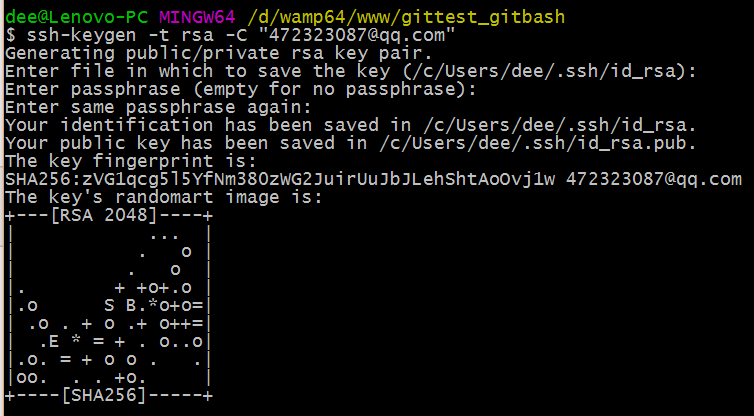
此时 C:\Users\用户名\.ssh 下会多出两个文件 id_rsa 和 id_rsa.pub
id_rsa 是私钥
id_rsa.pub 是公钥
⑥ 服务器端 Git 打开 RSA 认证
进入 /etc/ssh 目录,编辑 sshd_config,打开以下三个配置的注释:
|
1
2
3
|
RSAAuthentication yesPubkeyAuthentication yesAuthorizedKeysFile .ssh/authorized_keys |
保存并重启 sshd 服务:
|
1
|
[root@localhost ssh]# /etc/rc.d/init.d/sshd restart |
由 AuthorizedKeysFile 得知公钥的存放路径是 .ssh/authorized_keys,实际上是
$Home/.ssh/authorized_keys,由于管理 Git 服务的用户是 git,所以实际存放公钥的路径是
/home/git/.ssh/authorized_keys
在 /home/git/ 下创建目录 .ssh
|
1
2
3
4
5
|
[root@localhost git]# pwd/home/git[root@localhost git]# mkdir .ssh[root@localhost git]# ls -a . .. .bash_logout .bash_profile .bashrc .gnome2 .mozilla .ssh |
然后把 .ssh 文件夹的 owner 修改为 git
|
1
2
3
4
5
6
7
8
9
10
11
|
[root@localhost git]# chown -R git:git .ssh[root@localhost git]# ll -a总用量 32drwx------. 5 git git 4096 8月 28 20:04 .drwxr-xr-x. 8 root root 4096 8月 28 19:32 ..-rw-r--r--. 1 git git 18 10月 16 2014 .bash_logout-rw-r--r--. 1 git git 176 10月 16 2014 .bash_profile-rw-r--r--. 1 git git 124 10月 16 2014 .bashrcdrwxr-xr-x. 2 git git 4096 11月 12 2010 .gnome2drwxr-xr-x. 4 git git 4096 5月 8 12:22 .mozilladrwxr-xr-x. 2 git git 4096 8月 28 20:08 .ssh |
⑦ 将客户端公钥导入服务器端 /home/git/.ssh/authorized_keys 文件
回到 Git Bash 下,导入文件:
|
1
|
$ ssh git@192.168.56.101 'cat >> .ssh/authorized_keys' < ~/.ssh/id_rsa.pub |
需要输入服务器端 git 用户的密码

回到服务器端,查看 .ssh 下是否存在 authorized_keys 文件:
|
1
2
3
4
|
[root@localhost git]# cd .ssh[root@localhost .ssh]# ll总用量 4-rw-rw-r--. 1 git git 398 8月 28 20:08 authorized_keys |
可以查看一下是否是客户端生成的公钥。
重要:
修改 .ssh 目录的权限为 700
修改 .ssh/authorized_keys 文件的权限为 600
|
1
2
3
|
[root@localhost git]# chmod 700 .ssh[root@localhost git]# cd .ssh[root@localhost .ssh]# chmod 600 authorized_keys |
⑧ 客户端再次 clone 远程仓库
|
1
|
$ git clone git@192.168.56.101:/home/data/git/gittest.git |

查看客户端项目目录:

项目已经 clone 了。
也可以使用 tortoiseGit 客户端来管理项目:
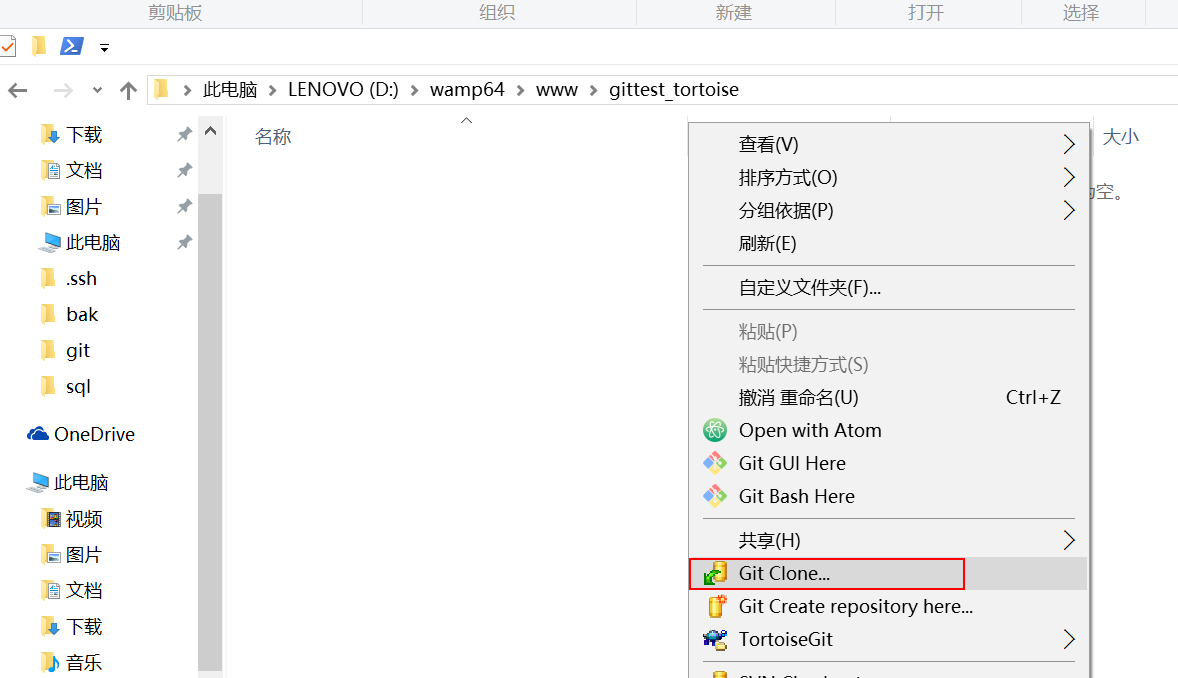
clone
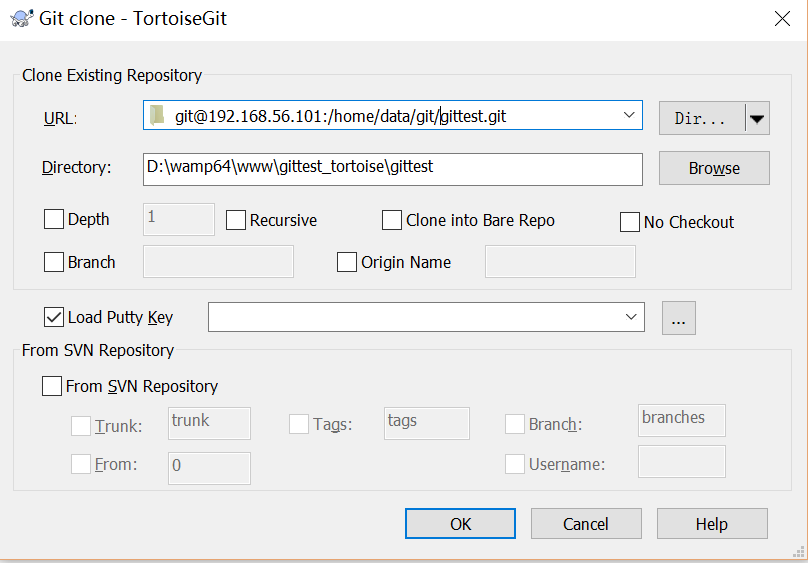
⑨ 禁止 git 用户 ssh 登录服务器
之前在服务器端创建的 git 用户不允许 ssh 登录服务器
编辑 /etc/passwd
找到:
|
1
|
git:x:502:504::/home/git:/bin/bash |
修改为
|
1
|
git:x:502:504::/home/git:/bin/git-shell |
此时 git 用户可以正常通过 ssh 使用 git,但无法通过 ssh 登录系统。
以上就是本文的全部内容,希望对大家的学习有所帮助,也希望大家多多支持脚本之家。
在Linux下搭建Git服务器步骤的更多相关文章
- 【转】在Linux下搭建Git服务器
在 Linux 下搭建 Git 服务器 环境: 服务器 CentOS6.6 + git(version 1.7.1)客户端 Windows10 + git(version 2.8.4.windows. ...
- 在Linux下搭建Git服务器的方法是什么样?
第一步 安装git:可以通过命令的方式快速安装,不同的linux的安装方法可能不一样,我的是采用的yum方法.ubuntu可以用apt-get命令.sudo yum install git 第二步 添 ...
- Linux 下搭建Git 服务器详细步骤
参考: https://www.cnblogs.com/dee0912/p/5815267.html#_label0 https://blog.csdn.net/carfge/article/deta ...
- 在 Linux 下搭建 Git 服务器
环境: 服务器 CentOS6.6 + git(version 1.7.1)客户端 Windows10 + git(version 2.8.4.windows.1) ① 安装 Git Linux 做为 ...
- 在 Linux 下搭建 Git 服务器(yum安装)
服务端(linux): 1. 安装git [root@localhost ~]# yum -y install git 2. 增加一个git账户 为了管理的方便,在linux下面增添一个 " ...
- Linux下搭建Git服务器
1.安装Git 见 Jenkins持续集成环境部署 第四节 2.创建Git用户和用户组 groupadd git useradd git -g git 3.创建证书切换到git用户创建证书 su gi ...
- kali linux 下搭建git服务器
参考:http://www.cnblogs.com/dee0912/p/5815267.html https://www.liaoxuefeng.com/wiki/001373951630592960 ...
- 在Linux下搭建git服务器
http://www.cnblogs.com/dee0912/p/5815267.html 步骤很详细,很受用
- Windows操作系统下搭建Git服务器和客户端。
本文将介绍如何在Windows操作系统下搭建Git服务器和客户端.服务器端采用的是Bonobo Git Server,一款用ASP.NET MVC开发的Git源代码管理工具,界面简洁,基于Web方式配 ...
随机推荐
- Mysql Grant权限
查看用户权限: SELECT host,user,password,Grant_priv,Super_priv FROM mysql.user; 权限取决于最上一条记录的值 如果需要收回权限: REV ...
- How to: Launch the Debugger Automatically
Sometimes, you may need to debug the startup code for an application that is launched by another pro ...
- 【mybatis】mybatis中的<if test=“”>test中多条件
mybatis中的<if test=“”>test中多条件 代码展示: 其中 accountCode和apiName都是ApiAllRespBean的属性 <select id=&q ...
- 安卓查看包名,activity方法
https://www.cnblogs.com/wangcp-2014/p/6144530.html 一.有源码情况 直接打开AndroidManifest.xml文件,找到包含android.int ...
- 【JUnit】Junit命令行执行、参数化执行、Main方法执行
参考资料: main方法执行:http://stackoverflow.com/questions/2543912/how-do-i-run-junit-tests-from-inside-my-ja ...
- Java模式的秘密--java常用的几种模式
要学习设计模式,首先要明白设计模式,就是为实现某一种或某一组功能提供的代码编码方式.它没有固定的套路,只有约定俗成的风格.所有编码者可以根据已有的设计模式开放思维,设计出自己的设计模式,也会在无意中使 ...
- 载入本地Html文件
NSString * resousePath = [[NSBundle mainBundle]resourcePath]; NSString * filePath = [resouse ...
- ionic准备之angular基础———服务provider 和 factory和service(9)
<!DOCTYPE html> <html lang="en"> <head> <meta charset="UTF-8&quo ...
- JavaScript对象this指向(普通键this指向 非指向函数的键)
1.结论 JavaScript对象普通键(非指向函数的键)this指向是window. 2.示例 <!DOCTYPE html> <html lang="zh"& ...
- zabbix根据graph name 做screen
下面亲测可用 #!/usr/bin/env python #coding:utf8 import urllib2 import sys import json import argparse #定义通 ...