
Git基本操作(add,commit的理解)
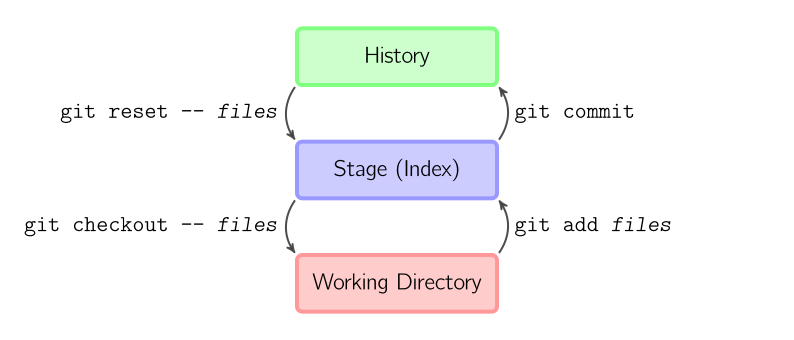
1.创建仓库
——创建工作目录(Working Directory):git三种副本:工作目录(Working Direcotry),暂存区域(Stage,索引(Index)),仓库(History)
#/home/yang/Documents/repo01
.

├── datafiles

│   └── data.txt

├── test01

├── test02

└── test03
# Initialize the local Git repository(在根目录下生成.git文件夹)

git init
2.查看文件状态
yang@mint-linux ~/Documents/repo01 $ git status

# On branch master

#

# Initial commit

#

# Untracked files:

#   (use "git add <file>..." to include in what will be committed)

#

#    datafiles/

#    test01

#    test02

#    test03

nothing added to commit but untracked files present (use "git add" to track)
3.添加文件
——git add files 把当前文件放入暂存区域
yang@mint-linux ~/Documents/repo01 $ git add .

yang@mint-linux ~/Documents/repo01 $ git status

# On branch master

#

# Initial commit

#

# Changes to be committed:

# (use "git rm --cached <file>..." to unstage)

#

#    new file: datafiles/data.txt

#    new file: test01

#    new file: test02

#    new file: test03

#
3.提交文件
——git commit 给暂存区域生成快照并提交。
yang@mint-linux ~/Documents/repo01 $ git commit -m "Initial commit"

[master (root-commit) 3f79459] Initial commit

  files changed,  insertions(+)

 create mode  datafiles/data.txt

 create mode  test01

 create mode  test02

 create mode  test03

yang@mint-linux ~/Documents/repo01 $ git status

# On branch master

nothing to commit, working directory clean
4.查看文件内容变更
yang@mint-linux ~/Documents/repo01 $ echo "This is a change" > test01

yang@mint-linux ~/Documents/repo01 $ echo "and this is another change" > test02

yang@mint-linux ~/Documents/repo01 $ git diff

diff --git a/test01 b/test01

index 749eb2d..d0a432b

--- a/test01

+++ b/test01

@@ -, + @@

-datafiles

-test01

-test02

-test03

+This is a change

diff --git a/test02 b/test02

index e69de29..552c22e

--- a/test02

+++ b/test02

@@ -, + @@

+and this is another change
yang@mint-linux ~/Documents/repo01 $ git commit -a -m "These are new changes"
5.查看工作目录提交记录
(回顾:git status--查看文件状态,git-diff--查看文件内容状态)
# Make some changes in the file

echo "This is a new change" > test01

echo "and this is another new change" > test02
yang@mint-linux ~/Documents/repo01 $ git status

# On branch master

# Changes not staged for commit:

#   (use "git add <file>..." to update what will be committed)

#   (use "git checkout -- <file>..." to discard changes in working directory)

#

#    modified:   test01

#    modified:   test02

#

no changes added to commit (use "git add" and/or "git commit -a")

yang@mint-linux ~/Documents/repo01 $ git diff

diff --git a/test01 b/test01

index d0a432b..18fec42

--- a/test01

+++ b/test01

@@ - + @@

-This is a change

+This is a new change

diff --git a/test02 b/test02

index 552c22e..0b17386

--- a/test02

+++ b/test02

@@ - + @@

-and this is another change

+and this is another new change

yang@mint-linux ~/Documents/repo01 $ git add . && git commit -m "More changes - type in the commit message"

[master 8a18ab1] More changes - type in the commit message

  files changed,  insertions(+),  deletions(-)

yang@mint-linux ~/Documents/repo01 $ git log

commit 8a18ab1c77ecaf049d17e5ac8fb682ae618cd710

Author: Will Hunting <yangqionggo@gmail.com>

Date:   Sun Aug  ::  +

    More changes - type in the commit message

commit a6bd74cdbaa1b349d537008f33fa186eae9d48c9

Author: Will Hunting <yangqionggo@gmail.com>

Date:   Sun Aug  ::  +

    These are new changes

commit 3f794593e7008286a893a5d00f81ee5757140469

Author: Will Hunting <yangqionggo@gmail.com>

Date:   Sun Aug  ::  +

    Initial commit
6.删除文件
如果你删除了一个在版本控制之下的文件,那么使用git add .不会在索引中删除这个文件。需要通过带-a选项的git commit命令和-A选项的git add命令来完成
# Create a file and put it under version control

touch nonsense.txt

git add . && git commit -m "a new file has been created"

# Remove the file

rm nonsense.txt

# Try standard way of committing -> will not work

git add . && git commit -m "a new file has been created"

# Now commit with the -a flag

git commit -a -m "File nonsense.txt is now removed"

# Alternatively you could add deleted files to the staging index via

git add -A .

git commit -m "File nonsense.txt is now removed"
7.更正提交的信息
git commit --amend -m "More changes - now correct"
Git基本操作(add,commit的理解)的更多相关文章
- 【原创】关于Git暂存区的理解
关于Git暂存区的理解 暂存区可以说是Git的三大重要的区域之一,另外两个分别是工作目录和Git仓库,所以说对暂存区的深入理解可以帮助我们理解很多Git命令背后隐藏的工作原理.今天,本文将以 ...
- 关于git使用的几点理解
1.git为分布式的版本控制系统,有远程仓库和本地仓库,远程仓库和本地仓库之间建立关联关系后,可将本地仓库的更新push(相当于是内容同步)到远程仓库进行保存,远程仓库的作用相当于一个最终代码备份的地 ...
- Git error on commit after merge - fatal: cannot do a partial commit during a merge
Git error on commit after merge - fatal: cannot do a partial commit during a merge this answer is : ...
- 转 关于C#中派生类调用基类构造函数的理解
关于C#中派生类调用基类构造函数的理解 .c#class 本文中的默认构造函数是指在没有编写构造函数的情况下系统默认的无参构造函数 1. 当基类中没有自己编写构造函数时,派生类默认的调用 ...
- 【Git 学习三】深入理解git reset 命令
重置命令(git reset)是Git 最常用的命令之一,也是最危险最容易误用的命令.来看看git reset命令用法. --------------------------------------- ...
- Git 合并多次 commit 、 删除某次 commit
Git 合并多次 commit 有时候在一个分支的多次意义相近的 commit,会把整个提交历史搞得很混乱,此时可以将一部分的 commit 合并为一个 commit,以美化整个 commit 历史, ...
- [Git/GitHub] Tutorial 1. Git download and commit first project
1. Install at https://git-scm.com/downloads 2. Set up your name and email $ git config --global user ...
- Git冲突:commit your changes or stash them before you can merge.
用git pull来更新代码的时候,遇到了下面的问题: error: Your local changes to the following files would be overwritten by ...
- [Git] git revert ( revert commit 和 revert merge)
转载自:http://blog.csdn.net/qinjienj/article/details/7621887 我们难免会因为种种原因执行一些错误的commit / push,git提供了reve ...
- git取消本地commit
如果不小心commit了一个不需要commit的文件,可以对其进行撤销. 先使用git log 查看 commit日志 commit 422bc088a7d6c5429f1d0760d008d86c5 ...
随机推荐
- O - 听说下面都是裸题 (最小生成树模板题)
Economic times these days are tough, even in Byteland. To reduce the operating costs, the government ...
- Arm寄存器介绍及汇编基础
一.ARM处理器支持7种工作模式 ① 用户模式(USR): 用于正常执行程序(The normal ARM program execution state) ② 快速中断模式(FIQ): 用于高速数据 ...
- my.资料__烹饪炼药
ZC: 新区的时候,烹饪炼药 也不是 等级越高越好:等级越高需要的人可能少,价格高 但是买的人少:大家都在那个等级 很容易堵车 没有摊位... 刚开始 大家都穷 可能等级稍低的 反而好卖... ZC: ...
- 数据库mysql基础语言--各模式的含义
1. 欢迎信息 欢迎来到 MySQL 镜像.命令以 ; 或 g 结束.你的 MySQL 连接编号为 2.服务器版本:5.1.47-社区 MySQL 社区服务器(GPL) 版权(C)2000.2010, ...
- [转]js判断url是否有效
本文转自:http://www.cnblogs.com/fumj/p/3490121.html 方法一:(仅适用于ie) function CheckStatus(url) { XMLHTTP = n ...
- Windows 10家庭版升级到专业版,系统蓝屏
Log Name: SystemSource: Microsoft-Windows-DistributedCOMDate: 9/9/2018 7:56:57 PMEvent ID: 10016Task ...
- Kudu1.1.0 、 Kudu1.2.0 Kudu1.3.0的版本信息异同比较
不多说,直接上干货! Kudu1.1.0 新特性 python API升级,具备JAVA C++client一样的功能(从0.3版本直接升级到1.1),主要的点如下: 1.1. 改进了Parial ...
- java内存区域与内存溢出
JVM的内存区域划分: jvm的内存区域分为5部分:程序计数器,虚拟机栈,本地方法栈,堆跟方法区. 程序计数器,虚拟机栈,本地方法栈三部分是线程私有的,堆跟方法区是公共的. 1.程序计数器 是一块较小 ...
- jQuery.hover() 函数详解
hover()函数用于为每个匹配元素的hover事件绑定处理函数. hover事件就是鼠标悬停事件.此外,你还可以额外传递给事件处理函数一些数据. 此外,你可以为同一元素多次调用该函数,从而绑定多个事 ...
- C++/CLI中的const literal initonly 友元(转)
C++/CLI中的const literal initonly 友元 C++/CLI中的const Visual C++并不允许在const对象上调用成员函数,除非该成员函数也被声明为const. C ...