
Vuex进阶
1.插件
下面以一个对state进行持久化存储的插件为例进行介绍:
代码结构:
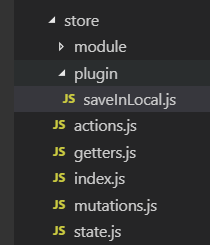
saveInLocal.js
export default function (store) {

  if (localStorage.state) {

    store.replaceState(JSON.parse(localStorage.state));

  }

  store.subscribe((mutation, state) => {

    //在HTML5中,新加入了一个localStorage特性,这个特性主要是用来作为本地存储来使用的,解决了cookie存储空间不足的问题(cookie中每条cookie的存储空间为4k),localStorage中一般浏览器支持的是5M大小,这个在不同的浏览器中localStorage会有所不同。

    localStorage.state = JSON.stringify(state);

  });

}
index.js
import Vue from 'vue'

import Vuex from 'vuex'

import state from "./state"

import getters from './getters'

import mutations from "./mutations"

import actions from "./actions"

import user from './module/user'

import saveInLocal from './plugin/saveInLocal';

Vue.use(Vuex)

export default new Vuex.Store({

  state,

  getters,

  mutations,

  actions,

  modules: {

    user

  },

  plugins:[saveInLocal]

})
store.vue:
<template>

  <div>

    <a-input :value="inputValue" @input="handlerInput"></a-input>

    <p>{{ inputValue }} -> lastLetter is {{ inputValueLastLetter }}</p>

    <p>appName: {{ appName }}, appNameWithVersion : {{ appNameWithVersion }}</p>

    <p>userName : {{ userName }}, firstLetter is : {{ firstLetter }}</p>

    <button @click="handleChangeAppName">修改appName和user.js中的userName</button>

    <p>动态给state增加appVersion: {{ appVersion }}</p>

    <button @click="handleActionChangeAppName">通过Action修改appName</button>

    <button @click="registerModule">动态注册模块</button>

    <p v-for="(li, index) in todoList" :key="index">{{ li }}</p>

  </div>

</template>

<script>

import AInput from "_c/AInput.vue";

import AShow from "_c/AShow.vue";

//变量的解构赋值

import { mapState, mapGetters, mapMutations, mapActions } from "vuex";

import { stat } from "fs";

export default {

  name: "store",

  data() {

    return {

      inputValue: ""

    };

  },

  components: {

    AInput: AInput,

    AShow: AShow

  },

  computed: {

    //ES6展开操作符 mapState展开会形成一个对象 使用对象展开运算符将此对象混入到外部对象中

    ...mapState({

      appName: state => state.appName,

      appVersion: state => state.appVersion,

      userName: state => state.user.userName,

      todoList: state => (state.user.todo ? state.user.todo.todoList : [])

    }),

    // 使用对象展开运算符将 getter 混入 computed 对象中

    // ...mapGetters(["appNameWithVersion"]),

    appNameWithVersion() {

      //通过属性访问getters,Getter 会暴露为 store.getters 对象,可以以属性的形式访问这些值:

      return this.$store.getters.appNameWithVersion;

    },

    ...mapGetters(["firstLetter"]),

    inputValueLastLetter() {

      return this.inputValue.substr(-1, 1);

    }

  },

  methods: {

    handlerInput(val) {

      this.inputValue = val;

    },

    //

    ...mapMutations([

      "SET_USER_NAME", //将 `this.SET_USER_NAME()` 映射为 `this.$store.commit('SET_USER_NAME')`

      "SET_APP_NAME" //将 `this.SET_APP_NAME()` 映射为 `this.$store.commit('SET_APP_NAME')`

    ]),

    ...mapActions([

      "updateAppName" //将 `this.updateAppName()` 映射为 `this.$store.dispatch('updateAppName')`

    ]),

    handleChangeAppName() {

      this.SET_APP_NAME({

        appName: "newAppName"

      });

      this.SET_USER_NAME({

        userName: "shuyujie"

      });

      this.$store.commit("SET_APP_VERSION");

    },

    handleActionChangeAppName() {

      //第一种调用Action的方法

      //this.$store.dispatch('updateAppName')

      //第二种调用Action的方法

      this.updateAppName();

    },

    registerModule() {

      this.$store.registerModule(["user", "todo"], {

        state: {

          todoList: ["学习mutations", "学习actions"]

        }

      });

    }

  }

};

</script>
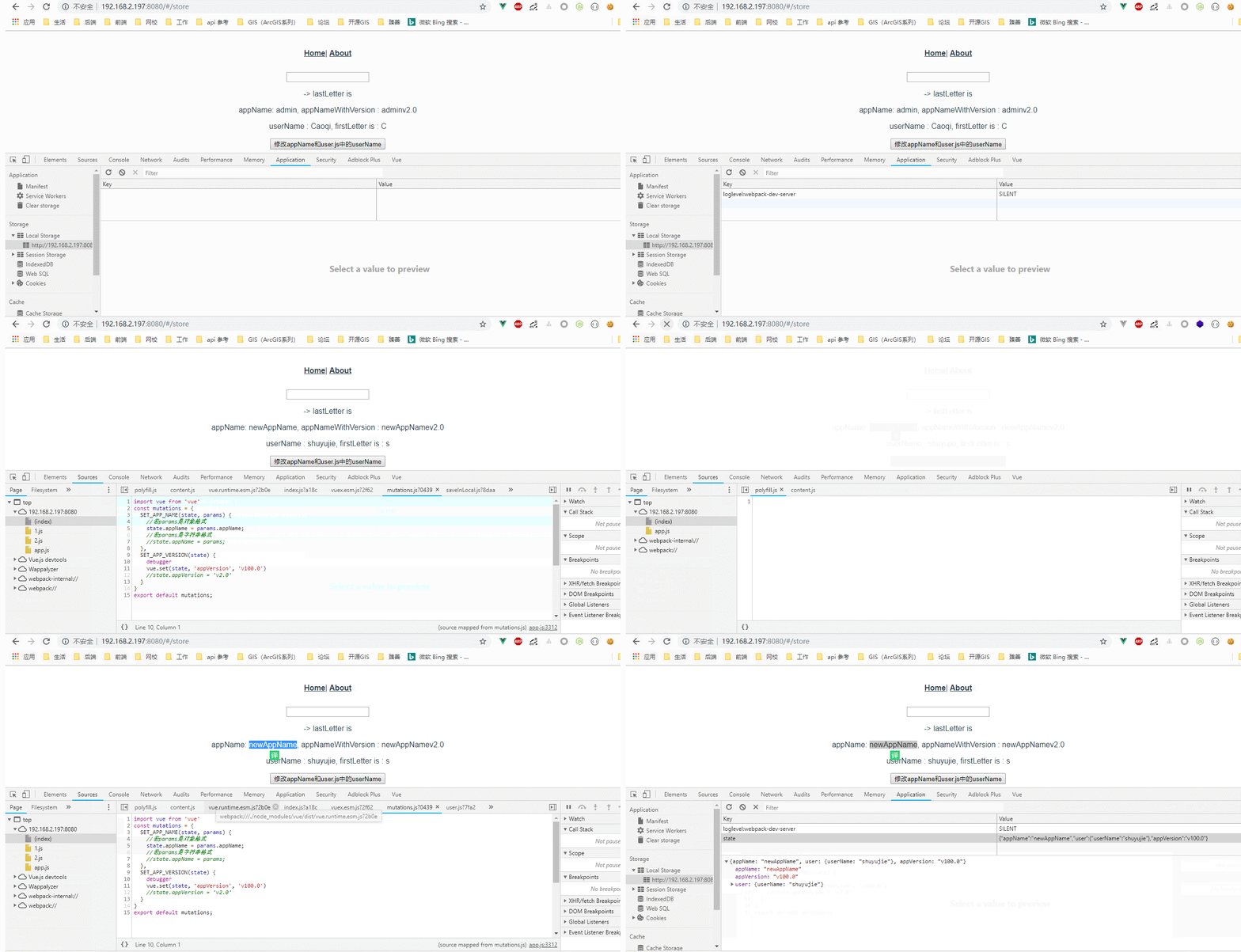
点击名称为:“修改appName和user.js中的userName”的按钮:
效果图:
2.严格模式
在严格模式下,无论何时发生了状态变更且不是由 mutation 函数引起的,将会抛出错误。这能保证所有的状态变更都能被调试工具跟踪到。
index.js代码:
import Vue from 'vue'

import Vuex from 'vuex'

import state from "./state"

import getters from './getters'

import mutations from "./mutations"

import actions from "./actions"

import user from './module/user'

import saveInLocal from './plugin/saveInLocal';

Vue.use(Vuex)

export default new Vuex.Store({

  strict: process.env.NODE_ENV === 'development',//不要在发布环境下启用严格模式!

  state,

  getters,

  mutations,

  actions,

  modules: {

    user

  },

  plugins:[saveInLocal]

})
3.Vuex+双向数据绑定
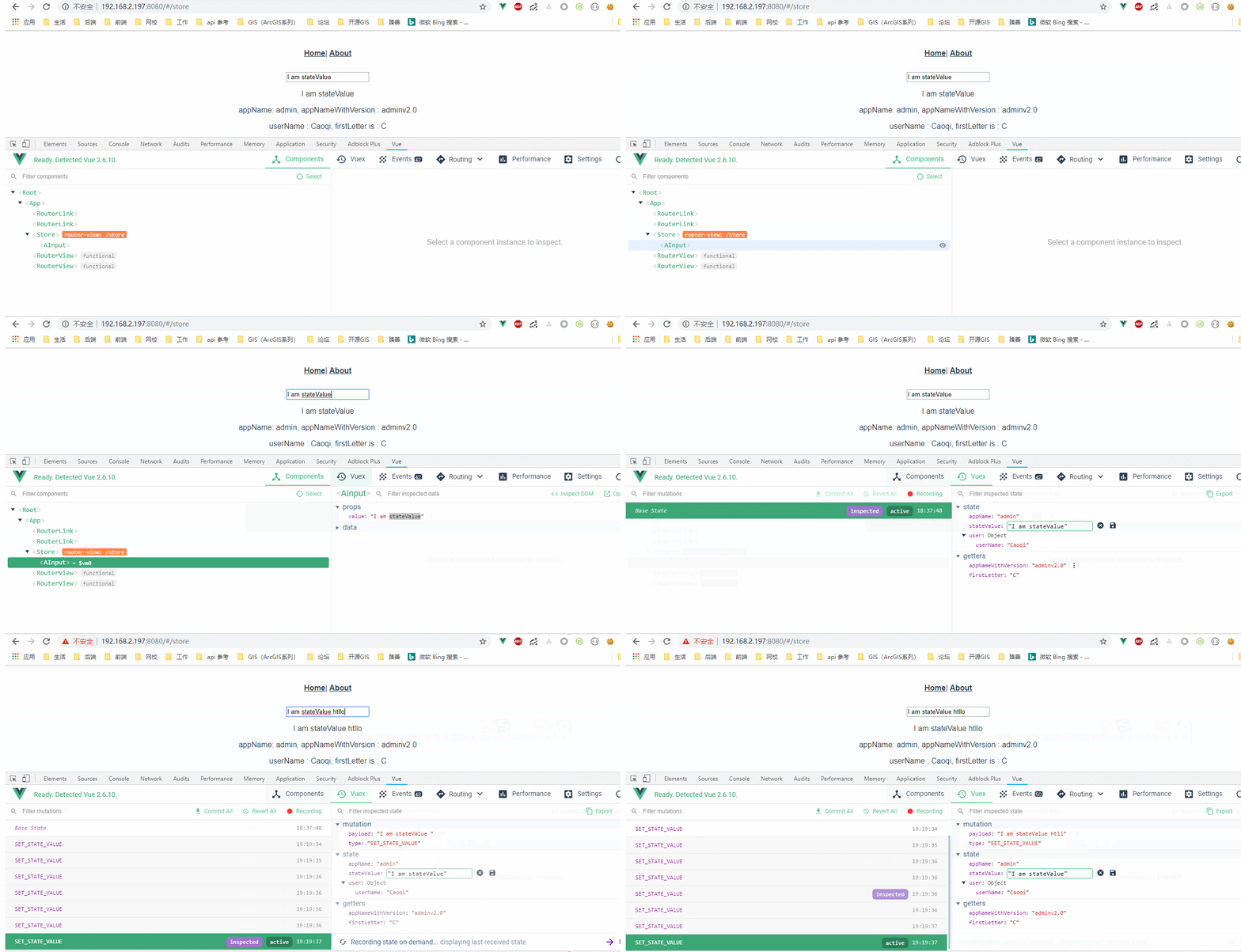
当在严格模式中使用 Vuex 时,在属于 Vuex 的 state 上使用 v-model 会比较棘手,因为state只允许被mutation修改。
解决办法:使用带有 setter 的双向绑定计算属性
state.js:
const state = {

  appName: 'admin',

  stateValue: 'I am stateValue'

}

export default state
mutations.js:
import vue from 'vue'

const mutations = {

  SET_APP_NAME(state, params) {

    //若params是对象格式

    state.appName = params.appName;

    //若params是字符串格式

    //state.appName = params;

  },

  SET_APP_VERSION(state) {

    vue.set(state, 'appVersion', 'v100.0')

    //state.appVersion = 'v2.0'

  },

  SET_STATE_VALUE (state, value) {

    state.stateValue = value

  }

}

export default mutations;
store.vue:
<template>

  <div>

    <a-input v-model="stateValue"/>

   <p>{{ stateValue }}</p>

    <p>appName: {{ appName }}, appNameWithVersion : {{ appNameWithVersion }}</p>

    <p>userName : {{ userName }}, firstLetter is : {{ firstLetter }}</p>

    <button @click="handleChangeAppName">修改appName和user.js中的userName</button>

    <p>动态给state增加appVersion: {{ appVersion }}</p>

    <button @click="handleActionChangeAppName">通过Action修改appName</button>

    <button @click="registerModule">动态注册模块</button>

    <p v-for="(li, index) in todoList" :key="index">{{ li }}</p>

  </div>

</template>

<script>

import AInput from "_c/AInput.vue";

import AShow from "_c/AShow.vue";

//变量的解构赋值

import { mapState, mapGetters, mapMutations, mapActions } from "vuex";

import { stat } from "fs";

export default {

  name: "store",

  data() {

    return {

      inputValue: ""

    };

  },

  components: {

    AInput: AInput,

    AShow: AShow

  },

  computed: {

    //ES6展开操作符 mapState展开会形成一个对象 使用对象展开运算符将此对象混入到外部对象中

    ...mapState({

      appName: state => state.appName,

      appVersion: state => state.appVersion,

      userName: state => state.user.userName,

      todoList: state => (state.user.todo ? state.user.todo.todoList : [])

    }),

    // 使用对象展开运算符将 getter 混入 computed 对象中

    // ...mapGetters(["appNameWithVersion"]),

    appNameWithVersion() {

      //通过属性访问getters,Getter 会暴露为 store.getters 对象,可以以属性的形式访问这些值:

      return this.$store.getters.appNameWithVersion;

    },

    stateValue: {

      get () {

        return this.$store.state.stateValue

      },

      set (val) {

        this.SET_STATE_VALUE(val)

      }

   },

    ...mapGetters(["firstLetter"]),

    inputValueLastLetter() {

      return this.inputValue.substr(-1, 1);

    }

  },

  methods: {

    handlerInput(val) {

      this.inputValue = val;

    },

    //

    ...mapMutations([

      "SET_USER_NAME", //将 `this.SET_USER_NAME()` 映射为 `this.$store.commit('SET_USER_NAME')`

      "SET_APP_NAME", //将 `this.SET_APP_NAME()` 映射为 `this.$store.commit('SET_APP_NAME')`

      'SET_STATE_VALUE'

    ]),

    ...mapActions([

      "updateAppName" //将 `this.updateAppName()` 映射为 `this.$store.dispatch('updateAppName')`

    ]),

    handleChangeAppName() {

      this.SET_APP_NAME({

        appName: "newAppName"

      });

      this.SET_USER_NAME({

        userName: "shuyujie"

      });

      this.$store.commit("SET_APP_VERSION");

    },

    handleActionChangeAppName() {

      //第一种调用Action的方法

      //this.$store.dispatch('updateAppName')

      //第二种调用Action的方法

      this.updateAppName();

    },

    registerModule() {

      this.$store.registerModule(["user", "todo"], {

        state: {

          todoList: ["学习mutations", "学习actions"]

        }

      });

    }

  }

};

</script>
AInput.js:
<template>

  <div>

    <input @input="handleInput" :value="value"/>

  </div>

</template>

<script>

export default {

  name:'AInput',

  props:{

    value:{

      type:[String,Number],

      default:''

    }

  },

  methods:{

    handleInput(event){

      const value=event.target.value;

      this.$emit('input',value);

    }

  }

}

</script>
效果图:
Vuex进阶的更多相关文章
- 「后端小伙伴来学前端了」Vuex进阶操作,让你的代码更加高效(简称如何学会偷懒 【手动狗头】)
学妹手机里的美照 前言 前一篇写了Vuex基本使用,用起来还稍稍有些繁琐,代码有很多 冗余的地方,这篇就带着大家用更简单的方式来使用Vuex(其实就是怎么更好的偷懒,用更少的代码来完之前的事情) 进入 ...
- Redux进阶(像VUEX一样使用Redux)
更好的阅度体验 前言 redux的问题 方案目标 如何实现 思考 前言 Redux是一个非常实用的状态管理库,对于大多数使用React库的开发者来说,Redux都是会接触到的.在使用Redux享受其带 ...
- vue从入门到进阶:Vuex状态管理(十)
Vuex 是一个专为 Vue.js 应用程序开发的状态管理模式.它采用集中式存储管理应用的所有组件的状态,并以相应的规则保证状态以一种可预测的方式发生变化. 在 Vue 之后引入 vuex 会进行自动 ...
- 【前端vue进阶实战】:从零打造一个流程图、拓扑图项目【Nuxt.js + Element + Vuex】 (一)
本系列教程是用Vue.js + Nuxt.js + Element + Vuex + 开源js绘图库,打造一个属于自己的在线绘图软件,最终效果:topology.le5le.com .如果你觉得好,欢 ...
- vue进阶:vuex(数据池)
非父子组件传值 vuex 一.非父子组件传值 基于父子组件通信与传值实现非父子组件传值的示例关键代码: <template> <div> <!-- 学员展示 --> ...
- Vuex入门、同步异步存取值进阶版
关注公众号查看原文: 1. vueX介&绍安装 Vuex 是一个专为 Vue.js 应用程序开发的状态管理模式.它采用集中式存储管理应用的所有组件的状态,并以相应的规则保证状态以一种可预测的方 ...
- vuex 初体验
vuex是vue的状态管理工具,vue进阶从es6和npm开始,es6推荐阮一峰大神的教程. vuex学习从官方文档和一个记忆小游戏开始.本着兴趣为先的原则,我先去试玩了一把-->. Vuex ...
- [vue最新实战] gank客户端(vue2 + vue-router2 + vuex +webpace + es6)新手福利,干货多多
vue-meizi 本项目是基于vue2最新实战项目,是适合新手进阶的绝佳教程.代码简单易懂,注释多多.实现了移动端使用最多的 无限滚动,图片加载,左右滑动,等待.先发布预览版本,后面更多更全的功能和 ...
- 简单的vuex 的使用
1. npm install vuex 2. 在src 下 新建文件夹 store (为什么是这个单词,vuex 是用来状态管理的,用储存一些组件的状态,取存贮之意),store 文件下 新建文件 i ...
随机推荐
- Mybatis学习笔记2 - 解析config
<?xml version="1.0" encoding="UTF-8" ?> <!DOCTYPE configuration PUBLIC ...
- python3 FTP简单实现文件下载(含中文乱码问题)
from ftplib import FTP def ftp_down(HOST,romatepath,filename,localpath): user=***** password=***** f ...
- python csv.reader参数指定
- Java基础13-数组算法
1.数组的复制 //复制算法,将arr1数组的值复制给arr2数组 import java.util.Arrays; public class Test1{ public static void ma ...
- jemeter的简单使用
建立测试计划 启动jmeter后,jmeter会自动生成一个空的测试计划,用户可以基于该测试计划建立自己的测试计划. 添加线程组 一个性能测试请求负载是基于一个线程组完成的.一个测试计划必须有一个线程 ...
- CentOS下NFS服务器配置教程
说明: NFS服务器: 操作系统:CentOS 5.5 IP:192.168.21.160 nfs网络文件服务器共享目录:/data/osyunwei 目录所有者:www(说明:www为nginx运行 ...
- 几个CSS的黑科技
这里的黑科技其实就是一些CSS中不怎么为人所知但在解决某些问题的时候很溜的属性. border-radius 很多开发者估计都没有正确认识这个border-radius,因为基本上很多人都是这么用的: ...
- Oracle安装后忘记用户名或密码+创建新登陆用户
新安装的Oracle11g,不料在使用的时候没记住安装时的用户名和密码. 不用担心,打开sqlplus. 按如下步骤,新建一个登陆用户: 第一步:以sys登陆 sys/密码 as sysdba 此 ...
- 虚拟机复制操作CentOS6导致eth0转为eth0以至于网络服务启动失败的解决方案
CentOS6复制到虚拟机中eth0转为了eth1 原因: CentOS6硬盘上的信息保存着操作系统的信息, 将该硬盘上的信息拷贝到另一开新的硬盘上时, 硬件的环境就会一定会发生变化, 就那网卡来首, ...
- Spring的注解积累
需要在applicationContext.xml中注册: 如:在base-package指明一个包 <context:component-scan base-package="cn. ...