
flume 配置与使用
1、下载flume,解压到自建文件夹
2、修改flume-env.sh文件
在文件中添加JAVA_HOME
3、修改flume.conf 文件(原名好像不叫这个,我自己把模板名改了)
里面我自己配的(具体配置参见 http://flume.apache.org/FlumeUserGuide.html)
agent1 是我的代理名称
source是netcat (数据源)
channel 是memory(内存)
sink是hdfs(输出)
注意配置中添加
agent1.sinks.k1.hdfs.fileType = DataStream
否则hdfs中接收的文件会出现乱码
如果要配置根据时间来分类写入hdfs的功能,要求传入的文件必须要有时间戳(datastamp)
# Licensed to the Apache Software Foundation (ASF) under one

# or more contributor license agreements.  See the NOTICE file

# distributed with this work for additional information

# regarding copyright ownership.  The ASF licenses this file

# to you under the Apache License, Version 2.0 (the

# "License"); you may not use this file except in compliance

# with the License.  You may obtain a copy of the License at

#

#  http://www.apache.org/licenses/LICENSE-2.0

#

# Unless required by applicable law or agreed to in writing,

# software distributed under the License is distributed on an

# "AS IS" BASIS, WITHOUT WARRANTIES OR CONDITIONS OF ANY

# KIND, either express or implied.  See the License for the

# specific language governing permissions and limitations

# under the License.

# The configuration file needs to define the sources,

# the channels and the sinks.

# Sources, channels and sinks are defined per agent,

# in this case called 'agent'

agent1.sources = r1

agent1.channels = c1

agent1.sinks = k1

# For each one of the sources, the type is defined

agent1.sources.r1.type = netcat

agent1.sources.r1.channels = c1

#agent1.sources.r1.ack-every-event = false

agent1.sources.r1.max-line-length = 100

agent1.sources.r1.bind = 192.168.19.107

agent1.sources.r1.port = 44445

# Describe/configure the interceptor

#agent1.sources.r1.interceptors = i1

#agent1.sources.r1.interceptors.i1.type = com.nd.bigdata.insight.interceptor.KeyTimestampForKafka$Builder

# Each sink's type must be defined

#agent1.sinks.k1.type = org.apache.flume.sink.kafka.KafkaSink

#agent1.sinks.k1.topic = insight-test6

#agent1.sinks.k1.brokerList =192.168.181.120:9092,192.168.181.121:9092,192.168.181.66:9092

#agent1.sinks.k1.batchSize=100

#agent1.sinks.k1.requiredAcks = 0

# logger

#agent1.sinks.k1.type = logger

#agent1.sinks.k1.channel = c1

#HDFS

agent1.sinks.k1.type = hdfs

agent1.sinks.k1.channel = c1

agent1.sinks.k1.hdfs.path = test/flume/events/

agent1.sinks.k1.hdfs.filePrefix = events-

agent1.sinks.k1.hdfs.round = true

agent1.sinks.k1.hdfs.roundValue = 10

agent1.sinks.k1.hdfs.roundUnit = minute

agent1.sinks.k1.hdfs.fileType = DataStream

# Each channel's type is defined.

agent1.channels.c1.type = memory

agent1.channels.c1.capacity = 1000

"flume.conf" 70L, 2291C
4、启动flume:(文件根目录下启动)
bin/flume-ng agent --conf conf --conf-file conf/flume.conf --name agent1 -Dflume.root.logger=INFO,console(里面的flume.conf ,agent1 请替换成你自己的名字)
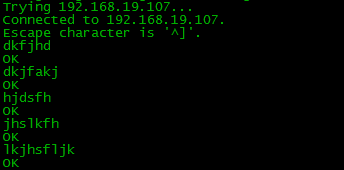
5、用另一台机试着发送文件
telnet 192.168.19.107 44445 (创建连接)
然后发送内容
6、生成的hdfs文件

flume 配置与使用的更多相关文章
- 关于flume配置加载(二)
为什么翻flume的代码,一方面是确实遇到了问题,另一方面是想翻一下flume的源码,看看有什么收获,现在收获还谈不上,因为要继续总结.不够已经够解决问题了,而且确实有好的代码,后续会继续慢慢分享,这 ...
- flume 配置
[root@dtpweb data]#tar -zxvf apache-flume-1.7.0-bin.tar.gz[root@dtpweb conf]# cp flume-env.sh.templa ...
- 关于flume配置加载
最近项目在用到flume,因此翻了下flume的代码, 启动脚本: nohup bin/flume-ng agent -n tsdbflume -c conf -f conf/配置文件.conf -D ...
- Flume配置Replicating Channel Selector
1 官网内容 上面的配置是r1获取到的内容会同时复制到c1 c2 c3 三个channel里面 2 详细配置信息 # Name the components on this agent a1.sour ...
- Flume配置Multiplexing Channel Selector
1 官网内容 上面配置的是根据不同的heder当中state值走不同的channels,如果是CZ就走c1 如果是US就走c2 c3 其他默认走c4 2 我的详细配置信息 一个监听http端口 然后 ...
- hadoop生态搭建(3节点)-09.flume配置
# http://archive.apache.org/dist/flume/1.8.0/# ===================================================== ...
- flume配置和说明(转)
Flume是什么 收集.聚合事件流数据的分布式框架 通常用于log数据 采用ad-hoc方案,明显优点如下: 可靠的.可伸缩.可管理.可定制.高性能 声明式配置,可以动态更新配置 提供上下文路由功能 ...
- flume配置参数的意义
1.监控端口数据: flume启动: [bingo@hadoop102 flume]$ bin/flume-ng agent --conf conf/ --name a1 --conf-file jo ...
- Flume配置Failover Sink Processor
1 官网内容 2 看一张图一目了然 3 详细配置 source配置文件 #配置文件: a1.sources= r1 a1.sinks= k1 k2 a1.channels= c1 #负载平衡 a1.s ...
随机推荐
- xCode9 一直Indexing
解决办法:打开终端输入:defaults write com.apple.dt.XCode IDEIndexDisable 1 然后重新打开工程就可以了
- netbeans无法新建项目
在ubuntu上安装netbeans最新版(7.3.1),但是安装之后发现无法新建项目,一直提示请等待,google之后说是jdk的问题,查看了一下jdk的版本为1.6.试着安装了1.7版本的,问题解 ...
- Django之表单验证
对于前端的表单进行验证的方法,从最简单的js到基于XML传输的Ajax,再到cookie的免认证,现在Django为我们提供了自带的表单验证方法. views.py: from django impo ...
- 016-Spring Boot JDBC
一.数据源装配 通过查看代码可知,默认已装配了数据源和JdbcTemplate System.out.println(context.getBean(DataSource.class)); Syste ...
- struts2中的ModelDriven使用
http://www.cnblogs.com/Topless/archive/2012/01/17/2324980.html 例子都为struts2中的文档例子 JSP提交数据: <s:fo ...
- R中常用数据挖掘算法包
数据挖掘主要分为4类,即预测.分类.聚类和关联,根据不同的挖掘目的选择相应的算法.下面对R语言中常用的数据挖掘包做一个汇总: 连续因变量的预测: stats包 lm函数,实现多元线性回归 stats包 ...
- Django——自定义分页(可调用)
1.view from django.shortcuts import render,HttpResponse # Create your views here. from app01.models ...
- MYSQL:基础——3N范式的表结构设计
基于3N范式的数据表设计 范式 设计关系数据库时,遵从不同的规范要求,设计出合理的关系型数据库,这些不同的规范要求被称为不同的范式,各种范式呈递次规范,越高的范式数据库冗余越小. 关系数据库现有六种范 ...
- Delphi 函数的重载和作用域
1.在delphi 中,我们可以使用相同的函数名来调用不同的函数,我们称这个函数为重载,函数的参数类型和参数的个数可以不同,用到的关键字overload:格式如下: function addInt(x ...
- 字典树 HDU 1075 What Are You Talking About
http://acm.hdu.edu.cn/showproblem.php?pid=1075 ;}