
jQuery关于复选框的基本小功能
这里是我初步学习jquery后中巨做的一个关于复选框的小功能:
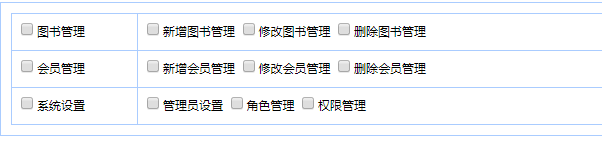
点击右边选项如果勾上,对应的左边三个小项全部选中,反之全不选,
左边只要有一个没选中,右边大项就取消选中,反之左边全部选中的话,左边大项即为选中,下面是样式图。
<div class="box">
<table id="table1" class="mytable">
<tr>
<td>
<span>
<input type="checkbox" id="chkPromote" class="parentfunc" />图书管理
</span>
</td>
<td>
<span>
<input type="checkbox" id="Checkbox1" />新增图书管理
</span> <span>
<input type="checkbox" id="Checkbox2" />修改图书管理
</span> <span>
<input type="checkbox" id="Checkbox3" />删除图书管理
</span>
</td>
</tr>
<tr>
<td>
<span>
<input type="checkbox" id="Checkbox4" class="parentfunc" />会员管理
</span>
</td>
<td>
<span>
<input type="checkbox" id="Checkbox5" />新增会员管理
</span> <span>
<input type="checkbox" id="Checkbox6" />修改会员管理
</span> <span>
<input type="checkbox" id="Checkbox7" />删除会员管理
</span>
</td>
</tr>
<tr>
<td>
<span>
<input type="checkbox" id="Checkbox8" class="parentfunc" />系统设置
</span>
</td>
<td>
<span>
<input type="checkbox" id="Checkbox9" />管理员设置
</span> <span>
<input type="checkbox" id="Checkbox10" />角色管理
</span> <span>
<input type="checkbox" id="Checkbox11" />权限管理
</span>
</td>
</tr>
</table>
</div>
jQuery代码如下:
<script type="text/javascript">
//页面加载
$(function () {
//点任意大项时
$("tr td:first-child span input").click(function () {
//利用点击的的大项的位置找到它所在的同级td下的所有小项设置他们的checked(大项是选中那就全部选中,反之、、、就能简单实现全选和全部选的功能)
$(this).parents("td").siblings().find("input[type=checkbox]").prop("checked",$(this).prop("checked"));
})
//点任意小项时
$("tr td:last-child span input").click(function () {
var a = 0;
//循环点击当前小项的同级的所有小项,所有的小项的选中情况
for (var i = 0; i < $(this).parents("td").children.length + 1 ; i++) {
//判断如果哪怕找到一个小项为没有选中,那么将对应的大项设为不选中。
if ($(this).parents("td").children(":eq(" + i + ")").children().prop("checked") == false) {
//设大项为不选中
$(this).parents("td").siblings().find("input[class=parentfunc]").prop("checked", false);
//只要有一个小项为false那么就a+1
a++;
}
}
//判断这个a变量,如果等等于0就说明所有小项都选中了,那么就把对应的大项选中
if (a == 0) {
//选中大项
$(this).parents("td").siblings().find("input[class=parentfunc]").prop("checked", true);
}
})
})
</script>
jQuery关于复选框的基本小功能的更多相关文章
- 对jquery操作复选框
摘要:jquery操作复选框.使用更简洁易懂,思路清晰,逻辑更明了,很实用 <!DOCTYPE html> <html> <head> <meta chars ...
- jquery操作复选框(checkbox)十二技巧
jquery操作复选框(checkbox)的12个小技巧. 1.获取单个checkbox选中项(三种写法)$("input:checkbox:checked").val()或者$( ...
- jQuery实现复选框的全选、反选、并且根据复选框的<checked属性>控制多个对应div的显示/隐藏
<!doctype html><html> <head> <meta charset="utf-8"> <title>j ...
- jQuery取复选框值、下拉列表里面的属性值、取单选按钮的属性值、全选按钮、JSON存储、*去空格
1.jquery取复选框的值<!--引入jquery包--> <script src="../jquery-1.11.2.min.js"></scri ...
- jquery判断复选框checkbox是否被选中
jquery判断复选框checkbox是否被选中 使用is方法 //如果选中返回true //如果未选中返回false .is(':checked');
- jquery判断复选框是否选中
jquery判断复选框是否被选中 $(function(){ $(document).on("click", ".checkbox",function(){ v ...
- jQuery操作复选框checkbox技巧总结 ---- 设置选中、取消选中、获取被选中的值、判断是否选中等
转载:https://blog.csdn.net/chenchunlin526/article/details/77448168 jQuery操作复选框checkbox技巧总结 --- 设置选中.取消 ...
- jQuery判断复选框checkbox的选中状态
通过jQuery设置复选框为选中状态 复选框 <input type="checkbox"/> 错误代码: $("input").attr(&quo ...
- jquery实现复选框全选,全不选,反选中的问题
今天试了一下用jquery选择复选框,本来以为很简单的东西却有bug,于是搜索了一下找到了解决方法. html代码如下(这里没有用任何样式,就没有再放css了): <html> <h ...
随机推荐
- hiho 1015 KMP算法 && CF 625 B. War of the Corporations
#1015 : KMP算法 时间限制:1000ms 单点时限:1000ms 内存限制:256MB 描述 小Hi和小Ho是一对好朋友,出生在信息化社会的他们对编程产生了莫大的兴趣,他们约定好互相帮助,在 ...
- 【Udacity】解决:字幕遮挡视频内容怎么办?Udacity字幕大小调整
字幕有没有办法显示在最下方,否则把内容挡住了,根本看不清老师所指的内容 Chrome 的小插件,能方便地调节视频的字幕大小,譬如:Udacity 的学习视频字幕大小不能调节,有时候不想它占太多位置,而 ...
- deb文件怎么安装
deb 是 ubuntu .debian 的格式.rpm 是 redhat .fedora .suse 的格式.deb是debian发行版的软件包ubuntu是基于debian 发行的 所有可以用.d ...
- python链接安卓 跳一跳
借鉴: 一百行代码实现微信跳一跳 之前需要安装adb 开启服务: adb nodaemon server 显示设备: adb devices 代码: import math import os im ...
- task可声明参数 z
直接这样写 var task1 = Task.Factory.StartNew(() => DoSomeWork(message1, message2)); 如果是winform,你在另外一个线 ...
- VS配置Qt
https://blog.csdn.net/qq_35488967/article/details/71516640
- console和windows子系统
https://blog.csdn.net/ilvu999/article/details/8050292
- 用CSS写扫描二维码图标
代码如下: <style>.icon{margin:300px;width:30px;height:30px;position:relative}.icon .b{border:2px s ...
- docker中自定ingress网络
在某些时候,docker自动生成的ingress网络会与服务器上已经存在的网络产生冲突,这个时候,你需要自定义ingress. 在自定义前,你需要删除所有有端口发布的服务. 使用命令docker ne ...
- February 12 2017 Week 7 Sunday
There is no place like home. 任何地方都不能与家相提并论. After tens of years roving outside the hometown, I sudde ...