
CentOS 7 开放防火墙端口
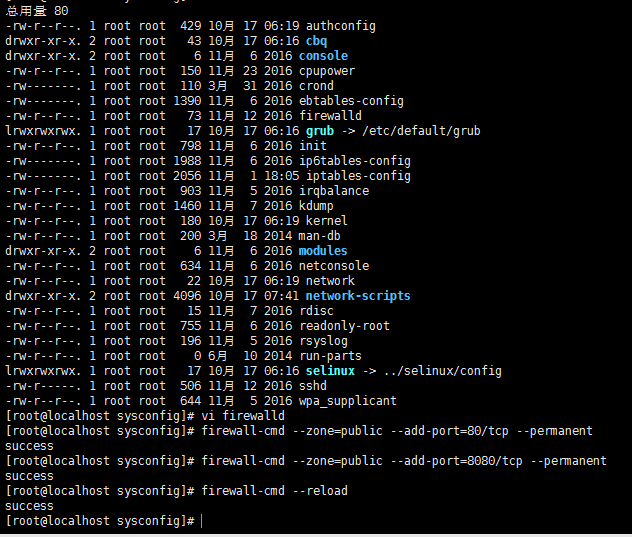
我:最近在使 CentOS 7时发现在本地不能访问linux上8080端口,以上是我的操作,修改后访问成功
CentOS 7 开放防火墙端口 命令
最近公司新的server要求用CentOS7, 发现以前CentOS 6 系列中的 iptables 相关命令不能用了,查了下,发现Centos 7使用firewalld代替了原来的iptables。
使用方法如下:
>>> 关闭防火墙
systemctl stop firewalld.service #停止firewall
systemctl disable firewalld.service #禁止firewall开机启动
>>> 开启端口
firewall-cmd --zone=public --add-port=80/tcp --permanent
命令含义:
--zone #作用域
--add-port=80/tcp #添加端口,格式为:端口/通讯协议
--permanent #永久生效,没有此参数重启后失效
>>> 重启防火墙
firewall-cmd --reload
常用命令介绍
firewall-cmd --state ##查看防火墙状态,是否是running
firewall-cmd --reload ##重新载入配置,比如添加规则之后,需要执行此命令
firewall-cmd --get-zones ##列出支持的zone
firewall-cmd --get-services ##列出支持的服务,在列表中的服务是放行的
firewall-cmd --query-service ftp ##查看ftp服务是否支持,返回yes或者no
firewall-cmd --add-service=ftp ##临时开放ftp服务
firewall-cmd --add-service=ftp --permanent ##永久开放ftp服务
firewall-cmd --remove-service=ftp --permanent ##永久移除ftp服务
firewall-cmd --add-port=80/tcp --permanent ##永久添加80端口
iptables -L -n ##查看规则,这个命令是和iptables的相同的
man firewall-cmd ##查看帮助
更多命令,使用 firewall-cmd --help 查看帮助文件
>>> CentOS 7.0默认使用的是firewall作为防火墙,使用iptables必须重新设置一下
1、直接关闭防火墙
systemctl stop firewalld.service #停止firewall
systemctl disable firewalld.service #禁止firewall开机启动
2、设置 iptables service
yum -y install iptables-services
如果要修改防火墙配置,如增加防火墙端口3306
vi /etc/sysconfig/iptables
增加规则
-A INPUT -m state --state NEW -m tcp -p tcp --dport 3306 -j ACCEPT
保存退出后
systemctl restart iptables.service #重启防火墙使配置生效
systemctl enable iptables.service #设置防火墙开机启动
最后重启系统使设置生效即可。
CentOS 7 开放防火墙端口的更多相关文章
- CentOS 7 开放防火墙端口命令
CentOS 7 开放防火墙端口 命令 最近公司新的server要求用CentOS7, 发现以前CentOS 6 系列中的 iptables 相关命令不能用了,查了下,发现Centos 7使用fire ...
- CentOS 7 开放防火墙端口 命令(转载)
CentOS 7 开放防火墙端口 命令 最近公司新的server要求用CentOS7, 发现以前CentOS 6 系列中的 iptables 相关命令不能用了,查了下,发现Centos 7使用fire ...
- linux 安装禅道 和 CentOS 7 开放防火墙端口 命令
linux 安装禅道链接: https://www.cnblogs.com/maohuidong/p/9750202.html CentOS 7 开放防火墙端口 命令 链接:https://www. ...
- CentOS 7 开放防火墙端口 命令
iptables防火墙 1.基本操作 # 查看防火墙状态 service iptables status # 停止防火墙 service iptables stop # 启动防火墙 servi ...
- CentOS/Linux开放某些端口
CentOS/Linux开放某些端口 CentOS/Linux 装载系统的时候只开启了少数端口如22,80(有些连80都没有开放)等. 结果再装完Nginx+PHP+MySQL 后不能访问网站. 当然 ...
- Centos 7和 Centos 6开放查看端口 防火墙关闭打开
Centos 7 firewall 命令: 查看已经开放的端口: firewall-cmd --list-ports 开启端口 firewall-cmd --zone=public --add-por ...
- Centos 7 开放查看端口 防火墙关闭打开
Centos 7 firewall 命令: 查看已经开放的端口: firewall-cmd --list-ports 开启端口 firewall-cmd --zone=public --add-por ...
- Centos7 开放防火墙端口命令
Centos 7 使用firewalld代替了原来的iptables,使用方法如下: >>>关闭防火墙 systemctl stop firewalld.service ...
- linux - centos7 开放防火墙端口的新方式
CentOS 升级到7之后,发现无法使用iptables控制Linuxs的端口, google之后发现Centos 7使用firewalld代替了原来的iptables. 下面记录如何使用firewa ...
随机推荐
- idea配置SpringBoot热部署之自动Build
一.pom.xml文件导入所需依赖文件 SpringBoot热部署插件 <dependency> <groupId>org.springframework.boot</g ...
- ElasticSearch5插件安装
http://blog.csdn.net/napoay/article/details/53896348 #更新 sudo yum update -y sudo rpm -ivh http://dl. ...
- Leecode刷题之旅-C语言/python-349两个数组的交集
/* * @lc app=leetcode.cn id=349 lang=c * * [349] 两个数组的交集 * * https://leetcode-cn.com/problems/inters ...
- AtCoder Regular Contest 098 D - Xor Sum 2 区间异或=相加 DP思想
题意:给出n个数,求它的连续子序列中,满足下列公式,(l,r)的对数有多少对 Al xor Al+1 xor … xor Ar=Al + Al+1 + … + Ar 思路:由题意可以得到,连续子序列, ...
- leetcode add_binary 采坑记
尽管add_binary在leetcode中是一个简单难度,但是踩了不少坑,记录一下 描述: 给两个字符串形式的二进制数,要求求和并输出字符串形式的结果,其中a和b均不为空字符串 样例: a=“101 ...
- 回顾爬虫的时候的一些小TIPS
1 json.dumps的时候默认会用ascii 所以在写入文件的时候会需要用到的指令变为json.dumps(a,ensuer_ascii=False),这样将禁止转换为ascii 然后再写入的时候 ...
- 阿里云 Debian 9.2 安装 Java Web 环境
CentOS 源内包太旧,和本地开发环境不兼容的地方太多 系统配置 更新数据库与软件包 # apt-get update && apt-get -y upgrade 提示是否保留本地已 ...
- sas的使用
1.建表 /*************************************/ /* create the second input data set */ /*************** ...
- hdu 2031 进制转换(栈思想的使用)
进制转换 Time Limit: 2000/1000 MS (Java/Others) Memory Limit: 65536/32768 K (Java/Others)Total Submis ...
- P1535 游荡的奶牛
P1535 游荡的奶牛 题目描述 Searching for the very best grass, the cows are travelling about the pasture which ...