
使用 xlue 实现 tips
经常遇到如下的需求
鼠标hover到目标对象一定时间后,弹出tips或者窗口;
鼠标离开目标对象一定时间后,隐藏tips或者窗口;
鼠标从目标对象移动到弹出的窗口上,这种状况下不隐藏窗口;
考虑到这种需求,绘制如下的状态图:
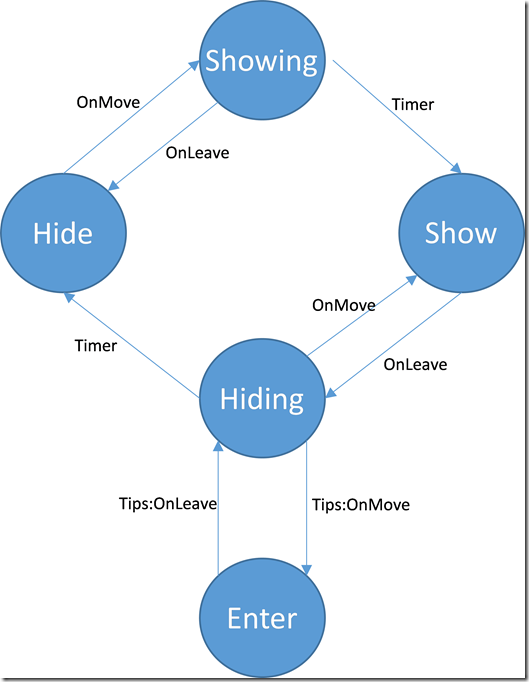
如上图所示,将tips的状态分为hide,showing,show,hiding,enter 五个状态;
hide: tips没有显示
showing: 准备显示tips
show: 显示tips
hiding: 准备隐藏tips
enter: 鼠标进入了tips控件,这种状况下仍然显示 tips
使用上面的状态图,清晰地描述了tips可能存在的各种状态,并确定了驱动事件有哪些。理清了思路。
hide状态时:hover到目标控件会进入 showing 状态;
showing 状态时:离开目标控件会返回到 hide 状态;
进入 showing 状态后,开启一个timer,当timer结束后,如果仍然是 showing 状态,则转到 show 状态并显示tips
show 状态时:离开目标控件会进入hiding状态;
hiding 状态时:hover到目标控件会返回到 show 状态;
进入 hiding 状态后,开启一个timer,当timer结束后,如果仍然是 hiding 状态,则转到 hide 状态并隐藏tips
鼠标从目标控件移动到tips上,会使得状态从 show 转到 hiding 转到 enter, 此时tips仍然显示,当离开tips控件后,状态又转移回 hiding ,此时开启一个timer,timer结束后,同样根据是否仍然是 hiding 状态来隐藏tips
编程实现:
function AddWindowTip(tippedObj, text, callback)

    local function showTipsFunc(tippedObj, x, y)

        -- 创建tips窗口

        local hostwndId = "TipsHelper.TipsHostWnd.Instance." .. tippedObj:GetID()

        local objtreeId = "TipsHelper.TipsTree.Instance." .. tippedObj:GetID()

        local hostwndTemplateId = "TipsWndTemplate"

        local objtreeTemplateId = "TipsTreeTemplate"

        local hostwndManager = XLGetObject("Xunlei.UIEngine.HostWndManager")

        local hostwnd = hostwndManager:GetHostWnd(hostwndId)

        if hostwnd then

            local objtree = hostwnd:GetBindUIObjectTree()

            if objtree then

                hostwnd:UnbindUIObjectTree()

                local objtreeManager = XLGetObject("Xunlei.UIEngine.TreeManager")

                objtreeManager:DestroyTree(objtree)

            end

            hostwndManager:RemoveHostWnd(hostwndId)

        end

        local templateManager = XLGetObject("Xunlei.UIEngine.TemplateManager")

        local wndTemplate = templateManager:GetTemplate(hostwndTemplateId, "HostWndTemplate")

        if not wndTemplate then

            return

        end

        local hostwnd = wndTemplate:CreateInstance(hostwndId)

        if not hostwnd then

            return

        end

        local objtreeTemplate = templateManager:GetTemplate(objtreeTemplateId, "ObjectTreeTemplate")

        local objtree = objtreeTemplate:CreateInstance(objtreeId)

        if not objtree then

            return

        end

        hostwnd:BindUIObjectTree(objtree)

        hostwnd:Create()

        -- 设定text

        local rootObj = objtree:GetRootObject()

        local textObj = objtree:GetUIObject("text")

        textObj:SetText(text)

        local width, height = textObj:GetTextExtent()

        textObj:SetObjPos(,,width,height)

        width,height = width + , height +

        rootObj:SetObjPos(,,width+,height+)

        -- 移动窗口位置

        local tippedOwner = tippedObj:GetOwner()

        local tippedHostWnd = tippedOwner:GetBindHostWnd()

        local l,t,r,b = tippedObj:GetObjPos()

        local left = l+(r-l-width)/

        local top = b

        left,top = tippedHostWnd:HostWndPtToScreenPt(left,top)

        hostwnd:Move(left,top,width,height)

        return rootObj

    end

    local function hideTipsFunc(tippedObj)

        -- 销毁tips窗口

        local hostwndId = "TipsHelper.TipsHostWnd.Instance." .. tippedObj:GetID()

        local hostwndManager = XLGetObject("Xunlei.UIEngine.HostWndManager")

        local hostwnd = hostwndManager:GetHostWnd(hostwndId)

        if not hostwnd then

            return

        end

        local objtree = hostwnd:GetBindUIObjectTree()

        if objtree then

            hostwnd:UnbindUIObjectTree()

            local objtreeManager = XLGetObject("Xunlei.UIEngine.TreeManager")

            objtreeManager:DestroyTree(objtree)

        end

        hostwndManager:RemoveHostWnd(hostwndId)

        return true

    end

    -- state: tip 的状态, hide隐藏,showing正在显示,show显示,hiding正在隐藏,enter进入tips中

    local state = "hide"    -- 使用状态控制 tips 在各个状态间转换

    tippedObj:AttachListener("OnMouseMove", true, function(obj, x, y, flags)

        if state == "hide" then

            state = "showing"

            local timerMgr = XLGetObject("Xunlei.UIEngine.TimerManager")

            timerMgr:SetOnceTimer(function()

                if state == "showing" then

                    local tipsObj = showTipsFunc(obj, x, y)

                    if tipsObj then

                        state = "show"

                        --[[ 这段代码,使得移动到弹出的窗口上时,窗口不会被隐藏

                        tipsObj:AttachListener("OnMouseMove", true, function()

                            if state == "hiding" then

                                state = "enter"

                            end

                        end)

                        tipsObj:AttachListener("OnMouseLeave", true, function()

                            if state == "enter" then

                                state = "hiding"

                                local timerMgr = XLGetObject("Xunlei.UIEngine.TimerManager")

                                timerMgr:SetOnceTimer(function()

                                    if state == "hiding" then

                                        if hideTipsFunc(obj) then

                                            state = "hide"

                                            if callback and type(callback) == "function" then

                                                callback(tippedObj, false)

                                            end

                                        end

                                    end

                                end, 300)

                            end

                        end)

                        --]]

                        if callback and type(callback) == "function" then

                            callback(obj, true)

                        end

                    end

                end

            end, )

        elseif state == "hiding" then

            state = "show"

        end

    end)

    tippedObj:AttachListener("OnMouseLeave", true, function(obj, x, y, flags)

        if state == "show" then

            state = "hiding"

            local timerMgr = XLGetObject("Xunlei.UIEngine.TimerManager")

            timerMgr:SetOnceTimer(function()

                if state == "hiding" then

                    if hideTipsFunc(obj) then

                        state = "hide"

                        if callback and type(callback) == "function" then

                            callback(tippedObj, false)

                        end

                    end

                end

            end, )

        elseif state == "showing" then

            state = "hide"

        end

    end)

end
使用 xlue 实现 tips的更多相关文章
- Mac上MySQL忘记root密码且没有权限的处理办法&workbench的一些tips (转)
忘记Root密码肿么办 Mac上安装MySQL就不多说了,去mysql的官网上下载最新的mysql包以及workbench,先安装哪个影响都不大.如果你是第一次安装,在mysql安装完成之后,会弹出来 ...
- 【Tips】史上最全H1B问题合辑——保持H1B身份终级篇
[Tips]史上最全H1B问题合辑——保持H1B身份终级篇 2015-04-10留学小助手留学小助手 留学小助手 微信号 liuxue_xiaozhushou 功能介绍 提供最真实全面的留学干货,帮您 ...
- layer.js中layer.tips
<script src="~/Content/js/layer/layer.js"></script> layer.tips('名称不能为空', '#pro ...
- HTML 最简单的tips 怎么支持指定DIV显示提示信息
<body> <style type="text/css"> a.link{position:relative;} a.link div.tips{ bor ...
- CSS:CSS使用Tips
Css是前端开发中效果展现的主要部分之一,良好的Css书写习惯可以为实际的项目开发提高效率,也可以为实现良好的团队合作提供保证. 一般新手在使用Css的时候经常会犯一些错误,出现一些不经意的漏洞,如果 ...
- 【读书笔记】100个Switf必备tips
声明 欢迎转载,但请保留文章原始出处:) 博客园:http://www.cnblogs.com 农民伯伯: http://over140.cnblogs.com 正文 1.Selector 在Swi ...
- 【转】40个良好用户界面Tips
一个良好的用户界面应具有高转换率,并且易于使用.但要用户体验良好并不容易做到,下面我们整理了40个良好用户界面Tips,希望能对你有帮助! 1 尽量使用单列而不是多列布局 单列布局能够让对全局有更好的 ...
- 转:Eclipse Search Tips
from: https://github.com/ajermakovics/eclipse-instasearch/wiki/Eclipse-search-tips Eclipse Search T ...
- VS:101 Visual Studio 2010 Tips
101 Visual Studio 2010 Tips Tip #1 How to not accidentally copy a blank line TO – Text Editor ...
随机推荐
- python中常用的推导(字典推导和列表推导)
在python开发中经常需要书写这样的代码 result = list() for data in datas: if data not in ['a', 'b']: result.append(da ...
- 该登录名来自不受信任的域,不能与 Windows 身份验证一起使用。
使用sql2008 远程连接数据库的时候遇到了这个问题,我用的是ADO.NET 实体数据模型,有app.config和web.config 解决了好久,因开始以为是sql的权限问题.后来解决了只需 ...
- HttpServletRequest和HttpServletResponse详解
请求与响应相关的类和接口非常多,下表是主要的与请求和接口相关的类以及接口. 主要的与请求和接口相关的类及接口 方 法 说 明 ServletInputStream Servlet的输入流 ...
- 超酷的实时颜色数据跟踪javascript类库 - Tracking.js
来源:GBin1.com 今天介绍这款超棒的Javascript类库是 - Tracking.js,它能够独立不依赖第三方类库帮助开发人员动态跟踪摄像头输出相关数据. 这些数据包括了颜色或者是人, 这 ...
- win7之64位下安装oracle11g遇到问题和不能删除干净的问题
今天在win7下装了oracle11g 删了又卸 来来回回重启了4.5次,结合网上是解释归纳下几点: 一.win64_11gR2_database_1of2.zip和win64_11gR2_datab ...
- TortoiseSVN版本管理软件使用简单说明
很多时候在写一个小的项目不想使用github等工具,只想简单在本地搭建一个版本管理器.那么TortoiseSVN就非常适合. 第一步:下载TortoiseSVN,http://tortoisesvn. ...
- Firefly 流程架构
print '----startmaster------' 1print '----appmain------' 2 print '----netserver------' 3 print '---- ...
- 算法笔记_085:蓝桥杯练习 9-3摩尔斯电码(Java)
目录 1 问题描述 2 解决方案 1 问题描述 问题描述 摩尔斯电码破译.类似于乔林教材第213页的例6.5,要求输入摩尔斯码,返回英文.请不要使用"zylib.h",只能使用 ...
- mysql 创建函数或者存储过程,定义变量报错
报错的原因是因为在过程或者函数中存在分隔符 分号(:),而mysql中默认分隔符也是 :,这就导致存储过程分开了 在存储过程外面包一层 delimiter // code //就行了
- Android使用SeekBar
转自:http://my.oschina.net/pingdy/blog/376735 最近有做一个android项目,里面有使用到在播放视频时可以跳播,同时动态显示播放时间.类似于下图 的效果,我只 ...