
使用 xlue 实现 tips
经常遇到如下的需求
鼠标hover到目标对象一定时间后,弹出tips或者窗口;
鼠标离开目标对象一定时间后,隐藏tips或者窗口;
鼠标从目标对象移动到弹出的窗口上,这种状况下不隐藏窗口;
考虑到这种需求,绘制如下的状态图:
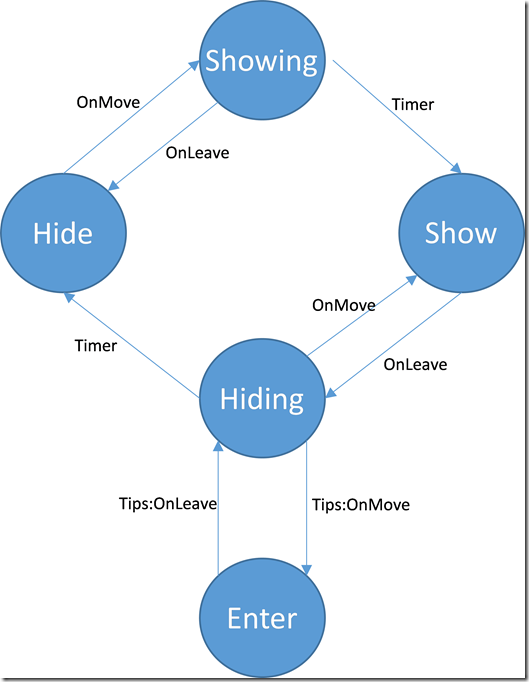
如上图所示,将tips的状态分为hide,showing,show,hiding,enter 五个状态;
hide: tips没有显示
showing: 准备显示tips
show: 显示tips
hiding: 准备隐藏tips
enter: 鼠标进入了tips控件,这种状况下仍然显示 tips
使用上面的状态图,清晰地描述了tips可能存在的各种状态,并确定了驱动事件有哪些。理清了思路。
hide状态时:hover到目标控件会进入 showing 状态;
showing 状态时:离开目标控件会返回到 hide 状态;
进入 showing 状态后,开启一个timer,当timer结束后,如果仍然是 showing 状态,则转到 show 状态并显示tips
show 状态时:离开目标控件会进入hiding状态;
hiding 状态时:hover到目标控件会返回到 show 状态;
进入 hiding 状态后,开启一个timer,当timer结束后,如果仍然是 hiding 状态,则转到 hide 状态并隐藏tips
鼠标从目标控件移动到tips上,会使得状态从 show 转到 hiding 转到 enter, 此时tips仍然显示,当离开tips控件后,状态又转移回 hiding ,此时开启一个timer,timer结束后,同样根据是否仍然是 hiding 状态来隐藏tips
编程实现:
function AddWindowTip(tippedObj, text, callback)

    local function showTipsFunc(tippedObj, x, y)

        -- 创建tips窗口

        local hostwndId = "TipsHelper.TipsHostWnd.Instance." .. tippedObj:GetID()

        local objtreeId = "TipsHelper.TipsTree.Instance." .. tippedObj:GetID()

        local hostwndTemplateId = "TipsWndTemplate"

        local objtreeTemplateId = "TipsTreeTemplate"

        local hostwndManager = XLGetObject("Xunlei.UIEngine.HostWndManager")

        local hostwnd = hostwndManager:GetHostWnd(hostwndId)

        if hostwnd then

            local objtree = hostwnd:GetBindUIObjectTree()

            if objtree then

                hostwnd:UnbindUIObjectTree()

                local objtreeManager = XLGetObject("Xunlei.UIEngine.TreeManager")

                objtreeManager:DestroyTree(objtree)

            end

            hostwndManager:RemoveHostWnd(hostwndId)

        end

        local templateManager = XLGetObject("Xunlei.UIEngine.TemplateManager")

        local wndTemplate = templateManager:GetTemplate(hostwndTemplateId, "HostWndTemplate")

        if not wndTemplate then

            return

        end

        local hostwnd = wndTemplate:CreateInstance(hostwndId)

        if not hostwnd then

            return

        end

        local objtreeTemplate = templateManager:GetTemplate(objtreeTemplateId, "ObjectTreeTemplate")

        local objtree = objtreeTemplate:CreateInstance(objtreeId)

        if not objtree then

            return

        end

        hostwnd:BindUIObjectTree(objtree)

        hostwnd:Create()

        -- 设定text

        local rootObj = objtree:GetRootObject()

        local textObj = objtree:GetUIObject("text")

        textObj:SetText(text)

        local width, height = textObj:GetTextExtent()

        textObj:SetObjPos(,,width,height)

        width,height = width + , height +

        rootObj:SetObjPos(,,width+,height+)

        -- 移动窗口位置

        local tippedOwner = tippedObj:GetOwner()

        local tippedHostWnd = tippedOwner:GetBindHostWnd()

        local l,t,r,b = tippedObj:GetObjPos()

        local left = l+(r-l-width)/

        local top = b

        left,top = tippedHostWnd:HostWndPtToScreenPt(left,top)

        hostwnd:Move(left,top,width,height)

        return rootObj

    end

    local function hideTipsFunc(tippedObj)

        -- 销毁tips窗口

        local hostwndId = "TipsHelper.TipsHostWnd.Instance." .. tippedObj:GetID()

        local hostwndManager = XLGetObject("Xunlei.UIEngine.HostWndManager")

        local hostwnd = hostwndManager:GetHostWnd(hostwndId)

        if not hostwnd then

            return

        end

        local objtree = hostwnd:GetBindUIObjectTree()

        if objtree then

            hostwnd:UnbindUIObjectTree()

            local objtreeManager = XLGetObject("Xunlei.UIEngine.TreeManager")

            objtreeManager:DestroyTree(objtree)

        end

        hostwndManager:RemoveHostWnd(hostwndId)

        return true

    end

    -- state: tip 的状态, hide隐藏,showing正在显示,show显示,hiding正在隐藏,enter进入tips中

    local state = "hide"    -- 使用状态控制 tips 在各个状态间转换

    tippedObj:AttachListener("OnMouseMove", true, function(obj, x, y, flags)

        if state == "hide" then

            state = "showing"

            local timerMgr = XLGetObject("Xunlei.UIEngine.TimerManager")

            timerMgr:SetOnceTimer(function()

                if state == "showing" then

                    local tipsObj = showTipsFunc(obj, x, y)

                    if tipsObj then

                        state = "show"

                        --[[ 这段代码,使得移动到弹出的窗口上时,窗口不会被隐藏

                        tipsObj:AttachListener("OnMouseMove", true, function()

                            if state == "hiding" then

                                state = "enter"

                            end

                        end)

                        tipsObj:AttachListener("OnMouseLeave", true, function()

                            if state == "enter" then

                                state = "hiding"

                                local timerMgr = XLGetObject("Xunlei.UIEngine.TimerManager")

                                timerMgr:SetOnceTimer(function()

                                    if state == "hiding" then

                                        if hideTipsFunc(obj) then

                                            state = "hide"

                                            if callback and type(callback) == "function" then

                                                callback(tippedObj, false)

                                            end

                                        end

                                    end

                                end, 300)

                            end

                        end)

                        --]]

                        if callback and type(callback) == "function" then

                            callback(obj, true)

                        end

                    end

                end

            end, )

        elseif state == "hiding" then

            state = "show"

        end

    end)

    tippedObj:AttachListener("OnMouseLeave", true, function(obj, x, y, flags)

        if state == "show" then

            state = "hiding"

            local timerMgr = XLGetObject("Xunlei.UIEngine.TimerManager")

            timerMgr:SetOnceTimer(function()

                if state == "hiding" then

                    if hideTipsFunc(obj) then

                        state = "hide"

                        if callback and type(callback) == "function" then

                            callback(tippedObj, false)

                        end

                    end

                end

            end, )

        elseif state == "showing" then

            state = "hide"

        end

    end)

end
使用 xlue 实现 tips的更多相关文章
- Mac上MySQL忘记root密码且没有权限的处理办法&workbench的一些tips (转)
忘记Root密码肿么办 Mac上安装MySQL就不多说了,去mysql的官网上下载最新的mysql包以及workbench,先安装哪个影响都不大.如果你是第一次安装,在mysql安装完成之后,会弹出来 ...
- 【Tips】史上最全H1B问题合辑——保持H1B身份终级篇
[Tips]史上最全H1B问题合辑——保持H1B身份终级篇 2015-04-10留学小助手留学小助手 留学小助手 微信号 liuxue_xiaozhushou 功能介绍 提供最真实全面的留学干货,帮您 ...
- layer.js中layer.tips
<script src="~/Content/js/layer/layer.js"></script> layer.tips('名称不能为空', '#pro ...
- HTML 最简单的tips 怎么支持指定DIV显示提示信息
<body> <style type="text/css"> a.link{position:relative;} a.link div.tips{ bor ...
- CSS:CSS使用Tips
Css是前端开发中效果展现的主要部分之一,良好的Css书写习惯可以为实际的项目开发提高效率,也可以为实现良好的团队合作提供保证. 一般新手在使用Css的时候经常会犯一些错误,出现一些不经意的漏洞,如果 ...
- 【读书笔记】100个Switf必备tips
声明 欢迎转载,但请保留文章原始出处:) 博客园:http://www.cnblogs.com 农民伯伯: http://over140.cnblogs.com 正文 1.Selector 在Swi ...
- 【转】40个良好用户界面Tips
一个良好的用户界面应具有高转换率,并且易于使用.但要用户体验良好并不容易做到,下面我们整理了40个良好用户界面Tips,希望能对你有帮助! 1 尽量使用单列而不是多列布局 单列布局能够让对全局有更好的 ...
- 转:Eclipse Search Tips
from: https://github.com/ajermakovics/eclipse-instasearch/wiki/Eclipse-search-tips Eclipse Search T ...
- VS:101 Visual Studio 2010 Tips
101 Visual Studio 2010 Tips Tip #1 How to not accidentally copy a blank line TO – Text Editor ...
随机推荐
- windows 配置环境变量快捷方式
在 Windows 设置环境变量 在环境变量中添加软件A的目录: 在命令提示框中(cmd) : 输入 path %path%;C:\A, 按下"Enter". 注意: C:\A是软 ...
- .NET Oracle Developer的福音——ODP.NET Managed正式推出
.NET Oracle Developer的福音--ODP.NET Managed正式推出 在.NET平台下开发Oracle应用的小伙伴们肯定都知道一方面做Oracle开发和实施相比SqlServ ...
- 详解vue静态资源打包中的坑与解决方案
本文主要解决: 1.vue-cli默认配置打包后部署至特定路径下静态资源路径错误问题; 2.静态资源打包使用相对路径后css文件引入图片路径错误问题. 一.问题 vue-cli 脚手架生成的默认打包配 ...
- vue中watch的用法总结以及报错处理Error in callback for watcher "checkList"
首先确认 watch是一个对象,一定要当成对象来用. 对象就有键,有值. 键:就是你要监控的那个家伙,比如说$route,这个就是要监控路由的变化,或者是data中的某个变量. 值可以是函数:就是当你 ...
- 使用MapReduce实现温度排序
温度排序代码,具体说明可以搜索其他博客 KeyPair.java package temperaturesort; import org.apache.hadoop.io.IntWritable; i ...
- 怎样删除Weblogic Domain?
转自:http://blog.csdn.net/biplusplus/article/details/7433558 旁白 由于没有现成的配置工具可以做这件事,我们需要手工来删除. 正题 以下方法适用 ...
- Mac下访问windows的共享文件夹
Finder->前往->smb://<user>@<ip>
- 饿了么ui添加事件
最近饿了么ui挺火,连美团都有项目组再用,刚好最近项目重构,就引入了进来,刚用上就发现一个大坑,在配合vue使用时,居然无法添加自定义事件 找了半天才发现原因是需要在事件后面加上 ‘’.native ...
- JavaScript(三)-- DOM编程
JavaScript编程中最基本的就是DOM编程,DOM是 Document Object Model文本对象模型,就是对DOM对象进行编程的过程. Java语言和Js都有针对于DOM的编程,两者类似 ...
- php抽象类和接口的异同【转】
1. 相同点: (1) 两者都是抽象类,都不能实例化. (2) interface 实现类及 abstract class 的子类都必须要实现已经声明的抽象方法. 2. 不同点: ...