
springboot创建多环境profile打包
springboot开发打包时,一般会有多个环境,dev,qa,prod等,配置文件大多雷同,只是方便开发切换,但是生成部署时产生的war包就无需这么多重复配置了,这时这些dev,qa的配置就不应该打入war包,这时就得用到profile属性
1、pom文件中添加profile节点,并在build下的resources节点添加打包过滤的配置文件规则
    <profiles>

        <profile>

            <id>dev</id>

            <properties>

                <profileActive>dev</profileActive>

            </properties>

            <activation>

                <activeByDefault>true</activeByDefault>

            </activation>

        </profile>

        <profile>

            <id>local</id>

            <properties>

                <profileActive>local</profileActive>

            </properties>

        </profile>

        <profile>

            <id>qa</id>

            <properties>

                <profileActive>qa</profileActive>

            </properties>

        </profile>

        <profile>

            <id>sdrmyy</id>

            <properties>

                <profileActive>sdrmyy</profileActive>

            </properties>

        </profile>

        <profile>

            <id>show</id>

            <properties>

                <profileActive>show</profileActive>

            </properties>

        </profile>

    </profiles>

    <build>

        <plugins>

            <plugin>

                <groupId>org.springframework.boot</groupId>

                <artifactId>spring-boot-maven-plugin</artifactId>

            </plugin>

            <plugin>

                <groupId>org.apache.maven.plugins</groupId>

                <artifactId>maven-compiler-plugin</artifactId>

            </plugin>

            <!-- maven打包插件 end -->

            <plugin>

                <groupId>org.apache.maven.plugins</groupId>

                <artifactId>maven-war-plugin</artifactId>

                <configuration>

                    <warName>oip_hosp</warName>

                </configuration>

            </plugin>

        </plugins>

        <resources>

            <resource>

                <directory>src/main/webapp</directory>

            </resource>

            <resource>

                <directory>src/main/resources</directory>

                <includes>

                    <include>application-${profileActive}.yml</include>

                    <include>application.yml</include>

                    <include>**/*.xml</include>

                </includes>

                <filtering>true</filtering>

            </resource>

            <resource>

                <directory>src/main/java</directory>

                <includes>

                    <include>**/*.xml</include>

                </includes>

            </resource>

        </resources>

    </build>
此节点需与配置文件后缀一一对应,如-dev
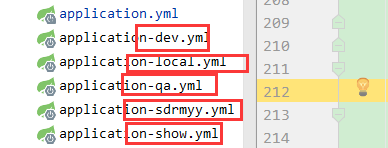
打包过滤配置文件规则也是用一个占位符进行占位,打包时也会通过maven传入参数进行替换
2、在主application.yml中配置一个动态属性进行占位,默认的分隔符是@属性名@,这个属性会通过maven打包时传入参数进行替换

3、maven打包时可以通过两种方式传入参数:
a)、通过 -D命令传入属性值profileActive,如:
clean install -Dmaven.test.skip=true -DprofileActive=dev
b)、通过-P命令指定profile环境,如:
clean package -P prod
或者直接通过插件可视化操作:

如果是idea的话,直接在右侧maven工具栏中勾选更方便:
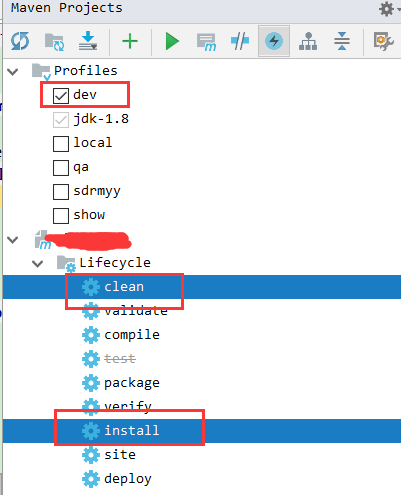
4、本机运行时,一般通过指定profile属性,如

springboot创建多环境profile打包的更多相关文章
- Springboot 创建的maven获取resource资源下的文件的两种方式
Springboot 创建的maven项目 打包后获取resource下的资源文件的两种方式: 资源目录: resources/config/wordFileXml/wordFileRecord.xm ...
- 通过maven profile 打包指定环境配置
背景 最近换了个新公司接手了一个老项目,然后比较坑的是这个公司的项目都没有没有做多环境打包配置,每次发布一个环境都要手动的去修改配置文件.今天正好有空就来配置下. 解决这个问题的方式有很多,我这里挑选 ...
- SpringBoot实现多环境配置
1.为什么需要配置多环境配置 在实际的开发中,我们往往需要在不同的环境中使用不同的数据库.缓存配置,如果使用同一套配置文件,在不同环境部署的时候手动去修改配置文件,会使部署变得很繁琐.使用多环境配置文 ...
- springboot maven 多环境配置
1.使用Intellij IDEA创建Spring Boot和Maven项目 2.Spring Boot项目下application.yaml(yaml支持中文)或者application.prope ...
- SpringBoot Profiles 多环境配置及切换
目录 前言 默认环境配置 多环境配置 多环境切换 小结 前言 大部分情况下,我们开发的产品应用都会根据不同的目的,支持运行在不同的环境(Profile)下,比如: 开发环境(dev) 测试环境(tes ...
- maven根据不同的运行环境,打包不同的配置文件
使用maven管理项目中的依赖,非常的方便.同时利用maven内置的各种插件,在命令行模式下完成打包.部署等操作,可方便后期的持续集成使用. 但是每一个maven工程(比如web项目),开发人员在开发 ...
- springboot创建maven多模块项目
SpringBoot创建maven多模块项目 项目结构 该项目名称为springboot-maven-multi,由springboot-maven-multi.user-dao.user-domai ...
- maven根据不同的运行环境,打包不同的配置文件(转载)
使用maven管理项目中的依赖,非常的方便.同时利用maven内置的各种插件,在命令行模式下完成打包.部署等操作,可方便后期的持续集成使用. 但是每一个maven工程(比如web项目),开发人员在开发 ...
- 利用springboot创建多模块项目
本文旨在用最通俗的语言讲述最枯燥的基本知识 最近要对一个不大不小的项目进行重构,用spring觉得太过于繁琐,用cloud又有觉得过于庞大,维护的人手不够:权衡之下,最终选了springboot作为架 ...
随机推荐
- LoadLibrary失敗,GetLastError 返回127錯誤
該原因一般是由於DLL或其依賴的DLL使用了高版本的API,而在低系統中運行時,找不到該函數所引發的錯誤. 比如:該函數:InterlockedExchange64, 看MSDN: Client Re ...
- c++ std::ifstream
#include <iostream> #include <plug/plug.h> using namespace std; //使用宽字符,我猜是为了适应那些要使用宽字符的 ...
- JAVA大数(转)
1.输入 首先要想输入需要先包括: import java.util.*; 我们需要其中的 Scanner类声明的对象来扫描控制台输入. 针对A+B来说: import java.util.*; pu ...
- Codeforces Round #210 (Div. 1).B
经典的一道DP题. 题目明显是一道DP题,但是比赛的时候一个劲就在想怎么记录状态和转移.最后想到了一种n^3的方法,写了下,不出所料的超时了. 看了别人的代码才发现竟然是先二分然后再进行DP,像这种思 ...
- fis3解决web网站缓存问题
为什么使用FIS3 项目上线一段时间后如果更新JS或CSS文件,而客户端已经对该文件缓存过了,那就有可能会无法及时更新而继续采用旧的JS或CSS文件,无法达到想要的效果. 处理类似情况最有效的解决方案 ...
- x-webkit-speech语音搜索
如果你没看到语音图标说明你的浏览器不支持x-webkit-speech 换个chrome你会发现输入框的右侧出现语音小图标.
- Spoken English Practice(I'm gonna do something I never thought I'd be able to)
绿色:连读: 红色:略读: 蓝色:浊化: 橙色:弱读 下划线_为浊化 口语蜕变(2017/7/6) 英 ...
- 使用electron进行原生应用的打包
因为信奉一句话:JavaScript 终将一统天下,所以要想方设法开疆扩土. 今天介绍的这个electron就是一大神器,可以很方便的将网页应用打包为Mac, Win, Linux下的可执行文件,只需 ...
- Pandas 删除指定列中为NaN的行
定位要删除的行 需求:删除指定列中NaN所在行. 如下图,’open‘ 列中有一行为NaN,定位到它,然后删除. 定位: df[np.isnan(df['open'])].index # 这样即可定位 ...
- KMP算法最浅显理解——一看就明确
说明 KMP算法看懂了认为特别简单,思路非常easy,看不懂之前.查各种资料,看的稀里糊涂.即使网上最简单的解释,依旧看的稀里糊涂. 我花了半天时间,争取用最短的篇幅大致搞明确这玩意究竟是啥. 这里不 ...