
关于localStorage的实际应用
在客户端存储数据
HTML5 提供了两种在客户端存储数据的新方法:
- localStorage - 没有时间限制的数据存储
- sessionStorage - 针对一个 session 的数据存储
之前,这些都是由 cookie 完成的。但是 cookie 不适合大量数据的存储,因为它们由每个对服务器的请求来传递,这使得 cookie 速度很慢而且效率也不高。
在 HTML5 中,数据不是由每个服务器请求传递的,而是只有在请求时使用数据。它使在不影响网站性能的情况下存储大量数据成为可能。
对于不同的网站,数据存储于不同的区域,并且一个网站只能访问其自身的数据。
HTML5 使用 JavaScript 来存储和访问数据。
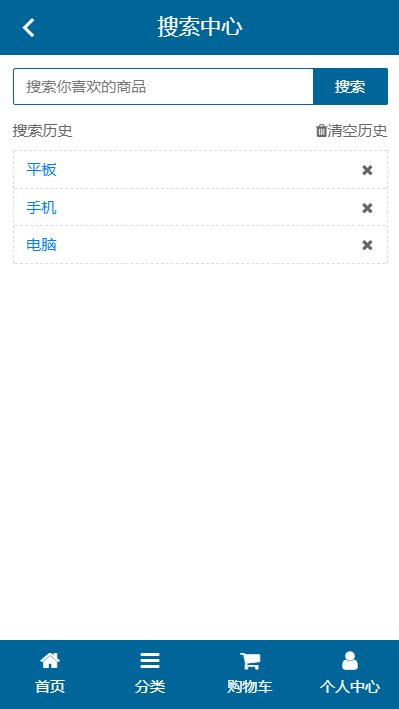
1.html代码
<!doctype html>

<html lang="en">

<head>

    <meta charset="UTF-8">

    <meta name="viewport" content="width=device-width, user-scalable=no, initial-scale=1.0, maximum-scale=1.0, minimum-scale=1.0">

    <title>搜索中心</title>

    <link rel="stylesheet" href="assets/mui/css/mui.min.css">

    <link rel="stylesheet" href="assets/fa/css/font-awesome.min.css">

    <link rel="stylesheet" href="css/mobile.css">

</head>

<body>

<div class="lt_container">

    <!--顶部-->

    <header class="lt_topBar">

        <a href="javascript:history.back();" class="mui-icon mui-icon-back left"></a>

        搜索中心

    </header>

    <!--内容-->

    <div class="lt_content">

        <div class="lt_wrapper">

            <!--搜索框-->

            <div class="lt_search">

                <input type="search" placeholder="搜索你喜欢的商品">

                <a href="javascript:;">搜索</a>

            </div>

            <!--历史列表-->

            <div class="lt_history">

                <!--TODO-->

            </div>

        </div>

    </div>

    <!--底部-->

    <footer class="lt_tabs">

        <a href="index.html"><span class="fa fa-home"></span><p>首页</p></a>

        <a href="category.html"><span class="fa fa-bars"></span><p>分类</p></a>

        <a href="user/cart.html"><span class="fa fa-shopping-cart"></span><p>购物车</p></a>

        <a href="user/index.html"><span class="fa fa-user"></span><p>个人中心</p></a>

    </footer>

</div>

<script type="text/template" id="list">

    <% if($data.length){ %>

        <div class="tit">

            <span class="name">搜索历史</span>

            <a class="clear" href="javascript:;"><span class="fa fa-trash"></span>清空历史</a>

        </div>

        <ul>

            <% for(var i = $data.length-1 ; i >=0 ; i --){ %>

                <li><a href="javascript:;" data-key="<%=$data[i]%>"><%=$data[i]%></a><span data-index="<%=i%>" class="fa fa-close"></span></li>

            <% } %>

        </ul>

    <% }else{ %>

        <div class="tit">

            <span class="name">没有搜索历史记录</span>

        </div>

    <% } %>

</script>

<script src="assets/mui/js/mui.min.js"></script>

<script src="assets/zepto/zepto.min.js"></script>

<script src="assets/art-template/template-web.js"></script>

<script src="js/search.js"></script>

</body>

</html>
2.js代码
$(function () {

    $('.lt_search input').val('');

    /*1. 默认渲染当前历史记录*/

    var storageKey = 'leTaoSearchHistoryList';

    /*1.1 需要约定当前网站存历史记录的KEY和数据类型   leTaoSearchHistoryList = '["电脑","手机"]'*/

    var jsonString = localStorage.getItem(storageKey) || '[]';

    var historyList = JSON.parse(jsonString);

    $('.lt_history').html(template('list', historyList));

    //$('.lt_history').html(template('list', {list:historyList,encodeURIComponent:encodeURIComponent}));

    /*2. 点击搜索记录新的搜索历史  跳转去搜索列表页*/

    /*2.1 添加之后  追加在最前面*/

    /*2.2 如果遇见相同的关键字  删除之前的  追加在最前面*/

    /*2.3 当记录的条数超过10条  删除之前的后面的  追加在最前面*/

    $('.lt_search a').on('tap', function () {

        //去除输入的内容  去了两端空格

        var key = $.trim($('.lt_search input').val());

        // 判断是否输入

        if (!key) {

            mui.toast('请输入关键字');

            return false;

        }

        // 有关键字

        /*删除相同的*/

        $.each(historyList, function (i, item) {

            if (item == key) {

                historyList.splice(i, 1);

                /*中断循环*/

                return false;

            }

        });

        /*加载最后*/

        historyList.push(key);

        /*超过10条删掉*/

        if (historyList.length > 10) {

            historyList.splice(0, historyList.length - 10);

        }

        /*存起来*/

        localStorage.setItem(storageKey, JSON.stringify(historyList));

        /*渲染  会跳走 没有必要*/

        //$('.lt_history').html(template('list', historyList));

        /*跳转  传数据转成URL编码*/

        location.href = '/mobile/searchList.html?key='+encodeURIComponent(key);

    })

    /*3. 点击删除  删除当前的历史记录*/

    $('.lt_history').on('tap', 'li span', function () {

        var index = $(this).data('index');

        console.log(index);

        historyList.splice(index, 1);

        /*存起来*/

        localStorage.setItem(storageKey, JSON.stringify(historyList));

        /*渲染  会跳走 没有必要*/

        $('.lt_history').html(template('list', historyList));

    }).on('tap','.clear',function () {

        /*4. 点击清空  清空所有的历史记录*/

        historyList = [];

        localStorage.setItem(storageKey, '[]');

        /*渲染  会跳走 没有必要*/

        $('.lt_history').html(template('list', historyList));

    }).on('tap','li a',function () {

        var key = $(this).data('key');

        /*跳转  传数据转成URL编码*/

        location.href = '/mobile/searchList.html?key='+encodeURIComponent(key);

    });

});
关于localStorage的实际应用的更多相关文章
- HTML5 localStorage本地存储
介绍 localStorage(本地存储)的使用方式.包括对存储对象的添加.修改.删除.事件触发等操作. 目录 1. 介绍 1.1 说明 1.2 特点 1.3 浏览器最小版本支持 1.4 适合场景 2 ...
- 似懂非懂的localStorage和sessionStorage
一.区别 相信很多人都见过这两个关于HTML5的新名词!HTML5种的web storage包含两种存储方式:localStorage和sessionStorage,这两种方式存储的数据不会自动发给服 ...
- 将css和js缓存到localStorage缓存,提高网页响应速度
适用于小站点,这很极致,很快速~~ /** * Created by SevenNight on 2016/9/21 0021. * 插件功能:使用localStorage缓存js和css文件,减少h ...
- cookies,sessionStorage和localStorage的区别---web前端sessionStorage和localStorage区别
sessionStorage用于本地存储一个会话(session)中的数据,这些数据只有在同一个会话中的页面才能访问并且当会话结束后数据也随之销毁.因此sessionStorage不是一种持久化的本地 ...
- sessionStorage 和 localStorage 、cookie
sessionStorage 和 localStorage html5中web storage包括两种储存方式:sessionStorage 和 localStorage sessionStorage ...
- 浏览器对localstorage的支持情况以及localstorage在saas系统中的应用实践思考
首先,还是要说,任何一种新特性的引入,通常有着其特有的场景和解决的目标需求,localstorage也一样.在我们的应用场景中,主要在金融业务服务的saas系统.其中涉及很多更改频率很多的元数据的客户 ...
- 初识html5的localStorage本地存储
一.概述 HTML5 提供了两种在客户端存储数据的新方法: localStorage - 没有时间限制的数据存储 sessionStorage - 针对一个 session 的数据存储 之前,这些都是 ...
- HTML5本地存储Localstorage
什么是localstorage 前几天在老项目中发现有对cookie的操作觉得很奇怪,咨询下来是要缓存一些信息,以避免在URL上面传递参数,但没有考虑过cookie会带来什么问题: ① cookie大 ...
- HTMl5的存储方式sessionStorage和localStorage详解
html5中的Web Storage包括了两种存储方式:sessionStorage和localStorage.sessionStorage用于本地存储一个会话(session)中的数据,这些数据只有 ...
- localStorage使用总结
一.什么是localStorage.sessionStorage 在HTML5中,新加入了一个localStorage特性,这个特性主要是用来作为本地存储来使用的,解决了cookie存储空间不足的问题 ...
随机推荐
- mysql alter 增加修改表结构及约束
1) 加索引,添加时若未指定索引名,默认为字段名 mysql> alter table 表名 add index 索引名 (字段名1[,字段名2 …]); 例子: mysql> alt ...
- es6新特性之 class 基本用法
javaScript 语言中,生成实例对象的传统方法是通过构造函数,与传统的面向对象语言(比如 C++ 和 Java)差异很大,ES6 提供了更接近传统语言的写法,引入了 class(类)这个概念,作 ...
- VirtualBox复制的虚拟机无法获取IP解决办法
自从建立了这个账号后写了一篇,好几年没来了,今天来看看,顺便分享一下. 昨天晚上想玩玩zookeeper集群,在vb里复制了一台主机,可怎么也无法获取IP,经研究,终于还是解决了. 1.复制主机时勾选 ...
- 5、GDB调试工具的使用
GDB是GNU发布的一款功能强大的程序调试工具.GDB主要完成下面三个方面的功能: 1.启动被调试程序. 2.让被调试的程序在指定的位置停住. 3.当程序被停住时,可以检查程序状态(如变量值). #i ...
- kubernetes理论基础#开始入坑啊!
什么是kubernetes 首先,他是一个全新的基于容器技术的分布式架构领先方案.Kubernetes(k8s)是Google开源的容器集群管理系统(谷歌内部:Borg).在Docker技术的基础上, ...
- python学习——初始面向对象
一.讲在前面 编程的世界中有三大体系,面向过程.面向函数和面向对象编程.而面向过程的编程就包括了面向函数编程,接下来说一下面向对象.假如 ,你现在是一家游戏公司的开发人员,现在需要你开发一款叫做< ...
- Redis在Linux中的运用
Redis在Linux中的运用 一.Redis安装部署 下载: wget http://download.redis.io/releases/redis-3.2.12.tar.gz 解压: 上传至 / ...
- [POJ3090]Visible Lattice Points(欧拉函数)
答案为3+2*∑φ(i),(i=2 to n) Code #include <cstdio> int T,n,A[1010]; void Init(){ for(int i=2;i< ...
- mySQL安装的时候一直卡在starting server这里解决办法
昨天安装mySQL的时候一直卡在了starting server这里,等了半天都没反应,后来就去网上寻找解决办法,大部分是说什么设置mysql本地启动服务啊,删除注册表啊,这些办法都试过了 然并卵. ...
- 北京Uber优步司机奖励政策(2月16日)
滴快车单单2.5倍,注册地址:http://www.udache.com/ 如何注册Uber司机(全国版最新最详细注册流程)/月入2万/不用抢单:http://www.cnblogs.com/mfry ...