
MyBatis For .NET学习- 初识MyBatis
MyBatis的框架。

Introduction
MyBatis本是apache的一个开源项目iBatis,2010年这个项目由 apache software foundation迁移到了google code,并且改名为Mybatis。iBATIS一词源于"internet"和"abatis"的组合,是一个基于Java的持久层框架。iBATIS提供的持久层框架包括SQL Maps和Data Access Objects(DAO)。此处省去概念性描述若干词,下面直接进入主题,记录我学习MyBatis的过程。。。
Content
- 准备工作
要想在项目中使用MyBatis.Net(当然,现在只是学习阶段),就需要到它的官方网站http://www.mybatis.org 下载相应的dll,根据官方网站的链接可以下载到IBatis.DataAccess.1.9.2.bin.zip和IBatis.DataMapper.1.6.2.bin.zip两个压缩文件(如果英语还不错,可以直接下载官方的文档,官方提供了两个压缩包Doc-DataAccess-1.9.2.zip和Doc-DataMapper-1.6.2.zip),在这个压缩文件中包含了几乎我们需要的所有dll文件(如果使用MySQL等其它数据库,可能需要到数据库厂商网站下载相应的dll驱动),包含如下文件:
Castle.DynamicProxy.dll
IBatisNet.Common.dll
IBatisNet.Common.Logging.Log4Net.dll
IBatisNet.DataAccess.dll
IBatisNet.DataMapper.dll
log4net.dll
同时MyBatis还提供了一些辅助文件,如IBatisNet.Common.Logging.Log4Net.xml、IBatisNet.Common.xml、IBatisNet.DataAccess.xml、log4net.xml及IBatisNet.DataMapper.xml,将这些文件拷贝到VS的相应目录就可以在编写代码时获得程序的API说明,这个位置就是你的.NET Framework的安装目录,比如系统盘是C盘,这个位置就是C:/WINDOWS/Microsoft.NET/Framework/v4.0.30319/zh-CN。除此之外,还有一些xsd文件,如provider.xsd、SqlMap.xsd及SqlMapConfig.xsd,这些文件都是对应的xml文件的验证文件,利用这些文件就可以在VS中编辑这些文件时获得智能感知,从而减少出错的机会。假设你的系统是安装在C盘,如果你使用的是VS2010,那么就把这些文件拷贝到C:/Program Files/Microsoft Visual Studio 10.0/Xml/Schemas;如果你使用的是VS2012,那么就拷贝到C:/Program Files/Microsoft Visual Studio 11/Xml/Schemas。
准备好DLL文件后,接下来是配置文件,如:Providers.config,SqlMap.config。
Providers.config文件
该文件提供了常用数据库驱动程序清单(共19个),在IBatis.DataAccess.1.9.2.bin下可以找到,但为提供对sqlserver2008的驱动信息,可下载官方的demo并找到该节点,这里就以sqlserver2008为例:
- <provider
- name="sqlServer2008"
- enabled="true"
- default="true"
- description="Microsoft SQL Server, provider V4.0.0.0 in framework .NET V4.0"
- assemblyName="System.Data, Version=4.0.0.0, Culture=Neutral, PublicKeyToken=b77a5c561934e089"
- connectionClass="System.Data.SqlClient.SqlConnection"
- commandClass="System.Data.SqlClient.SqlCommand"
- parameterClass="System.Data.SqlClient.SqlParameter"
- parameterDbTypeClass="System.Data.SqlDbType"
- parameterDbTypeProperty="SqlDbType"
- dataAdapterClass="System.Data.SqlClient.SqlDataAdapter"
- commandBuilderClass=" System.Data.SqlClient.SqlCommandBuilder"
- usePositionalParameters = "false"
- useParameterPrefixInSql = "true"
- useParameterPrefixInParameter = "true"
- parameterPrefix="@"
- allowMARS="true"
- />
根据value可以很大致明白各字段的含义,这里只说明三个地方,enabled,default,parameterprefix,如果想启用某个数据库驱动,只需要将enabled设置为true,如果设置了多个数据库驱动,可以使用default设置默认启动,parameterPrefix表示参数化SQL语句中参数的前缀。
SqlMap.config文件
这是一个配置当前数据库信息及实体映射文件配置的文件,直接看配置:
- <?xml version="1.0" encoding="utf-8" ?>
- <sqlMapConfig xmlns="http://ibatis.apache.org/dataMapper"
- xmlns:xsi="http://www.w3.org/2001/XMLSchema-instance">
- <properties>
- <property key="selectKey" value="select @@IDENTITY as value" />
- </properties>
- <providers resource="./providers.config"/>
- <database>
- <provider name="sqlServer2008" />
- <dataSource name="DataSource" connectionString="Data Source=(local);Initial Catalog=Northwind;Integrated Security=True"/>
- </database>
- <sqlMaps>
- <sqlMap embedded="products.xml,FeihonSamples"/>
- </sqlMaps>
- </sqlMapConfig>
看到这里,需要注意两个地方:
- Property key:当你向有自增长列的表插入数据时,需要用到这个属性。
- 引用外部文件时可以使用resource(如: <providers resource="./providers.config"/>)和embedded(如:<sqlMap embedded="products.xml,FeihonSamples"/>)
区别:resource直接引用外部文件,embedded需要将文件改为嵌入式资源,如下图:
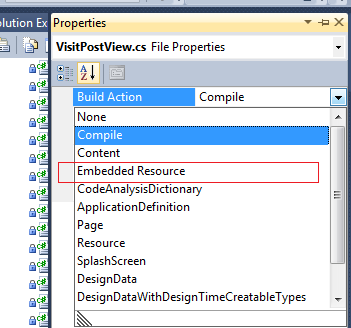
使用resouce时需要选择将文件Copy to Output Directory。
- 编写映射文件
映射文件与Nhibernate类似,主要包含两个部分:属性的映射和sql map,先通过代码直观感觉一下。
- <?xml version="1.0" encoding="utf-8" ?>
- <sqlMap namespace="Products" xmlns="http://ibatis.apache.org/mapping" xmlns:xsi="http://www.w3.org/2001/XMLSchema-instance">
- <alias>
- <typeAlias alias="Products" type="FeihonSamples.Products,FeihonSamples"></typeAlias>
- </alias>
- <resultMaps>
- <resultMap id="SelectAllResult" class="Products">
- <result property="ProductId" column="ProductID" dbType="int" type="int"/>
- <result property="ProductName" column="ProductName" dbType="varchar" type="String"/>
- <result property="SupplierId" column="SupplierID" dbType="int" type="int"/>
- <result property="CategoryId" column="CategoryID" dbType="int" type="int"/>
- <result property="QuantityPerUnit" column="QuantityPerUnit" dbType="nvarchar" type="string"/>
- <result property="UnitPrice" column="UnitPrice" dbType="money" type="double"/>
- <result property="UnitsInStock" column="UnitsInStock" dbType="smallint" type="int"/>
- <result property="UnitsOnOrder" column="UnitsOnOrder" dbType="smallint" type="int"/>
- <result property="ReorderLevel" column="ReorderLevel" dbType="smallint" type="int"/>
- <result property="Discontinued" column="Discontinued" dbType="bit" type="bool"/>
- </resultMap>
- </resultMaps>
- <statements>
- <select id="SelectAllProducts" resultMap="SelectAllResult">
- <![CDATA[
- select * from products
- ]]>
- </select>
- <select id="SelectByProductId" parameterClass="int" resultMap="SelectAllResult" extends="SelectAllProducts">
- <![CDATA[
- where productid=#value#
- ]]>
- </select>
- <select id="selectCount" resultClass="int">
- <![CDATA[
- select count(*) from products
- ]]>
- </select>
- <insert id="InsertProduct" parameterClass="Products">
- <selectKey property="ProductId" type="post" resultClass="int">
- ${selectKey}
- </selectKey>
- <![CDATA[
- insert into Products
- (ProductName
- ,SupplierID
- ,CategoryID
- ,QuantityPerUnit
- ,UnitPrice
- ,UnitsInStock
- ,UnitsOnOrder
- ,ReorderLevel
- ,Discontinued)
- values
- (#ProductName#
- ,#SupplierId#
- ,#CategoryId#
- ,#QuantityPerUnit#
- ,#UnitPrice#
- ,#UnitsInStock#
- ,#UnitsOnOrder#
- ,#ReorderLevel#
- ,#Discontinued#)
- ]]>
- </insert>
- <delete id="DeleteProduct" parameterClass="int">
- <![CDATA[
- delete from products
- where
- productid=#productid#
- ]]>
- </delete>
- </statements>
- </sqlMap >
映射文件是以XML文件的形式存在,这里先直观的感受一下,后续文章会对其中的属性做详细描述。
- 代码实现
完整iBatis.Net的环境配置和引用后,就可以实现代码的调用了,还是通过直观的方式展现一下。
- using System;
- using System.Collections.Generic;
- using System.Linq;
- using System.Text;
- using System.Threading.Tasks;
- using IBatisNet.DataMapper;
- using IBatisNet.DataAccess;
- using IBatisNet.DataMapper.Configuration;
- namespace FeihonSamples
- {
- public class IbatisSample
- {
- private static SqlMapper mapper = null;
- static IbatisSample()
- {
- DomSqlMapBuilder builder = new DomSqlMapBuilder();
- mapper = builder.Configure("SqlMap.config") as SqlMapper;
- }
- public int Count()
- {
- int result = mapper.QueryForObject<int>("selectCount", null);
- return result;
- }
- public bool Create(Products product)
- {
- int id = (int)mapper.Insert("InsertProduct", product);
- return id > 0;
- }
- public Products Select(int productid)
- {
- Products product = mapper.QueryForObject<Products>("SelectByProductId", productid);
- return product;
- }
- public IList<Products> SelectAll()
- {
- var result = mapper.QueryForList<Products>("SelectByProductId", null);
- return result;
- }
- public bool Update(Products product)
- {
- var result = mapper.Update("DeleteProduct", product);
- return result > 0;
- }
- public bool Delete(Products product)
- {
- var result = mapper.Delete("DeleteProduct", product);
- return result > 0;
- }
- }
- }
简单说明:此处通过静态构造函数初始化Sqlmap.config,ibatis支持多用初始化方式,这里使用DOM的方式进行初始化,需要引用IBatisNet.DataMapper.Configuration;
Summary
虽然此文是初识MyBatis,但我还是使用一种最直观的方式先感受一下。
MyBatis最大的优点就是简单、灵活、易扩展,第一次使用就会让你喜欢上它。不过它也有它的缺点,映射文件需要更多的手工书写,当然也可以使用模板生成,如codesmith的ibatis模板等。
MyBatis For .NET学习- 初识MyBatis的更多相关文章
- (转)MyBatis框架的学习(七)——MyBatis逆向工程自动生成代码
http://blog.csdn.net/yerenyuan_pku/article/details/71909325 什么是逆向工程 MyBatis的一个主要的特点就是需要程序员自己编写sql,那么 ...
- (转)MyBatis框架的学习(六)——MyBatis整合Spring
http://blog.csdn.net/yerenyuan_pku/article/details/71904315 本文将手把手教你如何使用MyBatis整合Spring,这儿,我本人使用的MyB ...
- (转)MyBatis框架的学习(二)——MyBatis架构与入门
http://blog.csdn.net/yerenyuan_pku/article/details/71699515 MyBatis框架的架构 MyBatis框架的架构如下图: 下面作简要概述: S ...
- mybatis源码学习--spring+mybatis注解方式为什么mybatis的dao接口不需要实现类
相信大家在刚开始学习mybatis注解方式,或者spring+mybatis注解方式的时候,一定会有一个疑问,为什么mybatis的dao接口只需要一个接口,不需要实现类,就可以正常使用,笔者最开始的 ...
- 【mybatis源码学习】mybatis和spring框架整合,我们依赖的mapper的接口真相
转载至:https://www.cnblogs.com/jpfss/p/7799806.html Mybatis MapperScannerConfigurer 自动扫描 将Mapper接口生成代理注 ...
- (转)MyBatis框架的学习(一)——MyBatis介绍
http://blog.csdn.net/yerenyuan_pku/article/details/71699343 MyBatis介绍 MyBatis本是apache的一个开源项目iBatis,2 ...
- mybatis源码学习(二)--mybatis+spring源码学习
这篇笔记主要来就,mybatis是如何利用spring的扩展点来实现和spring的整合 1.mybatis和spring整合之后,我们就不需要使用sqlSession.selectOne()这种方式 ...
- 【mybatis源码学习】mybatis的插件功能
一.mybatis的插件功能可拦截的目标 org.apache.ibatis.executor.parameter.ParameterHandler org.apache.ibatis.executo ...
- 【mybatis源码学习】mybatis的结果映射
一.mybatis结果映射的流程 二.mybatis结果映射重要的类 1.org.apache.ibatis.executor.resultset.ResultSetWrapper(对sql执行返回的 ...
随机推荐
- Cocos3.0 的android返回键功能实现
比如:Game.h Game.cpp 头文件Game.h中定义: void onKeyReleased(EventKeyboard::KeyCode keyCode,Event * pEvent) ...
- Tensorflow之计算tensor平均值
https://www.tensorflow.org/versions/r0.12/api_docs/python/math_ops.html#reduce_mean tf.reduce_mean(i ...
- 请用正则表达式匹配出QQ号(假设QQ号码为5—10位);
请用正则表达式匹配出QQ号(假设QQ号码为5—10位): 解答: ^ \d{5,10}$
- 【IOS】 readonly IOS下实战入门
当非常多XXX.h 文件属性YY设计中,对外的设计是 YY(readonly) 时.外界便不能改动该属性, 同一时候问题也来了,该XXX类的内部也不能改动改YY属性了.你瞬间凌乱过么. ..Y_Y 然 ...
- Asp.net控制Tomcat启动关闭的实现方法
一.场景 近日有个项目客户要求能自己配置相关权限.由于历史原因这个项目采用的是公司以前的权限系统.这个权限系统很强大,不过有个弊端,就是每增加一个权限菜单都要重启才能生效,不然就要等1天它缓存过期后才 ...
- jQuery左右选择框
<!DOCTYPE html> <html> <head> <title>左右选择框</title> <style type=&quo ...
- Eclipse用法和技巧
http://blog.csdn.net/ts1122/article/category/1385337/2
- js事件处理函数中return的作用
这里面的return含有一些细节知识: 例如:onClick='return add_onclick()'与 onClick='add_onclick()'的区别 JAVASCRIPT在事件中调用函数 ...
- android webview css z-index属性无效
在做android的web页面嵌入的时候,当使用css的z-index设置重叠div失败: 查询google说设置 -webkit-transform:translateZ(0) canvas{ -w ...
- 170120、java 如何在pdf中生成表格
1.目标 在pdf中生成一个可变表头的表格,并向其中填充数据.通过泛型动态的生成表头,通过反射动态获取实体类(我这里是User)的get方法动态获得数据,从而达到动态生成表格. 每天生成一个文件夹存储 ...