
【第四章】Shell 条件测试表达式
shell中条件测试的三种格式:
格式1: test 条件表达式
格式2: [ 条件表达式 ]
格式3: [[ 条件表达式 ]]
使用test:

[root@host- ~]# test -f file && echo true || echo false

false

[root@host- ~]# touch file

[root@host- ~]# test -f file && echo true || echo false

true

[root@host- ~]# man test #可以查看帮助

 -z 测试如果字符串长度是否为零:

[root@host- ~]# test -z "yanglt" && echo  || echo

[root@host- ~]# char="yanglt"

[root@host- ~]# test -z "$char" && echo  || echo

[root@host- ~]# char=""

[root@host- ~]# test -z "$char" && echo  || echo


使用[]:

[root@host- tmp]# touch yanglt.txt

[root@host- tmp]# [ -f /tmp/yanglt.txt ] && echo  || echo

判断逻辑表达式写法:

[root@host- tmp]# [ -f /tmp/yanglt.txt ] && echo     #成功输出1

[root@host- tmp]# [ -f /tmp/yanglt.txt ] || echo     #不成功输出0

[root@host- tmp]# [ -f /tmp/yanglt123.txt ] || echo

[]命令和test命令的选项时通用的,所以[] 也可以用 man test 命令获取帮助


使用[[]]:

[root@host- tmp]# [[ -f /tmp/yanglt.txt ]] && echo  || echo
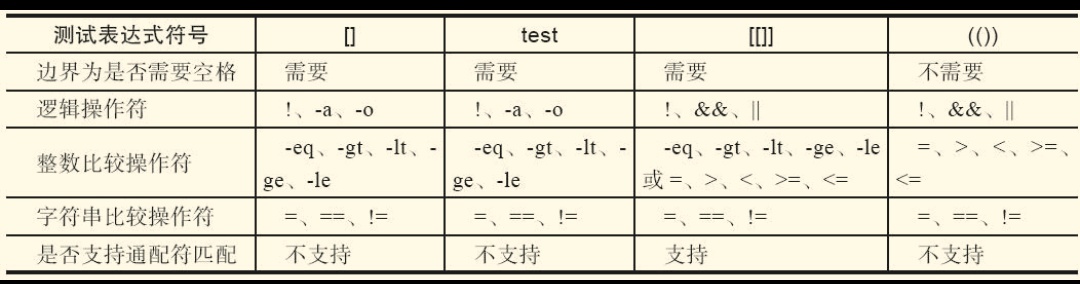
注:[[]] 表达式和 []和test 测试表达式区别:
[[]]:可以使用通配符进行模式匹配,可以使用&& 、 || 、> 、< 等操作符
但不能用于[]中,[]中一般使用-a 、-o 、-gt(用于整数) 、-lt(用于整数)
查看帮助:
test、[]、[[]]这些操作符的用法,通过help test 或 man test查询得到帮助,完整的[]、[[]] 用法可以通过man bash来获得帮助。
一、文件测试表达
常用的文件测试操作符:
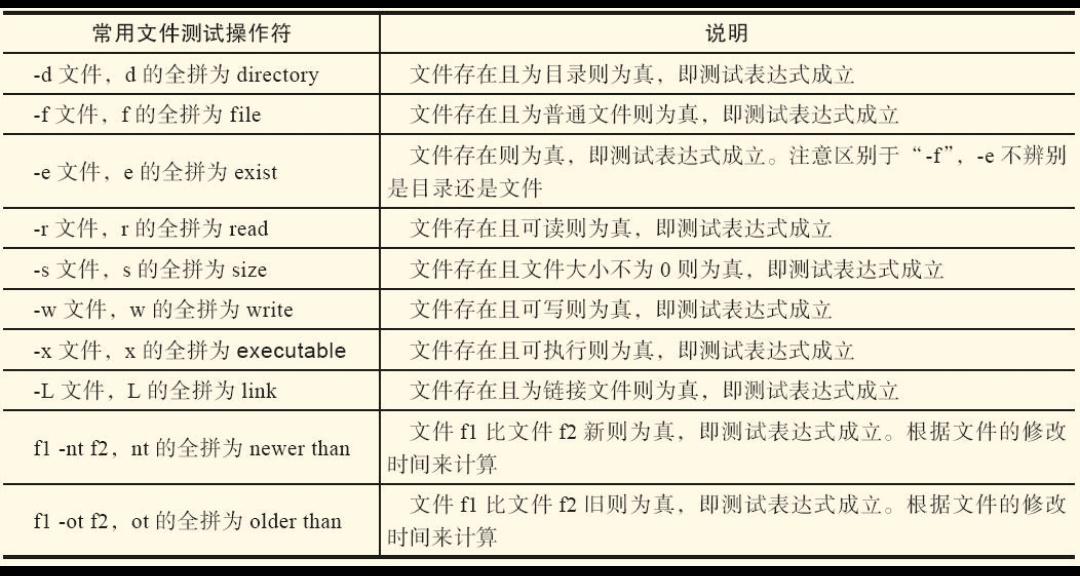
(1) 普通文件(测试文件类型)

[root@host- ~]# touch yanglt

[root@host- ~]# ls -l |grep "yanglt$"

-rw-r--r--   root root       6月   : yanglt

[root@host- ~]# [ -f yanglt ] && echo  || echo

()目录文件 (测试目录类型)

[root@host- ~]# mkdir yanglt01

[root@host- ~]# [ -f yanglt01 ] && echo || echo    #测试是否为普通文件 是为1,不是为0

[root@host- ~]# [ -e yanglt01 ] && echo || echo    #测试yanglt001是否存在

[root@host- ~]# [ -d yanglt01 ] && echo || echo    #测试是否为目录

[root@host- ~]# [ -d yanglt ] && echo || echo

[root@host- ~]#

()测试文件属性

[root@host- ~]# ls -l yanglt

-rw-r--r--  root root  6月   : yanglt

[root@host- ~]# ls -l yanglt01

总用量

[root@host- ~]# [ -r yanglt ] && echo ||echo

[root@host- ~]# [ -w yanglt ] && echo  || echo

[root@host- ~]# [ -x yanglt ] && echo  || echo

[root@host- ~]# chmod  yanglt

[root@host- ~]# ls -l yanglt

---------x  root root  6月   : yanglt

#我们发现用户权限没有读写,但是下边依然可以返回1,这就是root用户比较特殊的地方

[root@host- ~]# echo 'text' > yanglt

[root@host- ~]# cat yanglt

text

[root@host- ~]# [ -w yanglt ] && echo  || echo

[root@host- ~]# [ -x yanglt ] && echo  || echo

[root@host- ~]# [ -r yanglt ] && echo ||echo

当我们切换用户后按照以上方法再次操作:

[root@host- ~]# su - yanglt1

[yanglt1@host- ~]$ touch yanglt001

[yanglt1@host- ~]$ ls -l yanglt001

-rw-rw-r--  yanglt1 yanglt1  6月   : yanglt001

[yanglt1@host- ~]$ [ -x yanglt001 ] && echo  || echo

[yanglt1@host- ~]$ [ -w yanglt001 ] && echo  || echo

[yanglt1@host- ~]$ [ -r yanglt001 ] && echo  || echo

[yanglt1@host- ~]$ chmod  yanglt001

[yanglt1@host- ~]$ [ -x yanglt001 ] && echo  || echo

[yanglt1@host- ~]$ ls -l

总用量

---------x  yanglt1 yanglt1  6月   : yanglt001    #我们可以看到没有该用户读写执行权限,下边的测试结果可见

[yanglt1@host- ~]$ [ -x yanglt001 ] && echo  || echo

 #因为文件所属主没有执行权限

[yanglt1@host- ~]$ [ -w yanglt001 ] && echo  || echo

[yanglt1@host- ~]$ [ -r 4yanglt001 ] && echo  || echo

[yanglt1@host- ~]$

测试文件的读写执行属性,不仅要看rwx,还要看当前用户是否有操作该文件的对应权限
二、字符串测试表达式
对于字符串的测试,一定要将字符串加双引号之后在进行比较

比较符号“!=”和“=”两端要有空格,比较两个字符串是否相同
[root@host- ~]# [ -n "abc" ]&& echo  || echo     #字符串长度不为零

[root@host- ~]# test -n "abc" && echo  || echo

[root@host- ~]# var="yanglt"

[root@host- ~]# test -z "$var" && echo  || echo  #字符串长度为零的时候为真,现在不为真返回0

[root@host- ~]# [ "abc" = "abc"]    #括号两边需要加空格

-bash: [: 缺少 `]'

[root@host- ~]# [ "abc" = "abc" ]

[root@host- ~]# [ "abc" = "abc" ] && echo

[root@host- ~]# [ "abc" != "abc" ] && echo      #成立返回1,不成立返回0

[root@host- ~]# [ "$var" != "abc" ] && echo

[root@host- ~]# [ "$var" = "abc" ] && echo

等号两边没有空格会出现以下判断错误:

[root@host- ~]# [ "abc" = "" ] && echo  || echo

[root@host- ~]# [ "abc"="" ] && echo  || echo

[root@host- ~]#
字符串不加双引号出现逻辑的错误:
[root@host-131 ~]# var=""
[root@host-131 ~]# [ -n "$var" ] && echo 1 || echo 0
0
[root@host-131 ~]# [ -n $var ] && echo 1 || echo 0
1
[root@host-131 ~]# [ -z $var ] && echo 1 || echo 0
1
[root@host-131 ~]# [ -z "$var" ] && echo 1 || echo 0
1
[root@host-131 ~]#
三、数值测试表达式
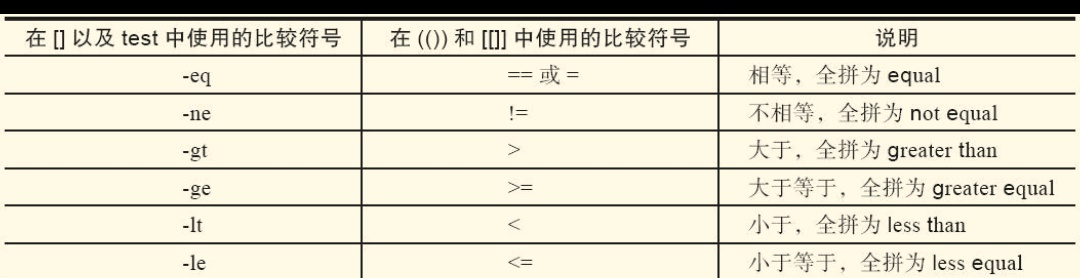
有关[]、[[]]、(())用法的小结:
- 整数加双引号的比较是对的。
- [[]]中用类似-eq等的写法是对的,[[]]中用类似>、<的写法也可能不对,有可能会只比较第一位,逻辑结果不对。
- []中用类似>、<的写法在语法上虽然可能没错,但逻辑结果不对,可以使用=、!=正确比较。
- (())中不能使用类似-eq等的写法,可以使用类似>、<的写法。
参考文件:跟老男孩学shell
【第四章】Shell 条件测试表达式的更多相关文章
- shell条件测试test
shell条件测试可以通过以下两种方式: test 参数 测试内容 [ 参数 测试内容 ] 一.测试文件类型: test -e 文件名 (测试文件是否存在) [ - ...
- shell条件测试语句实例-测试apache是否开启
终于理解了shell条件测试语句"!="和"-n"的用法区别,于是有了如下的shell脚本,做为练习. 第一种方法:测试apache是否开启?字符串测试 #!/ ...
- 四 Shell条件测试
条件测试操作 在bash的各种流程控制结构中通常要进行各种测试,然后根据测试结果执行不同的操作,有时也会通过与if等条件语句相结合,让我们可以方便的完成判断. 语法格式 test 选项 文件名或目录名 ...
- shell条件测试和流程控制
一.条件测试操作 1.test 用途:测试特定的表达式是否成立,当条件成立时,命令执行后的返回值为0,否则为其他数值 格式:test 表达式 2.常见的测试类型 ①测试文件状态 格式:[ 操作符 文件 ...
- shell条件测试结构
条件测试结构 if/then结构用来判断命令列表的退出状态码是否为0(因为在UNIX惯例, 0表示"成功"), 如果成功的话, 那么就执行接下来的一个或多个命令. 有一个专有命令[ ...
- bash Shell条件测试
3种测试命令: test EXPRESSION [ EXPRESSION ] [[ EXPRESSION ]] 注意:EXPRESSION前后必须有空白字符 bash的测试类型 数值测试: -eq: ...
- shell条件测试
文件状态测试-b filename : 当filename 存在并且是块文件时返回真(返回0)-c filename : 当filename 存在并且是字符文件时返回真-d pathname : 当p ...
- 第四章 函数之lambda 表达式和内置函数
4.5 lambda 表达式 用于表示简单的函数. # 三元运算,为了解决简单的if else的情况,如:if 1 == 1: a = 123else: a = 456# 相当于a = 1 ...
- 《shell条件测试语句,字符串测试apache是否开启》
还得我想了10分钟才明白”!=“和"-n"的用法区别,做个笔记捋一捋 第一种方法:测试apache是否开启?字符串测试 #!/bin/bash web=`/usr/bin/pgre ...
随机推荐
- 启动tomcat的时候为啥你启动的是8,启动起来的确实其他的Tomcat
如果发现,是启动tomcat的时候为啥你启动的是8,启动起来的确实其他的Tomcat ,你可以去看看你的环境变量,是不是配了一个tomcat,
- DQL-分组查询
一.语法 select 分组函数,分组后的字段 from 表 [ where 筛选条件] group by 分组的字段[having 分组后的筛选][order by 排序列表] 例如 S ...
- OC - 时间日期类NSDate
OC - 时间日期类NSDate //NSDate 时间日期类 NSDate 二进制数据流 { //1.获取当前时间 零时区的时间 //显示的是格林尼治的时间: 年-月-日 时:分:秒:+时区 NSD ...
- binlog2sql 用法
binlog2sql 用法 使用场景:binlog2sql是根据mysql的binlog (要求格式是row)反解析出delete,update操作,对误操作数据进行还原. https://githu ...
- hashcode和equals区别
hashcode:对象的初始地址的整数表示 Java中的对象是JVM在管理,JVM会在她认为合适的时候对对象进行移动,比如,在某些需要整理内存碎片的GC算法下发生的GC.此时,对象的地址会变动,但ha ...
- js实现QQ、微信、新浪微博分享功能
微信分享需要手机扫描二维码,需要对url进行编码.在https协议下,扫描二维码时,浏览器打不开可能时安全证书导致的. var shareModel = { /** * 分享QQ好友 * @param ...
- vue2.0 接收url参数
1) 路由配置传参方式在配置路由时 例如 "/firewall/authorize/:uid/:uname/:token"页面url为 http://XXX.com/firewal ...
- Laravel 开发支付宝支付与提现转账问题小结
由于项目需要,所以需要开发支付宝支付与微信支付,支付部分采用了 yansongda/pay https://packagist.org/packages/yansongda/pay https ...
- 使用百度编辑器--ueditor,后台接收提交编辑的内容,HTML不见了, 赋值不了,赋值之后,html暴露出来了??
1.提交编辑好的内容, 后台post 接收发现 html 不见了,这个时候也许就是转义的问题, 既可以试试 $content = htmlspecialchars(stripslashes(input ...
- day 18 类与类之间的关系
类与类之间的关系 在我们的世界中事物和事物之间总会有一些联系. 在面向对象中,类和类之间也可以产生相关的关系 1.依赖关系 执行某个动作的时候. 需要xxx来帮助你完成这个操作, ...