
Ocelot 使用
官方文档:http://ocelot.readthedocs.io/en/latest/introduction/gettingstarted.html
新建两个Asp.net core API项目
API1使用5001端口
API2使用5002端口,为了有所区别,改下返回数据
// GET api/values
        [HttpGet]
        public IEnumerable<string> Get()
        {
            return new string[] { "value1", "value2","value3" };
        }
新建asp.net core 空项目APIGate
修改Program
public static IWebHost BuildWebHost(string[] args) =>
            WebHost.CreateDefaultBuilder(args)
                .UseKestrel()
                .UseContentRoot(Directory.GetCurrentDirectory())
                .ConfigureAppConfiguration((hostingContext, config) =>
                {
                    config
                        .SetBasePath(hostingContext.HostingEnvironment.ContentRootPath)
                        .AddJsonFile("appsettings.json", true, true)
                        .AddJsonFile($"appsettings.{hostingContext.HostingEnvironment.EnvironmentName}.json", true, true)
                        .AddJsonFile("configuration.json")
                        .AddEnvironmentVariables();
                })
                .UseStartup<Startup>()
                .Build();
修改Startup
public void ConfigureServices(IServiceCollection services)
        {
            services.AddOcelot();
        }

        public void Configure(IApplicationBuilder app, IHostingEnvironment env)
        {
            if (env.IsDevelopment())
            {
                app.UseDeveloperExceptionPage();
            }

            app.UseOcelot().Wait();
        }
添加configuration.json
{
  "ReRoutes": [
    {
      "DownstreamPathTemplate": "/api/values",
      "DownstreamScheme": "http",
      "UpstreamPathTemplate": "/api/values",
      "UpstreamHttpMethod": [ "Get" ],
      "DownstreamHostAndPorts": [
        {
          "Host": "localhost",

        }
      ]
    },
    {
      "DownstreamPathTemplate": "/api/values",
      "DownstreamScheme": "http",
      "UpstreamPathTemplate": "/api/values2",
      "UpstreamHttpMethod": [ "Get" ],
      "DownstreamHostAndPorts": [
        {
          "Host": "localhost",

        }
      ]
    }
  ],
  "GlobalConfiguration": {
  }
}
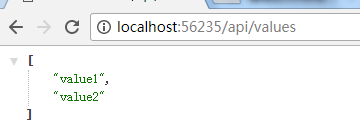
打开浏览器http://localhost:56235/api/values
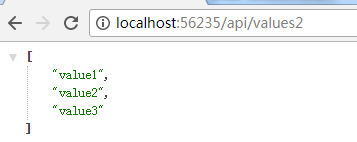
打开http://localhost:56235/api/values2
结合Butterfly实现微服务跟踪
下载Butterfly:https://github.com/ButterflyAPM/butterfly/releases
解压后执行
dotnet Butterfly.Web.dll --EnableHttpCollector=true
这里要主要加上后面的参数,否则是监控不到Http的请求的
接下来在API网关和API服务处添加Butterfly包
Install-Package Butterfly.Client.AspNetCore
在API网关Startup中添加服务
public void ConfigureServices(IServiceCollection services)
{
   //your other code
  services.AddButterfly(option =>
  {
      option.CollectorUrl = "http://localhost:9618";
      option.Service = "my service";
  });
}
在API服务中添加代码同上,只是服务名不同
修改configuration.json,开启tracing
{
  "ReRoutes": [
    {
      "DownstreamPathTemplate": "/api/values",
      "DownstreamScheme": "http",
      "UpstreamPathTemplate": "/api/values",
      "UpstreamHttpMethod": [ "Get" ],
      "DownstreamHostAndPorts": [
        {
          "Host": "localhost",

        }
      ],
      "HttpHandlerOptions": {
        "UseTracing": true
      }
    },
    {
      "DownstreamPathTemplate": "/api/values",
      "DownstreamScheme": "http",
      "UpstreamPathTemplate": "/api/values2",
      "UpstreamHttpMethod": [ "Get" ],
      "DownstreamHostAndPorts": [
        {
          "Host": "localhost",

        }
      ],
      "HttpHandlerOptions": {
        "UseTracing": true
      }
    }
  ],
  "GlobalConfiguration": {
  }
}
按上文请求http://localhost:56235/api/values2,然后打开http://localhost:9618/tracing/traces
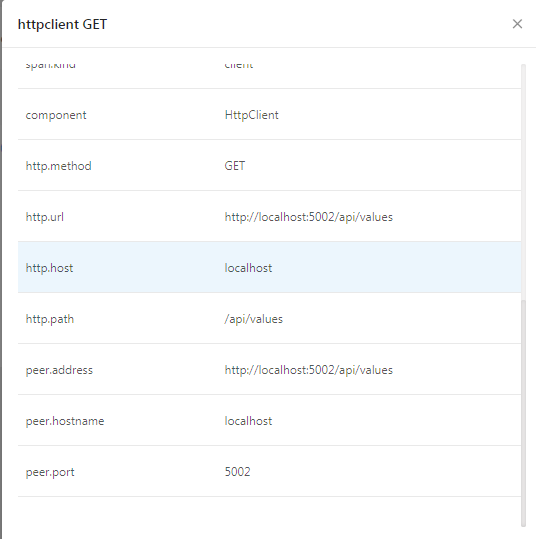
可以看到已经跟踪到了请求

点击进去可以看到服务的调用
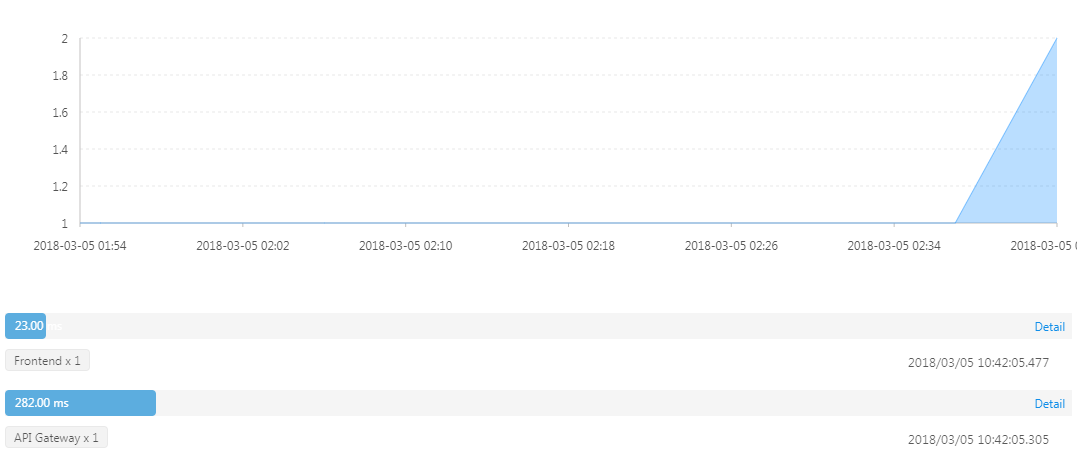
接下来按https://github.com/ButterflyAPM/butterfly-csharp 开启5001和5002,然后访问http://localhost:56235/api/values
Ocelot 使用的更多相关文章
- 编译器开发系列--Ocelot语言7.中间代码
Ocelot的中间代码是仿照国外编译器相关图书Modern Compiler Implementation 中所使用的名为Tree 的中间代码设计的.顾名思义,Tree 是一种树形结构,其特征是简单, ...
- 编译器开发系列--Ocelot语言6.静态类型检查
关于"静态类型检查",想必使用C 或Java 的各位应该非常熟悉了.在此过程中将检查表达式的类型,发现类型不正确的操作时就会报错.例如结构体之间无法用+ 进行加法运算,指针和数值之 ...
- 编译器开发系列--Ocelot语言1.抽象语法树
从今天开始研究开发自己的编程语言Ocelot,从<自制编译器>出发,然后再自己不断完善功能并优化. 编译器前端简单,就不深入研究了,直接用现成的一款工具叫JavaCC,它可以生成抽象语法树 ...
- API网关Ocelot 使用Polly 处理部分失败问题
在实现API Gateway过程中,另外一个需要考虑的问题就是部分失败.这个问题发生在分布式系统中当一个服务调用另外一个服务超时或者不可用的情况.API Gateway不应该被阻断并处于无限期等待下游 ...
- Ocelot API网关的实现剖析
在微软Tech Summit 2017 大会上和大家分享了一门课程<.NET Core 在腾讯财付通的企业级应用开发实践>,其中重点是基于ASP.NET Core打造可扩展的高性能企业级A ...
- Asp.Net Core API网关Ocelot
首先,让我们简单了解下什么是API网关? API网关是一个服务器,是系统的唯一入口.从面向对象设计的角度看,它与外观模式类似.API网关封装了系统内部架构,为每个客户端提供一个定制的API.它可能还具 ...
- Ocelot网关
Ocelot是一个.net core框架下的网关的开源项目,下图是官方给出的基础实现图,即把后台的多个服务统一到网关处,前端应用:桌面端,web端,app端都只用访问网关即可. Ocelot的实现原理 ...
- Ocelot 集成Butterfly 实现分布式跟踪
微服务,通常都是用复杂的.大规模分布式集群来实现的.微服务构建在不同的软件模块上,这些软件模块,有可能是由不同的团队开发.可能使用不同的编程语言来实现.有可能布在了几千台服务器,横跨多个不同的数据中心 ...
- 给Ocelot做一个Docker 镜像
写在前面 在微服务架构中,ApiGateway起到了承前启后,不仅可以根据客户端进行分类,也可以根据功能业务进行分类,而且对于服务调用服务也起到了很好的接口作用.目前在各个云端中,基本上都提供了Api ...
- .NET Core开源API网关 – Ocelot中文文档
Ocelot是一个用.NET Core实现并且开源的API网关,它功能强大,包括了:路由.请求聚合.服务发现.认证.鉴权.限流熔断.并内置了负载均衡器与Service Fabric.Butterfly ...
随机推荐
- java通过年月得到该月每一天的日期
public static List<String> getDayByMonth(int yearParam,int monthParam){ List<String> lis ...
- 解决IE浏览器缓存导致AJAX请求数据异常
IE10浏览器会把AJAX请求的数据都缓存下来,然后每次想去刷新数据时发现数据都是一样的,于是导致数据显示异常. 解决方法: 在页面<head>标签里,加上以下声明: <!-- 解决 ...
- [leetcode]49. Group Anagrams变位词归类
Given an array of strings, group anagrams together. Example: Input: ["eat", "tea" ...
- css3回顾 checkbox
<div class="checkBox"> <input type="checkbox" id="check1"> ...
- Java 7 使用TWR(Try-with-resources)完成文件copy
try-with-resources语句是声明了一个或多个资源的try语句块.在java中资源作为一个对象,在程序完成后必须关闭.try-with-resources语句确保每个资源在语句结束时关闭. ...
- CentOS 7 Redis 内网 安装 卸载
# 不能连接外网, 安装Redis服务器的过程 https://redis.io/download (官网下载安装包, 最新版) redis-*.tar.gz 放在安装目录/usr/local/red ...
- json字符转对象之new Function('return ' + str)
var jsonStr = '{"id":1,"name":"linda","hobbies":[{"id&q ...
- 【转】背后的故事之 - 快乐的Lambda表达式(二)
快乐的Lambda表达式 上一篇 背后的故事之 - 快乐的Lambda表达式(一)我们由浅入深的分析了一下Lambda表达式.知道了它和委托以及普通方法的区别,并且通过测试对比他们之间的性能,然后我们 ...
- 51nod 1344
一个很简单的算法题,求最小的前缀和,就是要注意数据范围要开一个longlong #include<iostream> using namespace std; int main() { i ...
- Noxim配置运行
Noxim - the NoC Simulator that is implemented by SystemC 第一步: C++ compiler installation 第二步: YAML in ...