
Ocelot 使用
官方文档:http://ocelot.readthedocs.io/en/latest/introduction/gettingstarted.html
新建两个Asp.net core API项目
API1使用5001端口
API2使用5002端口,为了有所区别,改下返回数据
// GET api/values
        [HttpGet]
        public IEnumerable<string> Get()
        {
            return new string[] { "value1", "value2","value3" };
        }
新建asp.net core 空项目APIGate
修改Program
public static IWebHost BuildWebHost(string[] args) =>
            WebHost.CreateDefaultBuilder(args)
                .UseKestrel()
                .UseContentRoot(Directory.GetCurrentDirectory())
                .ConfigureAppConfiguration((hostingContext, config) =>
                {
                    config
                        .SetBasePath(hostingContext.HostingEnvironment.ContentRootPath)
                        .AddJsonFile("appsettings.json", true, true)
                        .AddJsonFile($"appsettings.{hostingContext.HostingEnvironment.EnvironmentName}.json", true, true)
                        .AddJsonFile("configuration.json")
                        .AddEnvironmentVariables();
                })
                .UseStartup<Startup>()
                .Build();
修改Startup
public void ConfigureServices(IServiceCollection services)
        {
            services.AddOcelot();
        }

        public void Configure(IApplicationBuilder app, IHostingEnvironment env)
        {
            if (env.IsDevelopment())
            {
                app.UseDeveloperExceptionPage();
            }

            app.UseOcelot().Wait();
        }
添加configuration.json
{
  "ReRoutes": [
    {
      "DownstreamPathTemplate": "/api/values",
      "DownstreamScheme": "http",
      "UpstreamPathTemplate": "/api/values",
      "UpstreamHttpMethod": [ "Get" ],
      "DownstreamHostAndPorts": [
        {
          "Host": "localhost",

        }
      ]
    },
    {
      "DownstreamPathTemplate": "/api/values",
      "DownstreamScheme": "http",
      "UpstreamPathTemplate": "/api/values2",
      "UpstreamHttpMethod": [ "Get" ],
      "DownstreamHostAndPorts": [
        {
          "Host": "localhost",

        }
      ]
    }
  ],
  "GlobalConfiguration": {
  }
}
打开浏览器http://localhost:56235/api/values
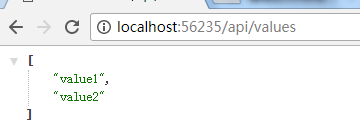
打开http://localhost:56235/api/values2
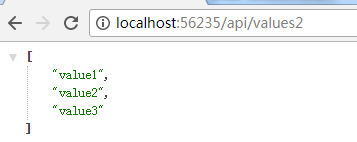
结合Butterfly实现微服务跟踪
下载Butterfly:https://github.com/ButterflyAPM/butterfly/releases
解压后执行
dotnet Butterfly.Web.dll --EnableHttpCollector=true
这里要主要加上后面的参数,否则是监控不到Http的请求的
接下来在API网关和API服务处添加Butterfly包
Install-Package Butterfly.Client.AspNetCore
在API网关Startup中添加服务
public void ConfigureServices(IServiceCollection services)
{
   //your other code
  services.AddButterfly(option =>
  {
      option.CollectorUrl = "http://localhost:9618";
      option.Service = "my service";
  });
}
在API服务中添加代码同上,只是服务名不同
修改configuration.json,开启tracing
{
  "ReRoutes": [
    {
      "DownstreamPathTemplate": "/api/values",
      "DownstreamScheme": "http",
      "UpstreamPathTemplate": "/api/values",
      "UpstreamHttpMethod": [ "Get" ],
      "DownstreamHostAndPorts": [
        {
          "Host": "localhost",

        }
      ],
      "HttpHandlerOptions": {
        "UseTracing": true
      }
    },
    {
      "DownstreamPathTemplate": "/api/values",
      "DownstreamScheme": "http",
      "UpstreamPathTemplate": "/api/values2",
      "UpstreamHttpMethod": [ "Get" ],
      "DownstreamHostAndPorts": [
        {
          "Host": "localhost",

        }
      ],
      "HttpHandlerOptions": {
        "UseTracing": true
      }
    }
  ],
  "GlobalConfiguration": {
  }
}
按上文请求http://localhost:56235/api/values2,然后打开http://localhost:9618/tracing/traces
可以看到已经跟踪到了请求

点击进去可以看到服务的调用
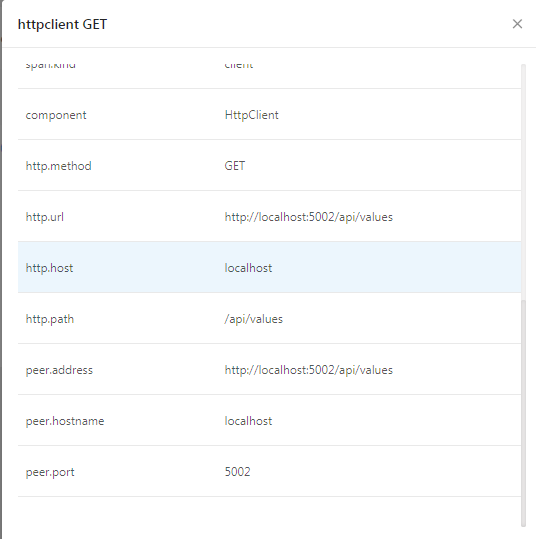
接下来按https://github.com/ButterflyAPM/butterfly-csharp 开启5001和5002,然后访问http://localhost:56235/api/values
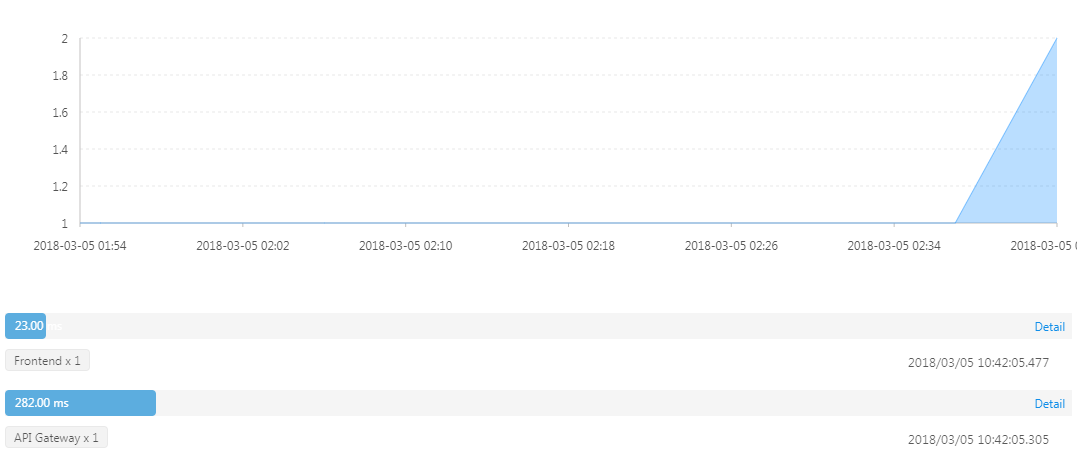
Ocelot 使用的更多相关文章
- 编译器开发系列--Ocelot语言7.中间代码
Ocelot的中间代码是仿照国外编译器相关图书Modern Compiler Implementation 中所使用的名为Tree 的中间代码设计的.顾名思义,Tree 是一种树形结构,其特征是简单, ...
- 编译器开发系列--Ocelot语言6.静态类型检查
关于"静态类型检查",想必使用C 或Java 的各位应该非常熟悉了.在此过程中将检查表达式的类型,发现类型不正确的操作时就会报错.例如结构体之间无法用+ 进行加法运算,指针和数值之 ...
- 编译器开发系列--Ocelot语言1.抽象语法树
从今天开始研究开发自己的编程语言Ocelot,从<自制编译器>出发,然后再自己不断完善功能并优化. 编译器前端简单,就不深入研究了,直接用现成的一款工具叫JavaCC,它可以生成抽象语法树 ...
- API网关Ocelot 使用Polly 处理部分失败问题
在实现API Gateway过程中,另外一个需要考虑的问题就是部分失败.这个问题发生在分布式系统中当一个服务调用另外一个服务超时或者不可用的情况.API Gateway不应该被阻断并处于无限期等待下游 ...
- Ocelot API网关的实现剖析
在微软Tech Summit 2017 大会上和大家分享了一门课程<.NET Core 在腾讯财付通的企业级应用开发实践>,其中重点是基于ASP.NET Core打造可扩展的高性能企业级A ...
- Asp.Net Core API网关Ocelot
首先,让我们简单了解下什么是API网关? API网关是一个服务器,是系统的唯一入口.从面向对象设计的角度看,它与外观模式类似.API网关封装了系统内部架构,为每个客户端提供一个定制的API.它可能还具 ...
- Ocelot网关
Ocelot是一个.net core框架下的网关的开源项目,下图是官方给出的基础实现图,即把后台的多个服务统一到网关处,前端应用:桌面端,web端,app端都只用访问网关即可. Ocelot的实现原理 ...
- Ocelot 集成Butterfly 实现分布式跟踪
微服务,通常都是用复杂的.大规模分布式集群来实现的.微服务构建在不同的软件模块上,这些软件模块,有可能是由不同的团队开发.可能使用不同的编程语言来实现.有可能布在了几千台服务器,横跨多个不同的数据中心 ...
- 给Ocelot做一个Docker 镜像
写在前面 在微服务架构中,ApiGateway起到了承前启后,不仅可以根据客户端进行分类,也可以根据功能业务进行分类,而且对于服务调用服务也起到了很好的接口作用.目前在各个云端中,基本上都提供了Api ...
- .NET Core开源API网关 – Ocelot中文文档
Ocelot是一个用.NET Core实现并且开源的API网关,它功能强大,包括了:路由.请求聚合.服务发现.认证.鉴权.限流熔断.并内置了负载均衡器与Service Fabric.Butterfly ...
随机推荐
- [Java学习]多线程
关于多进程与多线程 使用多进程的目的:提高CPU利用率. 使用多线程的目的:提高应用程序?利用率. 多线程与多进程区别:进程间内存独立:同一个进程的线程间共享"堆内存和方法区内存" ...
- [leetcode]58. Length of Last Word最后一个词的长度
Given a string s consists of upper/lower-case alphabets and empty space characters ' ', return the l ...
- [leetcode]59. Spiral Matrix II螺旋遍历矩阵2
Given a positive integer n, generate a square matrix filled with elements from 1 to n^2 in spiral or ...
- [leetcode]23. Merge k Sorted Lists归并k个有序链表
Merge k sorted linked lists and return it as one sorted list. Analyze and describe its complexity. I ...
- linux主机名设置
有时会报错: 代理抛出异常错误: java.net.MalformedURLException: Local host name unknown: java.net.UnknownHostExcept ...
- [原]CentOS7.2部署KVM虚拟机
前段时间学习了关于PostGis.OSM数据以及Mapnik相关内容,接下来将利用假期重点学习PostgreSQL-XL和瓦片服务器集群技术,因此先把环境搭好.计划采用KVM来充分利用家里不太宽裕的“ ...
- docker学习笔记-命令大全
容器生命周期管理 • Run OPTIONS说明: • -a :显示所有的容器,包括未运行的. • -f :根据条件过滤显示的内容. • --format :指定返回值的模板文件. • -l :显示最 ...
- Centos7.0进入单用户模式修改root密码
启动Centos7 ,按空格让其停留在如下界面. 按e进行编辑 在UTF-8后面输入init=/bin/sh 根据提示按ctrl+x 得如下图 输入mount -o remount,rw / 然后输 ...
- Vuejs——(4)v-if、v-for
版权声明:出处http://blog.csdn.net/qq20004604 目录(?)[+] (二十)v-if ①标准v-if用法 简单来说,该值为true则显示该标签,为false则不显示 ...
- docker知识点杂记
最近重新梳理了一下docker的一些基本知识,简单做了下总结.以后会逐步补充. 1.查看系统内核版本,需要3.10以上 $ uname -r 2.下载docker 说明:centos安装docker比 ...