
Linux驱动之一个简单的输入子系统程序编写
的在Linux驱动之输入子系统简析已经分析过了输入子系统的构成,它是由设备层、核心层、事件层共同组成的。其中核心层提供一些设备层与事件层公用的函数,比如说注册函数、反注册函数、事件到来的处理函数等等;事件层其实在Linux内核里面已经帮我们写好了很多有关的事件;而设备层就跟我们新添加到输入系统的具体设备相关了。这里以JZ2440开发板上的4个按键作为输入子系统的按键:它定义的功能分别为:KEY_L、KEY_S、KEY_ENTER、KEY_LEFTSHIFT。这几个值是在include\linux\input.h中被定义的。接下来就是编写程序:
直接贴出源程序:
#include <linux/module.h>

#include <linux/kernel.h>

#include <linux/fs.h>

#include <linux/init.h>

#include <asm/io.h>        //含有iomap函数iounmap函数

#include <asm/uaccess.h>//含有copy_from_user函数

#include <linux/device.h>//含有类相关的处理函数

#include <asm/arch/regs-gpio.h>//含有S3C2410_GPF0等相关的

#include <linux/irq.h>    //含有IRQ_HANDLED\IRQ_TYPE_EDGE_RISING

#include <asm-arm/irq.h>   //含有IRQT_BOTHEDGE触发类型

#include <linux/interrupt.h> //含有request_irq、free_irq函数

#include <linux/poll.h>

#include <asm-generic/errno-base.h>  //含有各种错误返回值

#include <linux/input.h>                    //含有输入子系统相关的类型

//#include <asm-arm\arch-s3c2410\irqs.h>

struct pin_desc

{

    char * name;          //名称

    unsigned int pin;     //管脚定义

    unsigned int irq;     //中断号

    unsigned int key_val; //按键值

};

static struct pin_desc  pins_desc[] = //初始化四个按键

{

    {"S2",S3C2410_GPF0,IRQ_EINT0,KEY_L},

    {"S3",S3C2410_GPF2,IRQ_EINT2,KEY_S},

    {"S4",S3C2410_GPG3,IRQ_EINT11,KEY_ENTER},

    {"S5",S3C2410_GPG11,IRQ_EINT19,KEY_LEFTSHIFT}

};

static struct pin_desc *pin_des=NULL;

static struct timer_list inputbuttons_timer;//新建一个定时器

static struct input_dev *buttons_input;     //新建一个输入子系统的设备层结构

/*

 *利用dev_id的值为pins_desc来判断是哪一个按键被按下或松开

 *中断处理程序主要是将发生中断的按键记录下来,然后修改定时器的定时时间为10ms

 */

static irqreturn_t buttons_irq(int irq, void *dev_id)

{

    pin_des = (struct pin_desc *)dev_id;            //取得哪个按键被按下的状态

    mod_timer(&inputbuttons_timer, jiffies+HZ/);//10ms之后调用定时器处理函数

    return IRQ_HANDLED;

}

/*

 *定时器的处理程序,主要根据按下的按键,通过input_event函数上传事件

 */

static void inputbuttons_timer_timeout(unsigned long a)

{

    unsigned int pin_val;

    if(pin_des==NULL)

        return;

    else

    {

        pin_val = s3c2410_gpio_getpin(pin_des->pin);

        /*0松开,1按下*/

        if(pin_val) //按键松开

        {

                   input_event(buttons_input,EV_KEY, pin_des->key_val, );

                //input_sync(buttons_input);//上传同步事件,似乎没什么作用

        }

        else

        {

                  input_event(buttons_input,EV_KEY, pin_des->key_val, );

                //input_sync(buttons_input);//上传同步事件

        }

    }

}

/*

 *模块入口函数

  1、分配buttons_input结构体并初始化

  2、注册buttons_input结构,一旦注册会产生一个/dev/event1设备节点文件

  3、初始化一个定时器

  4、申请4个中断

 */

static int seven_drv_init(void)

{

    unsigned char i;

    int ret;

    /*1、分配一个buttons_input结构体*/

    buttons_input = input_allocate_device();

    if (!buttons_input)

        return -ENOMEM;

    /*2、设置输入事件类型*/

    set_bit(EV_KEY, buttons_input->evbit);

    set_bit(EV_REP, buttons_input->evbit);//重复事件类型

    /*3、输入事件类型的哪一种按键*/

    set_bit(KEY_L, buttons_input->keybit);

    set_bit(KEY_S, buttons_input->keybit);

    set_bit(KEY_ENTER, buttons_input->keybit);

    set_bit(KEY_LEFTSHIFT, buttons_input->keybit);

    /*4、注册它*/

    input_register_device(buttons_input);//注册设备驱动

    /*5、硬件相关操作*/

    /*增加一个定时器用于处理按键抖动*/

    init_timer(&inputbuttons_timer);

    inputbuttons_timer.expires = ;

//    buttons_timer->data = (unsigned long) cs;

    inputbuttons_timer.function = inputbuttons_timer_timeout;

    add_timer(&inputbuttons_timer);

    /*申请中断*/

    for(i=;i<;i++)

    {

        ret = request_irq(pins_desc[i].irq, buttons_irq, IRQT_BOTHEDGE, pins_desc[i].name, (void * )&pins_desc[i]);

        if(ret)

        {

            printk("open failed %d\n",i);

            return -(i+);

        }

    }

    return ;

}

/*

 *模块出口函数

  1、反注册buttons_input

  2、释放buttons_input结构所占内存

  3、删除定时器

  4、释放4个中断申请

 */

static void seven_drv_exit(void)

{

    unsigned char i;

    input_unregister_device(buttons_input);

    input_free_device(buttons_input);

    del_timer(&inputbuttons_timer);

    for(i=;i<;i++)

    {

        free_irq(pins_desc[i].irq, (void * )&pins_desc[i]);

    }

}

module_init(seven_drv_init);

module_exit(seven_drv_exit);

MODULE_LICENSE("GPL");
a、先看seven_drv_init函数,因为它负责对设备层进行初始,并且注册它,将它与事件层联系起来。看到这个函数:
1、分配一个buttons_input结构体
/*1、分配一个buttons_input结构体*/

    buttons_input = input_allocate_device();

    if (!buttons_input)

        return -ENOMEM;
2、设置输入事件类型
set_bit(EV_KEY, buttons_input->evbit);

set_bit(EV_REP, buttons_input->evbit);//重复事件类型
事件类型位于include\linux\input.h中
/*

 * Event types

 */

#define EV_SYN            0x00//同步事件

#define EV_KEY            0x01//按键事件

#define EV_REL            0x02//位移事件

#define EV_ABS            0x03//绝对位移事件

#define EV_MSC            0x04

#define EV_SW            0x05

#define EV_LED            0x11

#define EV_SND            0x12

#define EV_REP            0x14

#define EV_FF            0x15

#define EV_PWR            0x16

#define EV_FF_STATUS        0x17

#define EV_MAX            0x1f
3、设置输入事件类型的哪一种按键
/*3、输入事件类型的哪一种按键*/

    set_bit(KEY_L, buttons_input->keybit);

    set_bit(KEY_S, buttons_input->keybit);

    set_bit(KEY_ENTER, buttons_input->keybit);

    set_bit(KEY_LEFTSHIFT, buttons_input->keybit);
按键码同样定义在include\linux\input.h中,截取其中一小部分:
#define KEY_ENTER        28//enter的按键码

#define KEY_S            31//S的按键码

#define KEY_L            38//L的按键码

#define KEY_LEFTSHIFT    42//leftshift的按键码
4、注册它buttons_input结构体
注册的功能其实就是将当前的设备与事件层的结构进行匹配,这里会匹配到evdev_handler,它位于drivers\input\evdev.c,匹配后会产生/dev/event1设备节点文件。
/*4、注册它*/

input_register_device(buttons_input);//注册设备驱动
b、接着看到inputbuttons_timer_timeout函数,最终的按键的按键值是通过它上传的。
/*

 *定时器的处理程序,主要根据按下的按键,通过input_event函数上传事件

 */

static void inputbuttons_timer_timeout(unsigned long a)

{

    unsigned int pin_val;

    if(pin_des==NULL)

        return;

    else

    {

        pin_val = s3c2410_gpio_getpin(pin_des->pin);

        /*0松开,1按下*/

        if(pin_val) //按键松开

        {

                   input_event(buttons_input,EV_KEY, pin_des->key_val, );

                //input_sync(buttons_input);//上传同步事件,似乎没什么作用

        }

        else

        {

                  input_event(buttons_input,EV_KEY, pin_des->key_val, );

                //input_sync(buttons_input);//上传同步事件

        }

    }

}
c、接着编写测试程序,源码如下:
#include <sys/types.h>

#include <sys/stat.h>

#include <fcntl.h>

#include <stdio.h>

#include <poll.h>

#include <signal.h>

static int fd;

int main(int argc, char **argv)

{

    char* filename="/dev/event1";

   int oflags,ret=;

   unsigned char key_val[];

    fd = open(filename, O_RDWR);//|O_NONBLOCK);//打开dev/firstdrv设备文件,阻塞方式打开

    if (fd < )//小于0说明没有成功

    {

        printf("error, can't open %s\n", filename);

        return ;

    }

    if(argc !=)

    {

        printf("Usage : %s ",argv[]);

     return ;

    }

  while()

  {

       ret = read(fd, key_val, );//读取的个数必须大于16字节

       printf("ret = %d,code: %02d value:%d\n",ret,key_val[],key_val[]);

  }

   return ;

}
可以看到这个测试程序是以阻塞方式打开的。read函数读的个数必须大于16个字节,看到drivers\input\evdev.c下的evdev_read函数,最后是它是将event这个结构发送给应用程序的。
static ssize_t evdev_read(struct file *file, char __user *buffer, size_t count, loff_t *ppos)

{

    struct evdev_client *client = file->private_data;

    struct evdev *evdev = client->evdev;

    int retval;

    if (count < evdev_event_size())

        return -EINVAL;

    if (client->head == client->tail && evdev->exist && (file->f_flags & O_NONBLOCK))//如果是非阻塞方式打开的文件,并且现在缓存中不存在数据,直接返回

        return -EAGAIN;

    retval = wait_event_interruptible(evdev->wait,

        client->head != client->tail || !evdev->exist);//如果以阻塞方式打开文件的话,将当前进程挂起,等待数据过来后,被唤醒

    if (retval)

        return retval;

    if (!evdev->exist)

        return -ENODEV;

    while (client->head != client->tail && retval + evdev_event_size() <= count) {//循环将数据发送给应用层

        struct input_event *event = (struct input_event *) client->buffer + client->tail;

        if (evdev_event_to_user(buffer + retval, event))//将数据发送给应用程序

            return -EFAULT;

        client->tail = (client->tail + ) & (EVDEV_BUFFER_SIZE - );

        retval += evdev_event_size();

    }

    return retval;

}
再找到event的类型定义,它位于include\linux\input.h文件中,其中时间占了8字节、类型2字节、按键码2字节、按键值4字节刚好16字节。
struct input_event {

    struct timeval time;//时间

    __u16 type;         //类型

    __u16 code;            //按键码

    __s32 value;        //按键值

};
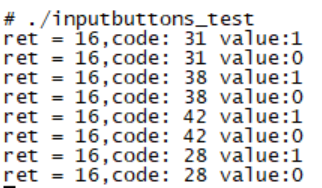
运行测试程序测试得到如下的图,分别按下四个按键,产生如下的按键值,一次按键会产生两个键值。所以会有8个按键值。其中code代码按键码:与前面设置的按键码一样;value代表按键值:1表示按下,0表示松开。
Linux驱动之一个简单的输入子系统程序编写的更多相关文章
- 12.Linux之输入子系统分析(详解)
版权声明:本文为博主原创文章,转载请标注出处: 在此节之前,我们学的都是简单的字符驱动,涉及的内容有字符驱动的框架.自动创建设备节点.linux中断.poll机制.异步通知.同步互斥/非阻塞.定时 ...
- 7.Linux 输入子系统分析
为什么要引入输入子系统? 在前面我们写了一些简单的字符设备的驱动程序,我们是怎么样打开一个设备并操作的呢? 一般都是在执行应用程序时,open一个特定的设备文件,如:/dev/buttons .... ...
- Linux输入子系统 转载
NQian 记录成长~ 首页 新随笔 联系 订阅 管理 随笔 - 305 文章 - 0 评论 - 254 12.Linux之输入子系统分析(详解) 在此节之前,我们学的都是简单的字符驱动,涉及 ...
- linux-2.6.38 input子系统(用输入子系统实现按键操作)
一.设备驱动程序 在上一篇随笔中已经分析,linux输入子系统分为设备驱动层.核心层和事件层.要利用linux内核中自带的输入子系统实现一个某个设备的操作,我们一般只需要完成驱动层的程序即可,核心层和 ...
- 嵌入式Linux驱动学习之路(十六)输入子系统
以前写的一些输入设备的驱动都是采用字符设备处理的.问题由此而来,Linux开源社区的大神们看到了这大量输入设备如此分散不堪,有木有可以实现一种机制,可以对分散的.不同类别的输入设备进行统一的驱动,所以 ...
- Linux输入子系统(一) _驱动编码
输入设备都有共性:中断驱动+字符IO,基于分层的思想,Linux内核将这些设备的公有的部分提取出来,基于cdev提供接口,设计了输入子系统,所有使用输入子系统构建的设备都使用主设备号13,同时输入子系 ...
- Linux驱动之输入子系统简析
输入子系统由驱动层.输入子系统核心.事件处理层三部分组成.一个输入事件,如鼠标移动.键盘按下等通过Driver->Inputcore->Event handler->userspac ...
- linux驱动模型<输入子系统>
在linux中提供一种输入子系统的驱动模型,其主要是实现在input.c中. 在输入子系统这套模型中,他把驱动分层分类.首先分为上下两层,上层为input.c .下层为驱动的实现,下层分为两部分,一部 ...
- Linux 驱动——Button8(输入子系统)
输入子系统由驱动层.输入子系统核心.事件处理层三部分组成.一个输入事件,如鼠标移动.键盘按下等通过Driver->Inputcore->Event handler->userspac ...
随机推荐
- 单因素方差分析的SAS实现
实验内容:某城市从4个排污口取水,进行某种处理后检测大肠杆菌数量,单位面积内菌落数如下表所示,请分析各个排污口的大肠杆菌数量是否有差别. 排污口 1 2 3 4 大肠杆菌数量 9,12,7,5 20, ...
- 【java】this用法
this代表当前类的引用对象:哪个对象调用方法,该方法内部的this就代表那个对象this关键字主要有两三个应用: (1)this调用本类中的属性,也就是类中的成员变量: class People { ...
- 织梦Dedecms文件目录结构
Dedecms文件目录结构 /根目录 ../a 默认生成文件存放目录 ../data 系统缓存或其他可写入数据存放目录 ../dede 默认后台登录管理(可任意改名) ../images 系统默认的部 ...
- Android批量验证渠道、版本号(Linux版)
功能:可校验单个或目录下所有apk文件的渠道号.版本号(Linux版本)使用说明:1.copy需要校验的apk文件到VerifyChannelVersion目录下2../VerifyChannelVe ...
- Pyhon文件的用途
Python1个文件2种用途: 当文件被当做脚本运行时 __name__='__main__'当模块被导入使用 __name__='spam' ==>等于模块名 假定spam代码如下 money ...
- SAS LOGISTIC 逻辑回归中加(EVENT='1')和不加(EVENT='1')区别
区别在于:最大似然估计分析中估计是刚好正负对调加上EVENT:%LET DVVAR = Y;%LET LOGIT_IN = S.T3;%LET LOGIT_MODEL = S.Model_Params ...
- ADB server didn't ACK failed to start daemon 5037
错误信息: C:\Users\lizy>adb devices adb devicesadb server is out of date. killing... ADB server didn ...
- Oracle 学习笔记 (七)
一.数据库的启动 启动数据库的三个阶段: nomount, mount,open mount 阶段:. 1.读参数文件 2.分配内存 3.启动后台进程 4.初始化部分v$视图 mount 阶段: 读参 ...
- 删除已经提交到远程仓库的gitignore文件
亲们支持我的新博客哦==>地址(以后更新会尽量在新博客更新,欢迎大家访问加入我的后宫w) ) gitignore里新添加了需要过滤的文件,但是之前已经提交到了远程分支 解决方法: # 1.为避免 ...
- 批量移动AD用户到指定OU
原文链接:http://blog.51cto.com/shubao/1346469 作为域管理员,在日常工作中使用ADUC(AD用户和计算机)工具在图形界面中进行账号管理操作可谓是家常便饭了.然而一个 ...