
Jenkins中配置邮件通知实例演示
前言:本文通过安装配置Jenkins实现邮件通知,告知一个C# Git Repo的build成功与否
一、预配条件
- 在windows上安装Jenkins和它推荐安装的Plugins
- 创建一个@163.com邮箱账号,用来发送邮件
- 准备一个测试用的git repo,此处我提供了 https://github.com/wenboyang214/jenkinsCsharpTest.git
- 运行下列脚本,Jenkins需要设置git、msbuild等的环境变量,请自行设置
二、对邮箱账号本身进行设置(此处以163邮箱为例)
Note: Jenkins中配置的邮箱secret需要授权码,而不是密码本身。因此我们需要获取授权码。
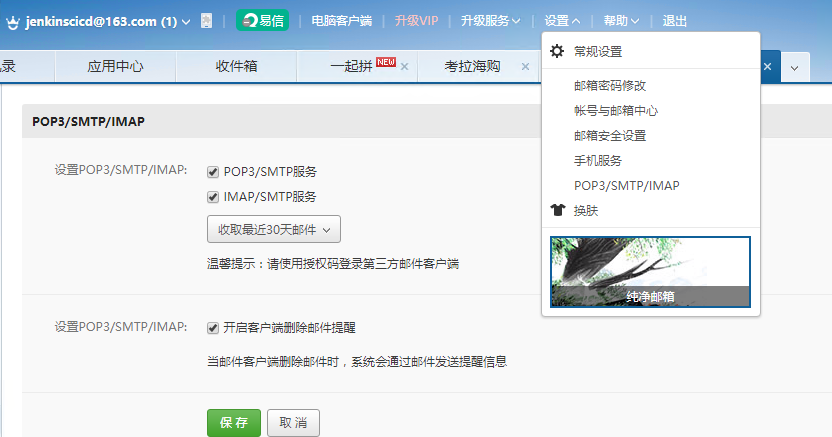
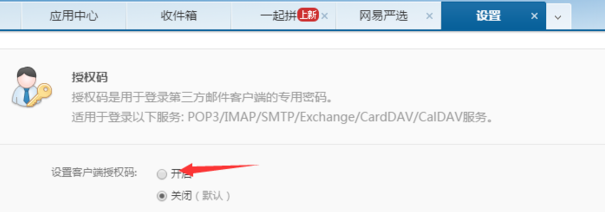
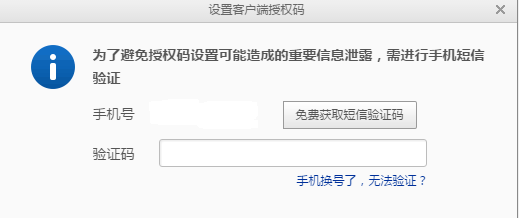
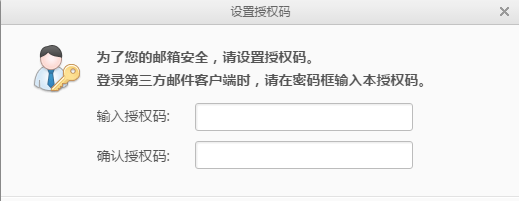
三、配置Jenkins 的系统参数
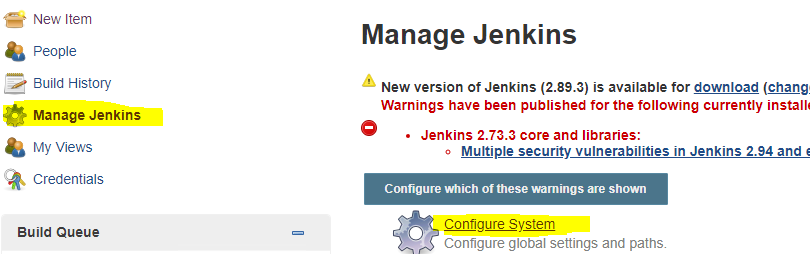
你需要做如下截图的配置
1.最好更改一下Jenkins的Workspace Root Directory,避免符号的一些错误

2.设置Jenkins的System Admin e-mail address,此处的邮箱要和你email notification的邮箱一致

3.在Extended E-mail Notification中进行如下设置,没设置的地方,保持默认
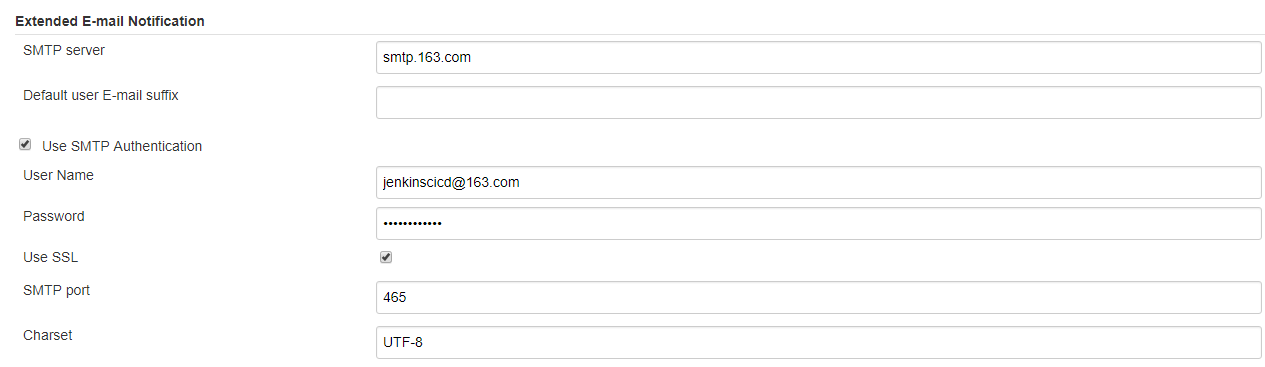
四、测试邮箱提醒功能
1.简单创建一个新的Pipeline item 名称为”test”
2.将下列脚本copy到Pipeline script中
#!/usr/bin/env groovy Jenkinsfile

pipeline {

    agent any

    environment {

        def gitRepo="https://github.com/wenboyang214/jenkinsCsharpTest.git"

        def mailRecipients="wenbya@163.com"

    }

    stages {

        stage('1. check the git repo'){

        steps{

                git "${gitRepo}"

            }

         }

        stage('3. msbuild the project'){

            steps{

                bat "msbuild .\\JenkinsTest\\JenkinsTest.sln"

            }

        }

    }

    post {

        always {

            echo 'testing email notification'

        }

        success {

            echo 'This will run only if successful'

            emailext(

                body: '''${SCRIPT, template="groovy-html.template"}''',

                mimeType: 'text/html',

                subject: "[Jenkins]${currentBuild.fullDisplayName}",

                to: "${mailRecipients}",

                replyTo: "${mailRecipients}",

                recipientProviders: [[$class: 'CulpritsRecipientProvider'],[$class: 'DevelopersRecipientProvider']]

            )

        }

        failure {

            echo 'This will run only if failed'

            emailext( body: '''${SCRIPT, template="groovy-html.template"}''',

                mimeType: 'text/html',

                subject: "[Jenkins]${currentBuild.fullDisplayName}",

                to: "${mailRecipients}",

                replyTo: "${mailRecipients}",

                recipientProviders: [[$class: 'CulpritsRecipientProvider'],[$class: 'DevelopersRecipientProvider']]

            )

        }

        unstable {

            echo 'This will run only if the run was marked as unstable'

        }

        changed {

            echo 'This will run only if the state of the Pipeline has changed'

            echo 'For example, if the Pipeline was previously failing but is now successful'

        }

    }

}
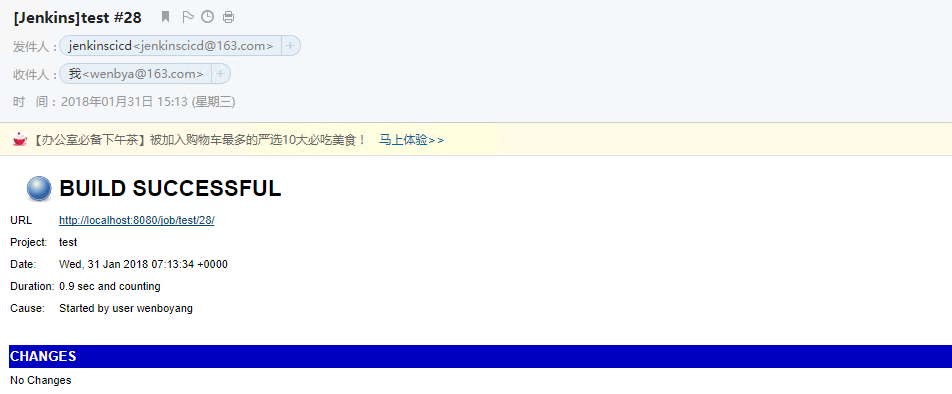
然后直接启动这个test item
五、进行对错改动,并检查邮箱是否收到邮件
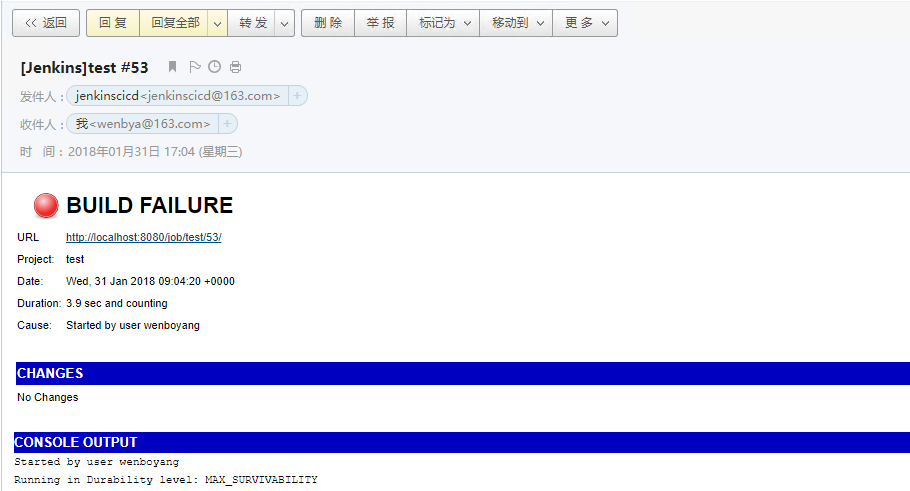
更改msbuild的路径,故意让其build出错,检查是否能收到报错邮件。
bat “msbuild .\JenkinsTest\JenkinsTest.sln” => bat “msbuild .\JenkinsTest1\JenkinsTest.sln”
Jenkins中配置邮件通知实例演示的更多相关文章
- Jenkins 配置邮件通知步骤
Jenkins 配置邮件通知前言 可以在Jenkins 中配置邮件通知,比如在构建失败时发送邮件通知项目组来及时修复问题. Jenkins 邮件通知功能的插件主要包括: Mailer Plugin ( ...
- 环境部署(八):jenkins配置邮件通知
完成基于jenkins的持续集成部署后,任务构建执行完成,测试结果需要通知到相关人员.这篇博客,介绍如何在jenkins中配置邮件通知的方法... 一.安装邮件插件 由于Jenkins自带的邮件功能比 ...
- jenkins持续集成(三): jenkins配置邮件通知
完成基于jenkins的持续集成部署后,任务构建执行完成,测试结果需要通知到相关人员.这篇博客,介绍如何在jenkins中配置邮件通知的方法... 一.安装邮件插件 由于Jenkins自带的邮件功能比 ...
- Jenkins中的邮件配置
摘自http://blog.csdn.net/fullbug/article/details/53024562 Jenkins是一个很受欢迎的CI持续集成工具,能够实现项目的自动构建.打包.测试.发布 ...
- Jenkins 配置邮件通知
jenkins 是一个开源的自动化服务器.通过Jenkins,可以通过自动化加速软件开发过程.Jenkins管理和控制各种开发的生命周期过程,包括构建,文档,测试,包,阶段,部署,静态分析等等.您可以 ...
- Jenkins中Jelly邮件模板的配置
[链接]Jenkins中Jelly邮件模板的配置http://blog.csdn.net/hwhua1986/article/details/47975237
- Jenkins中配置selenium测试
Jenkins中配置selenium测试 2015/03/23 第一步在jenkins中配置selenium服务器 第二步工程配置: 第三步:执行构建: 第四步,查看报告:
- 2.在Jenkins中配置及执行 maven + selenium + testng项目
1. 在Jenkins中配置Maven与Git 1)在系统管理>管理插件>可选插件 页面分别下载Git plugin 与 Maven Integration plugin插件,安装完成后再 ...
- Ossec 安装并配置邮件通知
Ossec 安装并配置邮件通知 目录 Ossec 安装并配置邮件通知 1. 介绍 2. 软硬件环境 3. 安装步骤 3.1 Server 3.2 Agent 3.3 配置邮件通知 4. 参考资料 1. ...
随机推荐
- 微服务监控zipkin+asp.net core
0.目录 整体架构目录:ASP.NET Core分布式项目实战-目录 监控目录:微服务监控zipkin.skywalking以及日志ELK监控系列 一.zipkin介绍 zipkin是一种分布式跟踪系 ...
- JS冷门知识盘点
(+new Date() 是简略写法,得到毫秒 超过多行显示省略号 overflow : hidden; text-overflow: ellipsis; display: -webkit-box; ...
- windows上tomcat8的安装及配置
提示:在安装tomcat之前,确定安装好jdk. 一.下载tomcat8 http://tomcat.apache.org/download-80.cgi 点击这个网址 根据自己电脑的才做系统版本安装 ...
- Anaconda2和Anaconda3同时安装
转载于:https://www.cnblogs.com/zle1992/p/6720425.html 1.先从网站(国内的清华镜像:https://mirrors.tuna.tsinghua.edu. ...
- Filter(转载)
web.xml中元素执行的顺序listener->filter->struts拦截器->servlet. 1.过滤器的概念 Java中的Filter 并不是一个标准的Servlet ...
- java.lang.Exception: No tests found matching Method tes(com.bw.test.Testrefiect) from org.junit.vintage.engine.descriptor.RunnerRequest@3bfdc050 at org.junit.internal.requests.FilterRequest.getRunner
junit 方法 没有加上注解 @Test java.lang.Exception: No tests found matching Method tes(com.bw.test.Testre ...
- [问题解决]基于注解配置dubbo遇到ConnectionLoss for /dubbo/xxx问题解决
今天升级spring版本的时候,同时升级dubbo的版本,采用的是dubbo的基于注解的配置方法,采用curator作为dubbo的客户端, curator版本为4.1.0,启动之后,发现一直报错 C ...
- Linux 下如何知道是否有人在使坏?
在 Linux 下查看用户的行为,不仅仅是网管要做的事,也是开发人员所应该具备的基本技能之一.为什么呢?因为有时其他同事在做一些很消耗资源的事情,比如在编译大型程序,可能会导致服务器变得很慢,从而影响 ...
- Node 连接池pool
//1:加载相应的模块 http url fs mysqlconst http = require("http");const url = require("url&qu ...
- spss入门
spss下载地址:http://www.ddooo.com/softdown/53379.htm