
接口自动化测试 (三)request.post
上一节介绍了 requests.get() 方法的基本使用,本节介绍 requests.post() 方法的使用:
本文目录:
一、方法定义
二、post方法简单使用
1、带数据的post
2、带header的post
3、带json的post
4、带参数的post
5、普通文件上传
6、定制化文件上传
7、多文件上传
一、方法定义:
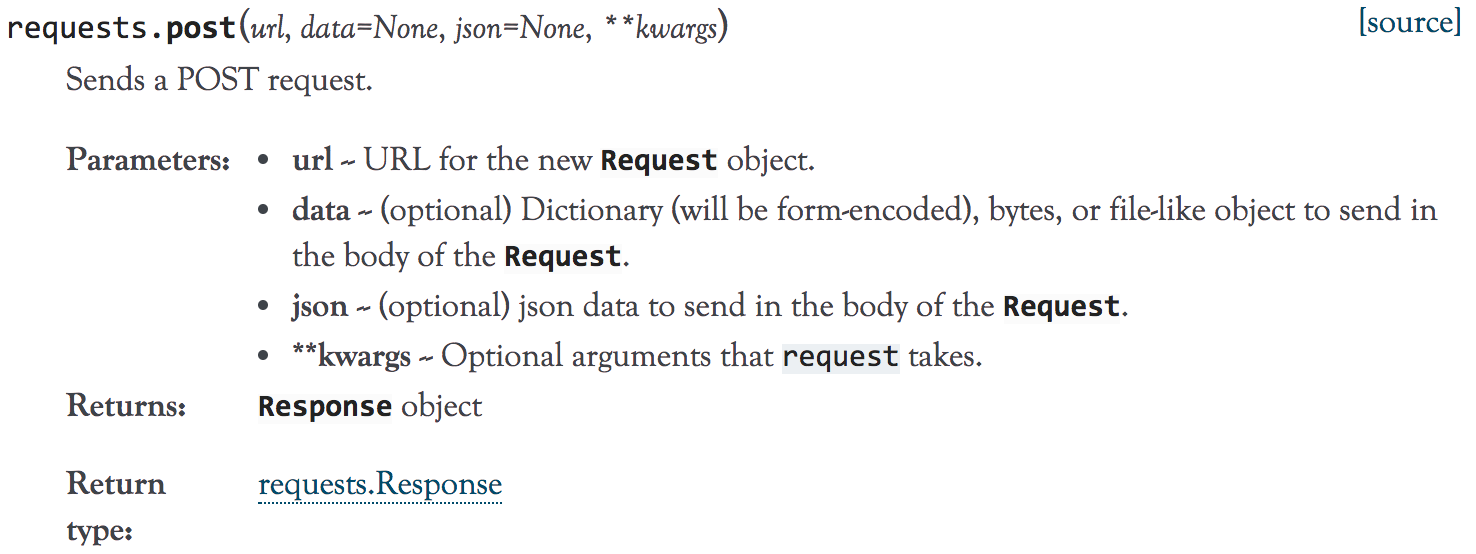
1、到官方文档去了下requests.post()方法的定义,如下:
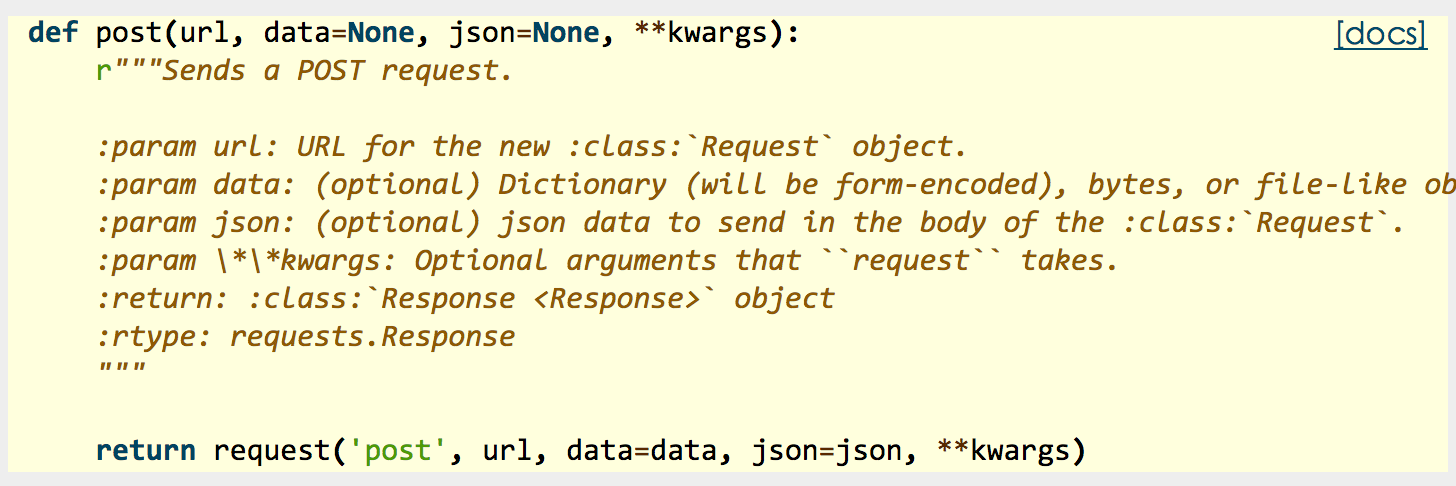
2、源码:
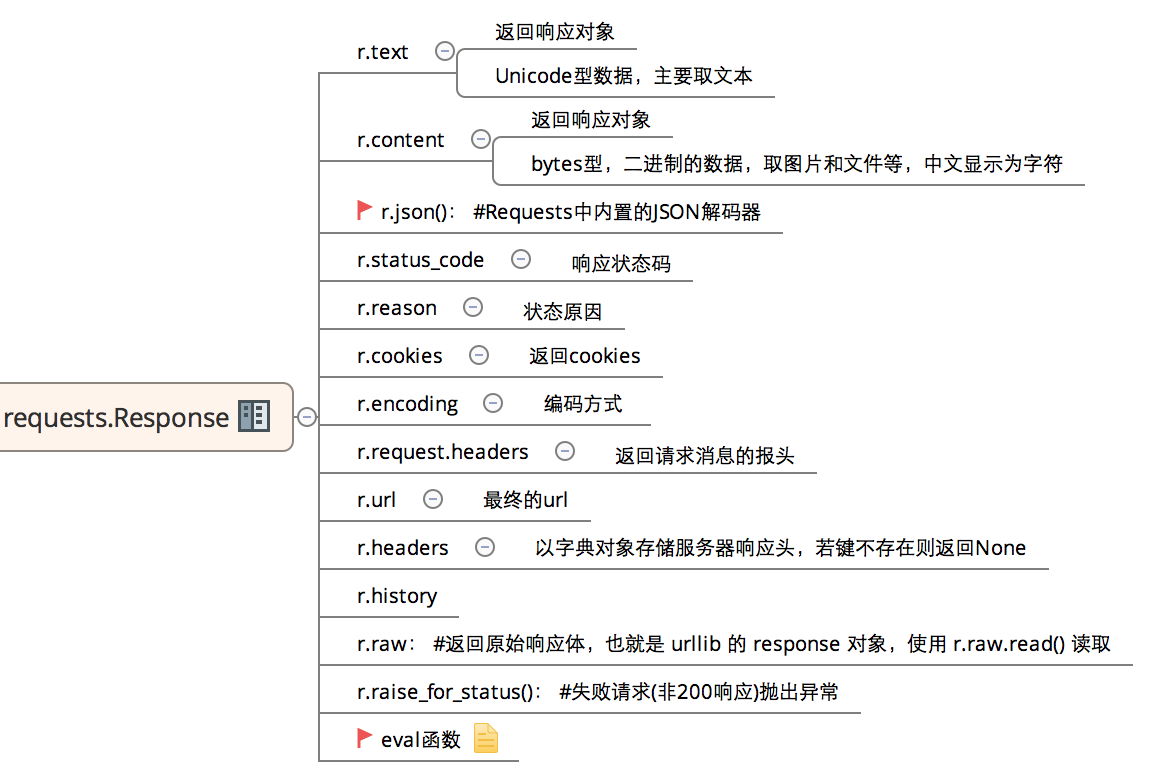
3、常用返回信息:
二、post方法简单使用:
1、带数据的post:

# -*- coding:utf-8 -*-

import requests

import json

host = "http://httpbin.org/"

endpoint = "post"

url = ''.join([host,endpoint])

data = {'key1':'value1','key2':'value2'}

r = requests.post(url,data=data)

#response = r.json()

print (r.text)
输出:
{

  "args": {},

  "data": "",

  "files": {},

  "form": {

    "key1": "value1",

    "key2": "value2"

  },

  "headers": {

    "Accept": "*/*",

    "Accept-Encoding": "gzip, deflate",

    "Connection": "close",

    "Content-Length": "23",

    "Content-Type": "application/x-www-form-urlencoded",

    "Host": "httpbin.org",

    "User-Agent": "python-requests/2.18.1"

  },

  "json": null,

  "origin": "183.14.133.88",

  "url": "http://httpbin.org/post"

}
2、带header的post:
# -*- coding:utf-8 -*-

import requests

import json


host = "http://httpbin.org/"

endpoint = "post"

url = ''.join([host,endpoint])

headers = {"User-Agent":"test request headers"}

# r = requests.post(url)

r = requests.post(url,headers=headers)

#response = r.json()
输出:
{

  "args": {},

  "data": "",

  "files": {},

  "form": {},

  "headers": {

    "Accept": "*/*",

    "Accept-Encoding": "gzip, deflate",

    "Connection": "close",

    "Content-Length": "0",

    "Host": "httpbin.org",

    "User-Agent": "test request headers"

  },

  "json": null,

  "origin": "183.14.133.88",

  "url": "http://httpbin.org/post"

}
3、带json的post:
# -*- coding:utf-8 -*-

import requests

import json

host = "http://httpbin.org/"

endpoint = "post"


url = ''.join([host,endpoint])

data = {

    "sites": [

                { "name":"test" , "url":"www.test.com" },

                { "name":"google" , "url":"www.google.com" },

                { "name":"weibo" , "url":"www.weibo.com" }

    ]

}

r = requests.post(url,json=data)

# r = requests.post(url,data=json.dumps(data))

response = r.json()
输出:
{

  "args": {},

  "data": "{\"sites\": [{\"url\": \"www.test.com\", \"name\": \"test\"}, {\"url\": \"www.google.com\", \"name\": \"google\"}, {\"url\": \"www.weibo.com\", \"name\": \"weibo\"}]}",

  "files": {},

  "form": {},

  "headers": {

    "Accept": "*/*",

    "Accept-Encoding": "gzip, deflate",

    "Connection": "close",

    "Content-Length": "140",

    "Content-Type": "application/json",

    "Host": "httpbin.org",

    "User-Agent": "python-requests/2.18.1"

  },

  "json": {

    "sites": [

      {

        "name": "test",

        "url": "www.test.com"

      },

      {

        "name": "google",

        "url": "www.google.com"

      },

      {

        "name": "weibo",

        "url": "www.weibo.com"

      }

    ]

  },

  "origin": "183.14.133.88",

  "url": "http://httpbin.org/post"

}
4、带参数的post:
# -*- coding:utf-8 -*-

import requests

import json

host = "http://httpbin.org/"

endpoint = "post"

url = ''.join([host,endpoint])

params = {'key1':'params1','key2':'params2'}

# r = requests.post(url)

r = requests.post(url,params=params)

#response = r.json()

print (r.text)
输出:
{

  "args": {

    "key1": "params1",

    "key2": "params2"

  },

  "data": "",

  "files": {},

  "form": {},

  "headers": {

    "Accept": "*/*",

    "Accept-Encoding": "gzip, deflate",

    "Connection": "close",

    "Content-Length": "0",

    "Host": "httpbin.org",

    "User-Agent": "python-requests/2.18.1"

  },

  "json": null,

  "origin": "183.14.133.88",

  "url": "http://httpbin.org/post?key2=params2&key1=params1"

}
5、普通文件上传:
# -*- coding:utf-8 -*-

import requests

import json

host = "http://httpbin.org/"

endpoint = "post"


url = ''.join([host,endpoint])

#普通上传

files = {

            'file':open('test.txt','rb')

        }

r = requests.post(url,files=files)

print (r.text)
输出:
{

  "args": {},

  "data": "",

  "files": {

    "file": "hello world!\n"

  },

  "form": {},

  "headers": {

    "Accept": "*/*",

    "Accept-Encoding": "gzip, deflate",

    "Connection": "close",

    "Content-Length": "157",

    "Content-Type": "multipart/form-data; boundary=392865f79bf6431f8a53c9d56c62571e",

    "Host": "httpbin.org",

    "User-Agent": "python-requests/2.18.1"

  },

  "json": null,

  "origin": "183.14.133.88",

  "url": "http://httpbin.org/post"

}
6、定制化文件上传:
# -*- coding:utf-8 -*-

import requests

import json

host = "http://httpbin.org/"

endpoint = "post"

url = ''.join([host,endpoint])

#自定义文件名,文件类型、请求头

files = {

        'file':('test.png',open('test.png','rb'),'image/png')

}

r = requests.post(url,files=files)

print (r.text)heman793
输出比较在,就不帖了。
7、多文件上传:
# -*- coding:utf-8 -*-

import requests

import json

host = "http://httpbin.org/"

endpoint = "post"

url = ''.join([host,endpoint])

#多文件上传

files = [

    ('file1',('test.txt',open('test.txt', 'rb'))),

    ('file2', ('test.png', open('test.png', 'rb')))

    ]

r = requests.post(url,files=files)

print (r.text)
输出上,太多内容,不帖了。
8、流式上传:
# -*- coding:utf-8 -*-

import requests

import json

host = "http://httpbin.org/"

endpoint = "post"

url = ''.join([host,endpoint])

#流式上传

with open( 'test.txt' ) as f:

    r = requests.post(url,data = f)

print (r.text)
输出:
{

  "args": {},

  "data": "hello world!\n",

  "files": {},

  "form": {},

  "headers": {

    "Accept": "*/*",

    "Accept-Encoding": "gzip, deflate",

    "Connection": "close",

    "Content-Length": "13",

    "Host": "httpbin.org",

    "User-Agent": "python-requests/2.18.1"

  },

  "json": null,

  "origin": "183.14.133.88",

  "url": "http://httpbin.org/post"

}
接口自动化测试 (三)request.post的更多相关文章
- 接口自动化测试unittest+request+excel(一)
注: 学习python自动化测试,需要先学习python基础,主要还是多敲代码,多联系,孰能生巧,你也会是一名合格的程序员 python基础学习: http://c.biancheng.net/pyt ...
- python接口自动化测试三十三:获取时间戳(10位和13位)
很多时候,在调用接口时,需要对请求进行签名.需要用到unix时间戳. 在python里,在网上介绍的很多方法,得到的时间戳是10位.而java里默认是13位(milliseconds,毫秒级的). 下 ...
- python接口自动化测试(三)-requests.post()
上一节介绍了 requests.get() 方法的基本使用,本节介绍 requests.post() 方法的使用: 本文目录: 一.方法定义 二.post方法简单使用 1.带数据的post 2 ...
- python接口自动化测试(一)-request模块
urllib.request模块是python3针对处理url的. 1. 首先导入: from urllib import request 2. 构造url,构造url的headers信息和传参[re ...
- python接口自动化测试三:代码发送HTTP请求
get请求: 1.get请求(无参数): 2.get请求(带参数): 接口地址:http://japi.juhe.cn/qqevaluate/qq 返回格式:json 请求方式:get post 请求 ...
- python接口自动化测试三十六:数据驱动参数化之paramunittest
官方文档1.官方文档地址:https://pypi.python.org/pypi/ParamUnittest/2.github源码下载地址:https://github.com/rik0/Param ...
- python接口自动化测试三十五:用BeautifulReport生成报告
GitHub传送门:https://github.com/TesterlifeRaymond/BeautifulReport 配置BeautifulReport 下载.解压并修改名字为Beautifu ...
- python接口自动化测试三十四:github上某接口测试平台及配置
TeserHome地址:https://testerhome.com/opensource_projects/60前端:https://github.com/pencil1/ApiTestWeb 实现 ...
- 【python3+request】python3+requests接口自动化测试框架实例详解教程
转自:https://my.oschina.net/u/3041656/blog/820023 [python3+request]python3+requests接口自动化测试框架实例详解教程 前段时 ...
- python+request+HTMLTestRunner+unittest接口自动化测试框架
转自https://my.oschina.net/u/3041656/blog/820023 正在调研使用python进行自动化测试,在网上发现一篇比较好的博文,作者使用的是python3,但目前自己 ...
随机推荐
- 【jvm】windows下查看java进程下多线程的相关信息
微软工具:Process Explorer v15.3 下载地址:http://technet.microsoft.com/en-us/sysinternals/bb896653.aspx 参考教程: ...
- Python计算分位数
Python计算分位数 版权声明:本文为博主原创文章,未经博主允许不得转载. https://blog.csdn.net/gdkyxy2013/article/details/80911514 ...
- 自动化运维之PSSH
1.PSSH简介 PSSH提供OpenSSH和相关工具的并行版本.包括pssh,pscp,prsync,pnuke和pslurp.该项目包括psshlib,可以在自定义应用程序中使用. pssh是py ...
- Quartz小记(一):Elastic-Job - 分布式定时任务框架
Elastic-Job是ddframe中dd-job的作业模块中分离出来的分布式弹性作业框架.去掉了和dd-job中的监控和ddframe接入规范部分.该项目基于成熟的开源产品Quartz和Zooke ...
- 用于Spring Boot Jar部署的shell脚本
用于在Jenkins将jar发送到目标节点之后的部署操作, 包含deploy, start, stop, restart功能. 在deploy时会自动备份原jar至指定目录 # Please defi ...
- CentOS 6.5 x64下安装VMware tools
[root@CentOS6 /]# mount /dev/cdrom /mnt mount: block device /dev/sr0 is write-protected, mounting re ...
- 基于weixin-java-mp 做微信JS签名 invalid signature签名错误 官方说明
微信JS签名详情请见:http://mp.weixin.qq.com/wiki?t=resource/res_main&id=mp1421141115&token=&lang= ...
- OpenCV自带dnn的Example研究(4)— openpose
这个博客系列,简单来说,今天我们就是要研究 https://docs.opencv.org/master/examples.html下的 6个文件,看看在最新的OpenCV中,它们是如何发挥作用的. ...
- MySQL和Mongodb的区别与应用场景对比
MySQL是关系型数据库 优势: 在不同的引擎上有不同 的存储方式. 查询语句是使用传统的sql语句,拥有较为成熟的体系,成熟度很高. 开源数据库的份额在不断增加,mysql的份额页在持续增长. 缺点 ...
- pom文件中maven-assembly-plugin插件学习
一.使用场景 如果项目是微服务架构,可能用到这个插件的概率比较高,平时普通的项目不需要这样的实现方式. 如果项目内的一部分通用功能,不需要挨个引用,则需要将通用功能部分达成jar包. 二.Maven- ...