
HTML DOM querySelector() 方法
 Document 对象
实例
获取文档中 id="demo" 的元素:
<!DOCTYPE html>
<html>
<head>
<meta charset="utf-8">
<title>菜鸟教程(runoob.com)</title>
</head>
<body>
<p id="demo">id="demo" 的 p 元素</p>
<p> 点击按钮修改 id="demo" 的 p 元素内容</p>
<button onclick="myFunction()">点我</button>
<script>
function myFunction() {
document.querySelector("#demo").innerHTML = "Hello World!";
}
</script>
</body>
</html>
定义和用法
querySelector() 方法返回文档中匹配指定 CSS 选择器的一个元素。
注意: querySelector() 方法仅仅返回匹配指定选择器的第一个元素。如果你需要返回所有的元素,请使用 querySelectorAll() 方法替代。
更多 CSS 选择器,请访问我们的 CSS 选择器教程 和我们的 CSS 选择器参考手册。
浏览器支持
表格中的数字表示支持该方法的第一个浏览器的版本号。

语法
参数值
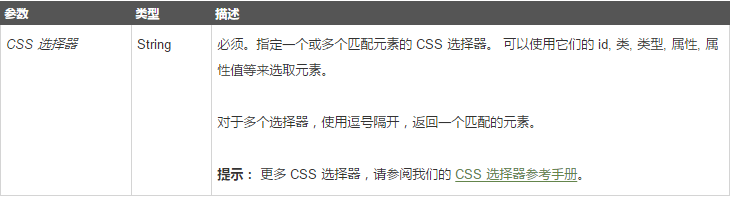
技术细节

更多实例
实例
获取文档中第一个 <p> 元素:
<!DOCTYPE html>
<html>
<head>
<meta charset="utf-8">
<title>菜鸟教程(runoob.com)</title>
</head>
<body>
<p>这是一个 p 与元素。</p>
<p>这也是一个 p 与元素。</p>
<p>点击按钮修改文档中第一个 p 元素的背景颜色。</p>
<button onclick="myFunction()">点我</button>
<script>
function myFunction() {
document.querySelector("p").style.backgroundColor = "red";
}
</script>
</body>
</html>
实例
获取文档中 class="example" 的第一个元素:
<!DOCTYPE html>
<html>
<head>
<meta charset="utf-8">
<title>菜鸟教程(runoob.com)</title>
</head>
<body>
<h2 class="example">class="example" 的标题</h2>
<p class="example"> class="example" 的段落。</p>
<p>点击按钮为第一个 class="example" 的元素添加背景颜色。</p>
<button onclick="myFunction()">点我</button>
<script>
function myFunction() {
document.querySelector(".example").style.backgroundColor = "red";
}
</script>
</body>
</html>
实例
获取文档中 class="example" 的第一个 <p> 元素:
<!DOCTYPE html>
<html>
<head>
<meta charset="utf-8">
<title>菜鸟教程(runoob.com)</title>
</head>
<body>
<h2 class="example">class="example" 的标题</h2>
<p class="example">class="example" 的段落。</p>
<p>点击按钮为第一个带有 class="example" 的 p 元素添加背景颜色。</p>
<button onclick="myFunction()">点我</button>
<script>
function myFunction() {
document.querySelector("p.example").style.backgroundColor = "red";
}
</script>
</body>
</html>
实例
获取文档中有 "target" 属性的第一个 <a> 元素:
<!DOCTYPE html>
<html>
<head>
<meta charset="utf-8">
<title>菜鸟教程(runoob.com)</title>
<style>
a[target] {
background-color: yellow;
}
</style>
</head>
<body>
<p> CSS 选择器 a[target] 确保所有有 target 属性的链接背景颜色为黄色:</p>
<a href="http://www.w3cschool.cc">w3cschool.cc</a>
<a href="http://www.disney.com" target="_blank">disney.com</a>
<a href="http://www.wikipedia.org" target="_top">wikipedia.org</a>
<p>点击按钮为带有 target 属性的链接添加红色背景。</p>
<button onclick="myFunction()">点我</button>
<script>
function myFunction() {
document.querySelector("a[target]").style.border = "10px solid red";
}
</script>
实例
以下实例演示了多个选择器的使用方法。
假定你选择了两个选择器: <h2> 和 <h3> 元素。
以下代码将为文档的第一个 <h2> 元素添加背景颜色:
<h3>A h3 element</h3>
document.querySelector("h2, h3").style.backgroundColor = "red";
<!DOCTYPE html>
<html>
<head>
<meta charset="utf-8">
<title>菜鸟教程(runoob.com)</title>
</head>
<body>
<h2> h2 元素</h2>
<h3> h3 元素</h3>
<script>
document.querySelector("h2, h3").style.backgroundColor = "red";
</script>
</body>
</html>
但是,如果文档中 <h3> 元素位于 <h2> 元素之前,<h3> 元素将会被设置指定的背景颜色。
<h2>A h2 element</h2>
document.querySelector("h2, h3").style.backgroundColor = "red";
<!DOCTYPE html>
<html>
<head>
<meta charset="utf-8">
<title>菜鸟教程(runoob.com)</title>
</head>
<body>
<h3> h3 元素</h3>
<h2> h2 元素</h2>
<script>
document.querySelector("h2, h3").style.backgroundColor = "red";
</script>
</body>
</html>
HTML DOM querySelector() 方法的更多相关文章
- DOM querySelector选择器
原生的强大DOM选择器querySelector 在传统的 JavaScript 开发中,查找 DOM 往往是开发人员遇到的第一个头疼的问题,原生的 JavaScript 所提供的 DOM 选择方法并 ...
- getElementById和querySelector方法的区别
"querySelector 属于 W3C 中的 Selectors API 规范 .而 getElementsBy 系列则属于 W3C 的 DOM 规范" 1.区别 getXXX ...
- JS1 js获取dom元素方法
js获取dom元素方法 1.通过ID选取元素(getElementById) 1)使用方法:document.getElementById("domId") 其 ...
- DOM 对象方法
DOM 对象方法 这里提供一些您将在本教程中学到的常用方法: 方法 描述 getElementById() 返回带有指定 ID 的元素. getElementsByTagName() 返回包含带有指定 ...
- HTML DOM submit() 方法
HTML DOM submit() 方法 HTML DOM Form 对象 定义和用法 submit() 方法把表单数据提交到 Web 服务器. 语法 formObject.submit() 说明 该 ...
- Vue 中 diff 算法后更新 DOM 的方法
vue 2.0加入了 virtual dom,在 node_modules\vue\src\core\vdom\patch.js 中会对虚拟 DOM 进行 diff 算法等,然后更新 DOM. 网上的 ...
- querySelector() 方法
返回文档中匹配指定 CSS 选择器的一个元素. 虽然IE8中没有getElementsByClassName()但可以用querySelector()代替 注意: querySelector() 方法 ...
- 使用DOM的方法获取所有li元素,然后使用jQuery()构造函数把它封装为jQuery对象
<!DOCTYPE html PUBLIC "-//W3C//DTD XHTML 1.0 Transitional//EN" "http://www.w3.org/ ...
- Javascript实例教程:querySelector()方法接受一个CSS查询并返回匹配模式的第一个子孙元素,如果没有匹配的元素则返回null。
文章简介:querySelector()方法接受一个CSS查询并返回匹配模式的第一个子孙元素,如果没有匹配的元素则返回null. querySelector()方法接受一个CSS查询并返回匹配模式的第 ...
随机推荐
- [uboot] (第四章)uboot流程——uboot编译流程
http://blog.csdn.net/ooonebook/article/details/53000893 以下例子都以project X项目tiny210(s5pv210平台,armv7架构)为 ...
- 2019.02.11 bzoj3165: [Heoi2013]Segment(线段树)
传送门 题意简述:要求支持两种操作: 插入一条线段. 询问与直线x=kx=kx=k相交的线段中,交点最靠上的线段的编号. 思路: 直接上李超线段树即可. 代码: #include<bits/st ...
- Solidity合约记录——(三)如何在合约中对操作进行权限控制
合约中一般会有多种针对不同数据的操作:例如对于存证内容的增加.更新及查询,若不进行一套符合要求的权限控制,事实上整个合约在真实环境下是没有多少使用价值的.那么应当如何对合约的权限进行划分?我们针对So ...
- 安装php7.2并且整合nginx且分开部署
1.安装php 7.2 2.php配置 3.nginx配置 4.测试 5.报错与解决 6.利用upstream实现负载均衡 1.安装php 7.2 启动容器: liwangdeMacBook-Air: ...
- 运行第一个Python程序
Python的三种运行方式 交互式解释器 在终端输入python3 进入python交互式解释器 输入exit()退出交互式解释器 命令行脚本 创建python脚本 通过命令执行程序 python h ...
- fscanf_s与scanf_s的宽度参数与缓冲区参数分析
fscanf_s函数 在文件操作中经常会用到fscanf这个函数,但是在VC和VS中会有警告 意思是编译器觉得fscanf不安全,叫你考虑用一下fscanf_s这个函数来代替fscanf,fscanf ...
- LeetCode算法题(长期更新)
1.给定一个整数数组 nums 和一个目标值 target,请你在该数组中找出和为目标值的那 两个 整数,并返回他们的数组下标. 你可以假设每种输入只会对应一个答案.但是,你不能重复利用这个数组中同样 ...
- Http Header 之 Requests Header 和 Responses Header
在开发中,经常会遇到对网络请求添加相应的头信息,下面我们梳理一下Http Header相关的内容. 一.Requests Header Header 解释 示例 Accept 指定客户端能够接收的内容 ...
- HoloLens开发手记 - 使用HoloLens模拟器 Using HoloLens emulator
首先下载HoloLens模拟器 HoloLens模拟器运行在没有真机的情况下在你的PC上测试应用,属于HoloLens开发工具系列.模拟器使用了Hyper-V虚拟机.通常通过传感器获取的人体和环境输入 ...
- Python函数——命名空间与闭包
前言 执行以下代码 def my_test(): x = 1 y = x+1 print(x) >> Traceback (most recent call last): File &qu ...