
angular2-4 之动效-animation
提示: angular2 时animation代码在核心模块里面(@angular/core里面);到了angular4.0时animation从核心模块中提取出来作为一个单独的模块,
这样可以在不用动效时可以不引入进来.
animation 模块特性方法:
1、 trigger 触发器
`trigger`是一个动画特定的函数,触发器,`trigger`将根据提供的`name`值创建一个动画触发器
trigger("myAnimationTrigger", [

       state(...),

       state(...),

       transition(...),

       transition(...)

])
2、state 状态
`state`是一个动画特定的函数,状态,每个状态都定义了最终的样式(动效过后的最终样子);通过改变状态(state)来触发(trigger)动画(animate)
state('A', style...)

//状态除了可以自己定义一个名字外,还有有很多特殊表示状态

*(通配符)状态

*(通配符)状态匹配任何动画状态

如:、当该元素的状态从active变成任何其它状态时,active => *转场都会生效

    、当在任意两个状态之间切换时,* => *转场都会生效,下图情况都会发行动效转场
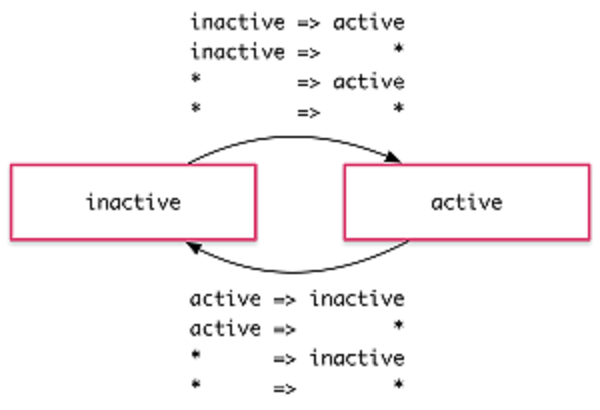
void
void的特殊状态,它表示元素没有被附加到视图。这种情况可能是由于它尚未被添加进来或者已经被移除了
如:如当一个元素离开视图时,* => void转场就会生效,而不管它在离场以前是什么状态。下图state的两个状态‘void’和‘in’,发生转场情况
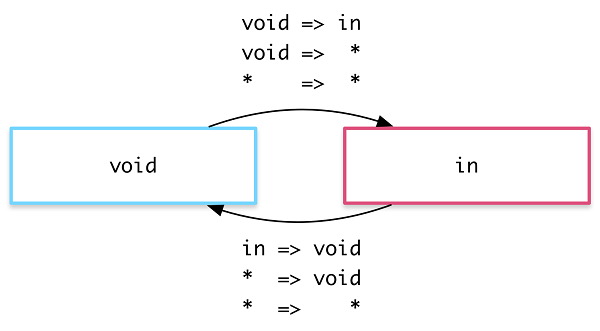
3、transition 转换
`transition`是一个动画特定的函数,负责定义各种 state 之间错综复杂的转换关系
transition('A => B', animate...)

transition('A <=> B', animate...)

transition('* => *', animate...)

transition(':enter', animate...)

transition(':leave', animate...)

transition('* => void', animate...)  也等于 :leave
transition('void => *', animate...) 也等于 :enter
transition((fromState, toState) => boolean, animate...) 还可以写方法判断哦
transition('A => B',[style,animate]) style 也可以放进来哦.
transition('A => B',[animate,animate]) 数组 animate 会按序执行和 transition('A => B', sequence([animate,animate])) 是一样的
transition('A => B',group([animate,animate])) 不想按序执行可以使用 group,表示里的动画同时进行。
4、style 样式
`style`是一个动画特定的函数,就是定义 css
style({backgroundColor: "red"})
5、animate 动画
`animate`是一个动画特定的函数,表示具体的动画定义
animate("5s 10ms cubic-bezier(.17,.67,.88,.1)", style(...))

//duration= 5second

//delay=10ms

//easing= cubic-bezier (ease-out 等等 css 有的都可以放)

//最后加上 style 就可以动画了咯

//如果想按帧来执行可以这样做

animate("5s", keyframes([

    style({opacity: , offset: }),

    style({opacity: , offset: 0.3})

]))

//offset 0.3 是百分比  这里和css3的动画是一样意思,
6、group 组
`group`是一个动画特定的函数,指定一个并行运行的动画步骤列表。分组动画是当一系列样式必须在不同的开始/结束时间进行动画/关闭时很有用。
group([

  animate("1s", { background: "black" }))

  animate("2s", { color: "white" }))

])
7、keyframes 关键帧
`keyframes`是一个动画特定的函数,可以描述每个样式条目是如何应用的,以及在什么点动画弧(很像CSS关键帧动画)
animate("5s", keyframes([
  style({ backgroundColor: "red", offset: 0 }),
  style({ backgroundColor: "blue", offset: 0.2 }),
  style({ backgroundColor: "orange", offset: 0.3 }),
  style({ backgroundColor: "black", offset: 1 })
]))
// 表示百分比,时间百分比
//如果在样式条目中没有使用“offset”值,则offset的值会自动计算
animate("5s", keyframes([
  style({ backgroundColor: "red" }) // offset = 0
  style({ backgroundColor: "blue" }) // offset = 0.33
  style({ backgroundColor: "orange" }) // offset = 0.66
  style({ backgroundColor: "black" }) // offset = 1
]))
8、sequence 顺序
`sequence`是一个动画特定的函数,指定逐个运行的动画步骤列表,这个也就是和group特性正好相反,一个同时进行,一个按先后顺序一个一个的进行
sequence([

  style({ opacity:  })),

  animate("1s", { opacity:  }))

])

//其实默认就是按sequence进行的,所以上面也可以这样写 如下

[

  style({ opacity:  })),

  animate("1s", { opacity:  }))

]
9、useAnimation
animate是可以封装的. 使用 animation 方法
let fadeAnimation = animation([

    style({ opacity: '{{ start }}' }),

    animate('{{ time }}',

    style({ opacity: '{{ end }}'))

], { params: { time: '1000ms', start: 0, end: 1 }});
然后在任何想使用 animate 的地方改用 useAnimation

useAnimation(fadeAnimation, {

    params: {

      time: '2s',

     start: 1,

      end: 0

    }

})
//如下面我定一个动效用到上面的定义。
export const fadel = trigger("fadel",[
  transition("void=>*",[
    useAnimation(fadeAnimation, {
      params: {
        time: '2s',
        start: 0,
        end: 1
      }
    })
  ])
]);
10、query 查询
`query`是一个动画特定的函数,用于在当前元素中查找一个或多个内部元素在序列中进行动画。提供的动画步骤已应用查询元素(默认情况下,提供了一个数组,然后这将是作为动画序列处理)。query()被设计为收集多个元素,并通过使用内部工作`element.querySelectorAll`。可以提供一个额外的选项对象可用于限制要收集的物品总量。query('div', [
  animate(...),

  animate(...)

], { limit: 1 }) //'limit'限制动画个数

//query()默认情况下会在找到零个项目时抛出一个错误。如果查询将“optional”标志设置为true,则该错误将被忽略。

query('.some-element-that-may-not-be-there', [

  animate(...),

  animate(...)

], { optional: true })
//特殊选择器值,查询中的选择器值可以收集包含角度特定的元素
//使用特殊的伪选择器标记 如下几个
- 使用query(“:enter”)`/`query(“:leave”)查询新插入
- 使用query(“:animating”)查询所有当前的动画元素
- 使用query(“@ triggerName”)查询包含动画触发器的元素
- 使用query(“@ *”)查询包含动画触发器的所有元素
- 使用`query(“:self”)`将当前元素包含到动画序列中
query(':self, .record:enter, .record:leave, @subTrigger', [...])
//demo
@Component({
  selector: 'inner',
  template: `
    <div [@queryAnimation]="exp">
      <h1>Title</h1>
      <div class="content">
        Blah blah blah
      </div>
    </div>
  `,
  animations: [
   trigger('queryAnimation', [
     transition('* => goAnimate', [
       // 隐藏内部元素
       query('h1', style({ opacity: 0 })),
       query('.content', style({ opacity: 0 })),
       // 一个接一个地动画内部元素
       query('h1', animate(1000, style({ opacity: 1 })),
       query('.content', animate(1000, style({ opacity: 1 })),
     ])
   ])
 ]
})
class Cmp {
  exp = '';
  goAnimate() {
    this.exp = 'goAnimate';
  }
11、stagger
`stagger`是一个动画特定的函数,通过在每个被查询的项目被动画之后发布时间间隔来工作。
//在下面的例子中,有一个容器元素包装了一系列被打印的项目

//由ngFor。容器元素包含稍后将设置的动画触发器

 //查询每个内部项目。

<!-- list.component.html -->

<button (click)="toggle()">Show / Hide Items</button>

<hr />

<div [@listAnimation]="items.length">

  <div *ngFor="let item of items">

    {{ item }}

  </div>

</div>

<!--list.component.ts>

@Component({

  templateUrl: 'list.component.html',

  animations: [

  trigger('listAnimation', [

  transition('* => *', [ // each time the binding value changes

    query(':leave', [

      stagger(, [

        animate('0.5s', style({ opacity:  }))

      ])

    ]),

    query(':enter', [

      style({ opacity:  }),

      stagger(, [

        animate('0.5s', style({ opacity:  }))

      ])

    ])

  ])

  ]

})

class ListComponent {

  items = [];

  showItems() {

    this.items = [,,,,];

  }

  hideItems() {

    this.items = [];

  }

  toggle() {

    this.items.length ? this.hideItems() : this.showItems();

  }

}

//现在每次添加/删除项目,然后是不透明度

//淡入淡出的动画将会运行或每个删除的项目将淡出。

// 当这些动画中的任何一个出现时,交错效应将是

//在每个项目的动画开始之后应用。
12、animateChild
每次在角度触发动画,父动画将始终获得优先权,任何儿童动画将被阻止。为了为了运行一个子动画,父动画必须查询每个元素包含儿童动画,然后允许动画使用`animateChild`运行。
// 下面的示例HTML代码显示了具有动画的父元素和子元素

// 触发器将在同一时间执行。

```html

<!-- parent-child.component.html -->

<button (click)="exp =! exp">Toggle</button>

<hr>

<div [@parentAnimation]="exp">

  <header>Hello</header>

  <div [@childAnimation]="exp">

      one

  </div>

  <div [@childAnimation]="exp">

      two

  </div>

  <div [@childAnimation]="exp">

      three

  </div>

</div>

```

//现在当`exp`值更改为true时,只有`parentAnimation`动画会生成动画

//因为它有优先权。但是,使用`query`和`animateChild`每个内部动画

//也可以触发:

// parent-child.component.ts

import {trigger, transition, animate, style, query, animateChild} from

@Component({

  selector: 'parent-child-component',

  animations: [

    trigger('parentAnimation', [

      transition('false => true', [

        query('header', [

          style({ opacity:  }),

          animate(, style({ opacity:  }))

        ]),

        query('@childAnimation', [

          animateChild()

        ])

      ])

    ]),

    trigger('childAnimation', [

      transition('false => true', [

        style({ opacity:  }),

        animate(, style({ opacity:  }))

      ])

    ])

  ]

})

class ParentChildCmp {

  exp: boolean = false;

}

```

//在上面的动画代码中,当“parentAnimation”转换开始时,它首先查询

//找到标题元素并淡入。然后找到包含该元素的每个子元素

//`@ childAnimation`触发器,然后允许他们的动画触发。

//这个例子可以进一步扩展使用交错:

query('@childAnimation', stagger(, [

  animateChild()

]))

//现在每个子动画都是以“100ms”的蹒跚步骤开始的。

// ##第一帧子动画

//当使用animateChild执行子动画时,动画引擎将始终应用该动画

//动画序列开头的每个子动画的第一帧。这条路

//父动画不需要在子元素之前设置任何初始样式数据

//子动画开始。

//在上面的例子中,'childAnimation'的'false => true'转换的第一帧

//由“不透明度:0”的风格组成。这是在“parentAnimation”时立即应用的

//动画转换序列开始。只有当@ @ childAnimation被查询和调用时

//与`animateChild`将它动画到`opacity:1`的目的地。

//请注意,此功能旨在与{ @link  query query()}一起使用,并且仅适用于此功能

//使用角度动画DSL分配的动画(这意味着CSS关键帧

//和转换不由这个API处理)
13、动画回调
//当动画开始和结束时,会触发一个回调。

//对于例子中的这个关键帧,我们有一个叫做@flyInOut的trigger。在那里我们可以挂钩到那些回调,比如:

template: `

  <ul>

    <li *ngFor="let hero of heroes"

        (@flyInOut.start)="animationStarted($event)"

        (@flyInOut.done)="animationDone($event)"

        [@flyInOut]="'in'">

      {{hero.name}}

    </li>

  </ul>

`,

//这些回调接收一个AnimationTransitionEvent参数,它包含一些有用的属性,例如fromState,toState和totalTime。

//无论动画是否实际执行过,那些回调都会触发。

//注意: 动画结束名为“done”,不是“end”
到这里基本全部介绍完了,当你们用动效时,可能有些人会发现 路由转场动效中的“离场”动效总是没有,后面会介绍单独写一个路由动效示例。
angular2-4 之动效-animation的更多相关文章
- angular2中的路由转场动效
1.为什么有的人路由转动效离场动效不生效? 自己研究发现是加动效的位置放错了 如下: <---! animate-state.component.html --> <div sty ...
- 一个绚丽的loading动效分析与实现!
最终效果如下 从效果上看,我们需要考虑以下几个问题: 1.叶子的随机产生: 2.叶子随着一条正余弦曲线移动: 3.叶子在移动的时候旋转,旋转方向随机,正时针或逆时针: 4.叶子遇到进度条,似乎是融合进 ...
- 玩转HTML5移动页面(动效篇)
原文:http://www.grycheng.com/?p=458 作为一名前端,在拿到设计稿时你有两种选择: 1.快速输出静态页面 2.加上高级大气上档次狂拽炫酷屌炸天的动画让页面动起来 作为一个有 ...
- Web动效研究与实践
随着CSS3和HTML5的发展,越来越多狂拽炫酷叼炸天的动效在网页设计上遍地开花,根据最新的浏览器市场份额报告,IE6的份额已经降到了5.21%,这简直是一个喜大普奔的消息,做动效可以完全不care低 ...
- Android 一个绚丽的loading动效分析与实现!
http://blog.csdn.net/tianjian4592/article/details/44538605 前两天我们这边的头儿给我说,有个 gif 动效很不错,可以考虑用来做项目里的loa ...
- android动效开篇
大神博客:http://blog.csdn.net/tianjian4592/article/details/44155147 在现在的Android App开发中,动效越来越受到产品和设计师同学的重 ...
- 基于clip-path的任意元素的碎片拼接动效(源自鑫空间)
一.实现原理. 效果本质上是CSS3动画,就是旋转transform:rotate和位移:transform:translate,只是旋转和位移的部件是三角碎片而已.三角是使用CSS3 clip-pa ...
- iOS开发之 Lottie -- 炫酷的动效
动效在软件开发中非常常见,炫酷的动画能提升应用的B格,然而由设计师的设计转化成程序猿GG的代码是个非常"痛苦"的过程.对于复杂动画,可能要花费很多时间去研究和实现.Lottie 的 ...
- 前端必须收藏的CSS3动效库!!!
现在的网站和App的设计中越来越重视用户体验,而优秀的动效则能使你的应用更具交互性,从而吸引更多用户的使用. 如果你对CSS3中定义动效还不熟练,或希望采用更加简单直接的方式在你的应用中引入动效的话, ...
随机推荐
- Linux命令更新系统时间,更新所有文件的时间(转)
https://blog.csdn.net/ccj2020/article/details/76026606
- [ERROR] - Error reading string. Unexpected token: StartObject. Path 'formData', line 1, position 13.
公司流程框架: businessData 为 string 所有要使用JSON.stringify();
- Ubuntu 18.04安装JDK并配置环境变量
1.官网下载jdk 下载链接 http://www.oracle.com/technetwork/java/javase/downloads/index.html 可以根据自己的系统进行下载 2.进行 ...
- GIT 身份验证失败问题解决方案,由于修改密码产生的问题
fatal: Authentication failed for 'http:xxxxxxxxxx.git/' 解决方案 1. git config --global user.name " ...
- ffmpeg命令的使用
参考博客:https://www.cnblogs.com/wainiwann/p/4128154.html 但是红色网页总结的 “ffmpeg 用法” 非常全面. http://www.360doc. ...
- eclipse maven引入第三方jar包后如何下载源代码(sources)
1. 在eclipse windows -> properties->maven 选项,然后查看右侧 菜单来中 找到 Download Artifact Sources 选项勾选:如果想 ...
- MVC中code first方式开发,数据库的生成与更新
在使用EF的实际编程中我们经常遇到这样的问题:发现实体结构需要新增加一个字段,或者减少一个字段,急需把实体结构修改,并让数据库更新这种修改.在用Model First或者Database First的 ...
- java框架之Shiro-安全/权限框架
准备 简介 Apache Shiro 是 Java 的一个安全(权限)框架. Shiro 不仅可以用在 JavaSE 环境,也可以用在 JavaEE 环境. Shiro 可以完成:认证.授权.加密.会 ...
- 【JVM】-NO.110.JVM.1 -【GC垃圾收集器】
Style:Mac Series:Java Since:2018-09-10 End:2018-09-10 Total Hours:1 Degree Of Diffculty:5 Degree Of ...
- vue-awesome-swiper组件不能自动播放和导航器小圆点不显示问题
from: https://blog.csdn.net/osdfhv/article/details/79062427 <template> <div class="swi ...