
vue 如何在循环中 "监听" 的绑定v-model数据
vue 如何在循环中 "监听" 的绑定v-model数据
阅读目录
- vue 如何在循环中 "监听" 的绑定v-model数据
1.普通属性的值进行监听
vue中提供了一个watch方法,它用于观察vue实列上的数据变动,来响应数据的变化。
下面我们来分别学习下使用watch对对象的属性值进行监听,有如下几种,普通属性的监听,对象的属性值的监听。最后一种就是对input中的v-modle的动态数组的数据属性进行监听,最后一种不是使用watch来监听,本文的重点是最后一种的实现。在项目中会经常碰到使用v-model监听数据的。
<!DOCTYPE html>

<html>

  <head>

    <title>演示Vue</title>

    <style>

      ul,li {list-style: none;}

      .list {float: left; width:200px;}

      button {float:left; margin-top:18px;}

    </style>

  </head>

  <body>

    <div id="app">

      <div style="width:100%;overflow:hidden;">

        <input type="text" v-model="count" />

      </div>

    </div>

  </body>

  <script src="https://tugenhua0707.github.io/vue/vue-watch/vue.js"></script>

  <script>

    var app = new Vue({

      el: '#app',

      data: {

        count: 1

      },

      watch: {

        count(newValue, oldValue) {

          console.log('新输入的值为:'+newValue); // 会输出新值

          console.log('原来的值为:'+oldValue); // 会输出旧值

        }

      }

    })

  </script>

</html>
2.监听对象的变化
如下代码:
<!DOCTYPE html>

<html>

  <head>

    <title>演示Vue</title>

    <style>

      ul,li {list-style: none;}

      .list {float: left; width:200px;}

      button {float:left; margin-top:18px;}

    </style>

  </head>

  <body>

    <div id="app">

      <div style="width:100%;overflow:hidden;">

        <input type="text" v-model="tform.count" />

      </div>

    </div>

  </body>

  <script src="https://tugenhua0707.github.io/vue/vue-watch/vue.js"></script>

  <script>

    var app = new Vue({

      el: '#app',

      data: {

        tform: {

          count: 1

        }

      },

      watch: {

        tform: {

          handler(newValue, oldValue) {

            // newValue 和 oldValue 是一样的

            console.log(newValue);

            console.log(oldValue);

          },

          // 深度监听 监听对象,数组的变化

          deep: true

        }

      }

    })

  </script>

</html>
3.监听对象中具体属性值的变化
如下代码:
<!DOCTYPE html>

<html>

  <head>

    <title>演示Vue</title>

    <style>

      ul,li {list-style: none;}

      .list {float: left; width:200px;}

      button {float:left; margin-top:18px;}

    </style>

  </head>

  <body>

    <div id="app">

      <div style="width:100%;overflow:hidden;">

        <input type="text" v-model="tform.count" />

      </div>

    </div>

  </body>

  <script src="https://tugenhua0707.github.io/vue/vue-watch/vue.js"></script>

  <script>

    var app = new Vue({

      el: '#app',

      data: {

        tform: {

          count: ''

        }

      },

      watch: {

        'tform.count': {

          handler(newValue, oldValue) {

            console.log('变动之前的值:' + oldValue);

            console.log('变动后的值:'+ newValue);

          },

          // 深度监听 监听对象,数组的变化

          deep: true

        }

      }

    })

  </script>

</html>
3.2 第二种方法 可以借助 computed 如下代码:
<!DOCTYPE html>

<html>

  <head>

    <title>演示Vue</title>

    <style>

      ul,li {list-style: none;}

      .list {float: left; width:200px;}

      button {float:left; margin-top:18px;}

    </style>

  </head>

  <body>

    <div id="app">

      <div style="width:100%;overflow:hidden;">

        <input type="text" v-model="tform.count" />

      </div>

    </div>

  </body>

  <script src="https://tugenhua0707.github.io/vue/vue-watch/vue.js"></script>

  <script>

    var app = new Vue({

      el: '#app',

      data: {

        tform: {

          count: ''

        }

      },

      computed: {

        newNum: function() {

          return this.tform.count;

        }

      },

      watch: {

        newNum: {

          handler(newVal, oldVal) {

            console.log('新值:' +newVal);

            console.log('原来的值:' +oldVal);

          },

          deep: true

        }

      }

    })

  </script>

</html>
4.vue 如何在循环中 "监听" 的绑定v-model数据
现在有这么一个需求,页面上有多项输入框,但是具体有多少项,我也不知道,它是通过"新增一项"按钮点击事件,点击一下,就新增一项;如下图这个样子;
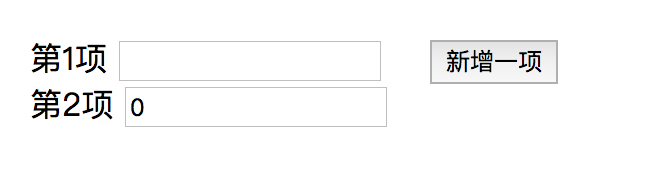
代码如下:
<ul class="list">

  <li>

    <label>第1项</label>

    <input type="text" v-model="item1" />

  </li>

  <li>

    <label>第2项</label>

    <input type="text" v-model="item2" />

  </li>

</ul>
我希望的是,如上代码 v-model="item1", item2, 依次类推 ... item(n);
然后会对input的输入框值进行监听,比如有这么一个需求,如果输入框的值小于0的话,让input输入框自动变为0,也就是说输入框最小值为0,且为数字。
如果上面的 item1 和 item2 只有两项的话,那么我们可以使用watch来监听 item1 和 item2属性,但是如果页面上有多项的话,这样就不好使用watch来监听数据了。所以我们可以换一种方式来监听,使用input事件来监听输入框值的变化了。如下代码:
<!DOCTYPE html>

<html>

  <head>

    <title>演示Vue</title>

    <style>

      ul,li {list-style: none;}

      .list {float: left; width:200px;}

      button {float:left; margin-top:18px;}

    </style>

  </head>

  <body>

    <div id="app">

      <div style="width:100%;overflow:hidden;">

        <ul class="list">

          <li v-for="(item, index) in arrs">

            <label>第{{index+1}}项</label>

            <input type="number" v-model="item.customItem" @input="changeFunc(item, index)"/>

          </li>

        </ul>

        <button @click="newadd">新增一项</button>

      </div>

    </div>

  </body>

  <script src="https://tugenhua0707.github.io/vue/vue-watch/vue.js"></script>

  <script>

    var app = new Vue({

      el: '#app',

      data: {

        count: 1,

        arrs: [{'value': 1, 'customItem': ''}]

      },

      methods: {

        newadd() {

          this.count++;

          this.arrs.push({'customItem': '', 'value': this.count});

        },

        changeFunc(item, index) {

          this.arrs[index].customItem = item.customItem;

          this.watchVal();

        },

        // 监听值的变化

        watchVal() {

          const arrs = this.arrs;

          if (arrs.length > 0) {

            for (let i = 0; i < arrs.length; i++) {

              let customItem = arrs[i].customItem;

              if (customItem * 1 < 0) {

                this.$set(this.arrs[i], 'customItem', 0);

              }

            }

          }

        }

      }

    })

  </script>

</html>
vue 如何在循环中 "监听" 的绑定v-model数据的更多相关文章
- Vue 为什么在 HTML 中监听事件?
为什么在 HTML 中监听事件? 你可能注意到这种事件监听的方式违背了关注点分离(separation of concern)传统理念.不必担心,因为所有的 Vue.js 事件处理方法和表达式都严格绑 ...
- vue mounted中监听div的变化
vue mounted中监听div的变化 <div style="width:200px;height:30px;background: #0e90d2" id=" ...
- 在vue中监听storage的变化
1.首先在main.js中给Vue.protorype注册一个全局方法,其中,我们约定好了想要监听的sessionStorage的key值为’watchStorage’,然后创建一个StorageEv ...
- vue项目中监听sessionStorage值发生变化
首先在main.js中给Vue.protorype注册一个全局方法, 其中,我们约定好了想要监听的sessionStorage的key值为’watchStorage’, 然后创建一个StorageEv ...
- vue 定义全局函数,监听android返回键事件
vue 定义全局函数,监听android返回键事件 方法一:main.js 注入(1)在main.js中写入函数Vue.prototype.changeData = function (){ aler ...
- vue解惑之v-on(事件监听指令)
一.v-on指令 vue中用v-on指令来监听DOM事件,并触发相应的代码.比如v-on:click,表示监听了点击事件. 二.事件修饰符 在事件处理函数中调用 event.preventDefaul ...
- 在Javascript中监听flash事件(转)
在Javascript中监听flash事件,其实有两种做法: 1.在特定的环境下(例如专门制作的flash),大家约定一个全局函数,然后在flash的事件中用ExternalInterface.cal ...
- Fragment中监听onKey事件,没你想象的那么难。
项目中越来越多的用到Fragment,在用Fragment取代TabHost的时候遇到了一个问题,我们都知道,TabHost的Tab为Activity实例,有OnKey事件,但是Fragment中没有 ...
- wemall app商城源码Fragment中监听onKey事件
wemall-mobile是基于WeMall的android app商城,只需要在原商城目录下上传接口文件即可完成服务端的配置,客户端可定制修改.本文分享android开发Fragment中监听onK ...
随机推荐
- mongodb 权限设置--用户名、密码、端口
转自:http://www.cnblogs.com/valor-xh/p/6369432.html 一.关于权限的默认配置 在默认情况下,mongod是监听在0.0.0.0之上的,任何客户端都可以直接 ...
- 浏览器能正常访问的url,superagent不能正常访问
在写音乐播放器的过程中,我需要获取qq音乐排行榜的信息,于是我向以前一样,在后台的MusicController中添加一个getTopList方法 然后写下以下代码 // 获取排行 async get ...
- AOP,过滤器,监听器,拦截器【转载】
面向切面编程(AOP是Aspect Oriented Program的首字母缩写) ,我们知道,面向对象的特点是继承.多态和封装.而封装就要求将功能分散到不同的对象中去,这在软件设计中往往称为职责分配 ...
- (二)在实战中使用Sass和Compass
第三章 无需计算玩转CSS网格布局 3.1 网格布局介绍 3.2 使用网格布局 3.2.1 术语 术语名 定义 是否涉及HTML标签 列 内容度量的垂直单位 否 容器 构成一个网格布局的HTML元素 ...
- css3火焰文字样式代码
css样式: <style type="text/css"> body{background:#000;} *{margin:0;padding:0;transitio ...
- cf666E. Forensic Examination(广义后缀自动机 线段树合并)
题意 题目链接 Sol 神仙题Orz 后缀自动机 + 线段树合并 首先对所有的\(t_i\)建个广义后缀自动机,这样可以得到所有子串信息. 考虑把询问离线,然后把\(S\)拿到自动机上跑,同时维护一下 ...
- 【读书笔记】iOS-Objective-C编程
Objective-C中的类可以继承自任何一个顶级类,需要注意的是,虽然NSObject是最常见的顶级类,但是它并不是唯一的顶级类,例如,NSProxy就是和NSObject一样的顶级类,所以你不能说 ...
- 从零开始学习html(五)与浏览者交互,表单标签——下
六.使用下拉列表框进行多选 <!DOCTYPE HTML> <html> <head> <meta http-equiv="Content-Type ...
- [VUE ERROR] Invalid options in vue.config.js: "publicPath" is not allowed
项目在build的时候报的这个错误: 具体原因是因为版本支持的问题,publicPath 属性到 vue-cli 3.2.0 之后才支持,所以将 publicPaht 改成 baseUrl 即可,或者 ...
- Linux 学习笔记之超详细基础linux命令 Part 6
Linux学习笔记之超详细基础linux命令 by:授客 QQ:1033553122 ---------------------------------接Part 5----------------- ...