
SpringMVC 常用applicationContext.xml、web.xml、servlet-mvc.xml简单配置
在进行学习配置文件之前,为了加深对框架的认识,简单的做了SSM框架的简单实验。然后画出listAll查询方法的整个过程的思维导图。 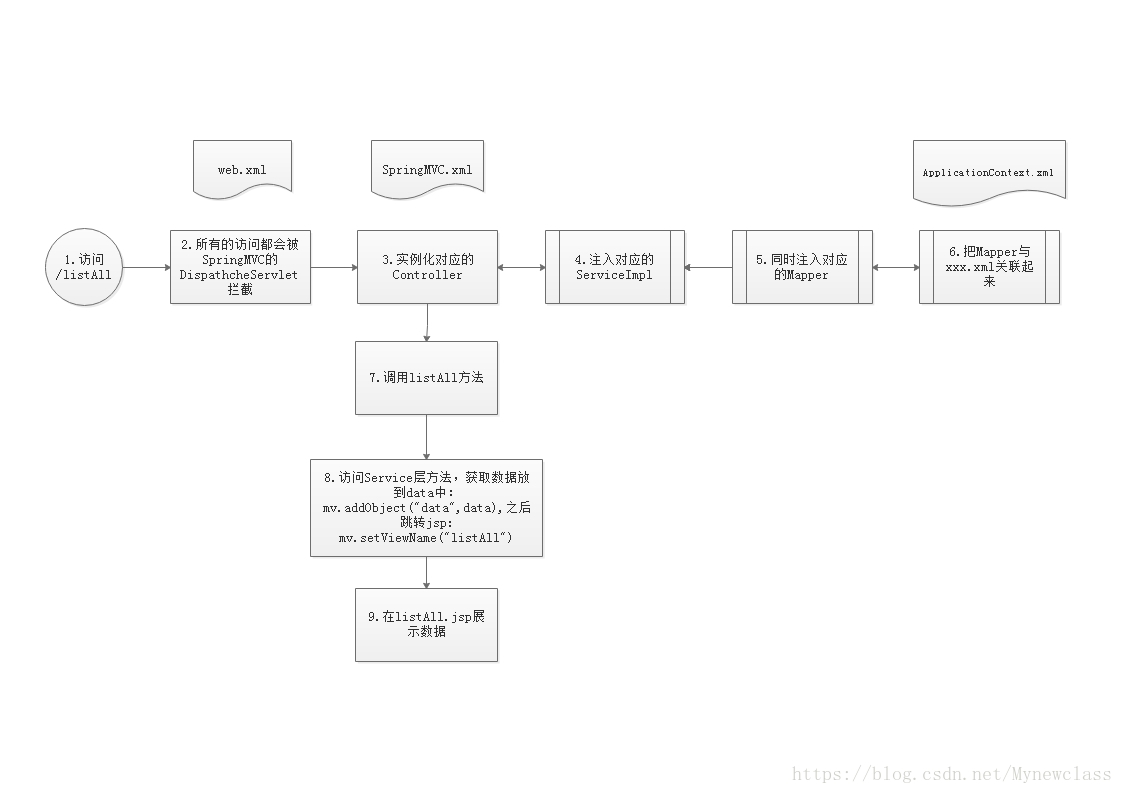 整个过程中的
web.xml、SpringMVC.xml、applicationContext.xml配置文件起到关键作用,同时也是为了加深理解,在此做下记录,请看下面! github源码链接:https://github.com/Jian0110/ssm
一、SpringMVC的web.xml配置
关于SpringMVC 的web.xml详细介绍,我之前已经做过了介绍并记录,请看Spring MVC的web.xml配置详解
1.思维导图:
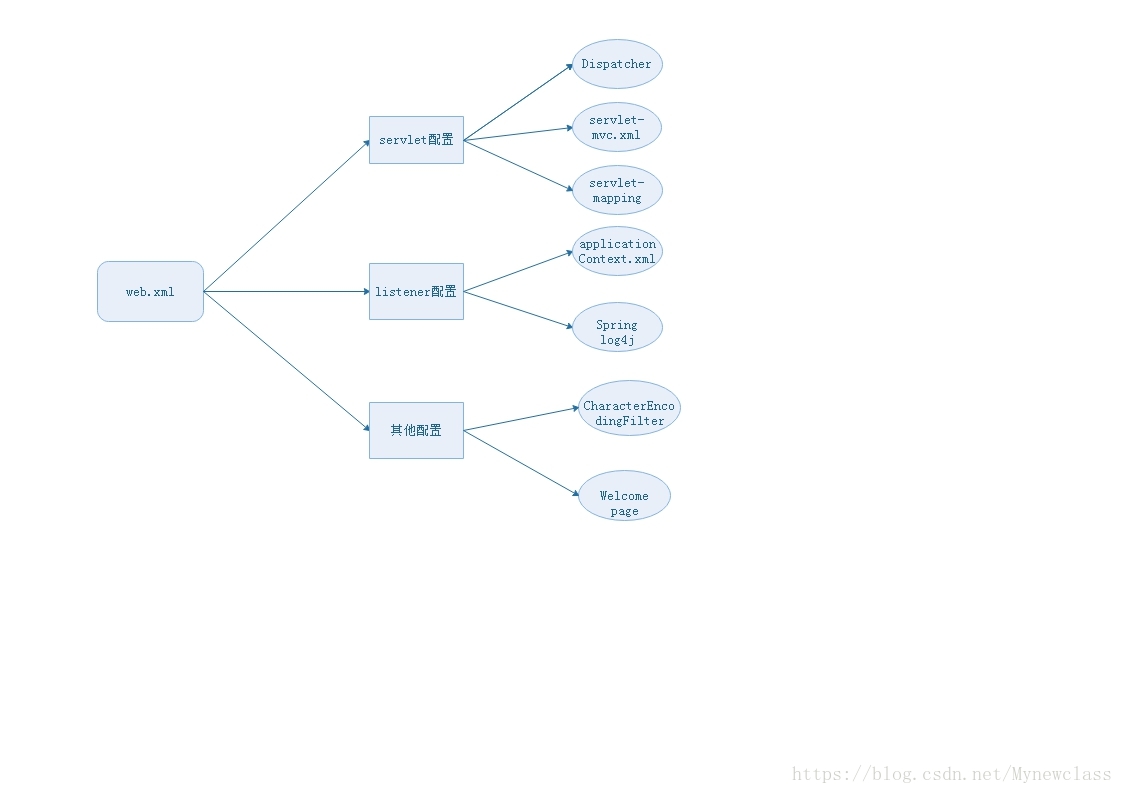
2.详细描述:
(1)servlet配置(即SpringMVC核心分发器Dispatcher):
dispatcher配置与servlet-mvc.xml配置 若没有<init-param>初始化servlet-mvc.xml,那么就会自动寻找servletname-servlet.xml并加载!
<servlet>

    <servlet-name>mvc-dispatcher</servlet-name>

    <servlet-class>org.springframework.web.servlet.DispatcherServlet</servlet-class>

    <!-- spring mvc的配置文件:springMVC.xml -->

    <init-param>

        <param-name>contextConfigLocation</param-name>

        <param-value>classpath:springMVC.xml</param-value>

    </init-param>

    <load-on-startup>1</load-on-startup>

</servlet>dispatcherer拦截路径配置:
<servlet-mapping>

    <servlet-name>mvc-dispatcher</servlet-name>

    <url-pattern>/</url-pattern>

</servlet-mapping>(2)applicationContext.xml的自动装配:
ContextLoaderListener的作用就是启动Web容器时,自动装配ApplicationContext.xml的配置信息。
<context-param>

    <param-name>contextConfigLocation</param-name>

    <param-value>classpath:applicationContext.xml</param-value>

</context-param>

<listener>

    <listener-class>org.springframework.web.context.ContextLoaderListener</listener-class>

</listener>
二、SpringMVC的servlet-mvc.xml配置
servlet-mvc.xml配置文件主要是用来扫描@Controller注解并注入,还有视图解析转向等。
1.思维导图
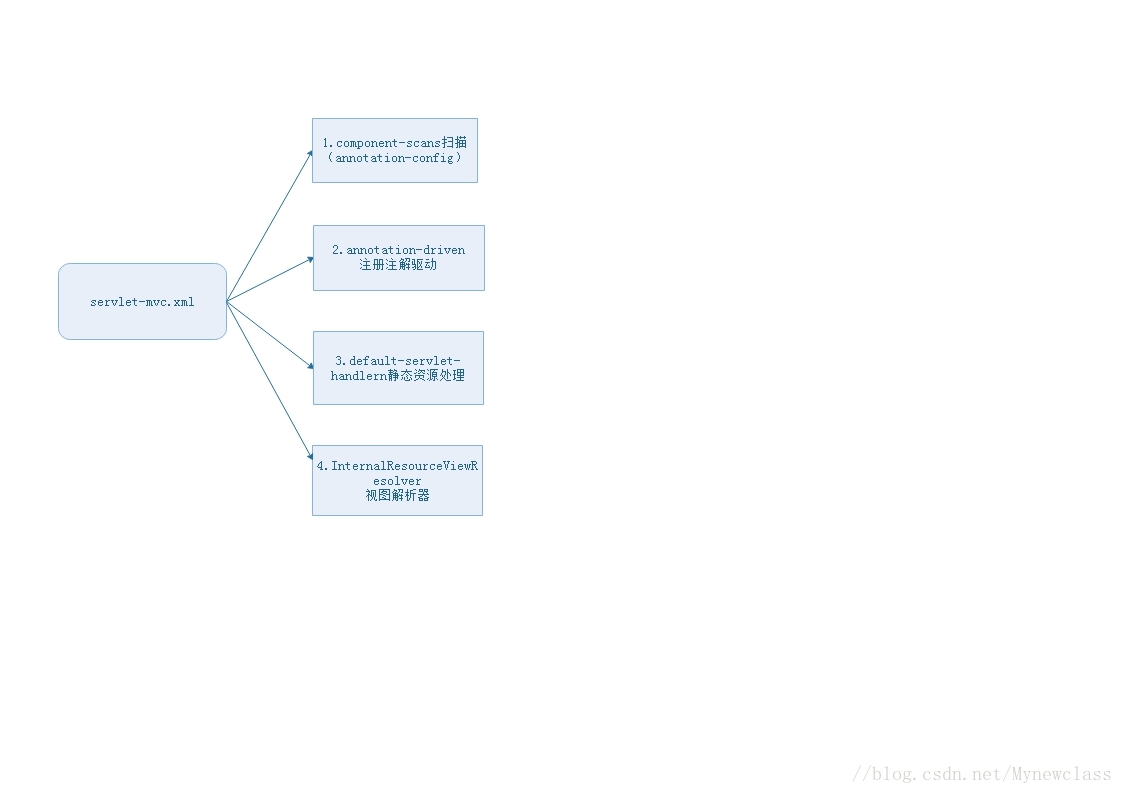
2.详细描述:
(1)annotation-config与component-scan:
- 在
servlte-mvc.xml扫描注入bean的时候只需要找到@Controller注解,同时注入bean,其他的bean的注入是依靠applicationContext.xml进行的。 - 关于扫描包
component-scan的详细介绍可以看SpringMVC扫描包使用
<!-- 1. 扫描Controller,并将其生命周期纳入Spring管理(这里只扫描@Controller) -->

<!--  <context:annotation-config/> -->

<context:component-scan base-package="com.test.controller">

    <context:include-filter type="annotation" expression="org.springframework.stereotype.Controller"/>

</context:component-scan>annotation-config:对已被注册到Spring容器里的Bean进行操作(比如注入到某个类的内部),主要的作用是为了能够识别相应的注解(@Autowired、@Required、@Resource、@ PostConstruct、@ PreDestroy等)。component-scan:不仅具有annotation-config的功能,还可以扫描指定包下的类,将拥有注解的它们注册到Spring容器中中。
(2)annotation-driven注解驱动:
SpringMVC就知道了我们启用注解驱动。然后通过context:component-scan标签的配置,会自动为我们将扫描到的@Component,@Controller,@Service,@Repository等注解标记的组件注册到工厂中,来处理我们的请求。
<!-- 注解驱动,以使得访问路径与方法的匹配可以通过注解配置 -->

<mvc:annotation-driven />(3)default-servlet-handler静态资源:
由于在web.xml中的的</servlet-mapping>拦截了所有的url请求,那么如果请求中使用到静态资源的话,则无法加载像js,css,jgp这样格式的资源。<mvc:default-servlet-handler />就是解决这个问题的,具体请看这位博主写的,解释很清晰mvc:default-servlet-handler标签的的作用
 <!-- 3. 静态页面,如html,css,js,images可以访问 -->

<mvc:default-servlet-handler />(4)InternalResourceViewResolver视图解析器:
在Controller层视图跳转mav.setViewName("listAll");中,只需要输入listAll.jsp文件前缀listAll即可跳转。
<!-- 4. 视图定位到/WEB/INF/jsp 这个目录下 -->

<bean class="org.springframework.web.servlet.view.InternalResourceViewResolver">

     <property name="viewClass"

         value="org.springframework.web.servlet.view.JstlView" />

     <property name="prefix" value="/WEB-INF/jsp/" />

     <property name="suffix" value=".jsp" />

 </bean>
三、SpringMVC的applicationContext.xml配置
1.思维导图:
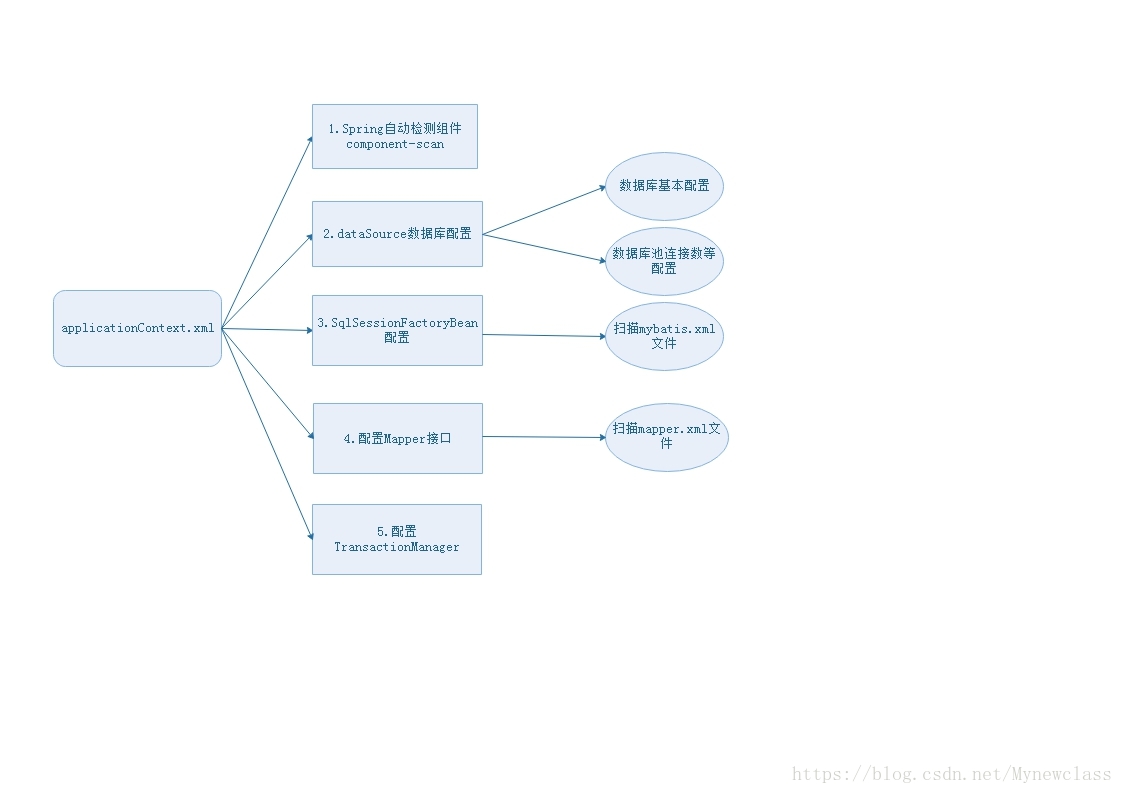
2.详细描述:
(1)component-scan自动扫描:
这里的component-scan不同servlet-mvc.xml中的component-scan,它不光只扫描@Controller,扫描包com.test的所有都会被注入。
<context:component-scan base-package="com.test" />(2)dataSource数据库配置:
在此之前,通常还需要引入db.properties数据库配置文件,才能使用EL表达式。
<bean class="org.springframework.beans.factory.config.PropertiesFactoryBean">

    <property name="locations">

        <value>classpath*:bd.properties</value>

    </property>

</bean>
数据库简单配置如下:
<bean id="dataSource" class="org.springframework.jdbc.datasource.DriverManagerDataSource">
<!-- 数据库连接基本信息 -->
<property name="driverClassName" value="${driver}" />
<property name="url" value="${url}?useUnicode=true&characterEncoding=utf8&" />
<property name="username" value="${username}" />
<property name="password" value="${password}" />
<!-- 数据连接池基本信息 -->
<property name="maxActive" value="${maxActive}" />
<property name="maxIdle" value="${maxIdle}" />
<property name="defaultAutoCommit" value="false" />
<property name="timeBetweenEvictionRunsMillis" value="3600000"/>
<property name="minEvictableIdleTimeMillis" value="3600000"/>
</bean>
(3)扫描mybatis.xml文件:
<!-- 3. 扫描存放SQL语句的Category.xml -->

<bean id="sqlSession" class="org.mybatis.spring.SqlSessionFactoryBean">

    <property name="typeAliasesPackage" value="com.test.pojo" />

    <property name="dataSource" ref="dataSource"/>

    <property name="mapperLocations" value="classpath:com/test/mapper/*.xml"/>

</bean>(4)配置Mapper接口 :
Mybatis MapperScannerConfigurer 自动扫描 将Mapper接口生成代理注入到Spring。 详情请看文章MapperScannerConfigurer自动扫描 将Mapper接口生成代理注入到Spring
<!-- 4. 扫描Mapper,并将其生命周期纳入Spring的管理 (配置Mapper接口)-->

<bean class="org.mybatis.spring.mapper.MapperScannerConfigurer">

    <property name="basePackage" value="com.test.mapper"/>

</bean>MapperScannerConfigurer将会创建MapperFactoryBean,之后自动装配。MapperFactoryBean创建的代理类实现了 XXXMapper接口,并且注入到应用程序中。这个bean就可以直接在应用程序中使用,比如:
 public class UserServiceImpl implements UserService {

  //直接使用userMapper

  private UserMapper userMapper;

  public void setUserMapper(UserMapper userMapper) {

    this.userMapper = userMapper;

  }

  public User getUser(String userId) {

    return this.userMapper.getUser(userId);

  }

}(5)TransactionManager事务管理:
<bean id="txManager" class="org.springframework.jdbc.datasource.DataSourceTransactionManager">

      <property name="dataSource" ref="dataSource"></property>

</bean>

<tx:annotation-driven transaction-manager="txManager"/>这样就可以在在Service实现类中增加@Transactional注解即可控制事务。
SpringMVC 常用applicationContext.xml、web.xml、servlet-mvc.xml简单配置的更多相关文章
- java Web 请求servlet绘制验证码简单例子
主要用来了解java代码怎么绘制验证码图片,实际开发中不会这样用 protected void doGet(HttpServletRequest request, HttpServletRespons ...
- Spring mvc系列一之 Spring mvc简单配置
Spring mvc系列一之 Spring mvc简单配置-引用 Spring MVC做为SpringFrameWork的后续产品,Spring 框架提供了构建 Web 应用程序的全功能 MVC 模块 ...
- Spring MVC之简单入门
一.Spring MVC简介: 1.什么是MVC 模型-视图-控制器(MVC)是一个众所周知的以设计界面应用程序为基础的设计模式.它主要通过分离模型(Model).视图(View)及控制器(Contr ...
- java之spring mvc之Controller配置的几种方式
这篇主要讲解 controller配置的几种方式. 1. URL对应 Bean 如果要使用此类配置方式,需要在XML中做如下样式配置 <!-- 配置handlerMapping --> & ...
- SpringMVC内容略多 有用 熟悉基于JSP和Servlet的Java Web开发,对Servlet和JSP的工作原理和生命周期有深入了解,熟练的使用JSTL和EL编写无脚本动态页面,有使用监听器、过滤器等Web组件以及MVC架构模式进行Java Web项目开发的经验。
熟悉基于JSP和Servlet的Java Web开发,对Servlet和JSP的工作原理和生命周期有深入了解,熟练的使用JSTL和EL编写无脚本动态页面,有使用监听器.过滤器等Web组件以及MVC架构 ...
- The difference between applicationContext.xml in Spring and xxx-servlet.xml in SpringMVC
一直搞不明白两者的区别.如果使用了SpringMVC,事实上,bean的配置完全可以在xxx-servlet.xml中进行配置.为什么需要applicationContext.xml?一定必须? 因为 ...
- springMVC之applicationcontext.xml配置说明
<?xml version="1.0" encoding="UTF-8"?> <beans xmlns="http://www.sp ...
- 新建structs2 web应用及structs.xml常用基础配置
建立一个structs2 web应用程序 1. 创建一个基本的web应用程序 2. 添加structs2的jar文件到Class Path 将structs2的最小jar包拷到WEB-INF/lib目 ...
- 在SpringMVC框架下建立Web项目时web.xml到底该写些什么呢?
刚刚初学Spring MVC,却连一个简单的helloworld都搞的懵懵懂懂的,配置文件搞不清,各种文件之间的逻辑关系也不懂,连续看了好些日子的Spring MVC了,今天终于下定决心,每天记录一点 ...
随机推荐
- 一段有意思的fork()程序
献上代码,不成敬意: #include <unistd.h> #include <stdio.h> int main() { int i = 0; if(fork()) i++ ...
- Abp中自定义Exception的HttpStatusCode
Abp中在新版本中,抛出的异常(比如:UserFriendlyException)通过AjaxResponse封装后返回的时候,HttpStatusCode默认指定成了500. 对于一些默认封装好的处 ...
- Topshelf 学习 跨平台【转载】
Topshelf 学习 跨平台 Topshelf是一个开源的跨平台的宿主服务框架,支持Windows和Mono,只需要几行代码就可以构建一个很方便使用的服务宿主. 官网:http://topshe ...
- soapui 自动化教程
本教程主要讲述对接口的自动化测试,略过压力测试.安全测试. 最终目标是通过groovy脚本执行一个文件,发送多个任务请求.验证返回值是否符合期望. 教程从soapui入门到groovy实现回传参数.生 ...
- oracle创建用户、创建表空间、授权、建表
2.然后我就可以来创建用户了. create user zzg identified by zzg123; 3.创建好用户我们接着就可以修改用户的密码. alter user zzg identifi ...
- Bootstrap学习记录-2.container和table
1. Container Bootstrap中容器类提供了2个类标识:container.container-fluid. 两者的区别在于: container:容器不止有15px的padding,还 ...
- c# txt代码转换成HTML格式
/// <summary> /// 字符串字符处理 /// </summary> /// <param name="chr">等待处理的字符串& ...
- RowVersion 用法
在数据表更新时,如何表征每个数据行更新时间的先后顺序?最简单的做法是使用RowVersion(行版本)字段,它和时间戳(TimeStamp)类型的功能相似,只不过TimeStamp 已过时,应避免用于 ...
- Receiver 和 Direct方式的区别
Kafka direct 跟receiver 方式接收数据的区别? Receiver是使用Kafka的高层次Consumer API来实现的.Receiver从Kafka中获取的数据都是存储在Spar ...
- Java基础——Oracle(六)
一.数据字典和动态性能视图 数据字典: oracle中的重要组成部分,提供了数据库的一些系统信息,记录了数据库的系统信息,它是只读表和视图的集合,数据字典的所有者为 sys 用户.用户只能在数据字典上 ...