
记录--Vue中前端导出word文件
这里给大家分享我在网上总结出来的一些知识,希望对大家有所帮助

很多时候在工作中会碰到完全由前端导出word文件的需求,因此特地记录一下比较常用的几种方式。
一、提供一个word模板
该方法提供一个word模板文件,数据通过参数替换的方式传入word文件中,灵活性较差,适用于简单的文件导出。需要依赖:docxtemplater、file-saver、jszip-utils、pizzip。

import Docxtemplater from "docxtemplater";

import { saveAs } from "file-saver";

import JSZipUtils from "jszip-utils";

import PizZip from "pizzip";

export function downloadWithTemplate(path, data, fileName) {

  JSZipUtils.getBinaryContent(path, (error, content) => {

    if (error) throw error;

    const zip = new PizZip(content);

    const doc = new Docxtemplater().loadZip(zip);

    doc.setData({

      ...data.form,

      // 循环项参数

      list: data.list,

      outsideList: data.outsideList,

    });

    try {

      doc.render();

    } catch (error) {

      const e = {

        message: error.message,

        name: error.name,

        stack: error.stack,

        properties: error.properties,

      };

      ElMessage.error("文件格式有误!");

      throw error;

    }

    const out = doc.getZip().generate({

      type: "blob",

      mimeType:

        "application/vnd.openxmlformats-officedocument.wordprocessingml.document",

    });

    saveAs(out, fileName);

  });

}

let data = {

    form: {

      title: "这是word标题",

      test: "这是表单1的数据",

      test1: "111",

      test2: 222,

      test3: 333,

    },

    outsideList: [

      {

        list: [

          {

            index: 0,

            table: "表格第一项",

            table1: "表格第二项",

            table2: "表格第三项",

          },

          {

            index: 1,

            table: "表格第一项",

            table1: "表格第二项",

            table2: "表格第三项",

          },

        ],

      },

      {

        list: [

          {

            index: 0,

            table: "表格第一项",

            table1: "表格第二项",

            table2: "表格第三项",

          },

          {

            index: 1,

            table: "表格第一项",

            table1: "表格第二项",

            table2: "表格第三项",

          },

        ],

      },

    ],

  };

  downloadWithTemplate("template.docx", data, "模板word.docx")
调用downloadWithTemplate方法即可导出如下文件:
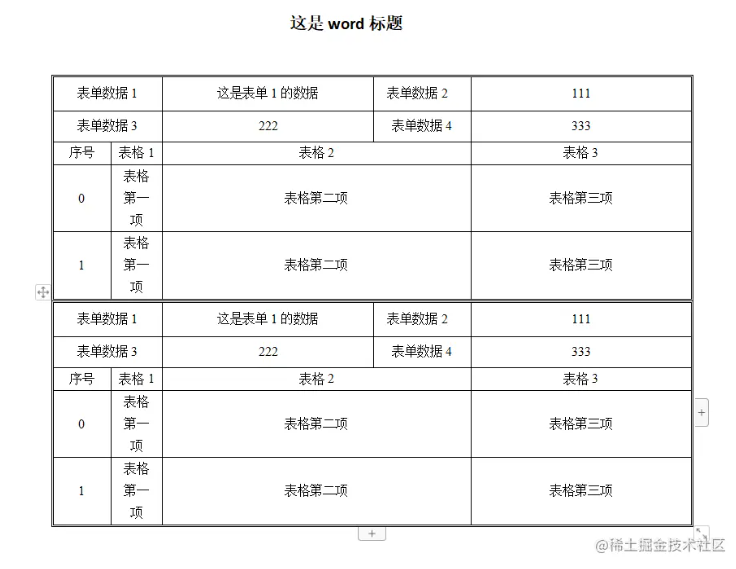
注: 上述方法中的path参数为你在vue项目中存放公共文件的位置,在vue2中为static文件夹下,在vue3中为public文件夹下。
二、根据html代码转换为word文件(推荐)
顾名思义,这个方法就是将我们在页面上书写的html代码直接转换成word文件,这也是我最推荐的一种方法,因为大部分的样式可控,且毕竟是我们较为熟悉的方式。需要插件: html-docx-js-typescript、file-saver。
import { saveAs } from "file-saver";

import { asBlob } from "html-docx-js-typescript";

 export function downloadWordWithHtmlString(html, name) {

  let htmlString = `

  <!DOCTYPE html>

  <html lang="en">

  <head>

    <meta charset="UTF-8">

    <title>Document</title>

  </head>

  <body>

    ${html}

  </body>

  </html>

  `;

  asBlob(htmlString).then((data) => {

    saveAs(data, `${name}.docx`);

  });

}
使用案例:
<div ref="word">

  <h3 style="text-align: center">word标题</h3>

  <table

    border="1"

    cellspacing="0"

    width="600"

    style="font-size: 12px; color: #000; text-align: center"

  >

    <tr height="50">

      <td width="100">1111</td>

      <td widt="200" colspan="2">合并单元格</td>

      <td width="300">最长的一项</td>

    </tr>

    <tr height="100">

      <td width="100">222</td>

      <td width="100">222</td>

      <td width="100">222</td>

      <td width="100">222</td>

    </tr>

  </table>

  <table width="600" border="1" cellspacing="0">

    <tr height="50">

      <td width="100">1111</td>

      <td rowspan="3">合并包括此行在内的下面三行</td>

    </tr>

    <tr height="100">

      <td>222</td>

    </tr>

    <tr height="300">

      <td>3333</td>

    </tr>

    <tr>

      <td>50</td>

    </tr>

  </table>

</div>

let word = ref(null);

downloadWordWithHtmlString(word.value.innerHTML, 'html字符串word.docx');
生成的word文件可以看到效果和在网页中的html代码一样:
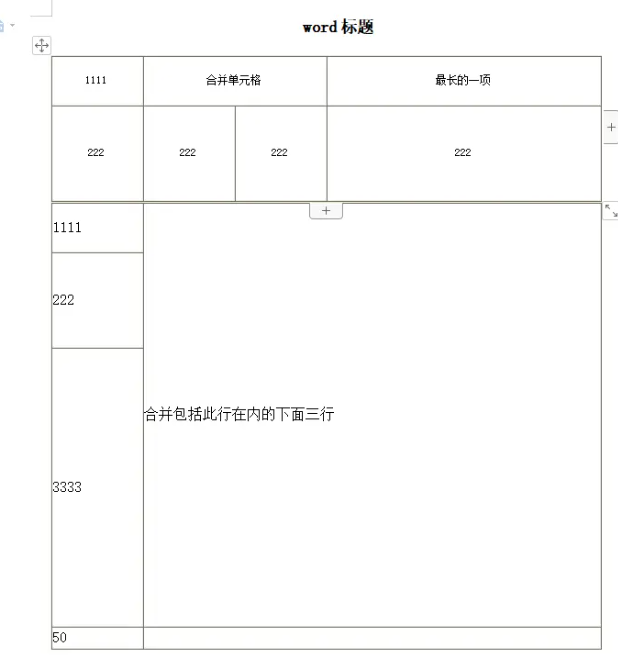
另外需要注意的是,若是需要在word中添加分页符,在需要分页的内容处添加CSS属性page-break-before即可。此时在浏览器上打印出innerHTML值会发现:

mdn上介绍page-break-before属性已经被break-before属性替代,但是经过我实际测试发现当html字符串是page-break: always时生成的word文件没有分页效果,反而是将其替换回page-break-before后实现了分页效果。若有大神知道这是什么问题还望不吝赐教。 因此需要在downloadWordWithHtmlString方法中添加一句正则: htmlString = htmlString.replace( /break-(after|before): page/g, "page-break-$1: always;" );,此时就能实现分页效果。
三、使用docx插件
第二种方法有个很致命的问题就是它无法在生成的word文件中添加图片页眉,我搜遍了npm也只找到一个能添加文字页眉的插件: html-docx-ts。要想实现这个需求,就需要用到docx插件。 docx官网的介绍是"Easily generate and modify .docx files with JS/TS. Works for Node and on the Browser.",意味着是一个专门用于生成word和修改word的文件。该插件就需要一个一个去配置你要生成的项,然后组合成一个word。一个简单的案例是:
import {

  Document,

  Paragraph,

  Header,

  TextRun,

  Table,

  TableRow,

  TableCell,

  WidthType,

  Packer,

} from "docx";

import { saveAs } from "file-saver";

const document = new Document({

    sections: [

      {

        headers: {

          default: new Header({

            children: [new Paragraph("我是页眉")],

          }),

        },

        children: [

          new Paragraph({

            children: [

              new TextRun({

                text: "我是文字内容",

                size: 16,

                bold: true,

              }),

            ],

          }),

          new Table({

            columnWidths: [1500, 7500],

            rows: [

              new TableRow({

                children: [

                  new TableCell({

                    width: {

                      size: 1500,

                      type: WidthType.DXA,

                    },

                    children: [

                      new Paragraph({

                        alignment: "center",

                        children: [

                          new TextRun({

                            text: "测试",

                            size: 24,

                            font: {

                              name: "楷体",

                            },

                          }),

                        ],

                      }),

                    ],

                  }),

                ],

              }),

            ],

          }),

        ],

      },

    ],

  });

  Packer.toBlob(document).then((blob) => {

    saveAs(blob, "test.docx");

  });
导出的word文件形式为:

面是我个人总结的比较常见能用到的功能和配置项:
// 导出文字

1.new Paragraph(text) -> 默认字体样式: 宋体,五号字

2.new Paragraph({

    children: [

      new TextRun({

        text: "我是文字内容",

        size: 16, // 对应word中的字体大小8

        bold: true, // 是否加粗

        underline: {

          type: UnderlineType.SINGLE,

          color: "#2e32ee",

        }, // 下划线类型及颜色

        font: {

          name: "仿宋", // 只要是word中有的字体类型都可以生效

        },

      }),

    ],

    indent: {

      left: 100,

    }, // 离左边距离 类似于margin-left

    spacing: {

      before: 150,

      after: 200,

    }, // 离上边和下边的距离 类似于margin-top/bottom

    alignment: "center", // 对齐方式

    pageBreakBefore: true, // 是否在这段文字前加入分页符

  })

 // 导出表格

new Table({

  columnWidths: [1500, 7500], // 表示单行有几项,总宽度是9000,对应宽度;

  rows: [

    new TableRow({

      children: [

        new TableCell({

          width: {

            size: 1500, // 需与columnWidths的第一项对应

            type: WidthType.DXA, // 官网的介绍是Value is in twentieths of a point

            // 因为表格的总宽度是以twips(每英寸的1/20)为单位进行计算的

          },

          children: [

            new Paragraph({

              alignment: "center",

              children: [

                new TextRun({

                  text: "测试",

                  size: 24,

                  font: {

                    name: "楷体",

                  },

                }),

              ],

            }),

          ],

        }),

        new TableCell({

          width: {

            size: 7500,

            type: WidthType.DXA,

          },

          children: [

            new Paragraph('ccc'),

          ],

          margins: {

            top: 500,

            bottom: 500,

            left: 500

          } // 类似于单元格内容的padding

        }),

      ],

    }),

  ],

})

// 导出图片

new Paragraph({

  children: [

    new ImageRun({

      data: "base64", // 图片需转成base64的形式

      transformation: {

        width: 100,

        height: 30,

      }, // 图片宽高

    }),

  ],

})

// 设置页眉页脚

headers: {

  default: new Header({

    children: [new Paragraph("我是页眉")],

  }),

},

footers: {

  default: new Footer({

    children: [new Paragraph("我是页脚")],

  }),

}
下面是一个完整的使用案例:
const document = new Document({

  sections: [

    {

      headers: {

        default: new Header({

          children: [

            new Paragraph({

              children: [

                new ImageRun({

                  data: "data:image/jpeg;base64,...",

                  transformation: {

                    width: 150,

                    height: 150,

                  },

                }),

              ],

            }),

          ],

        }),

      },

      footers: {

        default: new Footer({

          children: [new Paragraph("我是页脚")],

        }),

      },

      children: [

         new Paragraph("第一行直接默认形式"),

         new Paragraph({

           children: [

             new TextRun({

               text: "下一页",

             }),

           ],

           pageBreakBefore: true,

         }),

         new Table({

           columnWidths: [1500, 7500],

           rows: [

             new TableRow({

               children: [

                 new TableCell({

                   width: {

                     size: 1500,

                     type: WidthType.DXA,

                   },

                   children: [

                     new Paragraph({

                       alignment: "center",

                       children: [

                         new TextRun({

                           text: "测试",

                           size: 24,

                           font: {

                             name: "楷体",

                           },

                         }),

                       ],

                     }),

                   ],

                 }),

                 new TableCell({

                   width: {

                     size: 7500,

                     type: WidthType.DXA,

                   },

                   children: [

                     new Paragraph({

                       children: [

                         new ImageRun({

                           data: "data:image/jpeg;base64,...",

                           transformation: {

                             width: 150,

                             height: 150,

                           },

                         }),

                       ],

                     }),

                   ],

                   margins: {

                     top: 500,

                     bottom: 500,

                    left: 500,

                  },

                }),

              ],

            }),

          ],

        }),

      ],

    },

  ],

});

Packer.toBlob(document).then((blob) => {

  saveAs(blob, "test.docx");

});
此时导出的word文件如下:

本文转载于:
https://juejin.cn/post/7269022955471749131
如果对您有所帮助,欢迎您点个关注,我会定时更新技术文档,大家一起讨论学习,一起进步。

记录--Vue中前端导出word文件的更多相关文章
- vue项目前端导出word文件(bug解决)
摘要:之前项目中导出价格表是由后端实现,前端只需要调用接口下载word即可,后来业务改变比较大,word模版需要一直改动,后端改起来相对麻烦,后来直接前端自己定义模版,实现下载word文档. 一.需要 ...
- 纯前端导出pdf文件
纯前端js导出pdf,已经用于生产环境. 工具: 1.html2canvas,一种让html转换为图片的工具. 2.pdfmake或者jspdf ,一种生成.编辑pdf,并且导出pdf的工具. pdf ...
- java导出word文件
java导出word文件 test5.ftl文件生存方法, 第一步:用word新建test5.doc,填写完整模板,将需导出数据用${}代替 第二步:将test5.doc另存为test5.xml 第三 ...
- PDF.Js的使用—javascript中前端显示pdf文件
PDF.Js的使用—javascript中前端显示pdf文件 写于2018/12/6 起因是一个图片展示页面需要展示pdf格式的文件,所以查了半天决定使用pdf.js,我也不求有多了解它,能实现我想要 ...
- 记录vue中一些有意思的坑
记录vue中一些有意思的坑 'message' handler took 401ms 在出现这个之前,我一直纠结于 是如何使用vue-router或者不使用它,通过类似的v-if来实现.结果却出现这个 ...
- Vue中ESlint配置文件.eslintrc文件
很久没有分享和更新过了 今天就给大家分享一篇 Vue中ESlint配置文件.eslintrc文件详解吧 ------------------------------------------------ ...
- 利用模板导出文件(二)之jacob利用word模板导出word文件(Java2word)
https://blog.csdn.net/Fishroad/article/details/47951061?locationNum=2&fps=1 先下载jacob.jar包.解压后将ja ...
- web前端导出csv文件
前言 导出文件,使用最多的方式还是服务器端来处理.比如jsp 中使用response 的方式. 但是,有时候可能就想使用web 前端是否也可以把页面上的内容导出来呢? 比如说,导出页面的一个表格. 这 ...
- vue中配置axios.js文件,发送请求
为了统一管理请求,每个项目都会去配置axios:而不是在vue中直接使用,那样不好维护等等 下面是我配置的最基础的axios文件 第一步:首先新建一个axios文件,我是放在router文件下的 im ...
- vue中打包后vendor文件包过大
vue中webpack打包后vendor.xxx.js文件一般都特别大,其原因是因为我们引用的依赖都被压缩成一个js文件,这样会导致vendor文件过大.页面加载速度过慢,影响用户体验.所以我们就要把 ...
随机推荐
- Codeforces Round #887 (Div. 2) A-D
比赛链接 A 代码 #include <bits/stdc++.h> using namespace std; using ll = long long; int a[507]; bool ...
- NC19782 Tree
题目链接 题目 题目描述 修修去年种下了一棵树,现在它已经有n个结点了. 修修非常擅长数数,他很快就数出了包含每个点的连通点集的数量. 澜澜也想知道答案,但他不会数数,于是他把问题交给了你. 输入描述 ...
- Java核心技术卷1:基础知识(原书第10版)
本书为专业程序员解决实际问题而写,Java基础知识面覆盖很完整,可以帮助你深入了解Java语言和库.在卷I中,Horstmann主要强调基本语言概念和现代用户界面编程基础,深入介绍了从Java面向对象 ...
- 玩转C语言:深入理解输入输出函数的奥秘
欢迎大家来到贝蒂大讲堂 养成好习惯,先赞后看哦~ 所属专栏:C语言学习 贝蒂的主页:Betty's blog 1. 单字符输出函数 在C语言中有一个函数putchar专门负责输出单个字符,其语法如 ...
- SpringCloud Bus动态刷新中心化配置
说明 上一篇我们介绍了配置中心实战,并留下了一个配置修改后如何实现自动刷新的问题,下面就实际操作一下,首先是手动刷新单个微服务,其次是利用消息总线实现全部刷新. 手动动态刷新 动态刷新是当远程配置文件 ...
- Working with Dates in PL/SQL(PL/SQL中使用日期)
Working with Dates in PL/SQL By Steven Feuerstein 史蒂芬.佛伊尔斯坦 The previous articles in this introduct ...
- zabbix-server.service failed解决方法
1.问题描述 centos7中安装的zabbix server在重启系统后无法启动了,查看状态报错如下: 2.问题原因 selinux没有关闭! 3.解决 永久关闭selinux, 将SELINUX值 ...
- CF1398C Good Subarrays(写给我们萌新团体)
Good Subarrays 传送门: Good Subarrays - 洛谷 | 计算机科学教育新生态 (luogu.com.cn) 思路 暴力!!!!! 一如既往的暴力!!! 复杂度O(n^2) ...
- Linux Ubuntu 遇到的一些问题
Ubuntu 国内下载地址:https://mirrors.tuna.tsinghua.edu.cn/# 1. 安装一些常用的软件时,需要下载 amd.deb 类型的包,并使用下面命令安装 sudo ...
- Java Http客户端选型
JDK自带 HTTPURLConnect:功能单一 Apache HttpClient https://hc.apache.org/index.html 是一个比较古老的HTTP框架,使用非常普遍. ...