
WPF,图表控件
开源代码地址:https://github.com/bearhanQ/WPFFramework;
QQ群:332035933;
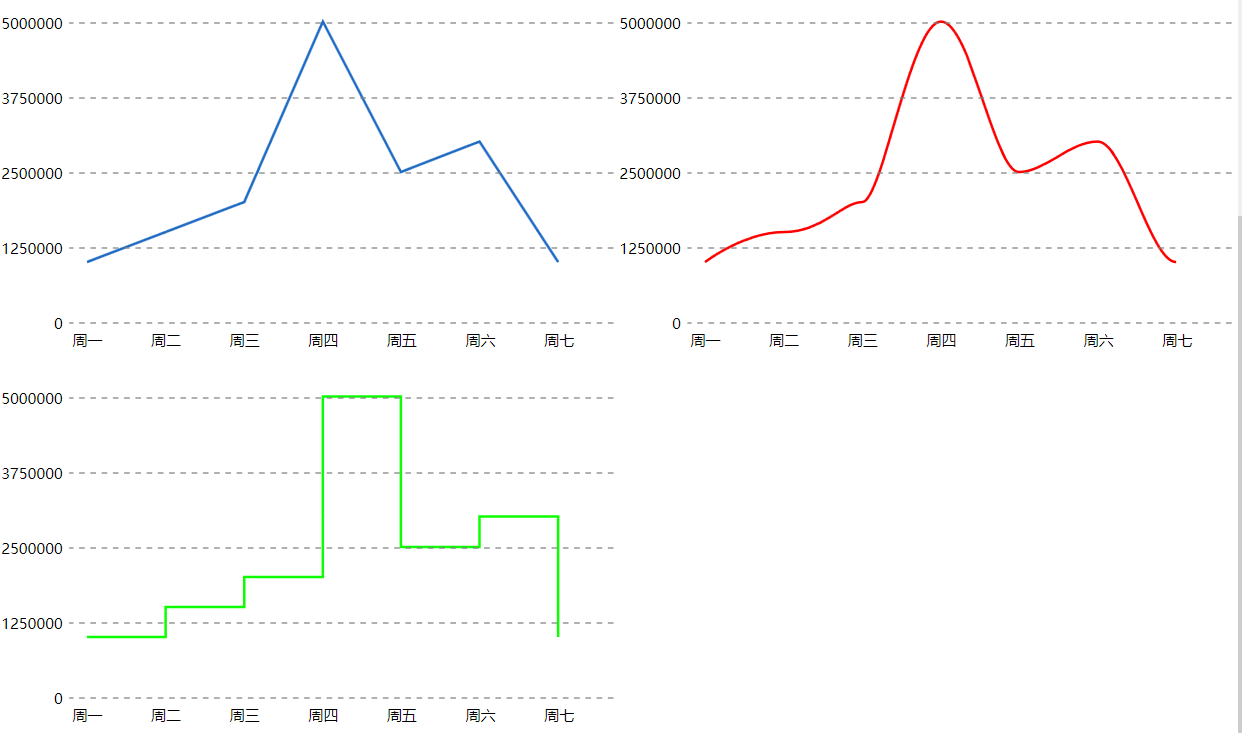
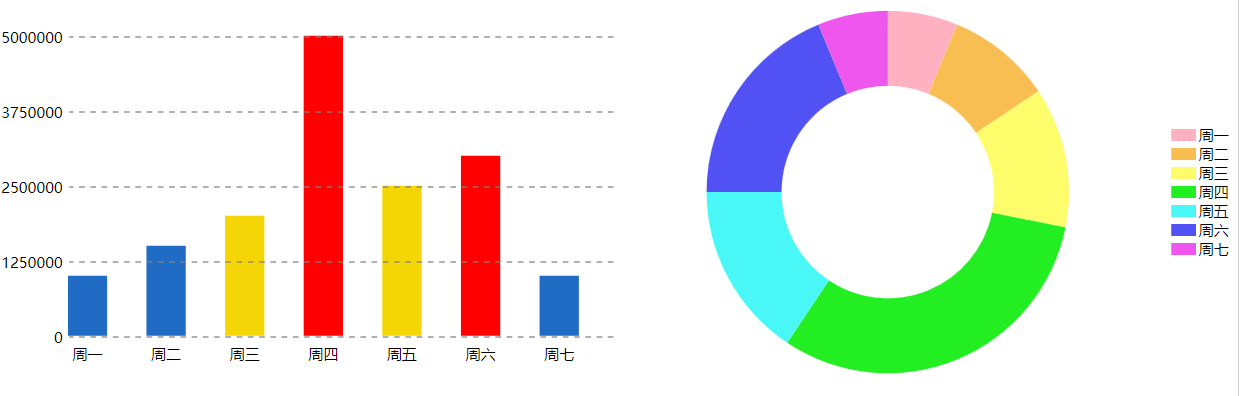
<UserControl x:Class="WpfBootstrap.View.ChartsView"

             xmlns="http://schemas.microsoft.com/winfx/2006/xaml/presentation"

             xmlns:x="http://schemas.microsoft.com/winfx/2006/xaml"

             xmlns:mc="http://schemas.openxmlformats.org/markup-compatibility/2006"

             xmlns:d="http://schemas.microsoft.com/expression/blend/2008"

             xmlns:local="clr-namespace:WpfBootstrap.View"

             xmlns:s="clr-namespace:System;assembly=mscorlib"

             xmlns:m="clr-namespace:WpfBootstrap.Model"

             xmlns:cc="clr-namespace:WPFTemplate;assembly=WPFTemplate"

             xmlns:p="clr-namespace:WpfBootstrap.Common"

             xmlns:vws="clr-namespace:WpfBootstrap.View"

             mc:Ignorable="d"

             d:DesignHeight="600" d:DesignWidth="400">

    <UserControl.Resources>

        <x:Array x:Key="revenueInfo" Type="{x:Type m:Revenue}">

            <m:Revenue Day="周一" Value="1000000"/>

            <m:Revenue Day="周二" Value="1500000"/>

            <m:Revenue Day="周三" Value="2000000"/>

            <m:Revenue Day="周四" Value="5000000"/>

            <m:Revenue Day="周五" Value="2500000"/>

            <m:Revenue Day="周六" Value="3000000"/>

            <m:Revenue Day="周七" Value="1000000"/>

        </x:Array>

        <p:BarValueWarningConverter x:Key="BarValueWarningConverter"/>

        <Style x:Key="barStyle1" TargetType="{x:Type cc:Bar}">

            <Setter Property="ItemContainerStyle">

                <Setter.Value>

                    <Style TargetType="{x:Type cc:BarItem}" BasedOn="{StaticResource {x:Type cc:BarItem}}">

                        <Style.Triggers>

                            <DataTrigger Binding="{Binding RelativeSource={RelativeSource Mode=Self}, Path=Value,Converter={StaticResource BarValueWarningConverter},ConverterParameter=2000000}" Value="True">

                                <DataTrigger.Setters>

                                    <Setter Property="Background" Value="#FFF4D505"/>

                                </DataTrigger.Setters>

                            </DataTrigger>

                            <DataTrigger Binding="{Binding RelativeSource={RelativeSource Mode=Self}, Path=Value,Converter={StaticResource BarValueWarningConverter},ConverterParameter=3000000}" Value="True">

                                <DataTrigger.Setters>

                                    <Setter Property="Background" Value="Red"/>

                                </DataTrigger.Setters>

                            </DataTrigger>

                        </Style.Triggers>

                    </Style>

                </Setter.Value>

            </Setter>

        </Style>

    </UserControl.Resources>

    <cc:CornerScrollViewer>

        <Grid>

            <Grid.ColumnDefinitions>

                <ColumnDefinition Width="*"/>

                <ColumnDefinition Width="*"/>

            </Grid.ColumnDefinitions>

            <Grid.RowDefinitions>

                <RowDefinition Height="300"/>

                <RowDefinition Height="300"/>

                <RowDefinition Height="300"/>

            </Grid.RowDefinitions>

            <cc:Bar ItemsSource="{StaticResource revenueInfo}" ValueMemberPath="Value" DisplayMemberPath="Day" Style="{StaticResource barStyle1}"/>

            <cc:Donut ItemsSource="{StaticResource revenueInfo}" ValueMemberPath="Value" DisplayMemberPath="Day"

                  Grid.Column="1" ArcThickness="60" Orientation="Vertical"/>

            <cc:LineChart Grid.Row="1" ItemsSource="{StaticResource revenueInfo}" DisplayMemberPath="Day" ValueMemberPath="Value" OpenAnimation="False"/>

            <cc:CurveChart Grid.Row="1" Grid.Column="1" ItemsSource="{StaticResource revenueInfo}"

                       DisplayMemberPath="Day" ValueMemberPath="Value" OpenAnimation="False"

                       Stroke="Red"/>

            <cc:StepChart Grid.Row="2" ItemsSource="{StaticResource revenueInfo}" Stroke="#FF0CFF00"

                      DisplayMemberPath="Day" ValueMemberPath="Value" OpenAnimation="False"/>

        </Grid>

    </cc:CornerScrollViewer>

</UserControl>
    public class Revenue

    {

        public string Month { get; set; }

        public string Day { get; set; }

        public string Profits { get; set; }

        public int Value { get; set; }

    }
WPF,图表控件的更多相关文章
- Visifire For WPF 图表控件 如何免费
可能用WPF生成过图表的开发人员都知道,WPF虽然本身的绘图能力强大,但如果每种图表都自己去实现一次的话可能工作量就大了, 尤其是在开发时间比较紧的情况下.这时候有必要借助一种专业的图表工具. Vis ...
- 一款开源免费的WPF图表控件ModernuiCharts
一款简洁好看的Chart控件 支持WPF.silverlight.Windows8 ,基本够用,主要是开源免费的.(商业控件ComponentOne for WPF要4w多呢) This proj ...
- WPF 图表控件之曲线绘制与移动
目的:绘制简单轻量级的曲线视图 二.实现效果: 1,绘制标准基准线 2,可拖动 三.用到控件 1,Canvas 2,Ellipse XAML代码: <Canvas Background=&quo ...
- WPF Visifire 图表控件
Visifire WPF 图表控件 破解 可能用WPF生成过图表的开发人员都知道,WPF虽然本身的绘图能力强大,但如果每种图表都自己去实现一次的话可能工作量就大了, 尤其是在开发时间比较紧的情况下.这 ...
- WPF 曲线图表控件(自制)(二)
原文:WPF 曲线图表控件(自制)(二) 版权声明:本文为博主原创文章,未经博主允许不得转载. https://blog.csdn.net/koloumi/article/details/775218 ...
- WPF 曲线图表控件(自制)(一)
原文:WPF 曲线图表控件(自制)(一) 版权声明:本文为博主原创文章,未经博主允许不得转载. https://blog.csdn.net/koloumi/article/details/775092 ...
- 【WPF】 OxyPlot图表控件学习
最近在学习OxyPlot图表控件,一些基本的学习心得,在这里记录一下,方便以后进行查找. 一.引用 OxyPlot控件可以直接在VS的 " Nuget " 里面下载 选择: ...
- C# WPF DevExpress 图表控件之柱状图
说明:DevExpress版本是17.1.VS是2015. XAML: <!--#region 图表控件--> <dxc:ChartControl x:Name="char ...
- [深入浅出Windows 10]QuickCharts图表控件库解析
13.4 QuickCharts图表控件库解析 QuickCharts图表控件是Amcharts公司提供的一个开源的图表控件库,这个控件库支持WPF.Silverlight.和Windows等 ...
- WPF第三方控件盘点
WPF统一的编程模型.语言和框架,实现了界面设计人员和开发人员工作可以分离的境界,鉴于WPF强大的优势,且一直是开发者关注的地方,下面和大家分享基于WPF项目开发需要用到的第三方控件,包括业界最受好评 ...
随机推荐
- String忽略大小写方法compareToIgnoreCase源码及Comparator自定义比较器
String忽略大小写方法compareToIgnoreCase源码及Comparator自定义比较器 //源码 public int compareToIgnoreCase(String str) ...
- CloseableHttpClient设置超时时间demo 未设置默认是2分钟
# CloseableHttpClient设置超时时间demo 未设置默认是2分钟 import org.apache.http.HttpHeaders; import org.apache.http ...
- 给你的博客加上个Live2D看板娘吧
Tips:当你看到这个提示的时候,说明当前的文章是由原emlog博客系统搬迁至此的,文章发布时间已过于久远,编排和内容不一定完整,还请谅解` 给你的博客加上个Live2D看板娘吧 日期:2017-12 ...
- HTML5 在泛在电力物联网的 10 大业务领域 2/3D 可视化应用
过去的 2018 年,我们认为是国内工业互联网可视化的元年,图扑软件作为在工业可视化领域的重度参与者,一线见证了众多 HTML5/Web 化.2D/3D 化的项目在工业界应用落地. 2019 年可以定 ...
- electron 安装遇到的各种奇怪问题解决
在国内,electron经常遇到各种问题,导致无法安装 在安装electron官网的快速入门步骤,到npx electron-forge import的时候,遇到了各种问题 npm install - ...
- 牛客小白月赛96(待F)
比赛链接:牛客小白月赛96 赛时感受 赛时在前面卡的时间有点长,C题没开longlong wa了n发,D题没考虑负数又wa了n发,然后来写E的时候时间就不长了,匆忙写一次交一发. A 思路 当其中一个 ...
- (数据科学学习手札162)Python GIS神器geopandas 1.0版本发布
本文完整代码及附件已上传至我的Github仓库https://github.com/CNFeffery/DataScienceStudyNotes 1 简介 大家好我是费老师,就在昨天,Python生 ...
- Goland断点调试一直进gopark
现象 使用Goland断点调试一直进gopark 分析 直接运行调试,不打断点,会有一个warning: undefined behavior - version of Delve is too ol ...
- Advanced .Net Debugging 10:事后调试
一.介绍 这是我的<Advanced .Net Debugging>这个系列的第十篇文章.这篇文章的内容是原书的第三部分的[高级主题]的第八章[事后调试].前面几篇文章,我们介绍了很多工具 ...
- IOS浏览器返回刷新页面
$(function () { var isPageHide = false; window.addEventListener('pageshow', function () { if (isPage ...