
【Java】【常用类】LocalDateTime 当前日期时间类 相关
LocalDate主要的三个API类:
java.time.LocalDate;

java.time.LocalDateTime;

java.time.LocalTime;
LocatDate对象获取:
@Test

void contextLoads() {

    // 获取方式

    LocalDate localDate = LocalDate.now();

    System.out.println(localDate);

    LocalDate localDate1 = LocalDate.of(2020, 5, 23);

    System.out.println(localDate1);

    // 2020-09-28

    // 2020-05-23

    int year = localDate.getYear(); // 取年

    int monthValue = localDate.getMonthValue(); // 取月

    Month month = localDate.getMonth(); // 取月的枚举对象

    int monthValue1 = month.getValue(); // 具体值可以通过该枚举对象获取

    // 除此之外Month还有一些获取其他信息的方法

    int maxDaysLength = month.maxLength(); // 该月的最大天数

    int minDaysLength = month.minLength(); // 该月的最小天数

    int dayOfMonth = localDate.getDayOfMonth(); // 按当月取天数

    int dayOfYear = localDate.getDayOfYear(); // 按本年取天数

    DayOfWeek dayOfWeek = localDate.getDayOfWeek(); // 按本周取天数?

    // 和月枚举对象一样,这里也是一个周枚举对象

    int value = dayOfWeek.getValue();

    System.out.println(dayOfWeek); // 打印为 MONDAY ....

}

private static void cryptTest() {

    final String PASSWORD = "123456";

    PasswordEncoder passwordEncoder = new BCryptPasswordEncoder();

    String encode = passwordEncoder.encode(PASSWORD);

    System.out.println(encode);

    boolean matches = passwordEncoder.matches(PASSWORD, encode);

    System.out.println(matches);

}
LocalDateTime & LocalTime:
@Test

void contextLoads() {

    LocalDateTime localDateTime1 = LocalDateTime.now();

    LocalDateTime localDateTime2 = LocalDateTime.of(2020, 2, 2, 13, 24, 52);

    System.out.println(localDateTime1); // 2020-09-28T16:01:48.248

    System.out.println(localDateTime2); // 2020-02-02T13:24:52

    LocalTime localTime1 = LocalTime.now();

    LocalTime localTime2 = LocalTime.of(20, 2, 2);

    System.out.println(localTime1); // 16:03:41.330

    System.out.println(localTime2); // 20:02:02

    int hour = localTime1.getHour();

    int minute = localTime1.getMinute();

    int second = localTime1.getSecond();

    int nano = localTime1.getNano();

    System.out.println("时 -> " + hour);         // 时 -> 16

    System.out.println("分 -> " + minute);       // 分 -> 6

    System.out.println("秒 -> " + second);       // 秒 -> 26

    System.out.println("Nano -> " + nano);      // Nano -> 206000000

}
GET方法
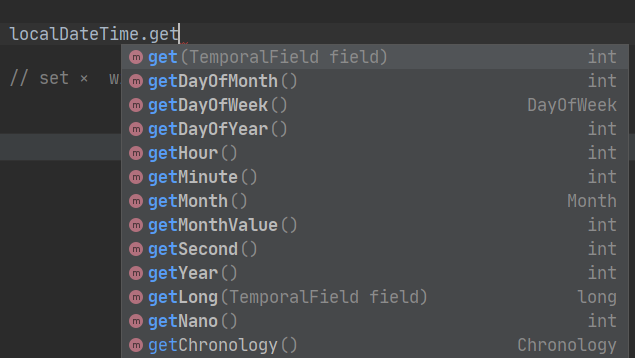
SET方法

增加时间
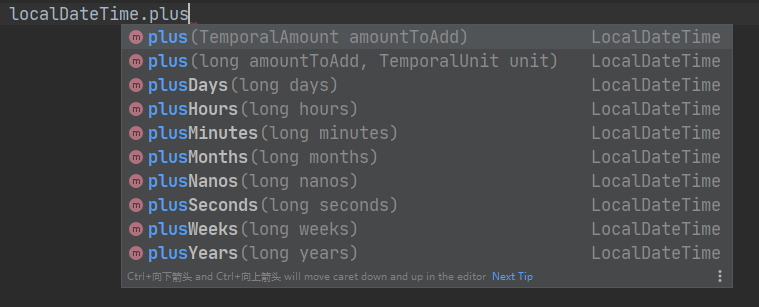
减少时间

public class DateTest {

    public static void main(String[] args) {

        LocalDate now1 = LocalDate.now();

        LocalTime now2 = LocalTime.now();

        LocalDateTime now3 = LocalDateTime.now();

        System.out.println("LocalDate.now() -> " + now1);

        System.out.println("LocalTime.now() -> " + now2);

        System.out.println("LocalDateTime.now() -> " + now3);

        /*

            LocalDate.now() -> 2020-04-19

            LocalTime.now() -> 21:16:03.854

            LocalDateTime.now() -> 2020-04-19T21:16:03.854

        */

        LocalDateTime localDateTime = LocalDateTime.now();

        System.out.println("localDateTime.getDayOfWeek() -> " + localDateTime.getDayOfWeek() );     // 按周算天

        System.out.println("localDateTime.getDayOfMonth() -> " + localDateTime.getDayOfMonth() );   // 按月算天

        System.out.println("localDateTime.getDayOfYear() -> " + localDateTime.getDayOfYear() );     // 按年算天

        /*

            localDateTime.getDayOfWeek() -> SUNDAY

            localDateTime.getDayOfMonth() -> 19

            localDateTime.getDayOfYear() -> 110

         */

        System.out.println( localDateTime.getSecond()       );// 取秒

        System.out.println( localDateTime.getMinute()       );// 取分

        System.out.println( localDateTime.getHour()         );// 取时

        System.out.println( localDateTime.getMonth()        );// 取月 英文大写

        System.out.println( localDateTime.getMonthValue()   );// 取月 数值表示

        System.out.println( localDateTime.getYear()         );// 取年

        // set ×  with √

    }

}
instant 瞬时时间 ,精度达到纳秒级
public class DateTest {

    public static void main(String[] args) {

        Instant instant = Instant.now();

        System.out.println(instant);

        //  2020-04-19T13:47:58.712Z 本初子午线的标准时间

        // 我们是东八时区,添加8小时的偏移量

        OffsetDateTime offsetDateTime = instant.atOffset(ZoneOffset.ofHours(8));

        System.out.println(offsetDateTime);

        // 从实例获取毫秒数 时间戳

        long epochMilli = instant.toEpochMilli();

        System.out.println(epochMilli);

        // 通过时间戳注入产生instant实例

        Instant epochMilli1 = Instant.ofEpochMilli(epochMilli);

        System.out.println(epochMilli1);

    }

}
DateTimeFormatter
public class DateTest {

    public static void main(String[] args) {

        // 预定义的标准格式

        DateTimeFormatter dateTimeFormatter = DateTimeFormatter.ISO_LOCAL_DATE_TIME;

        // 事件对象

        LocalDateTime now = LocalDateTime.now();

        // 转换格式 日期 -> 字符串格式

        String format = dateTimeFormatter.format(now);

        // 格式

        System.out.println( now );

        System.out.println( format );

        // 日期 转 字符串格式

        TemporalAccessor parse = dateTimeFormatter.parse("2020-03-19T22:09:46.345");

        System.out.println(parse);

        DateTimeFormatter dateTimeFormatter1 = DateTimeFormatter.ofLocalizedDate(FormatStyle.FULL);

        // ofLocalizedDateTime();

        // ofLocalizedDate(); 按Date就支持FULL全格式

        // ofPattern("自定义格式"); "yyyy-MM-dd hh:mm:ss"

        // FormatStyle.FULL     2020年4月19日 星期日

        // FormatStyle.LONG     2020年4月19日 下午10时15分01秒

        // FormatStyle.MEDIUM   2020-4-19 22:14:28

        // FormatStyle.SHORT    20-4-19 下午10:16

        String format1 = dateTimeFormatter1.format(now);

        System.out.println(now);

        System.out.println(format1);

        TemporalAccessor parse1 = dateTimeFormatter1.parse(format1);

        System.out.println(parse1);

    }

}
案例,制作日历:
@Test

void contextLoads() {

    localDateCalendar();

}

private static void localDateCalendar() {

    LocalDate now = LocalDate.now();

    int year = now.getYear();

    int month = now.getMonth().getValue();

    int dayOfMonth = now.getDayOfMonth();

    // 设置这个月的第一天

    now = now.minusDays(dayOfMonth - 1);

    // 找到这一天为周几

    int value = now.getDayOfWeek().getValue();

    // 开始渲染控制台输出样式

    System.out.println("Mon Tue Wed Thu Fri Sat Sun");

    for (int i = 1; i < value; i++) System.out.print("   ");

    while (now.getMonthValue() == month) {

        System.out.printf("%3d", now.getDayOfMonth());

        if (now.getDayOfMonth() == dayOfMonth) System.out.print("*");

        else System.out.print(" ");

        now = now.plusDays(1);

        if (now.getDayOfWeek().getValue() == 1) System.out.println();

    }

    if (now.getDayOfWeek().getValue() != 1) System.out.println();

}
打印结果:
Mon Tue Wed Thu Fri Sat Sun

     1   2   3   4   5   6

  7   8   9  10  11  12  13

 14  15  16  17  18  19  20

 21  22  23  24  25  26  27

 28* 29  30
其他API
ZoneId

ZoneDateTime

Clock

Duration

Period

TemporalAdjuster

TemporalAdjusters
【Java】【常用类】LocalDateTime 当前日期时间类 相关的更多相关文章
- Java 线程安全LocalTime 和LocaldateTime 新的Date和Time类 -JDK8新时间类的简单使用
不可变类且线程安全 LocalDate .java.time.LocalTime 和LocaldateTime 新的Date和Time类 DateTimeFormatter ==https://ww ...
- 日期类时间类,日期时间类,单例模式,装箱与拆箱,数字类随机数,BigDecimal总结
1.日期类,时间类,日期时间类 初步日期使用方法及格式转换方法(旧方法): 格式://Mon Jul 30 11:26:05 CST 2018 年月日时分秒 CST代表北 ...
- Java基础——常用类之日期时间类
如果有机会,请尝试Java8中全新的时间日期API!(参见Java8新特性随笔) 如果还是使用Java7及之前的版本,那么你可以尝试一些工具类(参考使用工具类相关的Hutool-DateUtil) 如 ...
- java 常用的验证方法帮助类
import java.text.ParseException; import java.util.Collection; import java.util.Map; /** * 常用的验证方法帮助类 ...
- 【Java SE进阶】Day01 Object类、日期时间类、System类、StringBuilder类、包装类
一.Object类 1.概述:Java语言的根类/超类,默认继承自Object类 2.常用方法 toString():返回对象的字符串表示--对象类型@内存地址值 可以对其重写@Override eq ...
- Object类、日期时间类、system类及StringBuilder字符串容器
一.Object类常用API 1.1 概述 java.lang.Object类是Java语言中的根类,即所有类的父类.Object类中描述的所有方法子类都可以使用.在对象实例化的时候,最终找的父类就是 ...
- java_Object类、日期时间类、System类、包装类
Object类 java.lang.Object 类是所有类的父类.它描述的所有方法子类都可以使用.在对象实例化的时候,最终找的父类就是Object. 如果一个类没有特别指定父类, 那么默认则继承自O ...
- java常用加密和解密工具类EncryptUtil.java
package cn.util; import java.io.UnsupportedEncodingException; import java.security.MessageDigest; im ...
- 用CTime类得到当前日期 时间
(1)定义一个CTime类的对象CTime time: (2)得到当前时间time = CTime::GetCurrentTime(); (3)Get Year(),GetMonth(),GetDay ...
- java 常用类库:操作系统System类,运行时环境Runtime
System类: System 类代表Java程序的运行平台,程序不能创建System类的对象, System类提供了一些类变量和类方法,允许直接通过 System 类来调用这些类变量和类方法. Sy ...
随机推荐
- 美团一面:什么是CAS?有什么优缺点?我说我只用过AtomicInteger。。。。
引言 传统的并发控制手段,如使用synchronized关键字或者ReentrantLock等互斥锁机制,虽然能够有效防止资源的竞争冲突,但也可能带来额外的性能开销,如上下文切换.锁竞争导致的线程阻塞 ...
- ASP.NET MVC 出现: Uncaught ReferenceError: $ is not defined
ASP.NET MVC 出现: Uncaught ReferenceError: $ is not defined 错误 将 _Layout.cshtml 中的三行代码,移动到 <head> ...
- 《Android开发卷——自定义日期选择器(三)》
继 <Android开发卷--自定义日期选择器(一)>:http://blog.csdn.net/chillax_li/article/details/19047 ...
- JVM性能分析与故障排查
引言 JVM调优 程序在上线前的测试或运行中有时会出现一些大大小小的JVM问题,比如cpu load过高.请求延迟.tps降低等,甚至出现内存泄漏(每次垃圾收集使用的时间越来越长,垃圾收集频率越来越高 ...
- Playbook条件语句
目录 Playbook条件语句 1. when的基本使用 1.1 when的基本示例 1.2比较运算符 1.3 比较运算符示例 1.4 逻辑运算符 1.5 逻辑运算符示例 2. 条件判断与block ...
- C# pythonnet(2)_傅里叶变换(FFT)
Python代码如下 import pandas as pd import numpy as np import matplotlib.pyplot as plt # 读取数据 data = pd.r ...
- QT学习:06 常用的全局变量与宏定义
--- title: framework-cpp-qt-06-常用的全局变量与宏定义 EntryName: framework-cpp-qt-06-global date: 2020-04-10 11 ...
- 专用M4F+四核A53,异构多核AM62x让工业控制“更实时、更安全” Tronlong创龙科技5 秒前 1 德州仪器 TI芯片
Cortex-M4F + Cortex-A53异构多核给工业控制带来何种意义? 创龙科技SOM-TL62x工业核心板搭载TI AM62x最新处理器,因其Cortex-M4F + Cortex-A53异 ...
- P8571 题解
既然字符串的总长一定,不妨对于每个询问中的 \(s_k\) 的长度根号分治,假定分治阈值为 \(B\).下面令 \(L\) 为所有串长度总和. 对于长度大于 \(B\) 的字符串,这样的不同字符串至多 ...
- Mac 版本10.15.4 安装 telnel工具
下载脚本 mac新版本安装telnel发生的变化,进入下面的链接,右键另存为,保存到桌面 https://raw.githubusercontent.com/Homebrew/install/mast ...