
Vertx 接入Redis (八)
项目github地址:https://github.com/fotocj007/VertxWebApi
web服务器经典的mysql+redis模式,这里介绍redis的接入。
一:导入gradle
1 compile group: 'io.vertx', name: 'vertx-redis-client', version: '3.9.8'
二:添加配置文件
1 {

2   "sources": [

3     {"connectionString": "redis://:foto_CJ123@10.0.201.215:6379/0", "maxPoolSize":6},

4     {"connectionString": "redis://:foto_CJ123@10.0.201.215:6379/1", "maxPoolSize":6},

5     {"connectionString": "redis://:foto_CJ123@10.0.201.215:6379/2", "maxPoolSize":6},

6     {"connectionString": "redis://:foto_CJ123@10.0.201.215:6379/3", "maxPoolSize":6}

7   ],

8   "poolSize": 8

9 }
三:添加json文件加载 RedisConfig
 1 public class RedisConfig extends JsonObjectConfig {

 2     private ArrayList<RedisOptions> sources;

 3

 4     private int poolSize;

 5

 6     public RedisConfig(Vertx vertx, String path){

 7         super(vertx,path);

 8     }

 9

10     @Override

11     public void parse(JsonObject jsonObject) {

12         poolSize = jsonObject.getInteger("poolSize");

13         sources = new ArrayList<>();

14         JsonArray sourcesJa = jsonObject.getJsonArray("sources");

15         for (int i = 0; i < sourcesJa.size();i++) {

16             JsonObject jo = sourcesJa.getJsonObject(i);

17

18             RedisOptions redisOpt = new RedisOptions(jo);

19

20             sources.add(redisOpt);

21         }

22     }

23

24     public ArrayList<RedisOptions> getSources() {

25         return sources;

26     }

27

28     public int getPoolSize() {

29         return poolSize;

30     }

31 }
四:添加RedisPool
 1 public class ConsistentHashWithNode {

 2     private static final String VIR_NODE_NAME_SEPARATOR = "@VirNode";

 3

 4     private static final List<String> instanceInfo = new LinkedList<>();

 5

 6     /**

 7      * 初始化虚拟节点 key表示服务器虚拟节点的hash值,value表示服务器虚拟节点的名称

 8      */

 9     private static final SortedMap<Integer, String> serverHashMap = new TreeMap<>();

10     /**

11      * 设置每台服务器需要的虚拟节点

12      */

13     private static final int VIRTUAL_NODES = 1000;

14

15     /**

16      * 构建hash环

17      * @param servers

18      */

19     public ConsistentHashWithNode(List<String> servers) {

20         //首先本地缓存一份实例信息

21         instanceInfo.addAll(servers);

22         instanceInfo.forEach(instance -> {

23             for (int i = 0; i < VIRTUAL_NODES; i++) {

24                 //构建虚拟节点

25                 String virNodeName = instance + VIR_NODE_NAME_SEPARATOR + i;

26                 serverHashMap.put(hash(virNodeName), virNodeName);

27             }

28         });

29     }

30

31     public static void addNode(String server) {

32         //首先本地缓存一份实例信息

33         instanceInfo.add(server);

34         for (int i = 0; i < VIRTUAL_NODES; i++) {

35             //构建虚拟节点

36             String virNodeName = server + VIR_NODE_NAME_SEPARATOR + i;

37             serverHashMap.put(hash(virNodeName), virNodeName);

38         }

39     }

40

41     /**

42      * 根据数据获取真实存储服务节点

43      * @param data

44      * @return

45      */

46     public static String getServer(String data) {

47         Integer firstKey;

48         SortedMap<Integer, String> subSortedMap = serverHashMap.tailMap(hash(data));

49         if (subSortedMap.isEmpty()){

50             firstKey = serverHashMap.firstKey();

51         }else{

52             firstKey = subSortedMap.firstKey();

53         }

54

55         String virNodeName = serverHashMap.get(firstKey);

56         return virNodeName.substring(0, virNodeName.indexOf(VIR_NODE_NAME_SEPARATOR));

57     }

58

59     /**

60      * FNV1_32_HASH 百度

61      * @param str

62      * @return

63      */

64     public static int hash(String str) {

65         final int p = 16777619;

66         int hash = (int)2166136261L;

67         for (int i = 0; i < str.length(); i++) {

68             hash = (hash ^ str.charAt(i)) * p;

69         }

70         hash += hash << 13;

71         hash ^= hash >> 7;

72         hash += hash << 3;

73         hash ^= hash >> 17;

74         hash += hash << 5;

75         if (hash < 0)

76             hash = Math.abs(hash);

77         return Math.abs(hash);

78     }

79 }
 1 public class RedisPool {

 2     private int poolSize;

 3

 4     private final Vertx vertx;

 5

 6     private final List<RedisOptions> dataSources;

 7

 8     private final Map<String,List<RedisAPI>> pools;

 9

10     /*************************

11      * Redis连接池参数配置和初始化

12      */

13     public RedisPool(Vertx vertx, RedisConfig redisConfig){

14         this.vertx = vertx;

15         this.poolSize = redisConfig.getPoolSize();

16         this.dataSources = redisConfig.getSources();

17         pools = new HashMap<>();

18         initPool();

19     }

20

21     private void initPool(){

22         for (RedisOptions dataSource : dataSources) {

23             String server = dataSource.getEndpoint();

24

25             List<RedisAPI> list = new ArrayList<>();

26             for (int j = 1; j <= poolSize; j++) {

27                 RedisClient client = new RedisClient(vertx,dataSource);

28

29                 list.add(RedisAPI.api(client));

30             }

31             pools.put(server, list);

32             ConsistentHashWithNode.addNode(server);

33         }

34     }

35

36     /*************************

37      * 根据下标获取也给链接

38      */

39     public RedisAPI getClientByIndex(int dbId){

40         RedisOptions options = dataSources.get(dbId);

41         String server = options.getEndpoint();

42         return pools.get(server).get(ThreadLocalRandom.current().nextInt(poolSize));

43     }

44

45     /*************************

46      * 根据hashKey获取一个链接

47      */

48     public RedisAPI getClient(String key){

49         String server = ConsistentHashWithNode.getServer(key);

50         return pools.get(server).get(ThreadLocalRandom.current().nextInt(poolSize));

51     }

52

53     /*************************

54      * 关闭连接

55      */

56     public void close(){

57         for(List<RedisAPI> list : pools.values()){

58             for(RedisAPI client : list){

59                 client.close();

60             }

61         }

62     }

63 }
五:Redis帮助类
 1 public class RedisUtil {

 2     private final Logger logger = LoggerFactory.getLogger(RedisUtil.class);

 3

 4     private final RedisPool redisPool;

 5

 6     public RedisUtil(RedisPool redisPool){

 7         this.redisPool = redisPool;

 8     }

 9

10     /**

11      * db = 0

12      * 数据格式 key-value

13      */

14     public void setConfigValue(String rKey, String value,long ex){

15         redisPool.getClientByIndex(0).setex(rKey,String.valueOf(ex),value,res -> {

16             if(!res.succeeded()) {

17                 logger.error("setConfigValue key="+rKey,res.cause());

18             }

19         });

20     }

21

22     public void getConfigValue(String rKey, Handler<AsyncResult<Response>> handler){

23         redisPool.getClientByIndex(0).get(rKey,res -> {

24             if(res.succeeded()) {

25                 handler.handle(Future.succeededFuture(res.result()));

26             }else {

27                 handler.handle(Future.failedFuture(res.cause()));

28                 logger.error("getConfigValue key="+rKey,res.cause());

29             }

30         });

31     }

32

33     /**

34      * 分库

35      * 数据格式 key-value

36      */

37     public void setValueStrById(String passportId,String rKey, String value,long ex){

38         redisPool.getClient(passportId).setex(rKey,String.valueOf(ex),value,res -> {

39             if(!res.succeeded()) {

40                 logger.error("setPlayerValue key="+rKey,res.cause());

41             }

42         });

43     }

44

45     public void getValueStrById(String passportId,String rKey,Handler<AsyncResult<Response>> handler){

46         redisPool.getClient(passportId).get(rKey,res -> {

47             if(res.succeeded()) {

48                 handler.handle(Future.succeededFuture(res.result()));

49             }else {

50                 handler.handle(Future.failedFuture(res.cause()));

51                 logger.error("getValueStrById key="+rKey,res.cause());

52             }

53         });

54     }

55

56 }
六:初始化,修改Config
 1 public class Configure {

 2     private static final Configure ourInstance = new Configure();

 3

 4     public static Configure getInstance() {

 5         return ourInstance;

 6     }

 7

 8     protected Vertx vertx;

 9

10     public MysqlConfig mysqlConfig;

11     private MySQLUtil mySQLPool;

12     public DaoManager daoManager;

13

14     private RedisConfig redisConfig;

15     private RedisPool redisPool;

16     public RedisUtil redisUtil;

17

18     public void init(Vertx vertx){

19         this.vertx = vertx;

20

21         initHandler();

22

23         loadConfig();

24

25         initDb();

26         initRedis();

27     }

28

29     private void initHandler(){

30         HandlerManager.getInstance().addHandler(new DemoHandler());

31     }

32

33     /**

34      *  加载db和Redis配置文件

35      */

36     protected void loadConfig(){

37         mysqlConfig = new MysqlConfig(vertx, "res/mysql.json");

38         redisConfig = new RedisConfig(vertx, "res/redis.json");

39     }

40

41     protected void initDb(){

42         List<JsonObject> list = new ArrayList<>();

43         for(int i = 0; i< mysqlConfig.configs.size();i++){

44             list.add(mysqlConfig.configs.getJsonObject(i));

45         }

46         mySQLPool = new MySQLUtil(vertx,2,list);

47

48         daoManager = new DaoManager(mysqlConfig,mySQLPool);

49     }

50

51     /**

52      *  初始化Redis

53      */

54     protected void initRedis(){

55         redisPool = new RedisPool(vertx,redisConfig);

56         redisUtil = new RedisUtil(redisPool);

57     }

58 }
七:测试一下,修改DemoHandler
    PlayerInfo info = new PlayerInfo();

        info.setUserName("kkkkkdd");

        info.setAge(100);

//        PlayerDao client = Configure.getInstance().daoManager.getPlayerDao();

//        client.saveBaseEntity(info,res -> {

//

//        });

        String key = "demo_test_key";

        Configure.getInstance().redisUtil.setConfigValue(key, JsonObject.mapFrom(info).toString(),300);

        try {

            Thread.sleep(1000);

        } catch (InterruptedException e) {

            e.printStackTrace();

        }

        Configure.getInstance().redisUtil.getConfigValue(key,res -> {

            System.out.println(res.result().toString());

            PlayerInfo rInfo = new JsonObject(res.result().toString()).mapTo(PlayerInfo.class);

            System.out.println(rInfo.getUserName());

        });
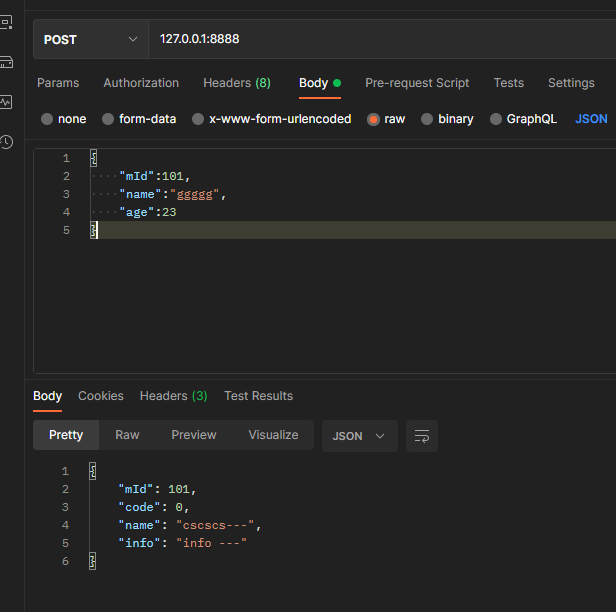
发起请求:

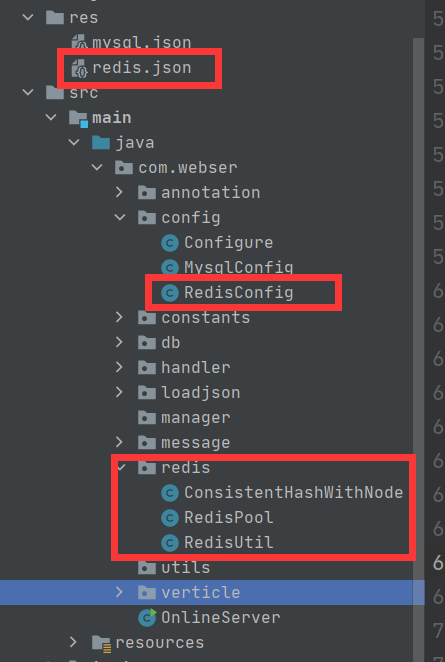
项目结构:
Vertx 接入Redis (八)的更多相关文章
- python框架之Django(16)-接入Redis
准备 安装Redis 参考 Ubuntu 中 Redis 的安装与使用. 在python中使用Redis 参考 python 中使用 Redis . 安装依赖包 在 Django 中接入 Redis ...
- Android支付接入(八):Amazon亚马逊支付
下面跟大家一起走一遍Amazon亚马逊的支付,亚马逊目前刚把业务拓展到大陆市场,但这并不代表Amazon支付不成熟,恰恰相反,Amazon的支付流程,支付结果获取及测试另人称赞,支付流程.测试流程简洁 ...
- 高可用Redis(八):Redis主从复制
1.Redis复制的原理和优化 1.1 Redis单机的问题 1.1.1 机器故障 在一台服务器上部署一个Redis节点,如果机器发生主板损坏,硬盘损坏等问题,不能在短时间修复完成,就不能处理Redi ...
- Redis(八):spring data redis 理解
前言 Spring Data Redis project,应用了Spring概念来开发使用键值形式的数据存储的解决方案.我们(官方)提供了一个 "template" ,这是一个高级 ...
- Redis——SpringBoot项目使用Lettuce和Jedis接入Redis集群
Jedis连接Redis: 非线程安全 如果是多线程环境下共用一个Jedis连接池,会产生线程安全问题,可以通过创建多个Jedis实例来解决,但是创建许多socket会影响性能,因此好一点的方法是使用 ...
- 《闲扯Redis八》Redis字典的哈希表执行Rehash过程分析
一.前言 随着操作的不断执行, 哈希表保存的键值对会逐渐地增多或者减少, 为了让哈希表的负载因子(load factor)维持在一个合理的范围之内, 当哈希表保存的键值对数量太多或者太少时, 程序需要 ...
- redis支持远程接入的安全防护问题
如果我们没有启用保护模式,支持远程接入,启用默认端口6379,而且是用root用户启动的,那么基本上redis就是在裸奔了,人家分分钟搞你没商量. 我们模拟一下,现在机器A(ip假设为10.100.1 ...
- Redis集群最佳实践
今天我们来聊一聊Redis集群.先看看集群的特点,我对它的理解是要需要同时满足高可用性以及可扩展性,即任何时候对外的接口都要是基本可用的并具备一定的灾备能力,同时节点的数量能够根据业务量级的大小动态的 ...
- thinkphp5使用redis实现秒杀商品活动
如题,废话少说贴码为上↓ // 初始化redis数据列表 模拟库存50,redis搭建在centos中已开启 public function redisinit(){ $store=50; // 库存 ...
- 高可用Redis(九):Redis Sentinel
1.主从复制高可用的问题 主从复制高可用的作用 1.为master提供备份,当master宕机时,slave有完整的备份数据 2.对master实现分流,实现读写分离 但是主从架构有一个问题 1.如果 ...
随机推荐
- 大型通用电子制造执行系统(MES)
简介: 系统参考西门子MOM智能制造Opcenter工业软件制造执行系统Camstar电子套件人机料法环数据建模业务对象和车间生产执行事务逻辑,采用面向对象分层设计与C#编程开发:包含电子制造企业 ...
- DeepSeek 官方推出的实用集成工具百宝箱,建议收藏!
项目介绍 该实用集成工具百宝箱汇聚了DeepSeek官方精心挑选和推荐的各类集成工具(其中包括:应用程序.AI Agent 框架.AI数据应用框架.RAG 框架.浏览器插件.VS Code 插件等), ...
- Netty源码—8.编解码原理
大纲 1.读数据入口 2.拆包原理 3.ByteToMessageDecoder解码步骤 4.解码器抽象的解码过程总结 5.Netty里常见的开箱即用的解码器 6.writeAndFlush()方法的 ...
- Vscode写Markdown解决图片使用问题
最近使用Vscode+Markdown写博客,图片不好弄,想了一下办法,有需要的人可以参考,有更方便的方法欢迎提出! 首先为了解决图片粘贴问题,下载一个扩展,Markdown Paste,下载 ...
- 生命游戏Delphi实现
生命游戏,康威生命游戏(Game of Life),剑桥大学约翰·何顿·康威设计的计算机程序. 生命游戏没有游戏玩家各方之间的竞争,也谈不上输赢,可以把它归类为仿真游戏.事实上,也是因为它模拟和显示的 ...
- Tengine-rpm 基于Tengine 3.1深度定制优化
Tengine RPM Tengine是亚洲最大的电子商务网站淘宝网推出的高性能的HTTP和反向代理web服务器.它基于 Nginx HTTP 服务器,拥有许多高级功能.事实证明,Tengine 在淘 ...
- zookeeper选主机制
Zookeeper选主机制 一.Server工作状态 每个Server在工作过程中有四种状态: LOOKING:竞选状态,当前Server不知道leader是谁,正在搜寻. LEADING:领导者状态 ...
- Spring AI与DeepSeek实战四:系统API调用
一.概述 在 AI 应用开发中,工具调用 Tool Calling 是增强大模型能力的核心技术.通过让模型与外部 API 或工具交互,可实现 实时信息检索(如天气查询.新闻获取).系统操作(如创建任务 ...
- 勒索病毒分析-2024wdb-re2
检查相关信息 可以看到病毒存在VMProtect虚拟壳 简单脱壳 首先我在x64debug中运行一次,发现没有中断退出,证明大概率没有反调试,但是有crc检测,所以尽量不下int3断点(脱壳时). 一 ...
- LightGBM算法原理及Python实现
一.概述 LightGBM 由微软公司开发,是基于梯度提升框架的高效机器学习算法,属于集成学习中提升树家族的一员.它以决策树为基学习器,通过迭代地训练一系列决策树,不断纠正前一棵树的预测误差,逐步 ...