
spring-ai 学习系列(4)-MCP 处理过程分析
上一节,通过1个最基本的MCP Server/Client示例,初步了解了MCP的用法.STDIO模式下,client与server同在1台机器上,client会创建1个子进程来启动server,然后使用json rpc来做为约定的消息格式进行通讯。
如果想知道交互过程中的json原文,可以下载 https://github.com/modelcontextprotocol/java-sdk 源码,找到io.modelcontextprotocol.client.transport.StdioClientTransport 这个类:
在 startInboundProcessing、startOutboundProcessing 这2个方法中,加2行日志,把原文通过日志打印出来
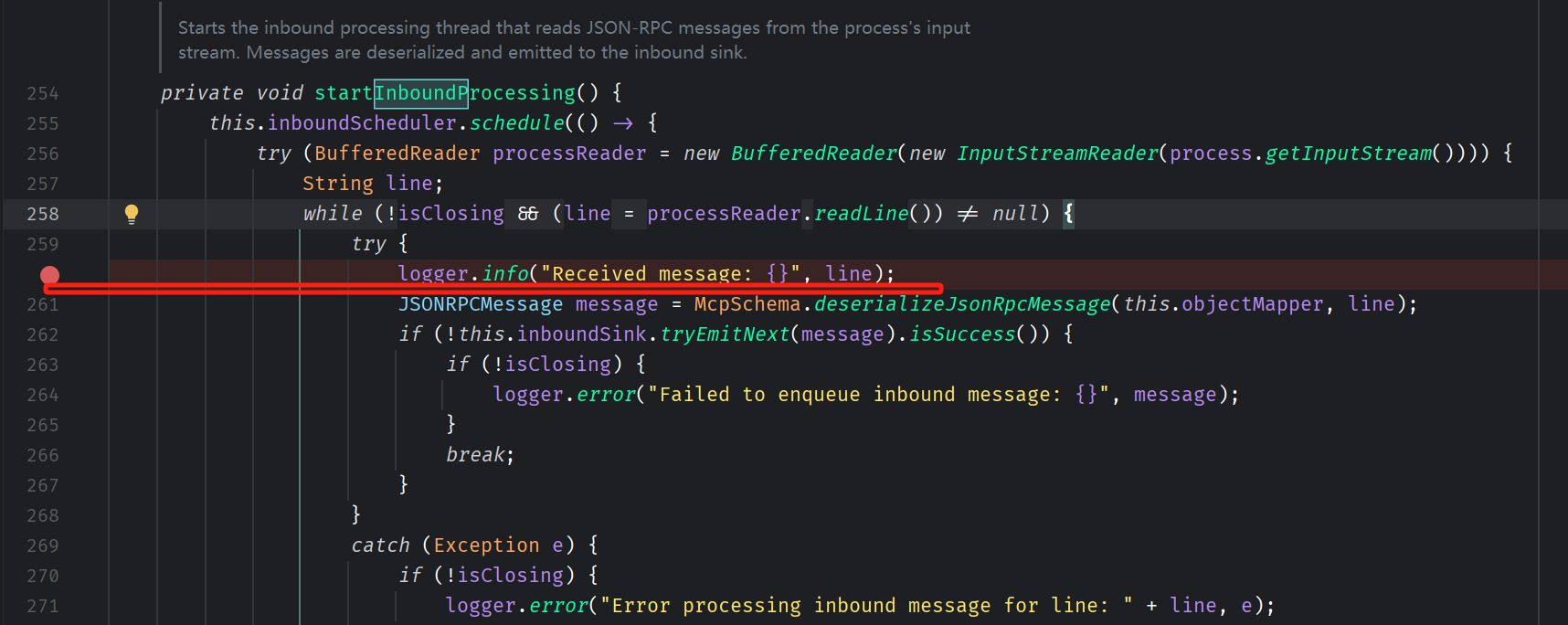
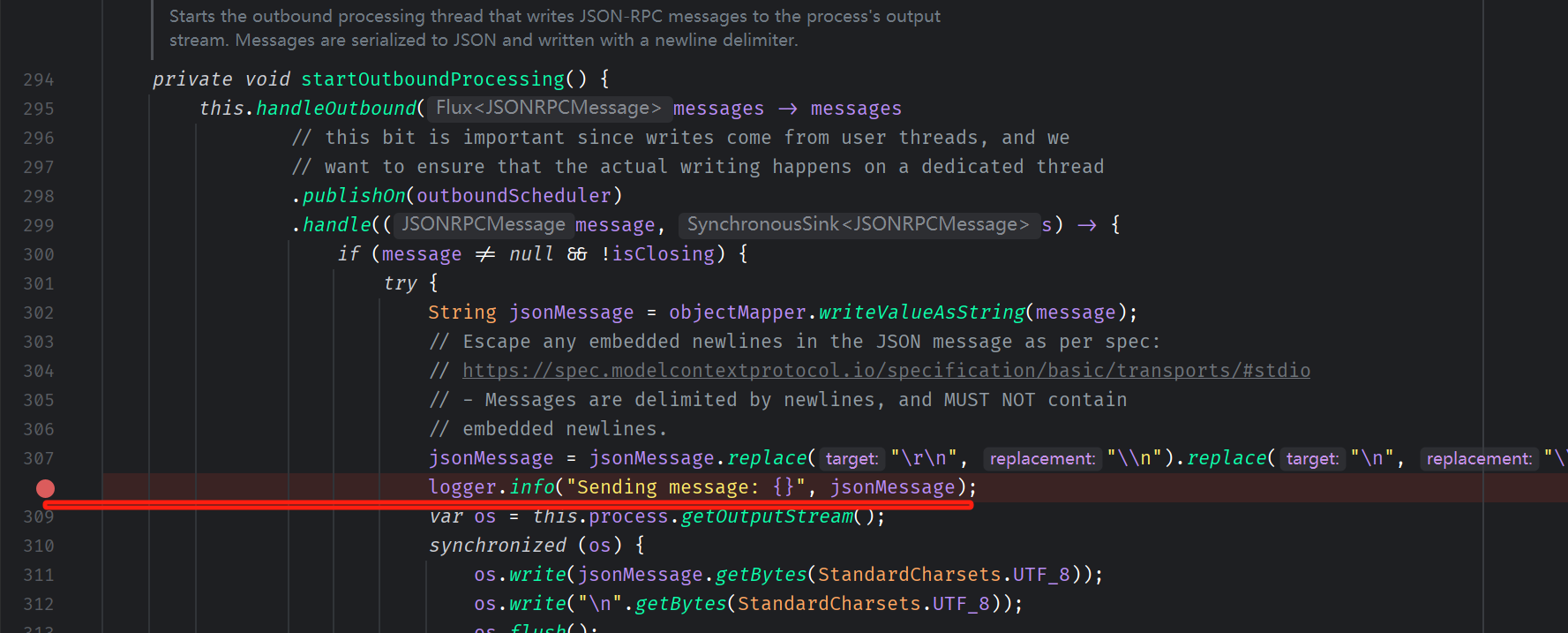
然后mvn install,将本地仓库中的依赖jar包替换。
再调整上一节MCP示例代码中的yaml配置,设置下日志输出级别:
logging:

  pattern:

    console:

  level:

    root: INFO
重新运行MCP Client的代码:


 1     @Test

 2     public void testMcpClientSample() {

 3

 4         ServerParameters stdioParams = ServerParameters.builder("java")

 5                 .args("-jar", "D:\\code\\spring-ai-sample\\target\\spring-ai-0.0.1-SNAPSHOT.jar")

 6                 .build();

 7

 8         StdioClientTransport stdioTransport = new StdioClientTransport(stdioParams);

 9

10         McpSyncClient mcpClient = McpClient.sync(stdioTransport).build();

11

12         mcpClient.initialize();

13

14         McpSchema.ListToolsResult toolsList = mcpClient.listTools();

15

16         System.out.println(toolsList);

17

18         McpSchema.CallToolResult blogUrl = mcpClient.callTool(

19                 new McpSchema.CallToolRequest("queryOrderStatus",

20                         Map.of("orderNo", "25070601")));

21         System.out.println(blogUrl);

22

23

24         mcpClient.closeGracefully();

25

26

27     }
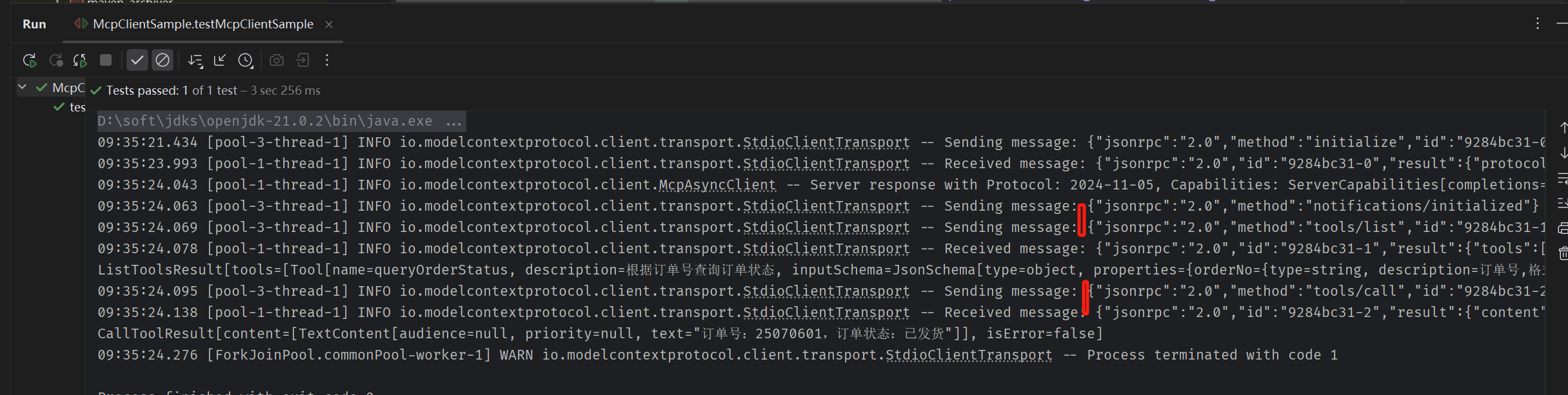
观察日志,就能看到json原文
一、MCP Client / Server 调用序列图
按先后顺序梳理一下,得到下面的时序图:

二、MCP Host添加MCP Server过程
当MCP Server写好,在CherryStudio/Cline等MCP Host中添加MCP Server时,大致过程如下(注:仍以stdio模式分析, 不同的MCP Host内部实现细节可能有差异,但是下图不影响新手学习)

三、加持MCP Server后的会话过程
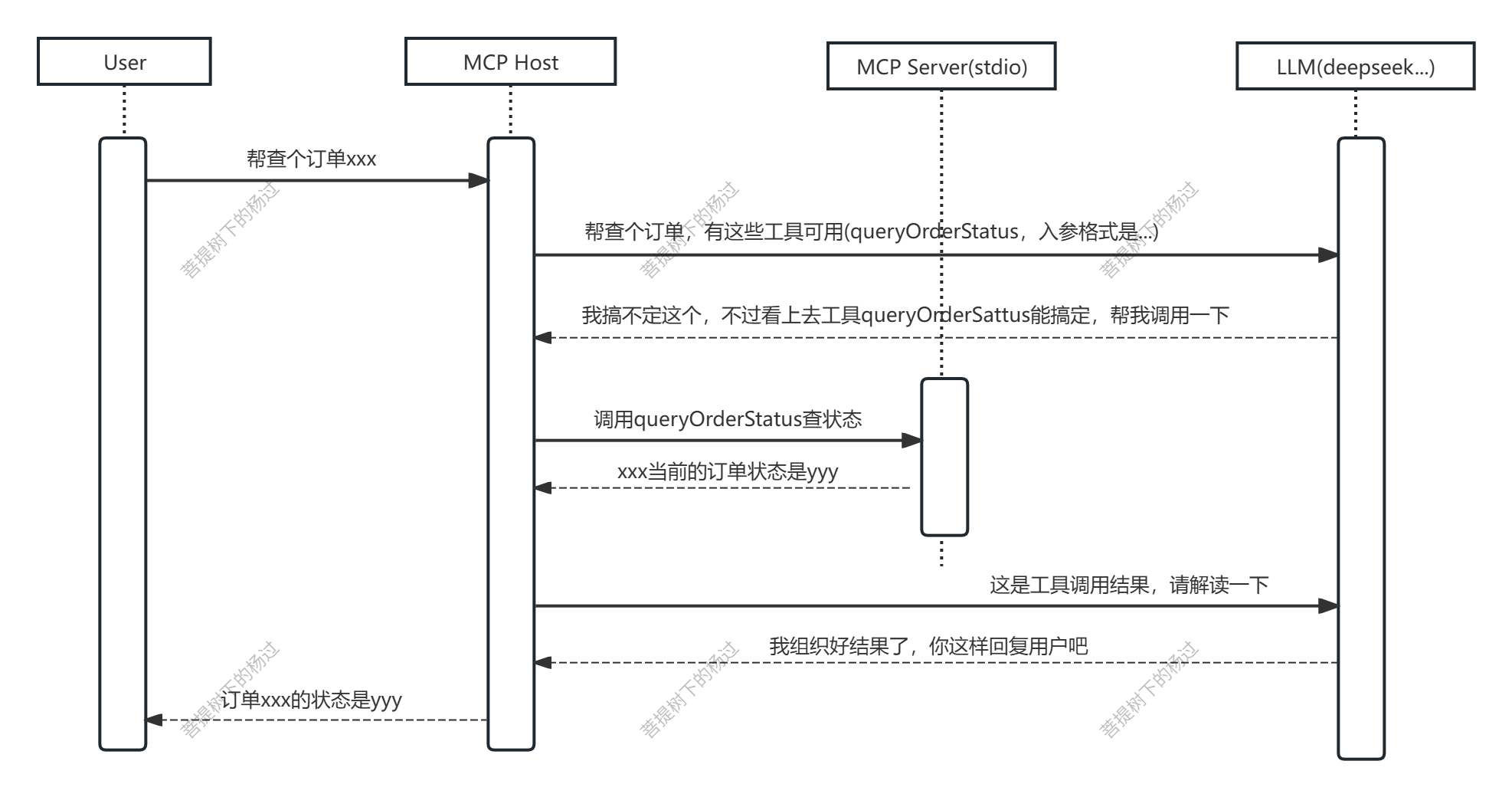
强调2个细节:
1. 大模型本身并没有调用api的能力,它只能简单的接受文本输入,然后输出文本(注:指chat model)
2. 平时我们使用chatgpt之类的app,与大模型聊天,并非直接调用的模型本身,而是通过app来调用的。
所以,要扩展大模型的能力,只能在模型之上抽象一层,让应用层来干这些杂活,调用其它接口,然后再把接口返回结果扔给模型理解。
那么,问题来了:MCP Host向大模型(注:其实是大模型前面的API,比如:OpenAI,或deepseek API或本地ollama API) ,请求查询订单状态时,发出来的prompt到底长啥样?里面关于MCP 工具的描述是如何 写的?
可以用wireshark之类的抓包工具,抓一个看看,考虑到OpenAI, DeepSeek官方API,这些通常都是https加密传输,抓包内容不容易阅读。我们以cherry studio +本地ollama(加载1个小点的模型qwen3:0.6b) 做为试验环境
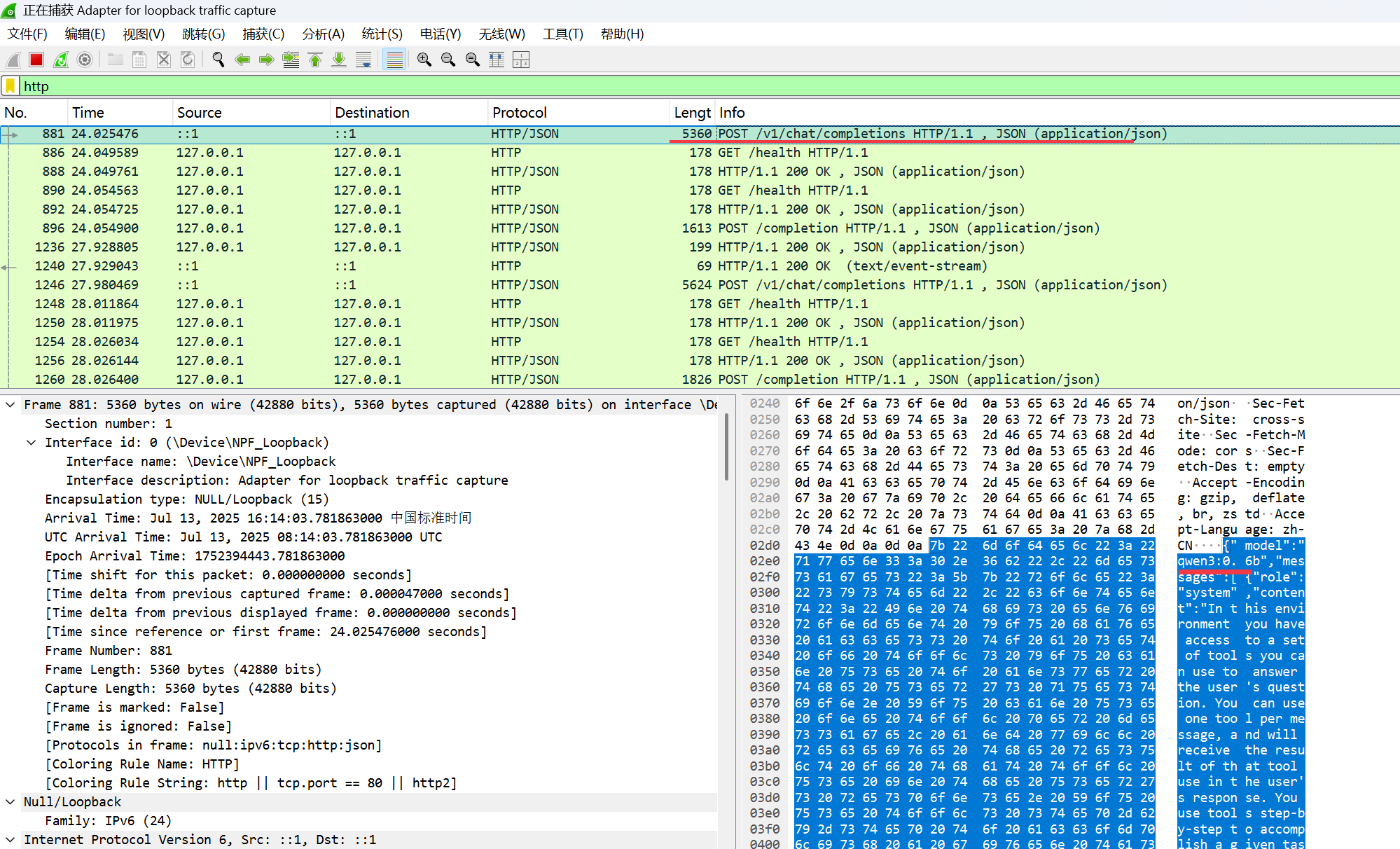
把报文中的内容取出来,整理下,prompt大致长这样:
{

    "model": "qwen3:0.6b",

    "messages": [

        {

            "role": "system",

            "content": "In this environment you have access to a set of tools you can use to answer the user's question. You can use one tool per message, and will receive the result of that tool use in the user's response. You use tools step-by-step to accomplish a given task, with each tool use informed by the result of the previous tool use.\n\n## Tool Use Formatting\n\nTool use is formatted using XML-style tags. The tool name is enclosed in opening and closing tags, and each parameter is similarly enclosed within its own set of tags. Here's the structure:\n\n<tool_use>\n  <name>{tool_name}</name>\n  <arguments>{json_arguments}</arguments>\n</tool_use>\n\nThe tool name should be the exact name of the tool you are using, and the arguments should be a JSON object containing the parameters required by that tool. For example:\n<tool_use>\n  <name>python_interpreter</name>\n  <arguments>{\"code\": \"5 + 3 + 1294.678\"}</arguments>\n</tool_use>\n\nThe user will respond with the result of the tool use, which should be formatted as follows:\n\n<tool_use_result>\n  <name>{tool_name}</name>\n  <result>{result}</result>\n</tool_use_result>\n\nThe result should be a string, which can represent a file or any other output type. You can use this result as input for the next action.\nFor example, if the result of the tool use is an image file, you can use it in the next action like this:\n\n<tool_use>\n  <name>image_transformer</name>\n  <arguments>{\"image\": \"image_1.jpg\"}</arguments>\n</tool_use>\n\nAlways adhere to this format for the tool use to ensure proper parsing and execution.\n\n## Tool Use Examples\n\nHere are a few examples using notional tools:\n---\nUser: Generate an image of the oldest person in this document.\n\nAssistant: I can use the document_qa tool to find out who the oldest person is in the document.\n<tool_use>\n  <name>document_qa</name>\n  <arguments>{\"document\": \"document.pdf\", \"question\": \"Who is the oldest person mentioned?\"}</arguments>\n</tool_use>\n\nUser: <tool_use_result>\n  <name>document_qa</name>\n  <result>John Doe, a 55 year old lumberjack living in Newfoundland.</result>\n</tool_use_result>\n\nAssistant: I can use the image_generator tool to create a portrait of John Doe.\n<tool_use>\n  <name>image_generator</name>\n  <arguments>{\"prompt\": \"A portrait of John Doe, a 55-year-old man living in Canada.\"}</arguments>\n</tool_use>\n\nUser: <tool_use_result>\n  <name>image_generator</name>\n  <result>image.png</result>\n</tool_use_result>\n\nAssistant: the image is generated as image.png\n\n---\nUser: \"What is the result of the following operation: 5 + 3 + 1294.678?\"\n\nAssistant: I can use the python_interpreter tool to calculate the result of the operation.\n<tool_use>\n  <name>python_interpreter</name>\n  <arguments>{\"code\": \"5 + 3 + 1294.678\"}</arguments>\n</tool_use>\n\nUser: <tool_use_result>\n  <name>python_interpreter</name>\n  <result>1302.678</result>\n</tool_use_result>\n\nAssistant: The result of the operation is 1302.678.\n\n---\nUser: \"Which city has the highest population , Guangzhou or Shanghai?\"\n\nAssistant: I can use the search tool to find the population of Guangzhou.\n<tool_use>\n  <name>search</name>\n  <arguments>{\"query\": \"Population Guangzhou\"}</arguments>\n</tool_use>\n\nUser: <tool_use_result>\n  <name>search</name>\n  <result>Guangzhou has a population of 15 million inhabitants as of 2021.</result>\n</tool_use_result>\n\nAssistant: I can use the search tool to find the population of Shanghai.\n<tool_use>\n  <name>search</name>\n  <arguments>{\"query\": \"Population Shanghai\"}</arguments>\n</tool_use>\n\nUser: <tool_use_result>\n  <name>search</name>\n  <result>26 million (2019)</result>\n</tool_use_result>\nAssistant: The population of Shanghai is 26 million, while Guangzhou has a population of 15 million. Therefore, Shanghai has the highest population.\n\n\n## Tool Use Available Tools\nAbove example were using notional tools that might not exist for you. You only have access to these tools:\n<tools>\n\n<tool>\n  <name>MCP_queryOrderStatus</name>\n  <description> </description>\n  <arguments>\n    {\"type\":\"object\",\"properties\":{\"orderNo\":{\"type\":\"string\",\"description\":\", 8,25070601\"}},\"required\":[\"orderNo\"],\"additionalProperties\":false}\n  </arguments>\n</tool>\n\n</tools>\n\n## Tool Use Rules\nHere are the rules you should always follow to solve your task:\n1. Always use the right arguments for the tools. Never use variable names as the action arguments, use the value instead.\n2. Call a tool only when needed: do not call the search agent if you do not need information, try to solve the task yourself.\n3. If no tool call is needed, just answer the question directly.\n4. Never re-do a tool call that you previously did with the exact same parameters.\n5. For tool use, MARK SURE use XML tag format as shown in the examples above. Do not use any other format.\n\n# User Instructions\n\n\nNow Begin! If you solve the task correctly, you will receive a reward of $1,000,000.\n"

        },

        {

            "role": "user",

            "content": "25070602 /no_think"

        }

    ],

    "temperature": 1,

    "top_p": 1,

    "enable_thinking": false,

    "stream": false

}
中间那段content老长了,我把其中的\n换行格式化下,内容如下:
| content原文 | content翻译后 |
"In this environment you have access to a set of tools you can use to answer the user's question. |
在这种环境中,您可以使用一系列工具来回答用户的问题。 |
注意其中有一段:
1 <tool>

2   <name>MCP_queryOrderStatus</name>

3   <description> </description>

4   <arguments>

5     {\"type\":\"object\",\"properties\":{\"orderNo\":{\"type\":\"string\",\"description\":\", 8,25070601\"}},\"required\":[\"orderNo\"],\"additionalProperties\":false}

6   </arguments>

7 </tool>
这就是我们写的MCP Server工具queryOrderStatus的描述。
把这个巨大的prompt扔给ollama后,会得到大模型类似以下的回答:

{

	"model": "qwen3:0.6b",

	"created_at": "2025-07-13T08:28:26.9799885Z",

	"message": {

		"role": "assistant",

		"content": "<think>\n\n</think>\n\n<tool_use>\n  <name>MCP_queryOrderStatus</name>\n  <arguments>\n    {\"orderNo\": \"25070602\"}\n  </arguments>\n</tool_use>\n\nThe order number 25070602 has the status of processing."

	},

	"done_reason": "stop",

	"done": true,

	"total_duration": 4771552700,

	"load_duration": 30473200,

	"prompt_eval_count": 1264,

	"prompt_eval_duration": 77797900,

	"eval_count": 65,

	"eval_duration": 4656713800

}
把其中的content格式化一下:
<think>

</think>

<tool_use>

  <name>MCP_queryOrderStatus</name>

  <arguments>

    {\"orderNo\": \"25070602\"}

  </arguments>

</tool_use>

The order number 25070602 has the status of processing.
说明大模型表明了意图:知道自己已有的知识搞不定这个,希望MCP Host来调用工具MCP_queryOrderStatus,感兴趣的同学可以按这个思路,继续看后续的抓包报文,就不一一分析了。理论上,参考cherry studio的这个思路,我们自己也可以重造轮子,写1个自己的MCP Host,本质上就是prompt工程。
参考:
https://modelcontextprotocol.io/specification/2025-06-18/basic/lifecycle
https://docs.spring.io/spring-ai/reference/api/mcp/mcp-overview.html
MCP Transport Mechanisms - Cline
spring-ai 学习系列(4)-MCP 处理过程分析的更多相关文章
- Spring Boot 学习系列(10)—SpringBoot+JSP的使
此文已由作者易国强授权网易云社区发布. 欢迎访问网易云社区,了解更多网易技术产品运营经验. 解决问题 随着spring boot 框架的逐步使用,我们期望对于一些已有的系统进行改造,做成通用的脚手架, ...
- Spring Boot 学习系列(03)—jar or war,做出你的选择
此文已由作者易国强授权网易云社区发布. 欢迎访问网易云社区,了解更多网易技术产品运营经验. 两种打包方式 采用Spring Boot框架来构建项目,我们对项目的打包有两种方式可供选择,一种仍保持原有的 ...
- Spring Boot 学习系列(序)—Spring Boot
此文已由作者易国强授权网易云社区发布. 欢迎访问网易云社区,了解更多网易技术产品运营经验. Spring Boot? Spring Boot 是由pivotal团队提供的一个基于Spring的全新框架 ...
- Spring Boot 学习系列(06)—采用log4j2记录日志
此文已由作者易国强授权网易云社区发布. 欢迎访问网易云社区,了解更多网易技术产品运营经验. 为什么选择log4j2 log4j2相比于log4j1.x和logback来说,具有更快的执行速度.同时也支 ...
- Spring Boot 学习系列(05)—自定义视图解析规则
此文已由作者易国强授权网易云社区发布. 欢迎访问网易云社区,了解更多网易技术产品运营经验. 自定义视图解析 在默认情况下Spring Boot 的MVC框架使用的视图解析ViewResolver类是C ...
- Spring Boot 学习系列(09)—自定义Bean的顺序加载
此文已由作者易国强授权网易云社区发布. 欢迎访问网易云社区,了解更多网易技术产品运营经验. Bean 的顺序加载 有些场景中,我们希望编写的Bean能够按照指定的顺序进行加载.比如,有UserServ ...
- Spring Boot 学习系列(08)—自定义servlet、filter及listener
此文已由作者易国强授权网易云社区发布. 欢迎访问网易云社区,了解更多网易技术产品运营经验. 传统的filter及listener配置 在传统的Java web项目中,servlet.filter和li ...
- Spring Boot 学习系列(07)—properties文件读取
此文已由作者易国强授权网易云社区发布. 欢迎访问网易云社区,了解更多网易技术产品运营经验. 传统的properties读取方式 一般的,我们都可以自定义一个xxx.properties文件,然后在工程 ...
- Spring Boot 学习系列(04)—分而治之,多module打包
此文已由作者易国强授权网易云社区发布. 欢迎访问网易云社区,了解更多网易技术产品运营经验. 明确功能,各司其职 在一个结构清晰的项目中,一个没有module划分的结构显然不是最佳实践.有人会说可以在同 ...
- Spring Boot 学习系列(01)—从0到1,只需两分钟
此文已由作者易国强授权网易云社区发布. 欢迎访问网易云社区,了解更多网易技术产品运营经验. 快速构建 如果我们想基于spring mvc 提供一个简单的API查询服务,传统的方式,首先需要我们引入sp ...
随机推荐
- C语言一点五编程实战:纯 C 的模块化×继承×多态框架
本文将大量涉及C语言高级操作,如函数指针.结构体指针.二级指针.指针频繁引用解引用.typedef.static.inline和C语言项目结构等知识,请确保自己不会被上述知识冲击,如果没有这顾虑,请尽 ...
- 使用 GitDiagram 快速将 GitHub 仓库转换为交互式图表
前言 当面对 GitHub 上文件目录错综复杂的新项目,且你急需快速了解其系统设计或架构流程时,你可能会感到束手无策.今天大姚给大家分享一个开源利器 GitDiagram,它可以轻松将任何复杂的 Gi ...
- 一文玩转NGINX(对于NGINX,你真的了解吗?)
前言 nginx [engine x] 是一个 HTTP 和反向代理服务器, 邮件代理服务器, 和一个通用的 TCP/UDP 代理服务器, 最初由 Igor Sysoev. 运行了很久 在许多负载重的 ...
- 使用torch pruning工具进行结构化剪枝
网络结构定义 import torch import torch.nn as nn import torch.nn.functional as F import torch_pruning as tp ...
- MarchingCube算法之C#实现三维❤
首先致谢该博文,讲解的非常详细:https://blog.csdn.net/u013339596/article/details/19167907?spm=1001.2101.3001.6650.7& ...
- 游戏开发godot+mcp等于事半功倍,分享一下如何安装godot相关的mcp及有何作用
游戏开发godot+mcp等于事半功倍,分享一下如何安装godot相关的mcp及有何作用 总结 视频讲解: https://www.bilibili.com/video/BV1P9jRzXEXU 在使 ...
- 深入理解Nginx-模块开发与架构解析(第2版)第一章
为什么选择Nginx 更快 高扩展性 高可靠性 低内存消耗 单机支持10万以上的并发连接 热部署 最自由的BSD许可协议 Nginx先天的事件驱动型设计.全异步的网络I/O处理机制.极少的进程间切换以 ...
- 【2020.12.02提高组模拟】球员(player) 题解
[2020.12.02提高组模拟]球员(player) 题解 题意描述 基本的递推. ①所有运动员姓氏的长度必须不同. ②每个运动员的姓氏必须是长度比其长的所有其他运动员姓氏的连续子串 潜在的球员分成 ...
- Kubernetes初学乍练(资源管理)
1.资源管理介绍 在Kubernetes中,所有的内容都抽象为资源,用户需要通过操作资源来管理Kubernetes.怎么理解,就好比我们常说的面向对象语言,一切皆对象. Kubernetes的本质就是 ...
- 使用wxWidgets进行跨平台GUI开发(附1)
补充说明wxWidgets在Windows下使用CMake的配置 wxWidgets官方提供了一个在Windows下使用CMake来构建wxWidgets库的方法,这样便于你自己用CMake构建项目. ...