
iOS-UI控件之UITableView(一)
UITableView
介绍
- UITableView 是用来用列表的形式显示数据的UI控件
- 举例
- QQ好友列表
- 通讯录
- iPhone设置列表
tableView 常见属性
    // 设置每一行cell的高度

    self.tableView.rowHeight = 100;

    // 设置每一组头部的高度

    self.tableView.sectionHeaderHeight = 50;

    // 设置每一组尾部的高度

    //    self.tableView.sectionFooterHeight = 50;

    // 设置分割线颜色

    self.tableView.separatorColor = [UIColor redColor];

    // 设置分割线样式

    self.tableView.separatorStyle = UITableViewCellSeparatorStyleNone;

    // 设置表头控件

    self.tableView.tableHeaderView = [[UISwitch alloc] init];

    // 设置表尾控件

    self.tableView.tableFooterView = [UIButton buttonWithType:UIButtonTypeContactAdd];
UITableView的两种样式只读属性
- 只读属性,在代码中不能修改
UITableViewStylePlain
- 一组显示Section = 1;
UITableViewStyleGrouped
- 分组显示Section >= 1;
展示数据
遵守协议
- UITableViewDataSource
设置数据源
- 连线
- 代码
实现数据源方法
- 先调多少组
//调用数据源的下面方法得知一共有多少组数据

- (NSInteger)numberOfSectionsInTableView:(UITableView *)tableView;
- 多少行
//调用数据源的下面方法得知每一组有多少行数据

- (NSInteger)tableView:(UITableView *)tableView numberOfRowsInSection:(NSInteger)section;
- 每行数据
//调用数据源的下面方法得知每一行显示什么内容

- (UITableViewCell *)tableView:(UITableView *)tableView cellForRowAtIndexPath:(NSIndexPath *)indexPath;
UITableView右边的索引条
- 属性
    //设置tableView右边索引文字的颜色

    self.tableView.sectionIndexColor = [UIColor redColor];

    //设置右边索引文字背景的颜色

    self.tableView.sectionIndexBackgroundColor = [UIColor grayColor];

    //数据源方法索引信息

    - (NSArray *)sectionIndexTitlesForTableView:(UITableView *)tableView

{

    //返回的是一个数组,数组中的元素是显示信息,只是提示,结果还是按索引位置分组

    return [NSArray arrayWithObjects:@"a",@"b",@"c",@"d", nil];

}
tableView常用方法
//设置分组的头部数据

- (NSString *)tableView:(UITableView *)tableView titleForHeaderInSection:(NSInteger)section

{

    return @"头部";

}

//设置分组的尾部数据

- (NSString *)tableView:(UITableView *)tableView titleForFooterInSection:(NSInteger)section

{

    return @"头部";

}

**

 *  当选中一行的时候调用(点击)

 */

- (void)tableView:(UITableView *)tableView didSelectRowAtIndexPath:(NSIndexPath *)indexPath

{

//    XMGWine *wine = self.wineArray[indexPath.row];

//    NSLog(@"点击了:%@", wine.name);

    NSLog(@"选中了:%zd", indexPath.row);

}

/**

 *  当取消选中一行的时候调用

 */

- (void)tableView:(UITableView *)tableView didDeselectRowAtIndexPath:(NSIndexPath *)indexPath

{

    NSLog(@"取消选中了:%zd", indexPath.row);

}

/**

 *  返回每个cell的高度

 */

- (CGFloat)tableView:(UITableView *)tableView heightForRowAtIndexPath:(NSIndexPath *)indexPath

{

    if (indexPath.row % 2 == 0) {

        return 50;

    } else {

        return 100;

    }

}
UITableViewCell
- cell 的样式属性
- UITableViewCellStyleDefault
- UITableViewCellStyleValue1
- UITableViewCellStyleValue2
- UITableViewCellStyleSubtitle
cell 右边指示样式的属性accessoryView
优先级高于accessoryType
cell 右边指示样式的属性 accessoryType
- UITableViewCellAccessoryNone
- UITableViewCellAccessoryDisclosureIndicator
- UITableViewCellAccessoryDetailDisclosureButton
- UITableViewCellAccessoryCheckmark
- UITableViewCellAccessoryDetailButton
cell 被点击的颜色变化
iOS 7 之前的- UITableViewCellSelectionStyleNone
- UITableViewCellSelectionStyleBlue
- UITableViewCellSelectionStyleGray
- UITableViewCellSelectionStyleDefault
创建 Cell 的性能分析及优化
cell的重用原理
iOS设备的内存有限,如果用UITableView显示成千上万条数据,就需要成千上万个UITableViewCell对象的话,那将会耗尽iOS设备的内存。要解决该问题,需要重用UITableViewCell对象
- 重用原理:当滚动列表时,部分UITableViewCell会移出窗口,UITableView会将窗口外的UITableViewCell放入一个对象池中,等待重用。当UITableView要求dataSource返回UITableViewCell时,dataSource会先查看这个对象池,如果池中有未使用的UITableViewCell,dataSource会用新的数据配置这个UITableViewCell,然后返回给UITableView,重新显示到窗口中,从而避免创建新对象
还有一个非常重要的问题:有时候需要自定义UITableViewCell(用一个子类继承UITableViewCell),而且每一行用的不一定是同一种UITableViewCell,所以一个UITableView可能拥有不同类型的UITableViewCell,对象池中也会有很多不同类型的UITableViewCell,那么UITableView在重用UITableViewCell时可能会得到错误类型的UITableViewCell
- 解决方案:UITableViewCell有个NSString *reuseIdentifier属性,可以在初始化UITableViewCell的时候传入一个特定的字符串标识来设置reuseIdentifier(一般用UITableViewCell的类名)。当UITableView要求dataSource返回UITableViewCell时,先通过一个字符串标识到对象池中查找对应类型的UITableViewCell对象,如果有,就重用,如果没有,就传入这个字符串标识来初始化一个UITableViewCell对象
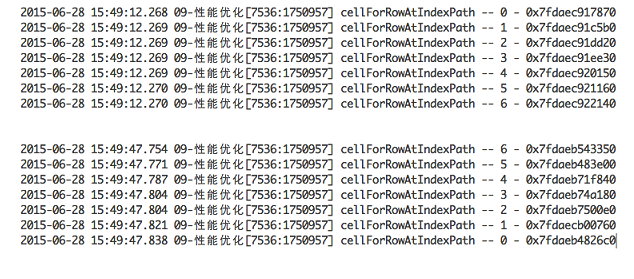
不优化时内存分析
不优化的时候
- 离开可视范围就销毁
- 频繁的开辟内存,销毁内存
- (UITableViewCell *)tableView:(UITableView *)tableView cellForRowAtIndexPath:(NSIndexPath *)indexPath

{

    UITableViewCell *cell = [[UITableViewCell alloc] init];

    cell.textLabel.text = [NSString stringWithFormat:@"%zd行",indexPath.row];

    NSLog(@"cellForRowIndexPath --%zd",indexPath.row);

    return cell;

}
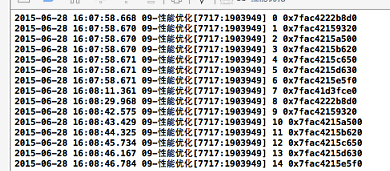
优化后内存地址分析
Cell的重用代码
- (UITableViewCell *)tableView:(UITableView *)tableView cellForRowAtIndexPath:(NSIndexPath *)indexPath

{

    // 1.定义一个cell的标识

    //static 定义变量----只初始换一次

      static NSString *ID = @"jrcell";

    // 2.从缓存池中取出cell

      UITableViewCell *cell = [tableView dequeueReusableCellWithIdentifier:ID];

    // 3.如果缓存池中没有cell

      if (cell == nil) {

        cell = [[UITableViewCell alloc] initWithStyle:UITableViewCellStyleSubtitle reuseIdentifier:ID];

    //尽量将cell的初始化设置,放在这个代码块中

    //如果这个设置是所有cell都要保持一致的,就可以放在这个代码块中

    cell.textLabel.font = [UIFont systemFontOfSize:30];

    }

    // 4.设置cell的属性...

      return cell;

}
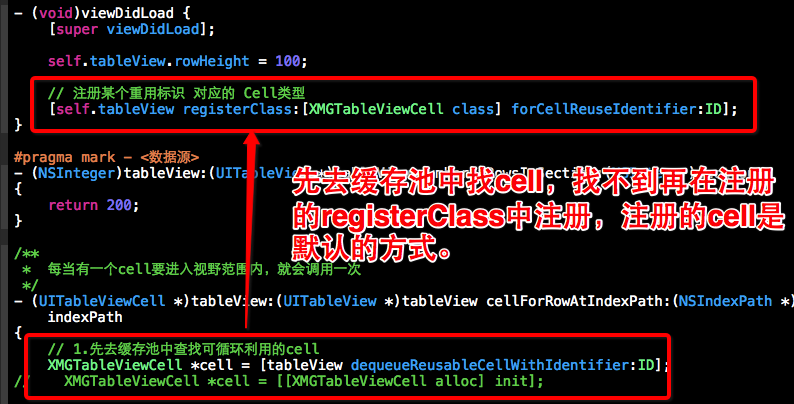
cell的重用代码新写法
iOS-UI控件之UITableView(一)的更多相关文章
- iOS UI控件继承关系图
闲来无事,把UI控件的继承关系图整理下来,供自己和大家使用.
- ios UI控件的简单整理
把该文件拷贝到.m文件中就能够方便的查找 /** 匿名类目:能够声明方法和变量,属性为private(不同意在外部调用,且不能被继承 */ /** 发送数据的托付方,接收数据的时代理发(即代理的反向传 ...
- iOS UI控件总结(全)
1.UIButton UIButton *btn = [UIButton buttonWithType:UIButtonTypeRoundedRect]; btn.frame = CGRectMake ...
- UI控件之UITableView的基本属性
UITableView:特殊的滚动视图,横向固定,可以在纵向上滚动,自动计算contentSize 创建tableView,初始化时指定样式,默认是plain UITableView *_tableV ...
- UI控件之UITableView的协议方法
<UITableViewDataSource,UITableViewDelegate> //设置表视图的编辑状态 -(void)setEditing:(BOOL)editing anima ...
- iOS UI控件
创建: 2018/04/21 完成: 2018/04/25 更新: 2018/09/24 补充UIActivityIndicatorView的显示和隐藏方法 UIButton 设定项目 项目名 ...
- iOS UI控件之间的关系图
- IOS学习资源收集--开发UI控件相关
收集的一些本人了解过的iOS开发UI控件相关的代码资源(本文持续补充更新) 内容大纲: 1.本人在github上也上传了我分装好的一些可重复利用的UI控件 2.计时相关的自定义UILabel控件 正文 ...
- ios 中的UI控件学习总结(1)
UIKit框架提供了非常多功能强大又易用的UI控件 下面列举一些在开发中可能用得上的UI控件 UIButton 按钮 UILabel 文本标签 UITextField 文本输入框 UIImageVie ...
- iOS 使用UI控件的外观协议UIAppearance进行设置默认UI控件样式
在iOS开发中,经常会对UINavigationBar的样式进行全局样式.采用的设置方式有两种: 第一种,采用方式如下: [UINavigationBar appearance] 这种是对一类对象的默 ...
随机推荐
- setTimeout不可靠的修正办法及clearTimeout
javascript里的这两个定时器函数,大家一定耳熟能详: setTimeout("函数()",毫秒)就是开启一个计时器,指定毫秒后执行该函数一次. 有关定时器,javascri ...
- 相关性系数缺点与证明 k阶矩
相关性系数 https://baike.baidu.com/item/相关系数/3109424?fr=aladdin 缺点 需要指出的是,相关系数有一个明显的缺点,即它接近于1的程度与数据组数n相关, ...
- WEB 字体
之前如果想在自己的网站使用某些好看的字体,总是迫不得已得在PS里先把字体图片做好.虽然这样做也能达到我们想要的效果,但是这样就增加了HTTP请求 (如果在多处使用的话),即使合并所有图片,也不好管理, ...
- ionic 和cordova的区别是什么
很多新朋友ionic基础教程都学完了,还是不知道ionic 和cordova 是什么关系 ionic是什么: Ionic(ionicframework)一款开源的Html5移动App开发框架,是Ang ...
- 获取Android APK JNI库
/************************************************************************** * 获取Android APK JNI库 * 说 ...
- 并不对劲的uoj276. [清华集训2016]汽水
想要很对劲的讲解,请点击这里 题目大意 有一棵\(n\)(\(n\leq 50000\))个节点的树,有边权 求一条路径使该路径的边权平均值最接近给出的一个数\(k\) 输出边权平均值下取整的整数部分 ...
- pssh 批量管理执行
pssh 是一个python写的批量执行工具,非常适合30台服务器以内的一些重复性的操作 安装很简单,只要python版本2.4 以上的都行 用这个工作最好把机器做做好ssh信任关系,不然很麻烦 每次 ...
- APACHE2 服务器配置 (二) 默认端口***
如将默认的80端口修改为9000 不管怎样,只要你选择合适的端口(电信商没有封的),进行如下的设置即可: 1, 修改 /etc/apache2/ports.conf 将 NameVirtualHost ...
- JS处理时间相关
<script>var d=new Date(); alert(d);alert(d.getMonth());alert(d.getHours());alert(d.getYear()); ...
- 文件系统访问控制ACL设置
1.传统Linux文件系统权限的问题 传统Linux文件系统有三类用户:文件属主-u,组用户-g,其它用户-o,以及三种访问权限:读-r,写-w,执行或目录进入-x,但很多时候并不能满足对文件访问的细 ...