
RobotFramework:App九宫格滑动解锁
转自:http://blog.csdn.net/codekxx/article/details/50577381
手势密码在很多手机应用都会运到,手势密码都要求至少连接4个点,但AppiumLibrary并没有提供对应的关键字,本人尝试连续使用Swipe关键字两次解决该问题,为什么要用两次呢?因为Swipe的参数只是起点和终点,如果直接给出手势密码的起点和终点,则会忽略中间的点。
手机QQ手势密码如下:
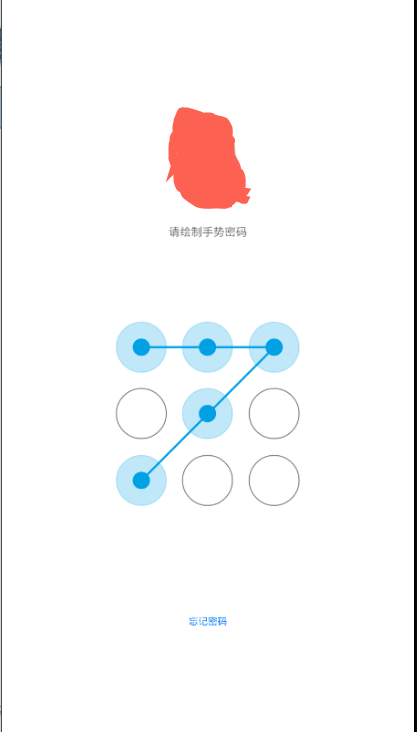
AppiumLibrary它是开源的,就直接去修改其源代码。
于是,去到AppiumLibrary安装的文件夹,默认安装路径为:C:\Python27\Lib\site-packages\AppiumLibrary\keywords),再到keywords目录中找到_touch.py文件,就是它了。
给这个文件的类_TouchKeywords加上一个方法nine_palace_unlock,具体代码如下:
    def nine_palace_unlock(self, locator):

        """nine palace"""

        driver = self._current_application()

        action = TouchAction(driver)

        lock_pattern = driver.find_element_by_xpath(locator)

        x = lock_pattern.location.get('x')

        y = lock_pattern.location.get('y')

        width = lock_pattern.size.get('width')

        height = lock_pattern.size.get('height')

        offset = width / 6

        p11 = int(x + width / 6), int(y + height / 6)

        p12 = int(x + width / 2), int(y + height / 6)

        p13 = int(x + width - offset), int(y + height / 6)

        p21 = int(x + width / 6), int(y + height / 2)

        p22 = int(x + width / 2), int(y + height / 2)

        p23 = int(x + width - offset), int(y + height / 2)

        p31 = int(x + width / 6), int(y + height - offset)

        p32 = int(x + width / 2), int(y + height - offset)

        p33 = int(x + width - offset), int(y + height - offset)

        print(p11,p12,p13)

        print(p21,p22,p23)

        print(p31,p32,p33)

        p2 = p12[0] - p11[0]

        print(p2)

        sleep(3)

        action.press(x=p11[0],y=p11[1]).move_to(x=p2,y=0).wait(1000).move_to(x=p2,y=0).wait(1000).\

            move_to(x=-p2,y=p2).wait(1000).move_to(x=-p2,y=p2).wait(1000).release().wait(1000).perform()
代码如下:
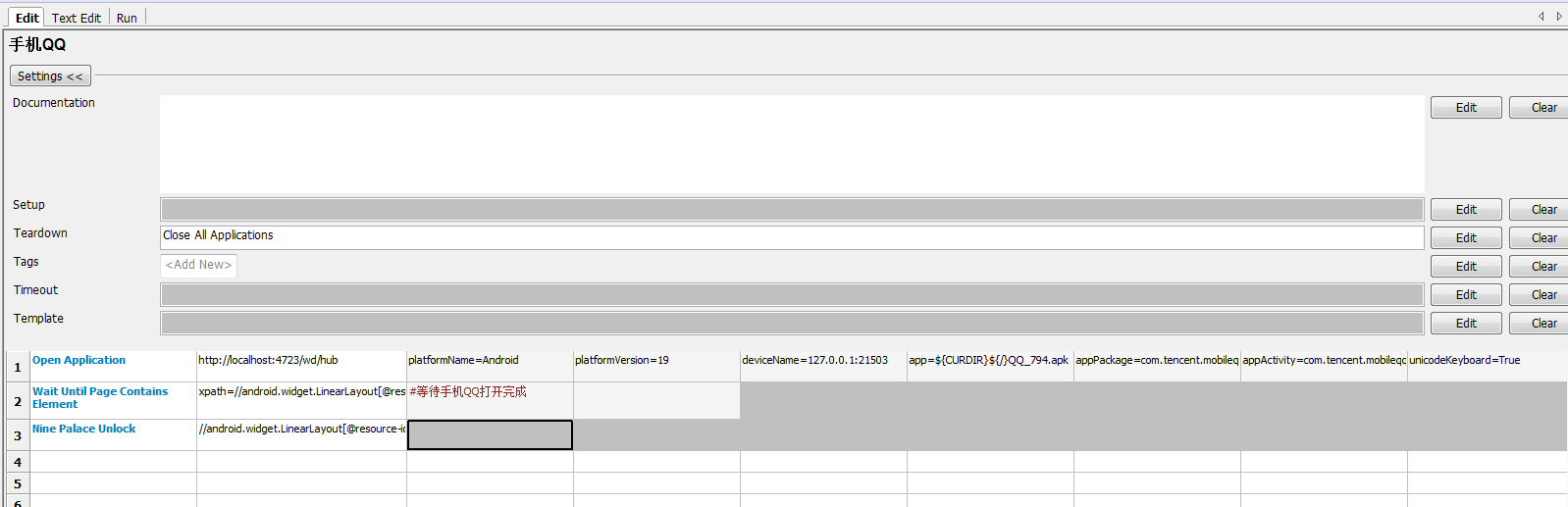
代码如下:
*** Settings ***

Suite Setup

Suite Teardown

Library           AppiumLibrary

*** Variables ***

*** Test Cases ***

手机QQ

    Open Application    http://localhost:4723/wd/hub    platformName=Android    platformVersion=19    deviceName=127.0.0.1:21503    app=${CURDIR}${/}QQ_794.apk    appPackage=com.tencent.mobileqq

    ...    appActivity=com.tencent.mobileqq.activity.SplashActivity    unicodeKeyboard=True    resetKeyboard=True

    Wait Until Page Contains Element    xpath=//android.widget.LinearLayout[@resource-id=\"com.tencent.mobileqq:id/name\"]/android.view.View[5]    #等待手机QQ打开完成

    Nine Palace Unlock    //android.widget.LinearLayout[@resource-id=\"com.tencent.mobileqq:id/name\"]/android.view.View[5]

    [Teardown]    Close All Applications

*** Keywords ***
RobotFramework:App九宫格滑动解锁的更多相关文章
- APP九宫格滑动解锁的处理
写手机自动化测试脚本关于APP九宫格滑动解锁方面采用了appium API 之 TouchAction 操作. 先是用uiautomatorviewer.bat查询APP元素坐标: 手工计算九宫格每个 ...
- Appium九宫格滑动解锁
1.适配各种机型,首先获取整个解锁元素的坐标 2.代码实现 WebElement lockPattern = driver.findElement(By.id("com.android.se ...
- APP自动化 -- 滑动解锁、滑动验证
一.解锁 1.代码 2.效果 1)执行效果 2)点位效果
- uiautomator2 实现App九宫格解锁
App九宫格解锁 之前在testerhome社区看见codeskyblue大佬写过一种方法,但是这种办法存在一个弊端,那就是多个点的坐标是写死的,也就是说要是换了部手机,九宫格解锁就行不通了,于是就想 ...
- Swift: 打造滑动解锁文字动画
原文:Swift: 打造滑动解锁文字动画 最近木事,找出来玩了玩facebook的paper.到处都是那个"slide to unlock your phone"的效果啊.忽闪忽闪 ...
- hiho_1054_滑动解锁
题目大意 智能手机九点屏幕滑动解锁,如果给出某些连接线段,求出经过所有给出线段的合法的滑动解锁手势的总数.题目链接: 滑动解锁 题目分析 首先,尝试求解没有给定线段情况下,所有合法的路径的总数.可以使 ...
- hihocoder#1054 : 滑动解锁(深度优先搜索)
描述 滑动解锁是智能手机一项常用的功能.你需要在3x3的点阵上,从任意一个点开始,反复移动到一个尚未经过的"相邻"的点.这些划过的点所组成的有向折线,如果与预设的折线在图案.方向上 ...
- Selenium模拟JQuery滑动解锁
滑动解锁一直做UI自动化的难点之一,我补一篇滑动解锁的例子,希望能给初做Web UI自动化测试的同学一些思路. 首先先看个例子. https://www.helloweba.com/demo/2017 ...
- hihocoder 1054 滑动解锁 dfs
详细分析见滑动解锁分析 AC代码 #include <cstdio> #include <cmath> #include <cctype> #include < ...
随机推荐
- Java并发编程实战 读书笔记(二)
关于发布和逸出 并发编程实践中,this引用逃逸("this"escape)是指对象还没有构造完成,它的this引用就被发布出去了.这是危及到线程安全的,因为其他线程有可能通过这个 ...
- Nginx常用命令(启动/重启/停止/测试配置文件/重新加载配置文件)
Nginx 安装后只有一个程序文件,本身并不提供各种管理程序,它是使用参数和系统信号机制对 Nginx 进程本身进行控制的. Nginx 的参数包括有如下几个: 使用: /usr/local/ngin ...
- SSD TRIM
SSD 在操作方式上与传统磁性驱动器不同,并且它们需要在软件上另行处理以达到功能优化.-- Don Watkins 编译自: https://opensource.com/article/17/1/s ...
- java消息队列怎么用
消息队列的使用场景是怎样的? 经常听到诸如rebbitmq,activemq,请教一下各位前辈消息队列的使用场景是怎样的,什么时候会用到它 校验用户名等信息,如果没问题会在数据库中添加一个用户记录 ...
- MD5加密算法Java代码
原文:http://www.open-open.com/code/view/1428398234916 import java.security.MessageDigest; import java. ...
- 【Spring boot】【gradle】idea新建spring boot+gradle项目
在此之前,安装了idea/jdk/gradle在本地 ===================================== gradle怎么安装:http://www.cnblogs.com/s ...
- 【Kotlin】spring boot项目中,在Idea下启动,报错@Configuration class 'BugsnagClient' may not be final.
报错如下: Exception encountered during context initialization - cancelling refresh attempt: org.springfr ...
- 天下文章一大抄 mysql远程连接
使用GRANT命令创建远程连接mysql授权用户特定用户mysql -u root -ppassword 注意:p后面没有空格直接密码.mysql>grant all privileges ...
- SolidWorks如何绘制抽壳零件
1 绘制一个零件,点击抽壳 2 你可以一个一个面选,也可以直接选中一个零件,对他的所有面都薄壳处理(右击弹出菜单选择确定即可) 3 可以用剖视图检查是否抽壳成功 4 对于复杂的零件,一个一 ...
- 【Nutch基础教程之七】Nutch的2种执行模式:local及deploy
在对nutch源码执行ant runtime后,会创建一个runtime的文件夹.在runtime文件夹下有deploy和local 2个文件夹. [jediael@jediael runtime]$ ...