
android开发学习 ------- RecyclerView多类型实例
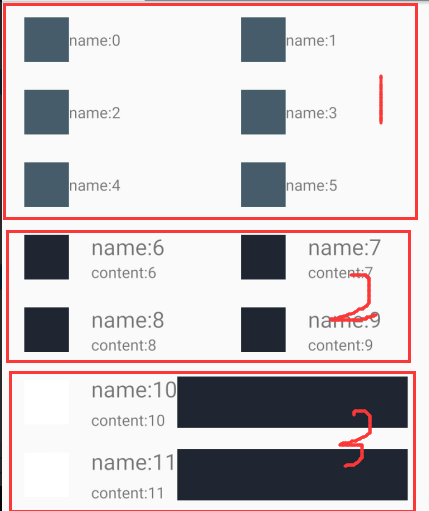
实现RecyclerView多类型的实例:效果如下图所示
public class CarFragment extends Fragment{

    private View view;

    private RecyclerView recycler;

    private CarAdapter madapter ;

    int colors[] = {R.color.app_color,R.color.oklib_frame_black,R.color.white};

    @Nullable

    @Override

    public View onCreateView(LayoutInflater inflater, @Nullable ViewGroup container, @Nullable Bundle

            savedInstanceState) {

        view = inflater.inflate(R.layout.fragment_car,container,false);

        //在布局中找到定义

        recycler = view.findViewById(R.id.recyclerview);

        //grid一行有2列的意思

        final GridLayoutManager gridLayoutManager = new GridLayoutManager(getContext(),2);

        gridLayoutManager.setSpanSizeLookup(new GridLayoutManager.SpanSizeLookup() {

            @Override

            public int getSpanSize(int position) {

                int type = recycler.getAdapter().getItemViewType(position);

                if(type == DataModel.TYPE_THREE){

                    return gridLayoutManager.getSpanCount();

                }else{

                    return 1; //占据一个单元格

                }

            }

        });

        //设置布局管理器

//        recycler.setLayoutManager(new LinearLayoutManager(getContext(),LinearLayoutManager.VERTICAL,

//                false));

        recycler.setLayoutManager(gridLayoutManager);

        madapter =  new CarAdapter(getContext());

        //设置适配器

        recycler.setAdapter(madapter);

        //添加item之间的分割线

        recycler.addItemDecoration(new RecyclerView.ItemDecoration() {

            @Override

            public void getItemOffsets(Rect outRect, View view, RecyclerView parent, RecyclerView.State state) {

                //super.getItemOffsets(outRect, view, parent, state);

                GridLayoutManager.LayoutParams layoutParams = (GridLayoutManager.LayoutParams) view.getLayoutParams();

                int spansize = layoutParams.getSpanSize();

                int spanindex = layoutParams.getSpanIndex();

                outRect.top = 20;

                if(spansize != gridLayoutManager.getSpanCount()){

                    if(spanindex == 1){

                        outRect.left = 10;

                    }else{

                        outRect.right = 10;

                    }

                }

            }

        });

        initData();

        return view;

    }

    /**

     * 模拟list集合.

     * 针对三种不同的类型,可以去写三个实体类来代替DataModel.

     *

     */

    private void initData(){

        List<DataModel> list = new ArrayList<>();

         for(int i = 0;i < 30; i++){

             //int type = (int)(Math.random()*3)+1;

             int type ;

              if( i < 6 || (i>15 && i<20)){

                type = 1;

              }else if(i<10 || i>26){

                  type = 2;

              }else{

                  type = 3;

              }

             DataModel data = new DataModel();

             data.avatarColor = colors[type - 1];

             data.type = type;

             data.content = "content:"+i;

             data.name = "name:"+i;

             data.contentColor = colors[(type+1)%3];

             list.add(data);

         }

        madapter.addList(list);

        madapter.notifyDataSetChanged();

    }

}
public class DataModel {

    public int type;

    public int avatarColor;

    public String name;

    public String content;

    public int contentColor;

    /**

     * 静态常量去区分类型 , 需要创建三个不同的布局

     */

    public static final int TYPE_ONR = 1;

    public static final int TYPE_TWO = 2;

    public static final int TYPE_THREE = 3;

}
public class CarAdapter extends RecyclerView.Adapter<RecyclerView.ViewHolder> {

    private LayoutInflater mLayoutInfater;

    private List<DataModel> mList = new ArrayList<>();

    public CarAdapter(Context context) {

        mLayoutInfater = LayoutInflater.from(context);

    }

    public void addList(List<DataModel> list) {

        mList.addAll(list);

    }

    @Override

    public RecyclerView.ViewHolder onCreateViewHolder(ViewGroup parent, int viewType) {

        switch (viewType) {

            case DataModel.TYPE_ONR:

                return new TypeOneViewHolder(mLayoutInfater.inflate(R.layout.item_car1,parent,false));

            case DataModel.TYPE_TWO:

                return new TypeTwoViewHolder(mLayoutInfater.inflate(R.layout.item_car2,parent,false));

            case DataModel.TYPE_THREE:

                return new TypeThreeViewHolder(mLayoutInfater.inflate(R.layout.item_car3,parent,false));

        }

        return null;

    }

    @Override

    public void onBindViewHolder(RecyclerView.ViewHolder holder, int position) {

        //判断需要获取哪个数据

        int viewType = getItemViewType(position);

        ((TypeAbstractViewHolder)holder).bindHolder(mList.get(position));

    }

    @Override

    public int getItemCount() {

        return mList.size();

    }

    @Override

    public int getItemViewType(int position) {

        return mList.get(position).type;

    }

}
public class TypeOneViewHolder extends TypeAbstractViewHolder{

    public ImageView avator;

    public TextView name;

    public TypeOneViewHolder(View itemView) {

        super(itemView);

        avator = itemView.findViewById(R.id.avator);

        name = itemView.findViewById(R.id.name);

    }

    @Override

    public void bingHolder(DataModel model) {

        avator.setBackgroundResource(model.avatarColor);

        name.setText(model.name);

    }

}
public class TypeTwoViewHolder extends TypeAbstractViewHolder{

    public ImageView avator;

    public TextView name;

    public TextView content ;

    public TypeTwoViewHolder(View itemView) {

        super(itemView);

        avator = itemView.findViewById(R.id.avator);

        name = itemView.findViewById(R.id.name);

        content = itemView.findViewById(R.id.content);

    }

    @Override

    public void bingHolder(DataModel model) {

        avator.setBackgroundResource(model.avatarColor);

        name.setText(model.name);

        content.setText(model.content);

    }

}
public class TypeThreeViewHolder extends TypeAbstractViewHolder{

    public ImageView avator;

    public TextView name;

    public TextView content ;

    public ImageView contentImage;

    public TypeThreeViewHolder(View itemView) {

        super(itemView);

        avator = itemView.findViewById(R.id.avator);

        name = itemView.findViewById(R.id.name);

        content = itemView.findViewById(R.id.content);

        contentImage = itemView.findViewById(R.id.contentImage);

    }

    @Override

    public void bingHolder(DataModel model) {

        avator.setBackgroundResource(model.avatarColor);

        name.setText(model.name);

        content.setText(model.content);

        contentImage.setBackgroundResource(model.contentColor);

    }

}
fragment_car.xml
<?xml version="1.0" encoding="utf-8"?>

<LinearLayout xmlns:android="http://schemas.android.com/apk/res/android"

android:layout_width="match_parent"

android:layout_height="match_parent"

android:orientation="vertical">

<android.support.v7.widget.RecyclerView

    android:id="@+id/recyclerview"

    android:layout_width="match_parent"

    android:layout_height="match_parent" />

</LinearLayout>
item_car1.xml
<?xml version="1.0" encoding="utf-8"?>

<LinearLayout android:layout_height="60dp"

    android:layout_width="match_parent"

    android:gravity="center_vertical"

    android:orientation="horizontal"

    xmlns:android="http://schemas.android.com/apk/res/android" >

    <ImageView

        android:layout_width="40dp"

        android:layout_height="40dp"

        android:id="@+id/avator"

        android:layout_marginLeft="20dp"/>

    <TextView

        android:id="@+id/name"

        android:text="lemon"

        android:layout_width="wrap_content"

        android:layout_height="wrap_content" />

</LinearLayout>
item_car2.xml
<?xml version="1.0" encoding="utf-8"?>

<LinearLayout android:layout_height="60dp"

    android:layout_width="match_parent"

    android:gravity="center_vertical"

    android:orientation="horizontal"

    xmlns:android="http://schemas.android.com/apk/res/android" >

    <ImageView

        android:layout_width="40dp"

        android:layout_height="40dp"

        android:id="@+id/avator"

        android:layout_marginLeft="20dp"/>

    <LinearLayout

        android:layout_marginLeft="20dp"

        android:orientation="vertical"

        android:layout_width="wrap_content"

        android:layout_height="wrap_content">

        <TextView

            android:id="@+id/name"

            android:text="lemon"

            android:textSize="20dp"

            android:layout_width="wrap_content"

            android:layout_height="wrap_content" />

        <TextView

            android:id="@+id/content"

            android:text="lemon"

            android:layout_width="wrap_content"

            android:layout_height="wrap_content" />

    </LinearLayout>

</LinearLayout>
item_car3.xml
<?xml version="1.0" encoding="utf-8"?>

<RelativeLayout android:layout_height="60dp"

    android:layout_width="match_parent"

    android:gravity="center_vertical"

    xmlns:android="http://schemas.android.com/apk/res/android" >

    <ImageView

        android:layout_centerVertical="true"

        android:layout_width="40dp"

        android:layout_height="40dp"

        android:id="@+id/avator"

        android:layout_marginLeft="20dp"/>

    <LinearLayout

        android:id="@+id/ll"

        android:layout_centerVertical="true"

        android:layout_toRightOf="@id/avator"

        android:layout_marginLeft="20dp"

        android:orientation="vertical"

        android:layout_width="wrap_content"

        android:layout_height="wrap_content">

        <TextView

            android:id="@+id/name"

            android:text="lemon"

            android:textSize="20dp"

            android:layout_width="wrap_content"

            android:layout_height="wrap_content" />

        <TextView

            android:id="@+id/content"

            android:text="lemon"

            android:layout_marginTop="5dp"

            android:layout_width="wrap_content"

            android:layout_height="wrap_content" />

    </LinearLayout>

    <ImageView

        android:layout_alignParentRight="true"

        android:layout_toRightOf="@id/ll"

        android:layout_marginRight="20dp"

        android:layout_centerVertical="true"

        android:id="@+id/contentImage"

        android:layout_width="46dp"

        android:layout_height="46dp" />

</RelativeLayout>
public abstract class TypeAbstractViewHolder extends RecyclerView.ViewHolder {

    public TypeAbstractViewHolder(View itemView) {

        super(itemView);

    }

    public abstract void bindHolder(DataModel model);

}
android开发学习 ------- RecyclerView多类型实例的更多相关文章
- Android开发学习之路-RecyclerView滑动删除和拖动排序
Android开发学习之路-RecyclerView使用初探 Android开发学习之路-RecyclerView的Item自定义动画及DefaultItemAnimator源码分析 Android开 ...
- Android开发学习之路--Android系统架构初探
环境搭建好了,最简单的app也运行过了,那么app到底是怎么运行在手机上的,手机又到底怎么能运行这些应用,一堆的电子元器件最后可以运行这么美妙的界面,在此还是需要好好研究研究.这里从芯片及硬件模块-& ...
- Android开发学习路线图
Android开发学习方法: Android是一个比较庞大的体系,从底层的Linux内核到上层的应用层,各部分的内容跨度也比较大.因此,一个好的学习方法对我们学习Android开发很重要. 在此建议, ...
- android开发学习笔记000
使用书籍:<疯狂android讲义>——李刚著,2011年7月出版 虽然现在已2014,可我挑来跳去,还是以这本书开始我的android之旅吧. “疯狂源自梦想,技术成就辉煌.” 让我这个 ...
- Android开发学习总结(一)——搭建最新版本的Android开发环境
Android开发学习总结(一)——搭建最新版本的Android开发环境(转) 最近由于工作中要负责开发一款Android的App,之前都是做JavaWeb的开发,Android开发虽然有所了解,但是 ...
- Android开发学习之LauncherActivity开发启动的列表
Android开发学习之LauncherActivity开发启动的列表 创建项目:OtherActivity 项目运行结果: 建立主Activity:OtherActivity.java [jav ...
- 最实用的Android开发学习路线分享
Android开发学习路线分享.Android发展主导移动互联发展进程,在热门行业来说,Android开发堪称火爆,但是,虽然Android有着自身种种优势,但对开发者的专业性要求也是极高,这种要求随 ...
- Android开发学习必备的java知识
Android开发学习必备的java知识本讲内容:对象.标识符.关键字.变量.常量.字面值.基本数据类型.整数.浮点数.布尔型.字符型.赋值.注释 Java作为一门语言,必然有他的语法规则.学习编程语 ...
- Android开发学习之路--基于vitamio的视频播放器(二)
终于把该忙的事情都忙得差不多了,接下来又可以开始good good study,day day up了.在Android开发学习之路–基于vitamio的视频播放器(一)中,主要讲了播放器的界面的 ...
随机推荐
- Java中数组复制的几种方式以及数组合并
1.Object.clone() 简单直接,只能对源数组完整地复制 2.Arrays.copyOf(T[] original, int newLength) 可以只复制源数组中部分元素,但复制的起始位 ...
- springboot和redis处理页面缓存
页面缓存是应对高并发的一个比较常见的方案,当请求页面的时候,会先查询redis缓存中是否存在,若存在则直接从缓存中返回页面,否则会通过代码逻辑去渲染页面,并将渲染后的页面缓存到redis中,然后返回. ...
- js中的连等==和全等===
===是没有强制类型转换的,和其他大部分语言的==是一样的.而js中==是有类型转换的. 比如说"true"==true就是错的,Boolean("false" ...
- HDU 6113 度度熊的01世界 【DFS】(2017"百度之星"程序设计大赛 - 初赛(A))
度度熊的01世界 Time Limit: 2000/1000 MS (Java/Others) Memory Limit: 32768/32768 K (Java/Others)Total Su ...
- 织梦文章页调用当前栏目名称和url地址的方法
其实织梦本身有这2个调用标签,可能大家没怎么注意,下面的代码就是织梦文章页调用当前栏目名称和url地址的方法: {dede:field name='typeurl' function=”GetType ...
- Pyhton:List build-in function
列表是Python中的可迭代对象之一,在讲列表的内建函数之前我们可以自己在IDE上看看都有那些内建函数,我们可以在pycharm中使用代码及其运行结果如下: print(dir(list)) ['__ ...
- BestCoder5 1001 Poor Hanamichi(hdu 4956) 解题报告
题目链接:http://acm.hdu.edu.cn/showproblem.php?pid=4956(它放在题库后面的格式有一点点问题啦,所以就把它粘下来,方便读者观看) 题目意思:给出一个范围 [ ...
- 【POJ 2411】 Mondriaan's Dream
[题目链接] 点击打开链接 [算法] 很明显,我们可以用状态压缩动态规划解决此题 f[n][m]表示n-1行已经放满,第n行状态为m的合法的方案数 状态转移方程很好推 注意这题时限较紧,注意加一些小优 ...
- 【BZOJ 3223】 文艺平衡树
[题目链接] 点击打开链接 [算法] 本题是splay区间操作的模板题 我们每个点的权值设为”当前在序列中的排名“,根据二叉排序树的性质,这棵树的中序遍历就是当前序列 如果我们要获得一段区间[l,r] ...
- kafka之四:Kafka集群搭建
1.软件环境 1.linux一台或多台,大于等于2 2.已经搭建好的zookeeper集群 3.软件版本kafka_2.11-0.9.0.1.tgz 2.创建目录并下载安装软件 #创建目录 cd /o ...