
微信小程序button授权页面,用户拒绝后仍可再次授权
微信小程序授权页面,进入小程序如果没授权跳转到授权页面,授权后跳转到首页,如果用户点拒绝下次进入小程序还是能跳转到授权页面,授权页面如下
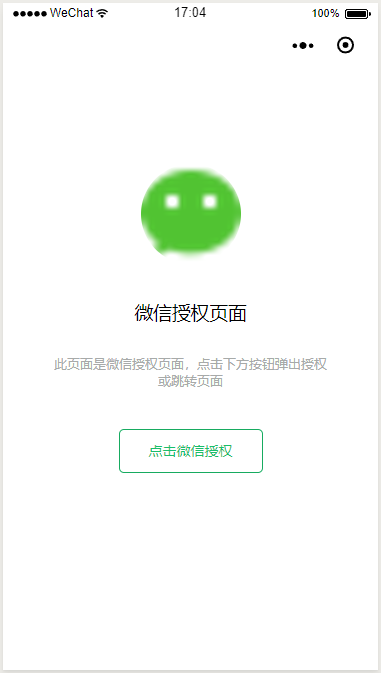
app.js 中的 onLaunch或onShow中加如下代码,如果没授权跳转到授权页面
    // 获取用户信息

    wx.getSetting({

      success: res => {

        if (res.authSetting['scope.userInfo']) {

          // 已经授权,可以直接调用 getUserInfo 获取头像昵称,不会弹框

          wx.getUserInfo({

            success: res => {

              // 可以将 res 发送给后台解码出 unionId

              this.globalData.userInfo = res.userInfo

              // 由于 getUserInfo 是网络请求,可能会在 Page.onLoad 之后才返回

              // 所以此处加入 callback 以防止这种情况

              if (this.userInfoReadyCallback) {

                this.userInfoReadyCallback(res)

              }

            }

          })

        }else{

          // 未授权,跳转到授权页面

          wx.reLaunch({

            url: '/pages/auth/auth',

          })

        }

      }

    })
auth.wxml 授权页面结构
<view class="auth">

  <image src="https://res.wx.qq.com/wxopenres/htmledition/images/favicon32f740.ico" class="img" mode="aspectFill"></image>

  <view class="title">微信授权页面</view>

  <view class="describe">此页面是微信授权页面,点击下方按钮弹出授权或跳转页面</view>

  <button class="btn" open-type='getUserInfo' wx:if="{{canIUse}}" bindgetuserinfo='onAuth'>点击微信授权</button>

  <navigator wx:if="{{!canIUse}}" class="btn" url="/pages/auth/auth" open-type="reLaunch" hover-class="other-navigator-hover">已经授权点击调转</navigator>

</view>
auth.wxss 授权页面样式
/* 开始 */

page {

  height: 100%;

  display: table;

}

.auth {

  margin-top: 0;

  text-align: center;

  display: table-cell;

  flex-direction: column;

  flex-wrap: wrap;

  justify-content: center;

  align-items: flex-start;

  padding: 100rpx;

  vertical-align: middle;

}

.img {

  border-radius: 50%;

  border: 1px solid #fff;

  background-color: #fff;

  margin: 0 0 60rpx;

  display: inline-block;

  width: 200rpx;

  height: 200rpx;

  line-height: 0;

}

.title {

  display: inline-block;

  width: 100%;

  margin: 0 0 60rpx;

}

.describe {

  color: #a7aaa9;

  font-size: 26rpx;

  margin: 0 0 60rpx;

  border-radius: 50%;

  text-align: center;

  display: inline-block;

  width: 100%;

}

.btn {

  padding: 0 60rpx;

  background-color: #19be6b;

  margin: 20rpx 0 200rpx;

  text-align: center;

  vertical-align: middle;

  touch-action: manipulation;

  cursor: pointer;

  background-image: none;

  white-space: nowrap;

  user-select: none;

  font-size: 14px;

  border: 0 !important;

  position: relative;

  text-decoration: none;

  height: 44px;

  line-height: 44px;

  box-shadow: inset 0 0 0 1px #19be6b;

  background: #fff !important;

  color: #19be6b !important;

  display: inline-block;

  border-radius: 10rpx;

}
auth.js 授权页面js,点击授权后跳转到首页
var app = getApp();

Page({

  data: {

    canIUse: wx.canIUse('button.open-type.getUserInfo')

  },

  onAuth() {

    wx.getSetting({

      success: (res) => {

        if (res.authSetting['scope.userInfo']) {

          wx.reLaunch({

            url: '../index/index',

          })

        }

      }

    })

  }

})
==============================================
本文链接 https://www.cnblogs.com/stumpx/p/9225323.html
==============================================
微信小程序button授权页面,用户拒绝后仍可再次授权的更多相关文章
- (十二)微信小程序实现登陆页面+登陆逻辑
微信小程序实现登陆页面 实现上面两个页面 第一个页面 <view> <!-- 上侧部分 --> <view class="top-view"> ...
- Java Web项目,Android和微信小程序的初始页面配置
Java Web项目 我们在Eclipse里开了Java Web项目之后,Run As Tomcat或者Apache服务器,本地运行,如果直接用http://localhost:8080访问项目,会发 ...
- 微信小程序开发之获取用户手机号码——使用简单php接口demo进行加密数据解密
后边要做一个微信小程序,并要能获取用户微信绑定的手机号码.而小程序开发文档上边提供的获取手机号码的接口(getPhoneNumber())返回的是密文,需要服务器端进行解密,但是官方提供的开发文档一如 ...
- 逍遥云天 微信小程序开发之获取用户手机号码——使用简单php接口demo进行加密数据解密
后边要做一个微信小程序,并要能获取用户微信绑定的手机号码.而小程序开发文档上边提供的获取手机号码的接口(getPhoneNumber())返回的是密文,需要服务器端进行解密,但是官方提供的开发文档一如 ...
- 微信小程序 button 组件
button 组件 拥有强大的功能 自身可以拥有很多跟微信风格的样式,且是 表单 和 开放的能力 重要的 按钮 button 的属性: size: 类型 字符串 按钮的大小 属性值:default 默 ...
- 体验了微信小程序,发现安卓用户终于把果粉“碾压”了一次
今天早上,张小龙在微信公开课上分享了小程序的理念,并且公布了小程序将于1月9日上线. 为了体现张小龙对未来程序形态的理解,小程序有四个特定:无需安装.触手可及.用完即走.无需卸载.今天,36氪刚好有机 ...
- 微信小程序——详细讲解页面传值(多种方法)
1.使用navigator的url带参传值 (1)在pageA页面有一个固定的值要传递到pageB页面,比如说一个固定的值user_id要传递给B <navigator url=".. ...
- 微信小程序详解——页面之间的跳转方式【路由】和参数传递
微信小程序拥有web网页和Application共同的特征,我们的页面都不是孤立存在的,而是通过和其他页面进行交互,来共同完成系统的功能.今天我们来研究小程序页面之间的跳转方式. 1.先导 在Andr ...
- 微信小程序开发系列五:微信小程序中如何响应用户输入事件
微信小程序开发系列教程 微信小程序开发系列一:微信小程序的申请和开发环境的搭建 微信小程序开发系列二:微信小程序的视图设计 微信小程序开发系列三:微信小程序的调试方法 微信小程序开发系列四:微信小程序 ...
随机推荐
- C#软件开发实例.私人订制自己的屏幕截图工具(十)在截图中包括鼠标指针形状
本实例所有文章文件夹 (一)功能概览 (二)创建项目.注冊热键.显示截图主窗体 (三)托盘图标及菜单的实现 (四)基本截图功能实现 (五)针对拖拽时闪烁卡顿现象的优化 (六)加入配置管理功能 (七)加 ...
- Eclipse+Maven(webapp)+Jetty+JReBel的配置方法
maven配置 省略 jrebel配置 jrebel毋须繁琐的配置,把jrebel-5.6.3-crack.zip解压放在磁盘文件夹就可以.(笔者路径为:D:\coding-life\IDE\jreb ...
- NHibernate不支持复杂的linq,就一定要用DataTable这么低级吗
有些linq,好不容易写出来,正想扬眉吐屁一番,不料用NHibernate一执行,却报错,说是不支持,我靠. 只好捏着鼻子写一大段sql,交给它.这种直接执行SQL的情况,我看我同事写的,全部都是返回 ...
- NPOI解析Excel
园子的文章: http://www.cnblogs.com/csqb-511612371/category/654604.html 关键就是如何解析Excel表头,特别是合并单元格的..还有对应NPO ...
- Django's CSRF mechanism
Forbidden (403) CSRF verification failed. Request aborted. You are seeing this message because this ...
- 常用的Sublime Text插件及安装方法
Package Control 功能:安装包管理 简介:sublime插件控制台,提供添加.删除.禁用.查找插件等功能 使用:https://sublime.wbond.net/installatio ...
- POJ - 1459 Power Network(最大流)(模板)
1.看了好久,囧. n个节点,np个源点,nc个汇点,m条边(对应代码中即节点u 到节点v 的最大流量为z) 求所有汇点的最大流. 2.多个源点,多个汇点的最大流. 建立一个超级源点.一个超级汇点,然 ...
- codeforces round #433 div2
A:枚举一下就行了...居然wa了一发,题目一定要看清 #include<bits/stdc++.h> using namespace std; int n; int main() { c ...
- 解决IE和firefox 下flash盖住div的问题(转载)
原文地址:http://www.oschina.net/question/171410_26563 做的企业站 顶部是flash的滚动图片. 右侧是在线客户,但是flash盖住了在线客户的div 网上 ...
- bzoj2720: [Violet 5]列队春游(概率期望+组合数学)
Description Input Output Sample Input Sample Output HINT 数学题都这么骚的么……怎么推出来的啊……我是真的想不出来…… 首先,要算总的视 ...