
ExtJS Form
form表单中多选框和复选框
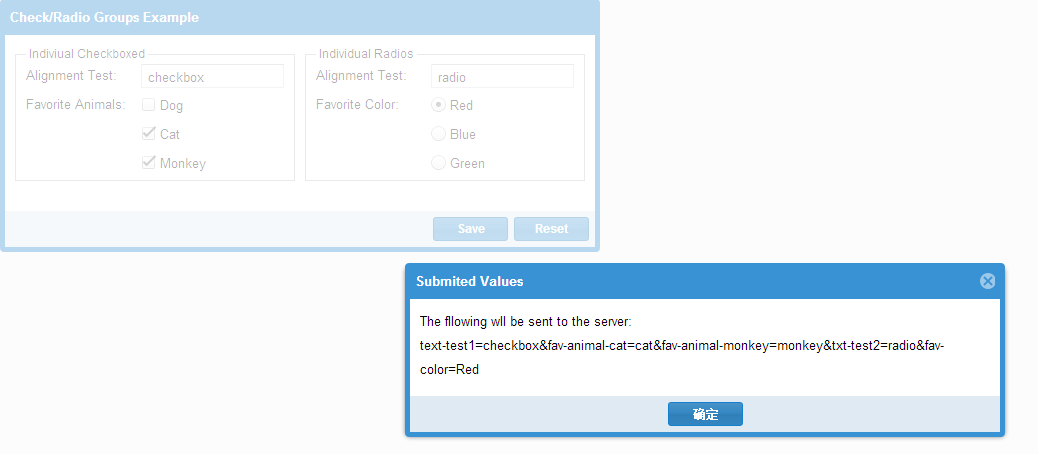
Ext.require([

    'Ext.form.*',

    'Ext.layout.container.Column',

    'Ext.window.MessageBox',

    'Ext.fx.target.Element'

]);

Ext.onReady(function () {

    var individual = {

        xtype: 'container',

        layout: 'hbox',

        margin: '0 0 10',

        items: [{

            xtype: 'fieldset',

            flex: 1,

            title: 'Indiviual Checkboxed', //geren checkbox

            defaultType: 'checkbox',

            defaults: {

                anchor: '100%',

                hideEmptyLabel: false //fieldLabel 当没有设置fieldLabel 的时候,fieldLabel空间会被保留

            },

            items: [{

                xtype: 'textfield',

                name: 'text-test1',

                fieldLabel: 'Alignment Test'

            }, {

                fieldLabel: 'Favorite Animals',

                boxLabel: 'Dog',

                name: 'fav-animal-dog', //

                inputValue: 'dog'

            }, {

                boxLabel: 'Cat',

                name: 'fav-animal-cat', //

                inputValue: 'cat'

            }, {

                checked: true, //默认选中

                boxLabel: 'Monkey',

                name: 'fav-animal-monkey', //

                inputValue: 'monkey'

            }]

        }, {

            xtype: 'component',

            width: 10

        }, {

            xtype: 'fieldset',

            flex: 1,

            title: 'Individual Radios', //个人radio

            defaultType: 'radio',

            layout: 'anchor',

            defaults: {

                anchor: '100%',

                hideEmptyLabel: false

            },

            items: [{

                xtype: 'textfield',

                name: 'txt-test2',

                fieldLabel: 'Alignment Test'

            }, {

                checked: true,

                fieldLabel: 'Favorite Color',

                boxLabel: 'Red',

                name: 'fav-color',

                inputValue: 'Red'

            }, {

                boxLabel: 'Blue',

                name: 'fav-color',

                inputValue: 'blue'

            }, {

                boxLabel: 'Green',

                name: 'fav-color',

                inputValue: 'green'

            }]

        }]

    };

    var fp = Ext.create('Ext.FormPanel', {

        title: 'Check/Radio Groups Example',

        frame: true,

        fieldDefaults: {

            labelWidth: 110,

            labelStyle: 'color:green,padding-left:4px'

        },

        width: 600,

        renderTo:Ext.getBody(),

        bodyPadding: 10,

        items: [

            individual

        ],

        buttons: [{

            text: 'Save',

            handler: function () {
         //fp.getForm()返回的Ext.form.Basic对象。

                if (fp.getForm().isValid()) {

                    Ext.Msg.alert('Submited Values', 'The fllowing wll be sent to the server:<br/>' +

                    fp.getForm().getValues(true).replace(/&/g, ', ')

                    );

                }

            }

        }, {

            text: 'Reset',

            handler: function () {

                fp.getForm().reset();

            }

        }]

    });

});
Ext.form.Basic
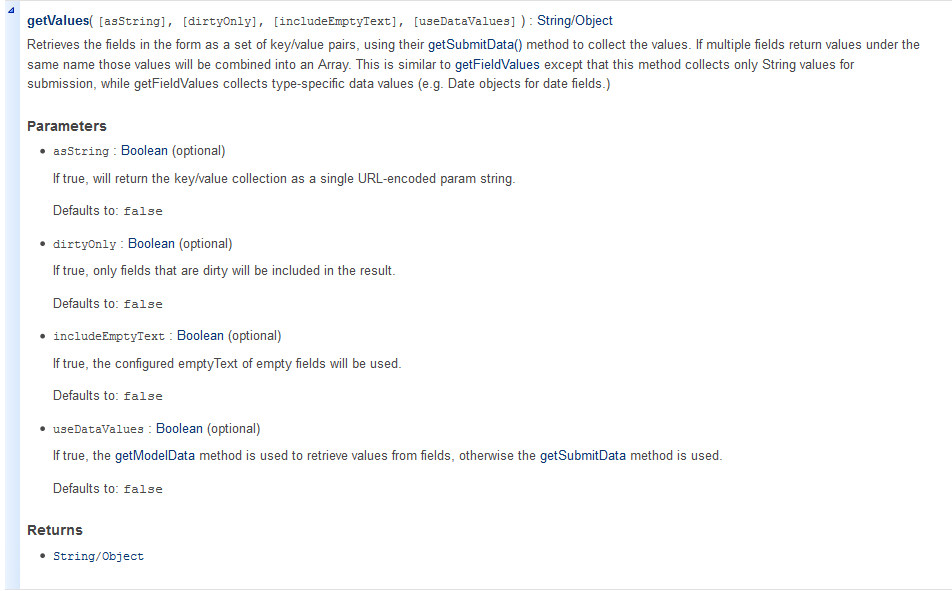
检索字段作为一组键/值对的形式,用自己的getSubmitData()方法来收集值。如果多个领域相同的名称下返回值,这些值将被组合成一个阵列。这是类似于getFieldValues的但该方法只收集提交的字符串值,而getFieldValues收集特定类型的数据值(如Date对象的日期字段)。
checkboxgroup
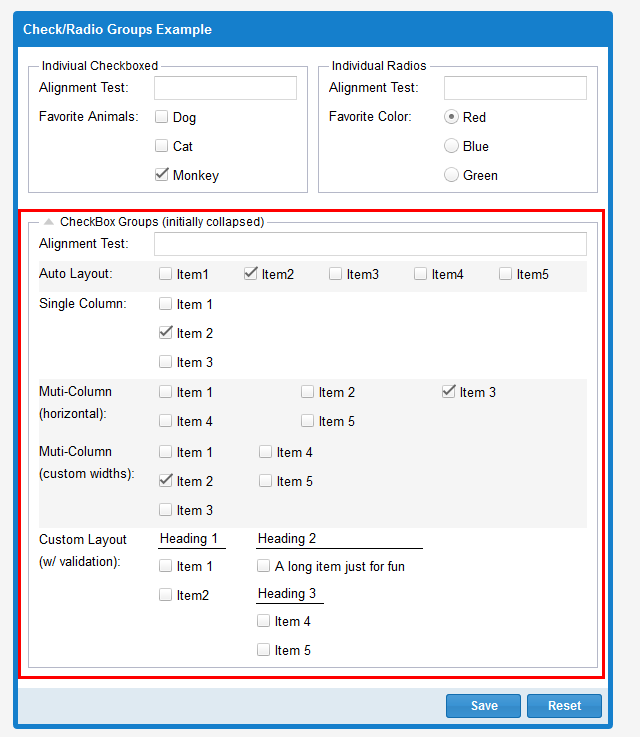
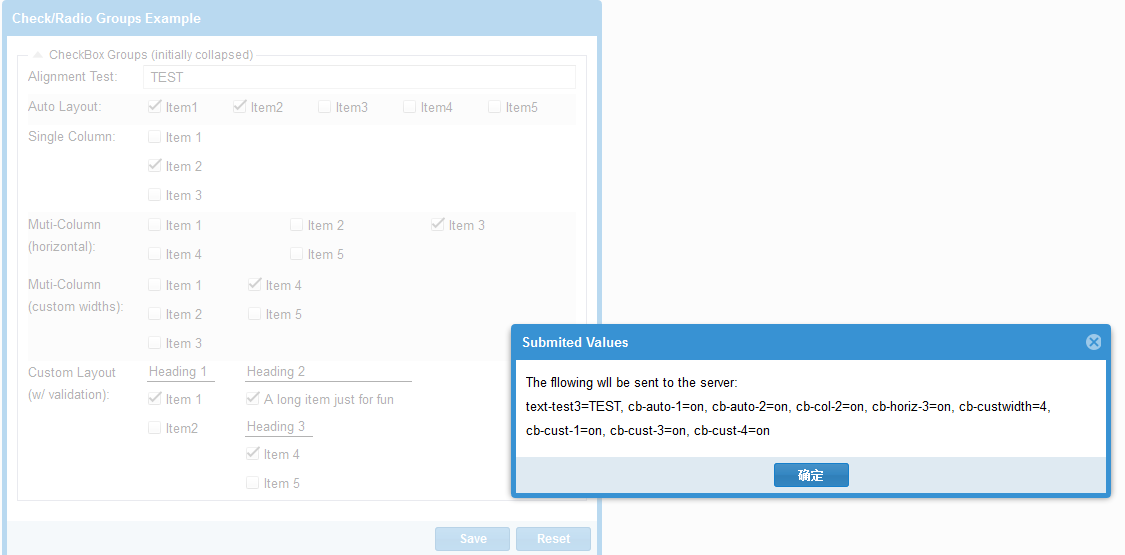
var checkGroup = {

        xtype: 'fieldset',

        title: 'CheckBox Groups (initially collapsed)',

        layout: 'anchor',

        defaults: {

            anchor: '100%'

        },

        collapsible: true, //可折叠的

        collapsed: false, //true:fieldset的状态 默认是折叠起来的 false:展开

        items: [{

            xtype: 'textfield',

            name: 'text-test3',

            fieldLabel: 'Alignment Test' //队列测试

        }, {

            //Use the default,auomtic layout to distribute the controls evenly

            //across a single row 横向导航

            xtype: 'checkboxgroup',

            fieldLabel: 'Auto Layout', //自动布局

            cls: 'x-check-group-alt',

            items: [

                { boxLabel: 'Item1', name: 'cb-auto-1' },

                { boxLabel: 'Item2', name: 'cb-auto-2', checked: true },

                { boxLabel: 'Item3', name: 'cb-auto-3' },

                { boxLabel: 'Item4', name: 'cb-auto-4' },

                { boxLabel: 'Item5', name: 'cb-auto-5' }

            ]

        }, {

            xtype: 'checkboxgroup',

            fieldLabel: 'Single Column',

            //put all controls in a single column with width 100% 把所有控件放在一行里 宽度100%

            columns: 1, //每行显示一列

            items: [

                { boxLabel: 'Item 1', name: 'cb-col-1' },

                { boxLabel: 'Item 2', name: 'cb-col-2', checked: true },

                { boxLabel: 'Item 3', name: 'cb-col-3' }

            ]

        }, {

            xtype: 'checkboxgroup',

            fieldLabel: 'Muti-Column (horizontal)', //多列 对行

            cls: 'x-check-group-alt',

            //Distribute controls across 3 even columns,filling each row //平等分配成三行

            //form left to right before starting the next row

            columns: 3, //每行显示三列

            items: [

                { boxLabel: 'Item 1', name: 'cb-horiz-1' },

                { boxLabel: 'Item 2', name: 'cb-horiz-2' },

                { boxLabel: 'Item 3', name: 'cb-horiz-3' },

                { boxLabel: 'Item 4', name: 'cb-horiz-4' },

                { boxLabel: 'Item 5', name: 'cb-horiz-5' }

            ]

        }, {

            xtype: 'checkboxgroup',

            fieldLabel: 'Muti-Column<br />(custom widths)',

            cls: 'x-check-group-alt',

            //Specify exact column widths(could also include float values for %)

            //制定确切的列宽 (也可以用百分比)

            columns: [100, 100], //每行两列 每列宽度100

            vertical: true,

            items: [

                { boxLabel: 'Item 1', name: 'cb-custwidth', inputValue: 1 },

                { boxLabel: 'Item 2', name: 'cb-custwidth', inputValue: 2, checked: true },

                { boxLabel: 'Item 3', name: 'cb-custwidth', inputValue: 3 },

                { boxLabel: 'Item 4', name: 'cb-custwidth', inputValue: 4 },

                { boxLabel: 'Item 5', name: 'cb-custwidth', inputValue: 5 }

            ]

        }, {

            xtype: 'checkboxgroup',

            fieldLabel: 'Custom Layout <br />(w/ validation)',

            allowBlanl: false,

            msgTarget: 'side',

            autoFitErrors: false,

            anchor: '-18',

            //You can change the 'layout' to anything you want,and include any nested(嵌套)

            //container structure(结构,构造),for complete layout control.In this example we only

            //want one item in the middle column,which would not be possible using the

            //default 'checkboxgroup' layout's columns config.we also want to put

            //heading at the top of each column

            layout: 'column',

            defaultType: 'container',

            items: [{

                columnWidth: .25,

                items: [

                    { xtype: 'component', html: 'Heading 1', cls: 'x-form-check-group-label' },

                    { xtype: 'checkboxfield', boxLabel: 'Item 1', name: 'cb-cust-1' },

                    { xtype: 'checkboxfield', boxLabel: 'Item2', name: 'cb-cust-2' }

                ]

            }, {

                columnWidth: .5,

                items: [

                    { xtype: 'component', html: 'Heading 2', cls: 'x-form-check-group-label' },

                    { xtype: 'checkboxfield', boxLabel: 'A long item just for fun', name: 'cb-cust-3' }

                ]

            }, {

                columnWidth: .25,

                items: [

                    { xtype: 'component', html: 'Heading 3', cls: 'x-form-check-group-label' },

                    { xtype: 'checkboxfield', boxLabel: 'Item 4', name: 'cb-cust-4' },

                    { xtype: 'checkboxfield', boxLabel: 'Item 5', name: 'cb-cust-5' }

                ]

            }]

        }]

    };
ExtJS Form的更多相关文章
- Extjs Form用法详解(适用于Extjs5)
Extjs Form是一个比较常用的控件,主要用来显示和编辑数据的,今天这篇文章将介绍Extjs Form控件的详细用法,包括创建Form.添加子项.加载和更新数据.验证等. 本文的示例代码适用于Ex ...
- 2014年12月20日00:33:14-遮罩+进度条-extjs form.isvalid
1.Extjs : 遮罩+进度条 2.Extjs: extjs form.isvalid http://stackoverflow.com/questions/19354433/extjs-form- ...
- 实用ExtJS教程100例-011:ExtJS Form 使用JSON数据赋值和取值
上一节中我们演示了ExtJS Form的异步加载和提交数据,本节中我们将演示如何使用JSON数据为ExtJS Form中的字段赋值和取值. 系列ExtJS教程持续更新中,点击查看>>最新E ...
- 实用ExtJS教程100例-010:ExtJS Form异步加载和提交数据
ExtJS Form 为我们提供了两个方法:load 和 submit,分别用来加载和提交数据,这两个方法都是异步的. 系列ExtJS教程持续更新中,点击查看>>最新ExtJS教程目录 F ...
- 实用ExtJS教程100例-009:ExtJS Form无刷新文件上传
文件上传在Web程序开发中必不可少,ExtJS Form中有一个filefield字段,用来选择文件并上传.今天我们来演示一下如何通过filefield实现ExtJS Form无刷新的文件上传. 首先 ...
- Extjs form 表单的 submit
说明:extjs form表单的提交方式是多种多样的,本文只是介绍其中的一种方法,本文介绍的方法可能不是完美的,但是对于一般的应用应该是没有问题的. 本文包括的主要内容有:form面板设计.f ...
- extjs form.load()加载服务端数据
formPanel.getForm().load({ url: 'getApproveRefundInf?refundIdDetail=${refundIdDetail}', waitMsg: '请稍 ...
- extjs form 取值 赋值 重置
一.从form中获取field的三个方法: 1.Ext.getCmp('id'); 2.FormPanel.getForm().findField('id/name'); 3.Ext.get('id/ ...
- 93.EXTJS Form之VTypes
转自:http://blog.sina.com.cn/s/blog_7778950d0100y2pg.html 本文我们主要探讨一下EXTJS的Form中验证的问题,可能用过EXTJS的Form的人都 ...
- extjs form submit 总是执行failure
代码: function createWeekReort() { if (form.getForm().isValid()) { Ext.Msg.confirm("提示", &qu ...
随机推荐
- UVA12345 (带修改的莫队)
UVA12345 Dynamic len Problem : 给一个序列,每次询问一个区间里面的数字种类数量,或者修改某一个位置的值. Solution : 第一关键字分块排序左端点,第二关键字分块排 ...
- linux命令2——进程相关
(1)ps -ef :可以看到内核的线程.
- Linux审计sudo
Linux日志审计项目案例实战(生产环境日志审计项目解决方案) https://www.linuxidc.com/Linux/2015-07/120501.htm
- POJ 2513 【字典树】【欧拉回路】
题意: 有很多棒子,两端有颜色,告诉你两端的颜色,让你把这些棒子拼接起来要求相邻的接点的两个颜色是一样的. 问能否拼接成功. 思路: 将颜色看作节点,将棒子看作边,寻找欧拉通路. 保证图的连通性的时候 ...
- 2017多校Round2(hdu6045~hdu6055)
补题进度:10/11 1001(不等式) 根据题意列不等式,解一解就行了 1002(套路) 题意: 给定一个随机产生的1e6*1e6的矩阵和一个1e3*1e3的矩阵,你要回答这个1e3*1e3的小矩阵 ...
- 【scrapy】Item及Spider
Items Item objects are simple containers used to collect the scraped data.They provide a dictionary- ...
- hdu 4057 Rescue the Rabbit
题意 给出n(n<=10)个串,每个串有个权值,然后让你构造一个长度为l(l<=100)的串,如果他包含给出的串就得到相应的权值,求可能得到的最大权值 解法 AC自动机+DP,很显然要建立 ...
- 理解Android进程创建流程(转)
/frameworks/base/core/java/com/android/internal/os/ - ZygoteInit.java - ZygoteConnection.java - Runt ...
- Scrum 时间估算
在新公司里,不懂软件工程的产品经理经常逼迫研发人员作出很不靠谱的时间估算.常见场景有下面这些: 需求未细化的情况下要求给出时间估算:比如,就一句话描述需要做一个什么样的功能,但是具体页面长什么样,交互 ...
- SonarQube---在具体项目中的使用
一.简介 SonarQube(简称Sonar)是管理代码质量的开放平台,它可以快速地对代码质量进行分析,并给出合理的解决方案,提高管理效率,保证代码质量. Sonar官网,文档 Sonar Scann ...