
apache、nginx实现反向代理
一、apache(不推荐):
- 代理80端口:
a. 配置: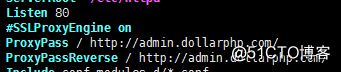
b. 效果: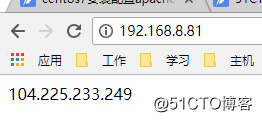
c. 配置文件参考:ServerRoot "/etc/httpd"
Listen 80
ProxyPass / http://admin.dollarphp.com/
ProxyPassReverse / http://admin.dollarphp.com/
Include conf.modules.d/*.conf
User apache
Group apache
ServerAdmin root@localhost
<Directory />
AllowOverride none
Require all denied
</Directory>
DocumentRoot "/var/www/html"
<Directory "/var/www">
AllowOverride None
Require all granted
</Directory>
<Directory "/var/www/html">
Options Indexes FollowSymLinks
AllowOverride None
Require all granted
</Directory>
<IfModule dir_module>
DirectoryIndex index.html
</IfModule>
<Files ".ht*">
Require all denied
</Files>
ErrorLog "logs/error_log"
LogLevel warn
<IfModule log_config_module>
LogFormat "%h %l %u %t \"%r\" %>s %b \"%{Referer}i\" \"%{User-Agent}i\"" combined
LogFormat "%h %l %u %t \"%r\" %>s %b" common
<IfModule logio_module>
LogFormat "%h %l %u %t \"%r\" %>s %b \"%{Referer}i\" \"%{User-Agent}i\" %I %O" combinedio
</IfModule>
CustomLog "logs/access_log" combined
</IfModule>
<IfModule alias_module>
ScriptAlias /cgi-bin/ "/var/www/cgi-bin/"
</IfModule>
<Directory "/var/www/cgi-bin">
AllowOverride None
Options None
Require all granted
</Directory>
<IfModule mime_module>
TypesConfig /etc/mime.types
AddType application/x-compress .Z
AddType application/x-gzip .gz .tgz
AddType text/html .shtml
AddOutputFilter INCLUDES .shtml
</IfModule>
AddDefaultCharset UTF-8
<IfModule mime_magic_module>
MIMEMagicFile conf/magic
</IfModule>
EnableSendfile on
IncludeOptional conf.d/*.conf - 代理443端口:
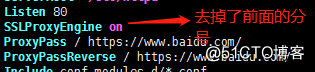
a. 安装mod_ssl:yum -y install mod_sslb. 配置:
c. 效果: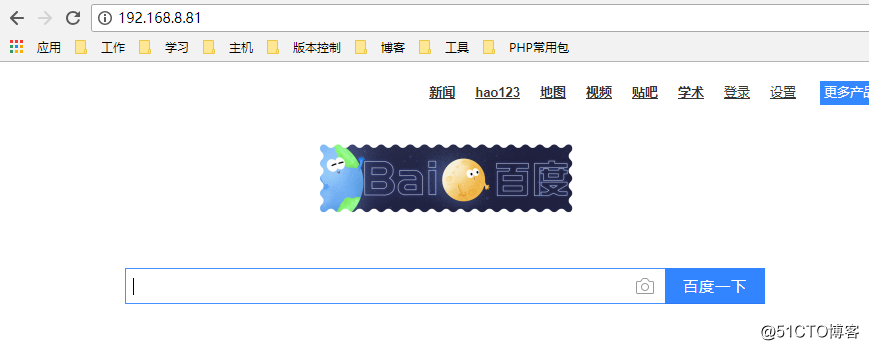
d. 配置文件参考:ServerRoot "/etc/httpd"
Listen 80
SSLProxyEngine on
ProxyPass / https://www.baidu.com/
ProxyPassReverse / https://www.baidu.com/
Include conf.modules.d/*.conf
User apache
Group apache
ServerAdmin root@localhost
<Directory />
AllowOverride none
Require all denied
</Directory>
DocumentRoot "/var/www/html"
<Directory "/var/www">
AllowOverride None
Require all granted
</Directory>
<Directory "/var/www/html">
Options Indexes FollowSymLinks
AllowOverride None
Require all granted
</Directory>
<IfModule dir_module>
DirectoryIndex index.html
</IfModule>
<Files ".ht*">
Require all denied
</Files>
ErrorLog "logs/error_log"
LogLevel warn
<IfModule log_config_module>
LogFormat "%h %l %u %t \"%r\" %>s %b \"%{Referer}i\" \"%{User-Agent}i\"" combined
LogFormat "%h %l %u %t \"%r\" %>s %b" common
<IfModule logio_module>
LogFormat "%h %l %u %t \"%r\" %>s %b \"%{Referer}i\" \"%{User-Agent}i\" %I %O" combinedio
</IfModule>
CustomLog "logs/access_log" combined
</IfModule>
<IfModule alias_module>
ScriptAlias /cgi-bin/ "/var/www/cgi-bin/"
</IfModule>
<Directory "/var/www/cgi-bin">
AllowOverride None
Options None
Require all granted
</Directory>
<IfModule mime_module>
TypesConfig /etc/mime.types
AddType application/x-compress .Z
AddType application/x-gzip .gz .tgz
AddType text/html .shtml
AddOutputFilter INCLUDES .shtml
</IfModule>
AddDefaultCharset UTF-8
<IfModule mime_magic_module>
MIMEMagicFile conf/magic
</IfModule>
EnableSendfile on
IncludeOptional conf.d/*.conf二、nginx(同时适用于80端口和443端口):
- 配置:
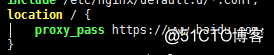
- 配置文件参考:
user nginx;

worker_processes auto;

error_log /var/log/nginx/error.log;

pid /run/nginx.pid;

include /usr/share/nginx/modules/*.conf;

events {

worker_connections 1024;

}

http {

log_format  main  '$remote_addr - $remote_user [$time_local] "$request" '

                  '$status $body_bytes_sent "$http_referer" '

                  '"$http_user_agent" "$http_x_forwarded_for"';

access_log  /var/log/nginx/access.log  main;

sendfile            on;

tcp_nopush          on;

tcp_nodelay         on;

keepalive_timeout   65;

types_hash_max_size 2048;

include             /etc/nginx/mime.types;

default_type        application/octet-stream;

include /etc/nginx/conf.d/*.conf;

server {

    listen       80 default_server;

    listen       [::]:80 default_server;

    server_name  _;

    root         /usr/share/nginx/html;

    include /etc/nginx/default.d/*.conf;

    location / {

        proxy_pass https://www.baidu.com;

    }

    error_page 404 /404.html;

        location = /40x.html {

    }

    error_page 500 502 503 504 /50x.html;

        location = /50x.html {

    }

}

}
apache、nginx实现反向代理的更多相关文章
- 前nginx后Apache+Node反向代理
前几天一直在被一个问题困扰,机器上跑的站点太多了,Apache上面有十几个,NodeJS的也有一堆,记端口号都要烦死,于是萌生了使用反向代理的想法.出发点貌似太low了,完全不是出于负载均衡.高并发什 ...
- Nginx 笔记与总结(15)nginx 实现反向代理 ( nginx + apache 动静分离)
在 nginx 中,proxy 用来实现反向代理,upstream 用来实现负载均衡. 例如有两台服务器,nginx 服务器作为代理服务器,执行 .html 文件,apache 服务器上执行 .php ...
- nginx的反向代理和负载均衡的一个总结
之前一直觉的nginx的反向代理和负载均衡很厉害的样子,最近有机会接触了一下公司的这方面的技术,发现技术就是一张窗户纸呀,捅破了啥都明白了! 接下来先看一下nginx的反向代理: 简单的来说就是ngi ...
- nginx做反向代理负载均衡 Java怎么获取后端服务器获取用户IP
nginx做反向负载均衡,后端服务器获取真实客户端ip 首先,在前端nginx上需要做如下配置: location / proxy_set_hearder host ...
- 用nginx做反向代理来访问防外链图片
用nginx做反向代理来访问防外链图片 女儿的博客从新浪搬到wordpress后,发现原来博客上链接的新浪相册的图片都不能访问了,一年的博客内容,一个个去重新上传图片,修正链接也是个大工程.还是得先想 ...
- Nginx的反向代理
先通过简单的图来说明一下正向代理和反向代理吧~ 正向代理 代理其实就是一个中介,A和B本来可以直连,中间插入一个C,C就是中介.刚开始的时候,代理多数是帮助内网client访问外网server用的(比 ...
- Httpd Nginx Haproxy反向代理
Apache反向代理 部署httpd反向代理 准备工作: 三台虚拟机Ip地址分配: linux-node1:192.168.1.5 (源码编译httpd,并且配置proxy用于代理后端的httpd服务 ...
- nginx的反向代理功能和缓存功能
html { font-family: sans-serif } body { margin: 0 } article,aside,details,figcaption,figure,footer,h ...
- 高性能Nginx服务器-反向代理
Nginx Nginx是一款轻量级的Web 服务器/反向代理服务器及电子邮件(IMAP/POP3)代理服务器,并在一个BSD-like 协议下发行.由俄罗斯的程序设计师Igor Sysoev所开发,供 ...
- NGINX如何反向代理Tomcat并且实现Session保持
简介 LNMT=Linux+Nginx+MySQL+Tomcat: Tomcat 服务器是一个免费的开放源代码的Web 应用服务器,属于轻量级应用服务器: 在中小型系统和并发访问用户不是很多的场合下被 ...
随机推荐
- Java代码生成图片验证码
1.jsp页面显示验证码,src跳转到Controller里的:getImg_validate,reloadImg()作用是点击验证码就会换一张(重新请求getImg_validate) <ul ...
- K:求取两个数的最大公约数的两个算法
相关介绍: 最大公因数,也称最大公约数.最大公因子,指两个或多个整数共有约数中最大的一个.a,b的最大公约数记为gcd(a,b).同样的,a,b,c的最大公约数记为gcd(a,b,c),多个整数的最 ...
- C#学习笔记-模板方法模式
题目:同学摘抄老师给的试卷并给出自己的对应的答案. 实现: static void Main(string[] args) { Console.WriteLine("学生甲抄的试卷:&quo ...
- 4.5&4.7联考题解
本来想加个密码的,后来一想全HE就咱们这几个人,外省的dalao愿看也没事儿,就公开算了,省得加密码各种麻烦. 先补这两天的题解吧……如果有空的话我可能会把上次联考的题解补上= =(中午没睡觉,现在困 ...
- Java中的继承:父类和子类的关系
一.父类引用指向子类对象时 1.若子类覆盖了某方法,则父类引用调用子类重新定义的新方法 2.若子类未覆盖某方法,则父类引用调用父类本身的旧方法 3.若子类覆盖了某属性,但父类引用仍调用父类本身的旧属性 ...
- .net reflector+reflexil修改编译后的dll文件
1.用reflector打开相关的dll文件. 2.如果reflector中没有reflexil插件,点击工具栏中的Tools->Add-Ins 3.找到需要修改的文件,双击打开该文件:点击To ...
- java多线程中的死锁、活锁、饥饿、无锁都是什么鬼?
死锁.活锁.饥饿是关于多线程是否活跃出现的运行阻塞障碍问题,如果线程出现了这三种情况,即线程不再活跃,不能再正常地执行下去了. 死锁 死锁是多线程中最差的一种情况,多个线程相互占用对方的资源的锁,而又 ...
- Vue打包桌面程序
开源的地址:https://github.com/electron/electron-quick-start 一.运行 1. 安装依赖 cnpm install electron --save cnp ...
- win8、win10出现已禁用IEM时的处理办法
计算机管理--任务计划程序--任务计划程序库--Microsoft--Windows--TextServicesFramework--MsCtfMonitor--运行即可
- Android BitmapFactory.Options
public Bitmap inBitmap 如果设置,解码选项“对象的方法,采取将尝试重用这个位图加载内容时. public int inDensity 使用的位图的象素密度. public boo ...