
OSMC Vs. OpenELEC Vs. LibreELEC – Kodi Operating System Comparison
Kodi’s two slim-and-trim kid brothers LibreELEC and OpenELEC were once great solutions for getting the most out of limited hardware. But now that even the cheapest Kodi boxes are more than powerful enough to run the deluxe Kodi operating system known as OSMC, are LibreELEC and OpenELEC are becoming irrelevant?
Continue on to learn:
- How OSMC, LibreELEC and OpenELEC compare
- The best hardware to buy for OSMC and LibreELEC
- Why you should think twice before installing OpenELEC
Contents
BEFORE WE PROCEED
We highly recommend using a VPN when using Kodi. Kodi users have been known to receive copyright infringement notices for streaming movies, sports, and TV shows through various App. If you would like to keep your streaming habits private, our recommendation is IPVanish - a complete privacy solution for Kodi users. It's also worth noting that purchasing a 12 month subscription will give you two months free.
TWO BROTHERS (AND ONE DISTANT COUSIN)
All Kodi operating systems are descended from Linux, so in a way they’re all related. But unlike LibreELEC and OpenELEC, OSMC is a fully featured operating system.
All LibreELEC and OpenELEC can do is run Kodi – and that’s about it. With OSMC you get plenty of speed, a better interface and more functionality.
Is OSMC the future?
Now that even the cheapest streaming TV boxes are equipped with heavy duty hardware, there may not be a strong need for “bare bones” operating systems like OpenELEC and LibreELEC anymore.
The latest version of OSMC performs quite well even on a $30 Raspberry Pi 3. With 1.2 GHz quad-core CPU and 1 GB of RAM, Raspberry Pi 3 is more than capable of running OSMC without a hitch. Plus with OSMC, you get a whole lot more than just the Kodi player (the ability to install Linux programs, for example, is a huge advantage).
WHY PURPOSELY LIMIT WHAT YOU CAN DO BY INSTALLING AN OPERATING SYSTEM THAT ISN’T AS CAPABLE?
Several years back, bare-bones operating systems were needed because set-top boxes had hardware limitations. (The first AppleTV ran on a wimpy Pentium M processor, for example.) But now that even the cheapest streaming boxes are super speedy, there may not be much room left for LibreELEC and OpenELEC.
THE 1BEST CODY OS FOR COMPUTER RECYCLERS
LibreELEC’s installer offers a “generic” option that allows you to install to a Windows or Mac computer (x86). Once you create your generic LibreELEC USB stick, all you have to do is pop it in your old computer when you are ready to install LibreELEC.
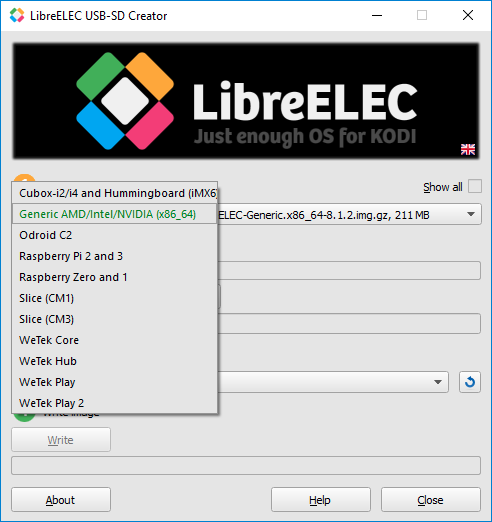
The OSMC installer currently lacks the option to install to a normal Mac or PC, but lead developer Sam Nazarko is working on an x86 version. When that comes out, there may not be a need for LibreELEC and OpenELEC, since OSMC will be able to run on just about everything.
WHY LIBREELEC IS MUCH BETTER THAN OPENELEC
OpenELEC was once the best, and only Kodi-centric operating system around, but now that LibreELEC is here there’s really no logical reason to use OpenElec anymore.
LibreELEC and OpenELEC both borrow heavily from Kodi’s source code. They both even look the same as Kodi, because they both come with Estuary – Kodi’s default skin. It’s mainly better security and several other small differences that set LibreELEC apart from OpenELEC.
OPENELEC IS A PAIN TO INSTALL COMPARED TO LIBREELEC
OpenELEC doesn’t have an installer, so you have to format your SD card (or USB stick) and flash the OS files yourself using 3rd party tools. LibreELEC also has a USB-SD creator tool that does everything for you.
LIBREELEC IS MORE UP-TO-DATE
The developers that make LibreELEC split away from the OpenELEC team in March of 2016. After LibreELEC branched off, it improved rapidly due in part to the fact that the LibreELEC team is larger than OpenELEC’s. OpenELEC is still chugging along, but the OpenELEC team releases patches on a far less frequent basis.
LIBREELEC RUNS BETTER ON RASPBERRY PI
Though both OpenELEC and LibreELEC are apparently neck-and-neck in terms of Raspberry Pi performance, the consensus seems to be that LibreELEC is a little quicker and more responsive on Pi compared to OpenELEC. MagPi(Raspberry Pi’s official magazine) recently compared OpenELEC and LibreELEC on Raspberry Pi, and concluded that LibreELEC works a bit better.
OPENELEC HAS SECURITY ISSUES
NIST (National Institute of Standards and Technology) recently pointed out some serious security issues in OpenELEC. The fact that they were directly called out by the United States Department of Commerce raises a red flag in our eyes.
A CLOSER LOOK AT OSMC
OSMC creator Sam Nazarko brought in professional graphics designerSimon Brunton to create a whole new user interface for OSMC.
When you browse movie files on OSMC, artwork appears on the left along with a short plot synopsis.
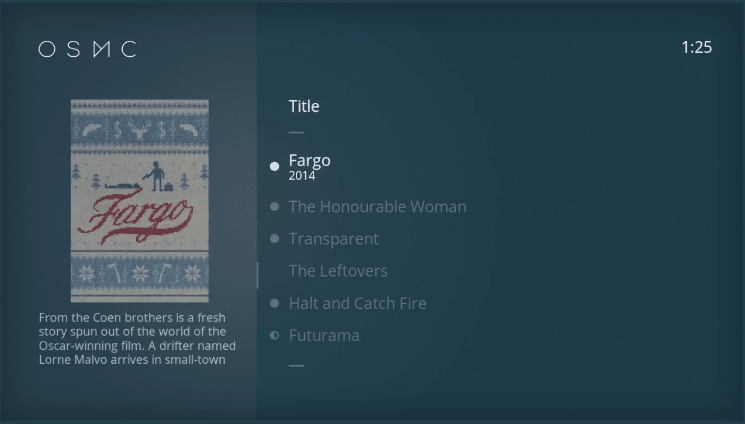
OSMC’s video control bar is minimalist and streamlined. Its blue and white color scheme is subtle and easy on the eyes.

OSMC allows you to install both Kodi add-ons and Linux programs via the OSMC App Store. You can get to the App Store via the graphical menu wheel depicted below.

OSMC’s main menu offers some choices that will look familiar if you’ve ever used Kodi. In addition to Movies, TV shows, Videos, Music, Pictures there’s also a “My OSMC” submenu. My OSMC is where you would go to fine-tune your settings.
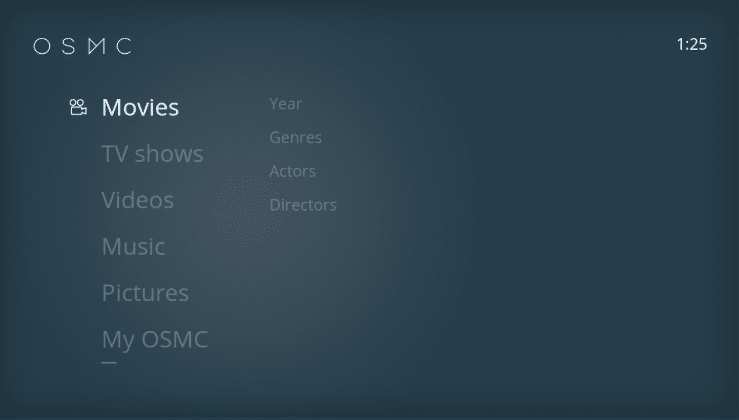
If for some reason you don’t like OSMC’s skin or you’re just used to Estuary (Kodi’s default skin), you can easily switch to Estuary via the My OSMC menu.
VERO 4K
The ideal hardware for OSMC is Vero 4k – team OSMC’s flagship TV box. You can get one for £119.00 (about $160 USD) via OSMC’s official website.

As its name suggests, Vero 4k can handle 4k video. Its other features include:
- HD sound support
- Bluetooth
- WiFi
- 1.6 GHz 64 bit processor
- 2 GB of RAM
RASPBERRY PI
If you don’t want to shell out $160 for Vero 4k, you can opt to get a $30 Raspberry Pi instead.
With 1.2 GHz 64-bit quad-core CPU and 1 GB of RAM, the latest Raspberry Pi is only slightly slower than Vero 4k.
OSMC works perfectly well on both devices. However, Raspberry Pi isn’t able to play 4k videos yet.
AN ALL-STAR CAST OF DEVELOPERS
Lead OSMC developer Sam Nazarko is a coding prodigy. When he was 19 years old, Nazarko released a Raspberry Pi operating system called Raspbmc. Apparently, he coded the entire thing on his own.
In an interview with Raspberry Pi Geek, Nazarko commented on why he decided to make Raspmbc.
“OPENELEC IS NOT DEBIAN BASED AND IS VERY MINIMAL FOR AN APPLIANCE-LIKE FEEL. I FEEL LIKE IT DOES NOT FIT IN WITH THE SPIRIT OF RASPBERRY PI, AS RASPBERRY PI IS ABOUT ALLOWING MODIFICATION.” – LEAD OSMC DEVELOPER SAM NAZARKO
Nazarko discontinued Raspbmc in 2013 to focus on OSMC.
In addition to Nazarko, the OSMC team also enlists the support of amateur coders via GitHubas well as professional graphic designers like Simon Brunton and others.
KEY OSMC FACTS
- Better interface compared to Kodi, OpenELEC and LibreELEC
- Automatic installer is available
- Fully-featured operating system under the hood (Debian Linux)
- Comes with an integrated version of Kodi Krypton pre-installed
- OSMC creator Sam Nazarko’s previous work includes Raspbmc
- OSMC app store allows you to install Linux programs
- Optimized for Vero 4K and Raspberry Pi
- Monthly upgrades and patches
- You can switch to Estuary if you don’t like OSMC’s interface
A CLOSER LOOK AT LIBREELEC
Because LibreELEC and OpenELEC both come with Kodi’s default skin Estuary, they both look exactly like Kodi itself.
Estuary is fairly easy to use once you get used to it. However, it can take a while to adjust to Estuary’s byzantine submenu logic. Also, some of the technical terms you may encounter (repository, etc.) may throw you off if you’re not familiar with Linux.
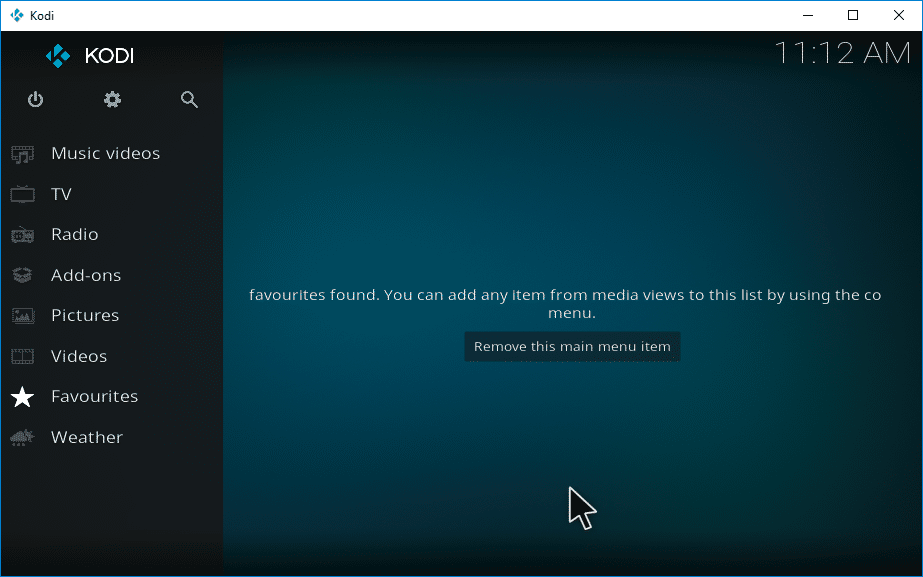
The main coder behind Estuary is Philipp Temminghoff. Temminghoff is a computer science researcher at Wuppertal University.His GitHubaccount shows that he has made some impressive contributions to Kodi over the years. However, Estuary’s occasionally awkward and text heavy menus suggest that team Kodi could stand to benefit from contributors that possess specific graphic design/user experience skills.
THE LIBREELEC INSTALLER
Unlike OSMC, the LibreELEC team does not sell a trademarked Kodi TV box. Instead, they work with a handful of different TV box manufacturers: CuBox, Odroid, Slice and WeTek. Additionally, LibreELEC works on all versions of Raspberry Pi.
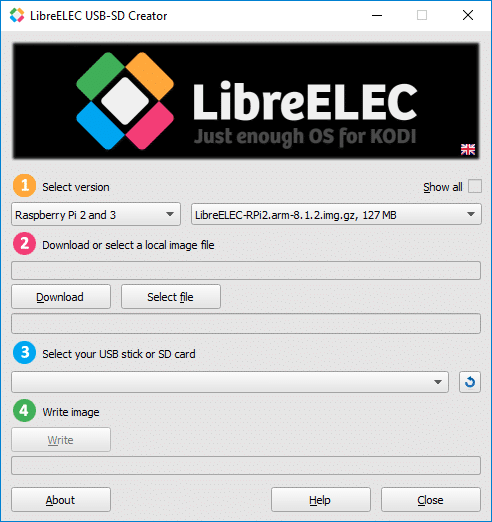
LIBREELEC DEVICES
As mentioned above, LibreELEC can run on standard x86 Macs and PCs, CuBox, Odroid, Slice, WeTek and Raspberry Pi. Let’s take a closer look at some of the lesser known devices on the list to see what they have to offer.
CUBOX
- Lots of RAM but is expensive, has a slow processor and lacks 4k.
CuBox i4x4 – the most top-of-the-line CuBoxTV box – doesn’t have 4k support and costs $10 more than OSMC’s Vero 4k. It has double the RAM (4 GB) of the Raspberry Pi but it’s processor only runs at 1.066 GHz. Raspberry Pi’s run at 1.2 GHz, so there may not be a good reason to buy a CuBox.
WETEK
- The best WeTek box is more expensive than Raspberry Pi but not as good as Vero 4k.
WeTek’s 1Best Cody box WeTek Play 2 features support for 4k video. It has 2 GB of RAM, a 1.536 GHz quad-core processor and a $109.90 price tag. For $10 more, you can tack on an OTA (Over-the-Air) digital antenna. Given that the Raspberry Pi is much cheaper and that Vero 4k has far more functionality and is only slightly more expensive, WeTek boxes may not be the best value.
ODROID
- Reasonably priced and more powerful than Raspberry Pi, but buggy and limited.
Odroid is a manufacturer from China. With an octo-core 2 GHz processor and 2 GB of RAM, Odroid’s flagship Odroid XU4 device is like a stronger version of Raspberry Pi. XU4 is super cheap ($59). However, few developers outside of team LibreELEC are interested in it. The consensus on Odroid seems to be that it’s buggy and fussy compared to Raspberry Pi. Sam Nazarko of OSMC is not interested in coding for Odroid because the Odroid isn’t popular enough to warrant the effort.
SLICE
- The makers of Slice recently called it quits.
Slice was basically a stylish, sexed-up version of Raspberry Pi 2 modeled after the first Apple TV. Its cool but somewhat gimmicky features (Knight Rider-esque flashy lights, for example) and 4 GB internal hard drive ultimately failed to compensate for its slow processor and inability to handle 4k video.
KEY FACTS ABOUT LIBREELEC
- OpenELEC offshoot
- More frequent updates compared to OpenLEC
- There’s an automatic installer for it
- Default interface is the same as Kodi’s (Estuary)
- Runs better on Raspberry Pi compared to OpenELEC
Related: How to Install LibreELEC on Your Streaming Device – LibreELEC with Kodi
OPENELEC’S FUTURE DOESN’T LOOK BRIGHT
There’s not much use in going into much detail with OpenELEC here because it’s basically just an inferior version of LibreELEC. Anything OpenELEC can do, LibreELEC can do better.
As mentioned above, NIST (National Institute of Standards and Technology) recently called out the OpenELEC team for not addressing its serious security issues. Apparently, team OpenELEC has attempted to address NIST’s concerns and the vulnerability notice is now “awaiting reanalysis.”
IS TEAM OPENELEC IMPLODING?
According to talk on Reddit, LibreELEC was the result of mutiny on the OpenELEC team. Apparently, the OpenELEC lead programmer irritated his colleges to the point that they all jumped ship just to spite him.
KEY FACTS
- History of security issues
- LibreELEC was created from OpenELEC’s source code
- Less frequent updates compared to LibreELEC
- You have to install it yourself
- Default interface is the same as Kodi’s (Estuary)
Related: How to Install OpenELEC on Your Streaming Device – OpenELEC with Kodi
OSMC Vs. OpenELEC Vs. LibreELEC – Kodi Operating System Comparison的更多相关文章
- DBCC CHECKDB 遭遇Operating system error 112(failed to retrieve text for this error. Reason: 15105) encountered
我们一个SQL Server服务器在执行YourSQLDBa的作业YourSQLDba_FullBackups_And_Maintenance时遇到了错误: Exec YourSQLDba.Maint ...
- The World's Only Advanced Operating System
The World's Only Advanced Operating System
- Unable to open the physical file xxxx. Operating system error 2
在新UAT服务器上,需要将tempdb放置在SSD(固态硬盘)上.由于SSD(固态硬盘)特性,所以tempdb的文件只能放置在D盘下面,而不能是D盘下的某一个目录下面. ALTER DATABASE ...
- CREATE FILE encountered operating system error 5(Access is denied.)
这篇博文主要演示"CREATE FILE encountered operating system error 5(Access is denied.)"错误如出现的原因(当然只是 ...
- Linux启动报错missing operating system
用UltraISO制作了一个Red Hat Enterprise Linux Server release 5.7系统的U盘启动盘,然后在一台PC上安装,由于安装过程中在干别的事情,有些选项没有细看. ...
- Learning Roadmap of Robotic Operating System (ROS)
ROS Wiki: http://wiki.ros.org/ Robots Using ROS Textbooks: A Gentle Introduction to ROS Learning ROS ...
- Full exploitation of a cluster hardware configuration requires some enhancements to a single-system operating system.
COMPUTER ORGANIZATION AND ARCHITECTURE DESIGNING FOR PERFORMANCE NINTH EDITION Operating System Desi ...
- Multiprocessor Operating System Design Considerations SYMMETRIC MULTIPROCESSORS
COMPUTER ORGANIZATION AND ARCHITECTURE DESIGNING FOR PERFORMANCE NINTH EDITION An SMP operating syst ...
- u盘安装CENTOS后,启动missing operating system ,只能用U盘才能启动系统
好久之前就想把家里闲置的那台老的不能再老的笔记本换成linux的,用来学习 从N久之前用光盘安装的时候发现光驱坏掉了之后就没有再装过,最近又想安装于是就试了U盘安装 U盘安装过程也很简单,只需要制作一 ...
随机推荐
- 【SpringBoot+Mybatis+thymeleaf报错】Error resolving template "XXX", template might not exist or might not be accessible by any of the configured
解决方法一: 原因:在使用springboot的过程中,如果使用thymeleaf作为模板文件,则要求HTML格式必须为严格的html5格式,必须有结束标签,否则会报错. 在application.y ...
- hiho#1449 重复旋律6 求长度为k的串最大次数 后缀自动机
题目传送门 题目大意:求长度为k的串的最大次数,把k从1到length的所有答案全部输出. 思路: 这道题放在$SAM$里就是求长度$k$对应的所有$right$集中最大的大小. 我们以$aabab$ ...
- 【App性能监控】:Android studio环境的搭建(以及遇到个各种坑)
今天搭建app性能测试环境,使用的是android studio的Android Device Monitor抓取trace日志分析: 1,下载最新的android studio安装,这一步没啥问题: ...
- 等价类计数问题(Polya定理和burnside引理)
零.约定: (置换等名词会在前置知识中有解释) \(1.\)在本文中,题目要求的染色方案等统称为"元素". \(2.\)两个元素严格相等我们记做"\(=\)", ...
- HBase 使用外部的 zookeeper
HBase 启动时,默认会根据hbase-site.xml文件中的如下设置端口上启动一个zookeeper服务: <property> <name>hbase.zookeepe ...
- golang (5) ---工程管理
1. go mod 添加本地package依赖 go mod 作为golang新的版本管理工具,减少了对GOPATH的依赖. 但是对本地文件的依赖的时候,提示 build server: cannot ...
- gerapy的初步使用(管理分布式爬虫)
一.简介与安装 Gerapy 是一款分布式爬虫管理框架,支持 Python 3,基于 Scrapy.Scrapyd.Scrapyd-Client.Scrapy-Redis.Scrapyd-API.Sc ...
- 1、 小白带你入坑xamarin系列之环境搭建和准备
重点提示 由于xamarin发展更新很快 目前教程部分内容已经过时 请注意下载最新版本 2018.05.23 www.xamarin.com 1. 小白带你入坑xamarin系列之环境搭建和准备 ...
- Visual Studio 跨平台開發實戰(3) - Xamarin iOS 多頁面應用程式開發 (转帖)
前言 在前一篇教學中, 我們學會如何使用Visual Studio 搭配Xcode 進行iOS基本控制項的操作. 但都是屬於單一畫面的應用程式. 這次我們要來練習如何透過Navigation Cont ...
- Java网络编程(一)
Java网络编程: 1.1: 网络编程:对于我这个“研究不深”的网络菜鸟来说,我觉得网络编程就是实现计算机与计算机之间通信的编程.写些能够实现计算机与计算机之间的通信就行了(目前来说). 1.2:一台 ...