
CSS布局相关概要
一、文档流
运用css布局首先要具备一些概念上的知识,文档流的概念充斥着布局的整个过程。浏览器渲染页面是有先后顺序的,其顺序是至上而下,根据HTML的文档结构进行渲染。
二、div+css
耳熟能详的div+css布局指的是:仅用容器标签div配合css样式进行布局。以往的table布局是不推荐使用的。
三、display: none / block/ inline / inline-block
设置元素的显示方式,以上为常见的取值。这是布局中非常重要的概念
block块元素:独自占据一行的元素,可控制宽高。如 div p h1~h6 ...
inline内联元素:不占据一行,,不能控制宽高,需要内容撑开。如 a span ...
inline-block: 内联的块元素,不占据一整行,但是可以控制宽高
CSS:

    .box1{

        display: block;

        width: 100px;

        height: 100px;

        background-color: #aaa;

    }

    .box2{

        display: inline;
     width:100px;
        height:100px;

        background-color: #f45;

    }

    .box3{

        display: inline-block;

        width: 100px;

        height: 100px;

        background-color: #567;

    }

HTML:

     <div class="box1">容器一</div>

    <div class="box2">容器二</div>

    <div class="box3">容器三</div>

可以看出,inline和inline-block都不会独自占据一行,且inline无法控制宽高。
好了,以上就是布局需要熟悉掌握的概念,接下来介绍布局的具体方法和需要用到的属性。
四、浮动布局float:浮动的目的是使元素脱离文档流,按照自己的意愿进行布局。
1.取值:none,left,right。浮动只能向左或者向右
<!doctype html>

<html lang="en">

<head>

    <meta charset="UTF-8">

    <title>Document</title>

    <style>

        div{

            display: block;

            width: 100px;

            height: 100px;

            margin-bottom: 5px;

            background-color: #000;

        }

        div.box2{

            background-color: #f34;

            float: left;

        }

        div.box3{

            background-color: #cd3;

            float: right;

        }

    </style>

</head>

<body>

    <div class="box1">容器一</div>

    <div class="box2">容器二</div>

    <div class="box3">容器三</div>

</body>

</html>
效果展示

可以看到,容器一仍然是不浮动的块元素,独自占据一行,而容器二和容器三分别向左右浮动,并出现在同一行,display:block,说明
2.浮动元素已经脱离文档流。
我们稍微更改上述代码,设置容器一浮动,二和三不浮动。
CSS:

    div{

            display: block;

            width: 100px;

            height: 100px;

            margin-bottom: 5px;

            background-color: #000;

        }

        div.box1{float: left;opacity:0.5;}  /*容器一浮动,并设置了透明度*/

        div.box2{background-color: #f34;}

        div.box3{ackground-color: #cd3;text-align:right}  /*将文本向右对齐*/
结果如下:
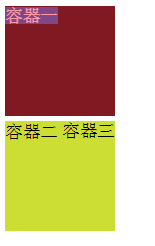
可以看到,设置了黑色背景的容器一变成了另外一种颜色,容器只剩下两个,为什么呢??其实原因是容器一设置了浮动,它原本的位置就不占用文档流的空间,后面的元素就会紧接着补上,所以容器二去到了容器一原本的位置,我们看到的容器一背景色实际上是容器一和二层叠所得的颜色,而文字“容器二”则围绕在浮动元素周围,不能补位。
结论:3.标准浏览器中,浮动元素脱离文档流,它后面的元素会占据浮动元素原本的位置。
4.文字内容会围绕在浮动元素周围
<!doctype html>

<html lang="en">

<head>

    <meta charset="UTF-8">

    <title>Document</title>

    <style>

        div{

            width: 100px;

            height: 100px;

            opacity:0.5;

            background-color: #000;

                        float: left;

        }

    </style>

</head>

<body>

    <div class="box1"></div>你好啊你好啊你好啊你好啊你好啊你好啊你好啊你好啊你好啊你好啊你好啊你好啊你好啊你好啊你好啊你好啊你好啊你好啊你好啊你好啊你好啊你好啊你好啊你好啊你好啊你好啊你好啊你好啊你好啊你好啊你好啊你好啊你好啊你好啊你好啊你好啊你好啊你好啊你好啊你好啊你好啊你好啊你好啊你好啊你好啊你好啊你好啊你好啊你好啊你好啊你好啊你好啊你好啊你好啊你好啊你好啊

</body>

</html>
效果演示

五、清除浮动clear
1.取值:left,right,both
其常用方法是添加一个div.clear标签,在需要的清除浮动的地方加入此标签
<!doctype html>

<html lang="en">

<head>

    <meta charset="UTF-8">

    <title>清除浮动</title>

    <style>

        .box{

            width: 50px;

            height: 50px;

            background-color: #f57;

            margin: 5px;

            float: left;

        }

        .clear{

            clear: both;

        }

    </style>

</head>

<body>

    <div class="box"></div>

    <div class="box"></div>

    <div class="clear"></div>  <!-- 清除浮动 -->

    <div class="box"></div>

    <div class="box"></div>

    <div class="box"></div>

    <div class="clear"></div>  <!-- 清除浮动 -->

    <div class="box"></div>

    <div class="box"></div>

    <div class="box"></div>

    <div class="box"></div>

    <div class="clear"></div>  <!-- 清除浮动 -->

    <div class="box"></div>

    <div class="box"></div>

    <div class="box"></div>

</body>

</html>
效果演示

六、position定位
1.取值:static 默认值,无定位
absolute 绝对定位,脱离文档流。若父元素无定位,则以body坐标原点进行定位;若position:relative,则以父元素左上角(原点)进行定位。
relative 相对定位,不脱离文档流。相对自己原来的位置进行定位。
fixed 固定定位,脱离文档流。相对浏览器窗口进行定位。
2.3种定位方式都是用top bottom left right进行定位
<!doctype html>

<html lang="en">

<head>

    <meta charset="UTF-8">

    <title>Document</title>

    <style>

        /*html,

        body{

            height: 100%;

        }

        body{

            background-color: #808;

        }

        .box{

            position:absolute;

            width: 100px;

            height: 100px;

            top: 10px;

            left: 10px;

            background-color: #f5f00c;

        }*/

        .box1{

            width: 100px;

            height: 100px;

            position: relative;

            top:50px;

            left: 30px;

            background-color: #ccc00c;

        }

    </style>

</head>

<body>

    <!-- <div class="box"></div> -->

    <div class="box1"></div>

</body>

</html>
效果演示

<!doctype html>

<html lang="en">

<head>

    <meta charset="UTF-8">

    <title>absolute定位的两种情况</title>

    <style>

        .box,

        .son{

            position:absolute;

            width: 100px;

            height: 100px;

            top: 10px;

            left: 10px;

            background-color: #f5f00c;

        }

        .father{

            width: 150px;

            height: 150px;

            background-color: #ccc;

            position: relative;

            top: 150px;

            left: 20px;

        }

    </style>

</head>

<body>

    <div class="box"></div>

    <div class="father">

        <div class="son"></div>

    </div>

</body>

</html>
演示结果

3.z-index:规定元素的层叠关系 ,即在平面建立一个z轴,数值越大离用户越近,层叠在上,数值越小的层叠在下。元素必须有position属性时z-index才生效
CSS:

    .box{

            width: 100px;

            height: 100px;

        }

        .box:first-child{

            background-color: #5ceb3f;

            position: absolute;

            top: 0px;

            left: 0px;

            z-index:1;

        }

        .box:last-child{

            background-color: #808080;

            position: absolute;

            top: 50px;

            left: 50px;

            z-index:999;

        }

HTML:

    <div class="box"></div>

    <div class="box"></div>
效果演示
z-index:1;

z-index:999;
CSS布局相关概要的更多相关文章
- amazeui笔记-CSS 布局相关
CSS 等分网格: 说明:.am-avg-sm-2 数字表示几等分 会将子元素 <li>的宽度设置为 50%. 只能用于 <ul> / <ol> 结构 辅助类: ...
- css布局相关:涉及到常见页面样式难点
一.display:table用法 Table:display:tableBody:table-row-group;Tr: table-row;Td: table-cell https://www.c ...
- 深入css布局篇(3)完结 — margin问题与格式化上下文
深入css布局(3) - margin问题与格式化上下文 在css知识体系中,除了css选择器,样式属性等基础知识外,css布局相关的知识才是css比较核心和重要的点.今天我们来深入学习一下 ...
- 深入css布局篇(2) — 定位与浮动
深入css布局(2) - 定位与浮动 在css知识体系中,除了css选择器,样式属性等基础知识外,css布局相关的知识才是css比较核心和重要的点.今天我们来深入学习一下css布局相关的知识 ...
- 深入css布局篇(1) — 盒模型 & 元素分类
深入css布局(1)-- 盒模型 & 元素分类 " 在css知识体系中,除了css选择器,样式属性等基础知识外,css布局相关的知识才是css比较核心和重要的点.今天我们来深 ...
- div+css布局记扎
实际开发网站过程中边碰壁边积累了一些div+css布局相关的小技巧,在这里做一些整理与大家一起探讨.本文章将间歇性更新. 1.div+css布局综述 div+css布局个人观点就是“盒子套盒子”的关系 ...
- amazeui学习笔记--css(布局相关1)--网格Grid
amazeui学习笔记--css(布局相关1)--网格Grid 一.总结 基本使用 1.div+class布局:amaze里面采取的就是div+class的布局方式 <div class=&q ...
- amazeui学习笔记--css(布局相关3)--辅助类Utility
amazeui学习笔记--css(布局相关3)--辅助类Utility 一.总结 1.元素清除浮动: 添加 am-cf 这个 class 即可 2.水平滚动: .am-scrollable-horiz ...
- amazeui学习笔记--css(布局相关2)--等分网格 AVG Grid
amazeui学习笔记--css(布局相关2)--等分网格 AVG Grid 一.总结 1.与grid区别:网格中:am-g + am-u-xx-n 等分网格中只有一个: am-avg-sm-4(在u ...
随机推荐
- Restoring Numbers
D. Restoring Numbers ...
- Flume同时输出数据到HDFS和kafka
cd /usr/local/flume/conf vim flume-exec-total.conf ## Explain #通过sink把数据分别输出到kafka和HDFS上 # Name the ...
- 在使用swiper时,解决同一个页面使用多个轮播出现问题做法
$(".swiper-container").each(function(){ $(this).swiper({ loop: true, initialSlide :0, pagi ...
- 20145302张薇《网络对抗技术》PC平台逆向破解
20145302张薇<网络对抗技术>PC平台逆向破解 实验任务 1.简单shellcode注入实验 2.Return-to-libc 攻击实验 实验相关原理 Bof攻击防御技术 从防止注入 ...
- Spring Data JPA 关系映射(一对一,一对多,多对多 )
CascadeType.REMOVE 级联删除操作,删除当前实体时,与它有映射关系的实体也会跟着被删除.CascadeType.MERGE 级联更新(合并)操作,当Student中的数据改变,会相应地 ...
- Redis之持久化
Redis 持久化 提供了多种不同级别的持久化方式:一种是RDB,另一种是AOF. RDB方式的持久化是通过快照(snapshotting)完成的,当符合一定条件时Redis会自动将内存中的所有数据进 ...
- java虚拟机类加载
java虚拟机中类的加载 (JVM的大致结构图) 从发class文件到内存中的类,按先后顺序,需要经过加载,链接以及初始化三大步骤. java语言的类型可分为两大类:基本类型(primitive ty ...
- Spring Cloud 开发的一些推荐规划
1.提供一个统一的 父 pom 依赖 作用:统一版本与引入必要依赖 2.提供一个模板模型. 作用: 开发人员不必关系具体基础启动项 3.提供一个统一基础配置模型 作用: 开发人员不比太过关注与必 ...
- [Kafka] - Kafka Java Consumer实现(二)
Kafka提供了两种Consumer API,分别是:High Level Consumer API 和 Lower Level Consumer API(Simple Consumer API) H ...
- 雷林鹏分享:Ruby 正则表达式
Ruby 正则表达式 正则表达式是一种特殊序列的字符,它通过使用有专门语法的模式来匹配或查找其他字符串或字符串集合. 语法 正则表达式从字面上看是一种介于斜杠之间或介于跟在 %r 后的任意分隔符之间的 ...