
一款仿ios7的switches开关按钮
今天给大家介绍一款仿ios7的switches开关按钮。这款按钮也是纯css实现的。无需引js代码。在实现中给出了两种颜色,三种不同大小的demo。一起看下效果图:
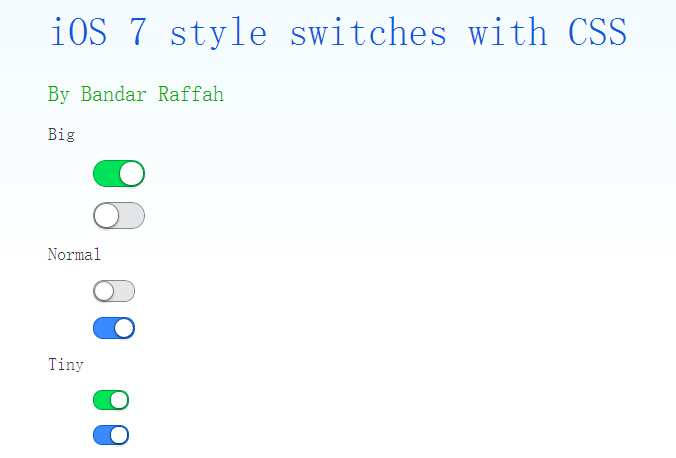
实现的代码。
html代码:
   <div class="wrap" style="width: 600px; margin: auto;">

        <h1>

            iOS 7 style switches with CSS</h1>

        <h2>

            By Bandar Raffah</h2>

        <label>

            Big<input type="checkbox" class="ios-switch green  bigswitch" checked /><div>

                <div>

                </div>

            </div>

        </label>

        <label>

            <input type="checkbox" class="ios-switch bigswitch" checked /><div>

                <div>

                </div>

            </div>

        </label>

        <label>

            Normal<input type="checkbox" class="ios-switch green" /><div>

                <div>

                </div>

            </div>

        </label>

        <label>

            <input type="checkbox" class="ios-switch" /><div>

                <div>

                </div>

            </div>

        </label>

        <label>

            Tiny<input type="checkbox" class="ios-switch green tinyswitch" checked /><div>

                <div>

                </div>

            </div>

        </label>

        <label>

            <input type="checkbox" class="ios-switch tinyswitch" checked /><div>

                <div>

                </div>

            </div>

        </label>

  </div>
css代码:
  input[type="checkbox"]

        {

            position: absolute;

            opacity:;

        }

        /* Normal Track */

        input[type="checkbox"].ios-switch + div

        {

            vertical-align: middle;

            width: 40px;

            height: 20px;

            border: 1px solid rgba(0,0,0,.4);

            border-radius: 999px;

            background-color: rgba(0, 0, 0, 0.1);

            -webkit-transition-duration: .4s;

            -webkit-transition-property: background-color, box-shadow;

            box-shadow: inset 0 0 0 0px rgba(0,0,0,0.4);

            margin: 15px 1.2em 15px 2.5em;

        }

        /* Checked Track (Blue) */

        input[type="checkbox"].ios-switch:checked + div

        {

            width: 40px;

            background-position: 0 0;

            background-color: #3b89ec;

            border: 1px solid #0e62cd;

            box-shadow: inset 0 0 0 10px rgba(59,137,259,1);

        }

        /* Tiny Track */

        input[type="checkbox"].tinyswitch.ios-switch + div

        {

            width: 34px;

            height: 18px;

        }

        /* Big Track */

        input[type="checkbox"].bigswitch.ios-switch + div

        {

            width: 50px;

            height: 25px;

        }

        /* Green Track */

        input[type="checkbox"].green.ios-switch:checked + div

        {

            background-color: #00e359;

            border: 1px solid rgba(0, 162, 63,1);

            box-shadow: inset 0 0 0 10px rgba(0,227,89,1);

        }

        /* Normal Knob */

        input[type="checkbox"].ios-switch + div > div

        {

            float: left;

            width: 18px;

            height: 18px;

            border-radius: inherit;

            background: #ffffff;

            -webkit-transition-timing-function: cubic-bezier(.54,1.85,.5,1);

            -webkit-transition-duration: 0.4s;

            -webkit-transition-property: transform, background-color, box-shadow;

            -moz-transition-timing-function: cubic-bezier(.54,1.85,.5,1);

            -moz-transition-duration: 0.4s;

            -moz-transition-property: transform, background-color;

            box-shadow: 0px 2px 5px rgba(0, 0, 0, 0.3), 0px 0px 0 1px rgba(0, 0, 0, 0.4);

            pointer-events: none;

            margin-top: 1px;

            margin-left: 1px;

        }

        /* Checked Knob (Blue Style) */

        input[type="checkbox"].ios-switch:checked + div > div

        {

            -webkit-transform: translate3d(20px, 0, 0);

            -moz-transform: translate3d(20px, 0, 0);

            background-color: #ffffff;

            box-shadow: 0px 2px 5px rgba(0, 0, 0, 0.3), 0px 0px 0 1px rgba(8, 80, 172,1);

        }

        /* Tiny Knob */

        input[type="checkbox"].tinyswitch.ios-switch + div > div

        {

            width: 16px;

            height: 16px;

            margin-top: 1px;

        }

        /* Checked Tiny Knob (Blue Style) */

        input[type="checkbox"].tinyswitch.ios-switch:checked + div > div

        {

            -webkit-transform: translate3d(16px, 0, 0);

            -moz-transform: translate3d(16px, 0, 0);

            box-shadow: 0px 2px 5px rgba(0, 0, 0, 0.3), 0px 0px 0 1px rgba(8, 80, 172,1);

        }

        /* Big Knob */

        input[type="checkbox"].bigswitch.ios-switch + div > div

        {

            width: 23px;

            height: 23px;

            margin-top: 1px;

        }

        /* Checked Big Knob (Blue Style) */

        input[type="checkbox"].bigswitch.ios-switch:checked + div > div

        {

            -webkit-transform: translate3d(25px, 0, 0);

            -moz-transform: translate3d(16px, 0, 0);

            box-shadow: 0px 4px 8px rgba(0, 0, 0, 0.3), 0px 0px 0 1px rgba(8, 80, 172,1);

        }

        /* Green Knob */

        input[type="checkbox"].green.ios-switch:checked + div > div

        {

            box-shadow: 0px 2px 5px rgba(0, 0, 0, 0.3), 0 0 0 1px rgba(0, 162, 63,1);

        }

        /* Needless Page Decoration */

        body

        {

            -webkit-user-select: none;

            cursor: default;

            font: 18px "Helvetica Neue";

            color: rgba(0, 0, 0, 0.77);

            font-weight:;

            padding-left: 30px;

            padding-top: 0px;

            background: -webkit-linear-gradient(top, #f2fbff 0%, #ffffff 64%) no-repeat;

            background: -moz-linear-gradient(top, #f2fbff 0%, #ffffff 64%) no-repeat;

            background: -ms-linear-gradient(top, #f2fbff 0%, #ffffff 64%) no-repeat;

            background: linear-gradient(to bottom, #f2fbff 0%, #ffffff 64%) no-repeat;

        }

        h1

        {

            font-weight:;

            font-size: 40px;

            color: #135ae4;

        }

        h2

        {

            font-weight:;

            font-size: 22px;

            color: #03b000;

        }

        h3

        {

            font-weight:;

            font-size: 18px;

            color: rgba(0, 0, 0, 0.77);

            margin-top: 50px;

        }

        a:link

        {

            text-decoration: none;

            color: #f06;

        }

        a:visited

        {

            text-decoration: none;

            color: #f06;

        }

        a:hover

        {

            text-decoration: underline;

        }

        a:active

        {

            text-decoration: underline;

        }
注:本文爱编程原创文章,转载请注明原文地址:http://www.w2bc.com/Article/8897
一款仿ios7的switches开关按钮的更多相关文章
- 一款仿PBA官网首页jQuery焦点图的切换特效
一款仿PBA官网首页jQuery焦点图的切换特效,非常的简单大方, 在对浏览器兼容性的方面做了不少的功夫.IE6也勉强能过去. 还是一款全屏的焦点图切换特效.大气而清新.很适合简介大方的网站. 下图还 ...
- 做一款仿映客的直播App
投稿文章,作者:JIAAIR(GitHub) 一.直播现状简介 1.技术实现层面 技术相对都比较成熟,设备也都支持硬编码.iOS还提供现成的Video ToolBox框架,可以对摄像头和流媒体数据结构 ...
- 做一款仿映客的直播App?看我就够了
来源:JIAAIR 链接:http://www.jianshu.com/p/5b1341e97757 一.直播现状简介 1.技术实现层面: 技术相对都比较成熟,设备也都支持硬编码.IOS还提供现成 ...
- iBox v2.0 发布,Web化仿iOS7界面/交互的JavaScirpt库
iBox2 是一个仿 iOS 7 界面/交互的 JavaScirpt 库,它运行在 webkit 内核的移动浏览器之上,依赖 iScroll5,帮助开发者构建更接近 iOS 体验的 WebApp. 伴 ...
- 【推荐】免费,19 款仿 Bootstrap 后台管理主题下载
声明: 1. 本篇文章提到的仿 Bootstrap 风格的主题,是基于 jQuery 的 ASP.NET MVC 控件库的主题. 2. FineUIMvc(基础版)完全免费,可以用于商业项目. 目录 ...
- 仿IOS7日期选择控件(新)
前面也写过好几篇仿IOS日期控件的文章,不过基本上都是基于Wheelview修改而来,大致实现了滑轮选择选项的效果,其实和ios7及以上的效果还是相差甚远,而本文中所展现的这个控件虽也是从网上而来(呵 ...
- 19 款仿 Bootstrap 后台管理主题免费下载
声明: 1. 本篇文章提到的仿 Bootstrap 风格的主题,是基于 jQuery 的 ASP.NET MVC 控件库的主题. 2. FineUIMvc(基础版)完全免费,可以用于商业项目. 目录 ...
- 一款仿36氪iOS版APP源码
Features 离线缓存 解决视频播放器的网速慢卡顿 视频播放器调用简单 cell自适应高度 cell中嵌套webView cell中嵌套webView 条件实时搜索 Known problems ...
- Handsontable-一款仿 Excel效果的表格插件使用总结 96
最近在做一个关于报表管理的项目,发现了一款很好用的jQuery插件-Handsontable.它真的特别给力,在 Excel 中可进行的操作,你几乎都可以在网页中做到,如拖动复制.Ctrl+C .Ct ...
随机推荐
- 自定义AppServer
TelnetSever.cs public class TelnetServer : AppServer<TelnetSession> { protected override bool ...
- java 加密工具(产生证书)
给Tomcat服务器应用加密: 命令:keytool -genkey -alias tomcat -keyalg RSA -genkey产生密钥对 -alias取得别名 -keyalg RSA产生密钥 ...
- 【laravel5.4 + TP5.0】hasOne和belongsTo的区别
1.从字面理解:假如A比B大,那么A hasOne B: B belongsTo A: 2.个人总结: 3.从代码角度: 主要是看你是在哪一个model(模型)中编写这个关联关系,父关联对象就是在父关 ...
- SVN访问版本库精细的权限控制
SVN精细权限控制本章将详细介绍前一章所涉及的两个配置文件, svnserve.conf 和 authz.conf,通过对配置逐行的描述,来阐明其中的一些细节含义.除此之外的其他配置.安装等内容,不是 ...
- JSON与Bean互转
转自: 关于json与javaBean之间的转换 废话不多说,直接进入主题,json与javaBean之间的互相转换 javaBean转换成json 直接使用提供的方法可以得到json JSONObj ...
- HDUOJ---1996汉诺塔VI
汉诺塔VI Time Limit: 2000/1000 MS (Java/Others) Memory Limit: 65536/32768 K (Java/Others) Total Subm ...
- Setting up a static IP address in Ubuntu
sudo gedit /etc/network/interfaces Change the line iface eth0 inet dhcp to iface eth0 inet static an ...
- Quartz.net官方开发指南[转]
http://www.cnblogs.com/shanyou/category/102991.html
- Jquery与mootools对比
换了新公司以后就很少使用原生Js来实现界面交互了,而是更多的依赖Jquery. 1.Jquery优点: 良好的一致性$().().xxxxx与强大的DOM api组件可以让一个js菜鸟一周之类立马开发 ...
- android自定义控件实例
很多时候android常用的控件不能满足我们的需求,那么我们就需要自定义一个控件了.今天做了一个自定义控件的实例,来分享下. 首先定义一个layout实现按钮内部布局: 01 <?xml ver ...