
wepy绘制雷达图
代码如下:
<style lang='less'>

  .radar-canvas2 {

    width: 690rpx;

    height: 420rpx;

  }

</style>

<template>

  <canvas class='radar-canvas2' canvas-id='radar-canvas'></canvas>

</template>

<script>

import wepy from 'wepy'

var windowW = wx.getSystemInfoSync().windowWidth

export default class RadarCanvas extends wepy.component {

  props = {

    source: {

      default: [

        {desc: '综合', value: 0},

        {desc: '思修法基', value: 0},

        {desc: '史纲', value: 0},

        {desc: '马原', value: 0},

        {desc: '毛中特', value: 0}

      ],

      type: Array

    }

  }

  data = {

    ctx: null,

    sideNum: 5,

    angle: 1.26,

    centerPointX: 345,

    centerPointY: 210,

    radius: 120

  }

  methods = {

    drawCanvas: () => {

      let ctx = wx.createCanvasContext('radar-canvas')

      this.sideNum = this.source.length

      this.angle = Math.PI * 2 / this.sideNum

      this.centerPointX = this.rpx(690 / 2)

      this.centerPointY = this.rpx(420 / 2)

      this.radius = this.rpx(120)

      this.$apply()

      this.drawPolygon(ctx)

      this.drawRib(ctx)

      this.addDataPoint(ctx)

      this.linePoint(ctx)

      ctx.draw(false)

    }

  }

  drawPolygon(ctx) {

    ctx.setLineDash([2, 2])

    ctx.setStrokeStyle('#E3E2E2')

    let r = this.rpx(30)

    for (let i = 1; i < 5; i++) {

      ctx.beginPath()

      let currR = r * i // 当前半径

      ctx.setFontSize(this.rpx(20))

      ctx.setFillStyle('#8E8C8B')

      ctx.setTextAlign('right')

      ctx.fillText(25 * (i - 1), this.centerPointX - 5, this.centerPointY - r * (i - 1) + this.rpx(10))

      //  最外面的是实线

      if (i === 4) {

        ctx.setLineDash()

      }

      for (let j = 0; j < this.sideNum; j++) {

        let x = this.centerPointX + currR * Math.cos(this.angle * j + Math.PI / 3.3)

        let y = this.centerPointY + currR * Math.sin(this.angle * j + Math.PI / 3.3)

        ctx.lineTo(x, y)

      }

      ctx.closePath()

      ctx.stroke()

    }

  }

  drawRib(ctx) {

    ctx.setLineDash([2, 2])  // 虚线

    ctx.setStrokeStyle('#E3E2E2')

    ctx.beginPath()

    for (let i = 0; i < this.sideNum; i++) {

      let x = this.centerPointX + this.radius * Math.cos(this.angle * i + Math.PI / 3.3)

      let y = this.centerPointY + this.radius * Math.sin(this.angle * i + Math.PI / 3.3)

      ctx.moveTo(this.centerPointX, this.centerPointY)

      ctx.lineTo(x, y)

      ctx.setFontSize(this.rpx(28))

      ctx.setFillStyle('#8E8C8B')

      switch (i) {

        case 0:

          ctx.setTextAlign('left')

          ctx.fillText(this.source[i].desc, x, y + 20)

          break

        case 1:

          ctx.setTextAlign('right')

          ctx.fillText(this.source[i].desc, x, y + 20)

          break

        case 2:

          ctx.setTextAlign('right')

          ctx.fillText(this.source[i].desc, x - 10, y)

          break

        case 3:

          ctx.setTextAlign('center')

          ctx.fillText(this.source[i].desc, x, y - 10)

          break

        case 4:

          ctx.setTextAlign('left')

          ctx.fillText(this.source[i].desc, x + 10, y)

          break

        default:

          break

      }

    }

    ctx.closePath()

    ctx.stroke()

  }

  addDataPoint(ctx) {

    ctx.setLineDash()

    for (let i = 0; i < this.sideNum; i++) {

      let x = this.centerPointX + this.radius * Math.cos(this.angle * i + Math.PI / 3.3) * this.source[i].value

      let y = this.centerPointY + this.radius * Math.sin(this.angle * i + Math.PI / 3.3) * this.source[i].value

      ctx.beginPath()

      ctx.arc(x, y, this.rpx(4), 0, 2 * Math.PI)

      ctx.setFillStyle('#47D891')

      ctx.fill()

      ctx.closePath()

    }

  }

  linePoint(ctx) {

    ctx.setStrokeStyle('#47D891')

    ctx.beginPath()

    for (var i = 0; i < this.sideNum; i++) {

      var x = this.centerPointX + this.radius * Math.cos(this.angle * i + Math.PI / 3.3) * this.source[i].value

      var y = this.centerPointY + this.radius * Math.sin(this.angle * i + Math.PI / 3.3) * this.source[i].value

      ctx.lineTo(x, y)

    }

    ctx.closePath()

    ctx.setFillStyle('rgba(37,212,129,0.25)')

    ctx.fill()

    ctx.stroke()

  }

  rpx(param) {

    return Number((windowW / 750 * param).toFixed(2))

  }

}

</script>
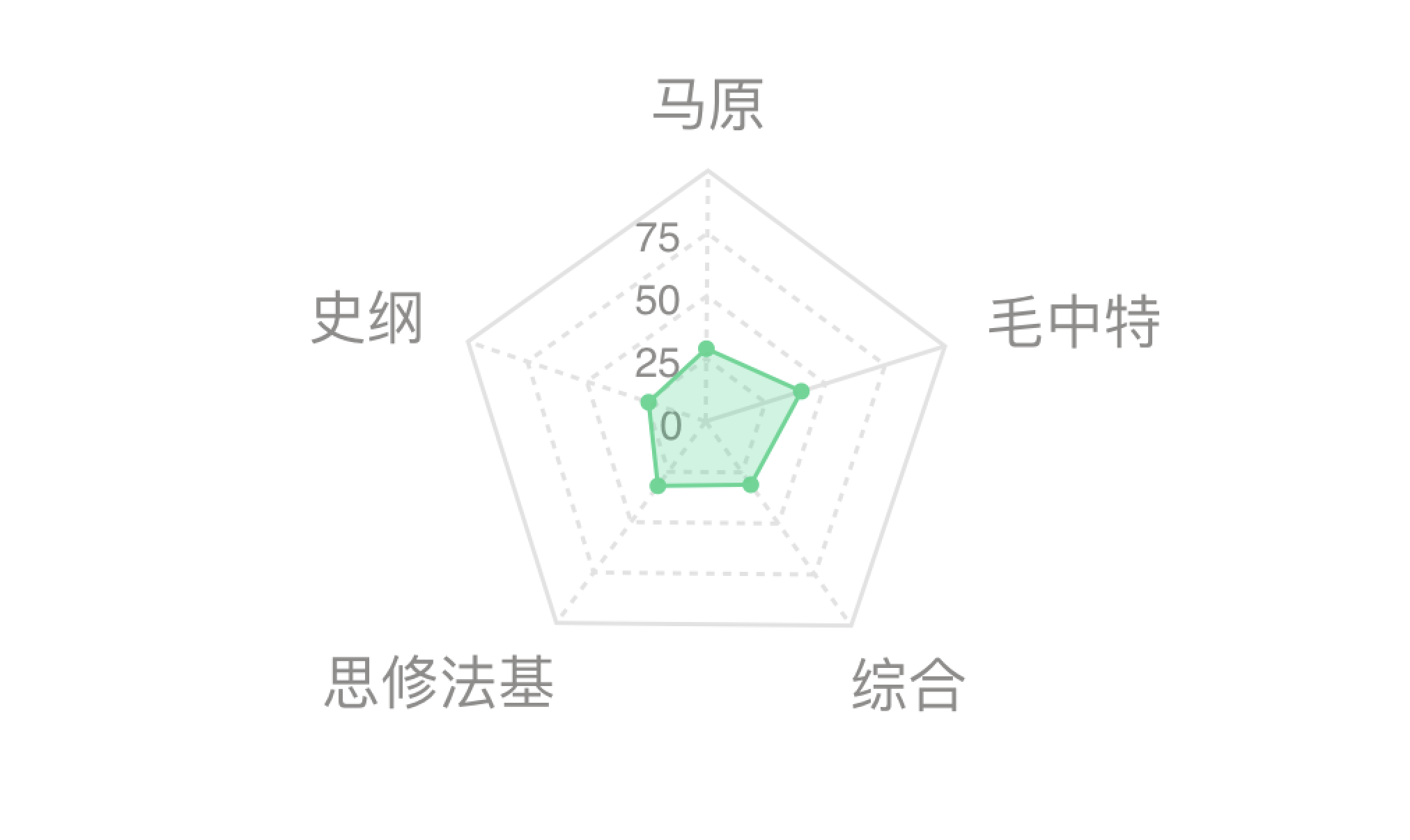
效果图如下:
wepy绘制雷达图的更多相关文章
- 【带着canvas去流浪(6)】绘制雷达图
目录 一. 任务说明 二. 重点提示 三. 示例代码 示例代码托管在:http://www.github.com/dashnowords/blogs 博客园地址:<大史住在大前端>原创博文 ...
- Emgu-WPF 激光雷达研究-绘制雷达图
原文:Emgu-WPF 激光雷达研究-绘制雷达图 硬件:Hokuyo URG04LX 环境:VS2017- win10- 64 Emgu_3.2.0.2682 语言:C# WPF 数据解析参考 ...
- 带着canvas去流浪系列之六 绘制雷达图
[摘要] 用canvas原生API实现百度Echarts基本图表. 示例代码托管在:http://www.github.com/dashnowords/blogs 一. 任务说明 使用原生canvas ...
- 利用matlibplot绘制雷达图
之前在一些数据分析案例中看到用 Go 语言绘制的雷达图,非常的漂亮,就想着用matlibplot.pyplot也照着画一个,遗憾的是matlibplot.pyplot模块中没有直接绘制雷达图的函数,不 ...
- 利用d3.js绘制雷达图
利用d3,js将数据可视化,能够做到数据与代码的分离.方便以后改动数据. 这次利用d3.js绘制了一个五维的雷达图.即将多个对象的五种属性在一张图上对照. 数据写入data.csv.数据类型写入typ ...
- Mesh绘制雷达图(UGUI)
参考资料:http://www.cnblogs.com/jeason1997/p/5130413.html ** 描述:雷达图 刷新 radarDate.SetVerticesDirty(); usi ...
- C# 使用GDI绘制雷达图
最近项目要用C#实现画一个雷达图,搜了搜网上竟然找不到C#画雷达图的解决方案,那么自己实现一个吧 实现效果如下图: 代码如下: public static class RadarDemo { ; ; ...
- Python绘制雷达图(俗称六芒星)
原文链接:https://blog.csdn.net/Just_youHG/article/details/83904618 背景 <Python数据分析与挖掘实战> 案例2–航空公司客户 ...
- R语言绘图:雷达图
使用fmsb包绘制雷达图 library("fmsb") radarfig <- rbind(rep(90, 4), rep(60, 4), c(86.17, 73.96, ...
随机推荐
- Oracle数据类型clob和blob
clob(size)变长 字符型大对象,最大8tb 应用场景:如果varchar2不够用了使用clob blob(size)变长 二进制数据,可以存放图片声音 8tb 但是,实际工作中很少把图片和声音 ...
- AutoLayout性能不如frame
http://draveness.me/layout-performance.html 复杂视图, 数量超过30个,用autoLayout就比较卡顿了 发现首页类似朋友圈,卡顿的原因应该就是使用了au ...
- python采用pika库使用rabbitmq总结,多篇笔记和示例(转)
add by zhj:作者的几篇文章参考了Rabbitmq的Tutorials中的几篇文章. 原文:http://www.01happy.com/python-pika-rabbitmq-summar ...
- andriod(十七)蓝牙profile
1. 蓝牙profile Bluetooth的一个很重要特性,就是所有的Bluetooth产品都无须实现全部的Bluetooth规范.为了更容易的保持Bluetooth设备之间的兼容, Bluetoo ...
- shell 环境变量的知识小结
环境变量的知识小结:·变量名通常要大写.·变量可以在自身的Shell及子Shell中使用.·常用export来定义环境变量.·执行env默认可以显示所有的环境变量名称及对应的值.·输出时用“$变量名” ...
- EOS token 代币兑换的资料
eos token 兑换价格预估查询: https://eosscan.io/ https://steemit.com/eos/@sandwich/how-to-check-which-eos-p ...
- WebDriver API 实例详解(三)
二十一.模拟鼠标右键事件 被测试网页的网址: http://www.sogou.com Java语言版本的API实例代码: package test; import org.testng.annota ...
- C#让应用程序只运行一个实例的几种方法
一 判断是否有相同的实例已经运行 1 根据“Mutex”判断是否有相同的实例在运行 /// <returns>已有实例运行返回true,否则为false</returns>pu ...
- hdu5139
这题需要我们计算 这个 因为n<10000000空间过大 那么我们可以计算出 当n可以被10整除的时候我们就将n/10记录下来当我们要查询的时候去暴力计算他们与整十之间的数去暴力去做就好了 这个 ...
- 用python解析word文件(段落篇(paragraph) 表格篇(table) 样式篇(style))
首先需要安装相应的支持库: 直接在命令行执行pip install python-docx 示例代码如下: import docxfrom docx import Document #导入库 path ...