
apache httpclient 4 范例
下面是一个通过apache httpclient 4 实现http/https的普通访问和BasicAuth认证访问的例子。依赖的第三方库为:
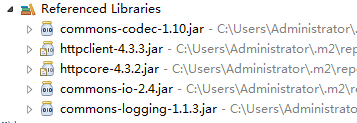
下面是具体实现:
package test;

import java.io.IOException;

import java.io.UnsupportedEncodingException;

import java.security.KeyManagementException;

import java.security.KeyStore;

import java.security.KeyStoreException;

import java.security.NoSuchAlgorithmException;

import java.security.cert.CertificateException;

import java.security.cert.X509Certificate;

import java.util.ArrayList;

import java.util.HashMap;

import java.util.List;

import java.util.Map;

import java.util.Map.Entry;

import javax.net.ssl.SSLContext;

import org.apache.commons.io.IOUtils;

import org.apache.http.HttpEntity;

import org.apache.http.HttpStatus;

import org.apache.http.NameValuePair;

import org.apache.http.auth.AuthScope;

import org.apache.http.auth.UsernamePasswordCredentials;

import org.apache.http.client.CredentialsProvider;

import org.apache.http.client.config.RequestConfig;

import org.apache.http.client.entity.UrlEncodedFormEntity;

import org.apache.http.client.methods.CloseableHttpResponse;

import org.apache.http.client.methods.HttpGet;

import org.apache.http.client.methods.HttpPost;

import org.apache.http.client.methods.HttpRequestBase;

import org.apache.http.config.Registry;

import org.apache.http.config.RegistryBuilder;

import org.apache.http.conn.socket.ConnectionSocketFactory;

import org.apache.http.conn.socket.LayeredConnectionSocketFactory;

import org.apache.http.conn.socket.PlainConnectionSocketFactory;

import org.apache.http.conn.ssl.SSLConnectionSocketFactory;

import org.apache.http.conn.ssl.SSLContexts;

import org.apache.http.conn.ssl.TrustStrategy;

import org.apache.http.entity.StringEntity;

import org.apache.http.impl.client.BasicCredentialsProvider;

import org.apache.http.impl.client.CloseableHttpClient;

import org.apache.http.impl.client.HttpClientBuilder;

import org.apache.http.impl.conn.PoolingHttpClientConnectionManager;

import org.apache.http.message.BasicNameValuePair;

/**

 * HttpClient的包装类,支持http/https的普通访问和basic Auth认证访问

 * @author needle

 *

 */

public class HttpUtilDemo {

    //默认超时时间

    private static final int DEFAULT_TIMEOUT = 5000;

    public static class HttpResult{

        public final int STATUS;

        public String CONTENT;

        public HttpResult(int status, String content){

            this.STATUS = status;

            this.CONTENT = content;

        }

    }

    private static void setTimeout(HttpRequestBase post) {

        RequestConfig requestConfig = RequestConfig.custom()

                .setConnectTimeout(DEFAULT_TIMEOUT).setConnectionRequestTimeout(DEFAULT_TIMEOUT)

                .setSocketTimeout(DEFAULT_TIMEOUT).build();

        post.setConfig(requestConfig);

    }

    //这里是同时支持http/https的关键

    private static CloseableHttpClient getHttpClient(HttpClientBuilder httpClientBuilder) {

        RegistryBuilder<ConnectionSocketFactory> registryBuilder = RegistryBuilder.<ConnectionSocketFactory>create();

        ConnectionSocketFactory plainSF = new PlainConnectionSocketFactory();

        registryBuilder.register("http", plainSF);

        //指定信任密钥存储对象和连接套接字工厂

        try {

            KeyStore trustStore = KeyStore.getInstance(KeyStore.getDefaultType());

            //信任任何链接

            TrustStrategy anyTrustStrategy = new TrustStrategy() {

                @Override

                public boolean isTrusted(X509Certificate[] x509Certificates, String s) throws CertificateException {

                    return true;

                }

            };

            SSLContext sslContext = SSLContexts.custom().useTLS().loadTrustMaterial(trustStore, anyTrustStrategy).build();

            LayeredConnectionSocketFactory sslSF = new SSLConnectionSocketFactory(sslContext, SSLConnectionSocketFactory.ALLOW_ALL_HOSTNAME_VERIFIER);

            registryBuilder.register("https", sslSF);

        } catch (KeyStoreException e) {

            throw new RuntimeException(e);

        } catch (KeyManagementException e) {

            throw new RuntimeException(e);

        } catch (NoSuchAlgorithmException e) {

            throw new RuntimeException(e);

        }

        Registry<ConnectionSocketFactory> registry = registryBuilder.build();

        //设置连接管理器

        PoolingHttpClientConnectionManager connManager = new PoolingHttpClientConnectionManager(registry);

        //构建客户端

        return httpClientBuilder.setConnectionManager(connManager).build();

    }

    //获取普通访问的HttpClient

    private static CloseableHttpClient getHttpClient() {

        return getHttpClient(HttpClientBuilder.create());

    }

    //获取支持basic Auth认证的HttpClient

    private static CloseableHttpClient getHttpClientWithBasicAuth(String username, String password){

        return getHttpClient(credential(username, password));

    }

    //配置basic Auth 认证

    private static HttpClientBuilder credential(String username, String password) {

        HttpClientBuilder httpClientBuilder = HttpClientBuilder.create();

        CredentialsProvider provider = new BasicCredentialsProvider();

        AuthScope scope = new AuthScope(AuthScope.ANY_HOST, AuthScope.ANY_PORT, AuthScope.ANY_REALM);

        UsernamePasswordCredentials credentials = new UsernamePasswordCredentials(username, password);

        provider.setCredentials(scope, credentials);

        httpClientBuilder.setDefaultCredentialsProvider(provider);

        return httpClientBuilder;

    }

    //设置头信息,e.g. content-type 等

    private static void setHeaders(HttpRequestBase req, Map<String, String> headers){

        if(headers == null) return;

        for(Entry<String, String> header : headers.entrySet()){

            req.setHeader(header.getKey(), header.getValue());

        }

    }

    /**

     * get基础类,支持普通访问和Basic Auth认证

     * @param uri

     * @param headers

     * @param client 不同的方式不同的HttpClient

     * @param isTimeout 是否超时

     * @return

     */

    private static HttpResult get(String uri, Map<String, String> headers, CloseableHttpClient client, boolean isTimeout){

        try(CloseableHttpClient httpClient = client){

            HttpGet get = new HttpGet(uri);

            setHeaders(get, headers);

            if(isTimeout){

                setTimeout(get);

            }

            try(CloseableHttpResponse httpResponse = httpClient.execute(get)){

                int status = httpResponse.getStatusLine().getStatusCode();

                if(status != HttpStatus.SC_NOT_FOUND){

                    return new HttpResult(status, IOUtils.toString(httpResponse.getEntity().getContent(), "utf-8"));

                }else{

                    return new HttpResult(status, "404");

                }

            }

        } catch (IOException e) {

            throw new RuntimeException(e);

        }

    }

    public static HttpResult get(String uri, Map<String, String> headers, boolean isTimeout){

        return get(uri, headers, getHttpClient(), isTimeout);

    }

    public static HttpResult getWithBaiscAuth(String uri, Map<String, String> headers, String username, String password, boolean isTimeout){

        return get(uri, headers, getHttpClientWithBasicAuth(username, password), isTimeout);

    }

    public static HttpEntity createUrlEncodedFormEntity(Map<String, String> params){

        List<NameValuePair> data = new ArrayList<>();

        for(Map.Entry<String, String> entry : params.entrySet()){

            data.add(new BasicNameValuePair(entry.getKey(), entry.getValue()));

        }

        try {

            return new UrlEncodedFormEntity(data, "UTF-8");

        } catch (UnsupportedEncodingException e) {

            throw new RuntimeException(e);

        }

    }

    public static HttpEntity createStringEntity(String body){

        try {

            return  new StringEntity(body);

        } catch (UnsupportedEncodingException e) {

            throw new RuntimeException(e);

        }

    }

    private static HttpResult post(CloseableHttpClient client, String uri, Map<String, String> headers, HttpEntity entity, boolean isTimeout){

        try(CloseableHttpClient httpClient = client){

            HttpPost post = new HttpPost(uri);

            setHeaders(post, headers);

            if(isTimeout){

                setTimeout(post);

            }

            post.setEntity(entity);

            try(CloseableHttpResponse httpResponse = httpClient.execute(post)){

                int status = httpResponse.getStatusLine().getStatusCode();

                if(status != HttpStatus.SC_NOT_FOUND){

                    return new HttpResult(status, IOUtils.toString(httpResponse.getEntity().getContent(), "utf-8"));

                }else{

                    return new HttpResult(status, "404");

                }

            }

        } catch (IOException e) {

            throw new RuntimeException(e);

        }

    }

    public static HttpResult post(String uri, Map<String, String> headers, HttpEntity entity, boolean isTimeout){

        return post(getHttpClient(), uri,headers, entity, isTimeout);

    }

    public static HttpResult postWithBasicAuth(String uri, Map<String, String> headers, String username, String password, HttpEntity entity, boolean isTimeout){

        return post(getHttpClientWithBasicAuth(username, password), uri, headers,  entity, isTimeout);

    }

    public static void main(String[] args) throws UnsupportedEncodingException {

        Map<String, String> headers = new HashMap<String, String>();

        headers.put("isClient","true");

        headers.put("content-type", "application/xml");

        headers.put("content-encoding", "UTF-8");

        String body = "<action><status></status><fault><reason></reason><detail></detail></fault></action>";

        //测试操作Ovirt 虚拟机

        HttpResult result = postWithBasicAuth("https://192.168.104.71/api/vms/41feaa71-4cb9-4c22-9380-ee530143eb0d/stop", headers, "sysadmin@internal", "admin==1", new StringEntity(body), false);

        System.out.println(result.STATUS);

        System.out.println(result.CONTENT);

    }

}
apache httpclient 4 范例的更多相关文章
- 在android 6.0(API 23)中,Google已经移除了移除了Apache HttpClient相关的类
推荐使用HttpUrlConnection,如果要继续使用需要Apache HttpClient,需要在eclipse下libs里添加org.apache.http.legacy.jar,androi ...
- 论httpclient上传带参数【commons-httpclient和apache httpclient区别】
需要做一个httpclient上传,然后啪啪啪网上找资料 1.首先以前系统中用到的了commons-httpclient上传,找了资料后一顿乱改,然后测试 PostMethod filePost = ...
- Apache HttpClient使用之阻塞陷阱
前言: 之前做个一个数据同步的定时程序. 其内部集成了某电商的SDK(简单的Apache Httpclient4.x封装)+Spring Quartz来实现. 原本以为简单轻松, 喝杯咖啡就高枕无忧的 ...
- Android 6.0删除Apache HttpClient相关类的解决方法
相应的官方文档如下: 上面文档的大致意思是,在Android 6.0(API 23)中,Google已经移除了Apache HttpClient相关的类,推荐使用HttpUrlConnection. ...
- android 中对apache httpclient及httpurlconnection的选择
在官方blog中,android工程师谈到了如何去选择apache client和httpurlconnection的问题: 原文见http://android-developers.blogspot ...
- 新旧apache HttpClient 获取httpClient方法
在apache httpclient 4.3版本中对很多旧的类进行了deprecated标注,通常比较常用的就是下面两个类了. DefaultHttpClient -> CloseableHtt ...
- 基于apache httpclient 调用Face++ API
简要: 本文简要介绍使用Apache HttpClient工具调用旷世科技的Face API. 前期准备: 依赖包maven地址: <!-- https://mvnrepository.com/ ...
- 一个封装的使用Apache HttpClient进行Http请求(GET、POST、PUT等)的类。
一个封装的使用Apache HttpClient进行Http请求(GET.POST.PUT等)的类. import com.qunar.payment.gateway.front.channel.mp ...
- RESTful Java client with Apache HttpClient / URL /Jersey client
JSON example with Jersey + Jackson Jersey client examples RESTful Java client with RESTEasy client f ...
随机推荐
- ServletContext的作用
一个项目只有一个ServletContext对象,一个tomcat有多个项目 作用:在多核Servlet中来获取这个唯一的对象,使用ta给多个Servlet传递数据. 在Tomcat启动时创建,在To ...
- 如何理解SQL的可重复读和幻读之间的区别?
从本源来理解比较容易理解,如果只是描述概念和定义,容易让人云里雾里找不到方向.正好这两天在浏览mysql的文档,我可以简单在这里总结一下,帮助其他还没有理解的朋友,如果有错误也麻烦帮忙指正. 先讲一点 ...
- DML、DDL、DCL
总体解释:DML(data manipulation language): 它们是SELECT.UPDATE.INSERT.DELETE,就象它的名字一样,这4条命令是用来对数据库里的数据 ...
- Thread中run和start方法的模板设计模式
创建一个Thread需要继承Thread重写run方法或者实现Runnable接口中的run方法,其实两者都是一样因为Thread也继承了Runnable接口. 实现了run方法,但是启动确实用sta ...
- HDFS 修改默认副本数
描述:将HDFS副本数修改为2第一步:将HDFS上已有文件副本数修改为2 hdfs dfs -setrep 2 -R -w / 第二步:修改dfs.replication值为2(页面上操作),然后重启 ...
- Spark的dataframe转rdd通用工具类
需求解决问题 当每次读取hive表或者其他数据源,获取数据,相对其进行rdd操作,遇到任何类都需要df.rdd(row>row.getstring(0))去获取,就很麻烦,所以可以实现个通用的转 ...
- SpringgBoot父子工程的创建
知识:SpringBoot父子工程创建 花开堪折直需折,莫待无花空折枝 开始之前,非常非常有必要了解一下关于以及的区别,这样才可以在进行创建maven父子工程种避免一些不必要的意外错误. depend ...
- 讲讲Java8的Optional类
前言 Java 8中引入了 Optional 类来解决 NullPointerException 与繁琐的 null 检查,该类首次出现在 Guava.Java 8 才成为类库中的一部分. 入门 Op ...
- 浅谈TypeScript,配置文件以及数据类型
TypeScript在javaScript基础上多了一些拓展特性,多出来的是一些类型系统以及对ES6新特性的支持最终会编译成原始的javaScript, 文件名以.ts结尾,编译过后.js结尾,在an ...
- 转载 - Ubuntu源改国内源 与 批量更改ubuntu机器apt源
change_apt_source.sh # !/bin/bash # 备份原来的源文件 cp /etc/apt/sources.list /etc/apt/sources.list.bak # 获取 ...