
window.navigator All In One
window.navigator All In One

navigator
"use strict";

/**

 *

 * @author xgqfrms

 * @license MIT

 * @copyright xgqfrms

 * @created 2020-11-11

 * @modified

 *

 * @description

 * @difficulty Easy Medium Hard

 * @complexity O(n)

 * @augments

 * @example

 * @link

 * @solutions

 *

 * @best_solutions

 *

 */

const log = console.log;

if(window.navigator) {

  log(`window.navigator =`, navigator)

}

for(const item in navigator) {

  // log(`navigator.${item} =`, item);

  // log(`navigator.${item} =`, item, typeof item);

  log(`navigator.${item} =`, item, navigator[item]);

}

// navigator.vendorSub = vendorSub

// navigator.productSub = productSub

// navigator.vendor = vendor

// navigator.maxTouchPoints = maxTouchPoints

// navigator.userActivation = userActivation

// navigator.doNotTrack = doNotTrack

// navigator.geolocation = geolocation

// navigator.connection = connection

// navigator.plugins = plugins

// navigator.mimeTypes = mimeTypes

// navigator.webkitTemporaryStorage = webkitTemporaryStorage

// navigator.webkitPersistentStorage = webkitPersistentStorage

// navigator.hardwareConcurrency = hardwareConcurrency

// navigator.cookieEnabled = cookieEnabled

// navigator.appCodeName = appCodeName

// navigator.appName = appName

// navigator.appVersion = appVersion

// navigator.platform = platform

// navigator.product = product

// navigator.userAgent = userAgent

// navigator.language = language

// navigator.languages = languages

// navigator.onLine = onLine

// navigator.getBattery = getBattery

// navigator.getGamepads = getGamepads

// navigator.javaEnabled = javaEnabled

// navigator.sendBeacon = sendBeacon

// navigator.vibrate = vibrate

// navigator.scheduling = scheduling

// navigator.xr = xr

// navigator.mediaCapabilities = mediaCapabilities

// navigator.permissions = permissions

// navigator.locks = locks

// navigator.wakeLock = wakeLock

// navigator.usb = usb

// navigator.mediaSession = mediaSession

// navigator.clipboard = clipboard

// navigator.credentials = credentials

// navigator.keyboard = keyboard

// navigator.mediaDevices = mediaDevices

// navigator.storage = storage

// navigator.serviceWorker = serviceWorker

// navigator.deviceMemory = deviceMemory

// navigator.presentation = presentation

// navigator.bluetooth = bluetooth

// navigator.registerProtocolHandler = registerProtocolHandler

// navigator.unregisterProtocolHandler = unregisterProtocolHandler

// navigator.getInstalledRelatedApps = getInstalledRelatedApps

// navigator.clearAppBadge = clearAppBadge

// navigator.setAppBadge = setAppBadge

// navigator.getUserMedia = getUserMedia

// navigator.requestMIDIAccess = requestMIDIAccess

// navigator.requestMediaKeySystemAccess = requestMediaKeySystemAccess

// navigator.webkitGetUserMedia = webkitGetUserMedia
导航器界面表示用户代理的状态和身份。它允许脚本查询并注册自己以进行一些活动。
https://developer.mozilla.org/en-US/docs/Web/API/Navigator
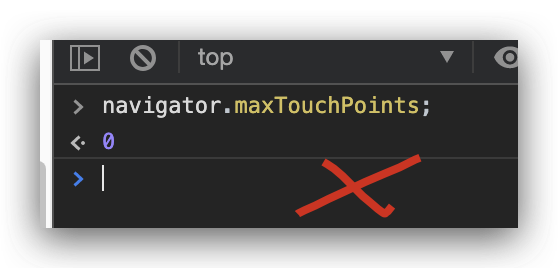
多点触控检测
navigator.maxTouchPoints
const log = console.log;

const touchPoints = navigator.maxTouchPoints;

if (touchPoints > 1) {

  log(` your browser supports multi-touch`)

} else {

 log(`  your  browser not supports multi-touch`)

}
https://www.w3.org/TR/pointerevents2/#extensions-to-the-navigator-interface
https://developer.mozilla.org/en-US/docs/Web/API/Navigator/maxTouchPoints
refs
UA
https://developer.mozilla.org/en-US/docs/Web/HTTP/Browser_detection_using_the_user_agent
xgqfrms 2012-2020
www.cnblogs.com 发布文章使用:只允许注册用户才可以访问!
window.navigator All In One的更多相关文章
- 完美解决window.navigator.geolocation.getCurrentPosition,在IOS10系统中无法定位问题
目前由于许多用户都将电话升级到了iOS系统,苹果的iOS 10已经正式对外推送,相信很多用户已经更新到了最新的系统.然而,如果web站没有及时支持https协议的话,当很多用户在iOS 10下访问很多 ...
- javascript宿主对象之window.navigator
window.navigator用来反映浏览器及其功能信息的对象. // 检测浏览器版本信息 function getBrowserInfo(){ var Sys = {}; var ua = win ...
- 使用window.navigator.userAgent属性判断浏览器类型及版本
使用window.navigator.userAgent属性判断浏览器类型及版本 2011-12-11 22:03:11 window.navigator.userAgent属性包含了浏览器类型.版本 ...
- Window.navigator
定义和用法 userAgent 属性是一个只读的字符串,声明了浏览器用于 HTTP 请求的用户代理头的值. 一般来讲,它是在 navigator.appCodeName 的值之后加上斜线和 navig ...
- 解决window.navigator.geolocation.getCurrentPosition在IOS10系统中无法进行地理定位问题
昨天接到用户通知说在点击"看场地"时无法获取地理位置信息. 在接到通知时,首先想到的是排查机型问题.由于客户多为IOS用户,所以最先看的是在安卓是有没有此问题的发生,调查结果为安卓 ...
- JavaScript Window Navigator
window.navigator 对象包含有关访问者浏览器的信息. Window Navigator window.navigator 对象在编写时可不使用 window 这个前缀. 实例 <d ...
- JavaScript Window Navigator 浏览器本身的信息
window.navigator 对象包含有关访问者浏览器的信息. Window Navigator window.navigator 对象在编写时可不使用 window 这个前缀. Navigato ...
- Window Navigator对象
Window Navigator对象 txt = "<p>浏览器代号: " + navigator.appCodeName + "</p>&quo ...
- window.navigator.userAgent $_SERVER['HTTP_USER_AGENT']
wjs php返回结果一致 <script> !function () { var UA = window.navigator.userAgent, docEl = document.do ...
- window.navigator.standalone 检测iOS WebApp是否运行在全屏模式
iOS上的Safari浏览器可以让Web应用程序全屏显示,以取得类似本地应用的显示效果.但是这需要用户把Web应用程序的图标添加到主屏幕才可以.作为开发者,为了更好的显示效果,我们可能希望自己开发的W ...
随机推荐
- Uber如何解决2000多个微服务带来的复杂性问题?
Uber如何解决2000多个微服务带来的复杂性问题? Adam Gluck 架构头条 2020-10-29 https://mp.weixin.qq.com/s/N7fVDZVm8uC9wVvd9DQ ...
- Qedis实现
对比redis的Qedis 实现在github 和 实验楼都有资料
- Location和Content-Location
div.example { background-color: rgba(229, 236, 243, 1); color: rgba(0, 0, 0, 1); padding: 0.5em; mar ...
- 在Ubuntu安装kubernetes
一.安装Docker 1. 配置Docker docker安装完成后需要配置cgroup驱动为systemd来增强稳定性 sudo vim /etc/docker/daemon.json { &quo ...
- 题解 UVA11694 【Gokigen Naname谜题 Gokigen Naname】
题目 题解 考场上连暴力都不会打的码农题,深搜是真的难 /kk 前置问题 怎么输出"\" cout<<"\\"; 2.怎么处理不在一个环里,可以考虑 ...
- Python骚操作从列表推导和生成器表达式开始
序列 序列是指一组数据,按存放类型分为容器序列与扁平序列,按能否被修改分为不可变序列与可变序列. 容器序列与扁平序列 容器序列存放的是对象的引用,包括list.tuple.collections.de ...
- Prometheus自定义监控内容
Prometheus自定义监控内容 一.io.micrometer的使用 1.1 Counter 1.2 Gauge 1.3 Timer 1.4 Summary 二.扩展 相关内容原文地址: 博客园: ...
- Linux——软件安装
Linux--软件安装 一.gcc 二.make 三.rpm 四.yum 一.gcc gcc是Linux上面最标准的C语言的编译程序,用来源代码的编译链接. gcc -c hello.c 编译产生目标 ...
- navicat连接阿里云mysql数据库服务器遇到的1130等相关问题
最近搭建自己的博客网站的时候使用了阿里云的云服务器ESC,搭建了一个mysql数据库,在windows下使用navicat连接mysql的时候,总是连接不上,出现了1130的问题等等错误信息. 下面将 ...
- 802.1X
1.简介 IEEE802 LAN/WAN委员会为解决无线局域网网络安全问题,提出了802.1X协议.后来,802.1X协议作为局域网端口的一个普通接入控制机制在以太网中被广泛应用,主要解决以太网内认证 ...