
Cookie (设置与读取、超时设置、指定路径、显示用户上次登录时间)
Cooike简介
Cookie规范
- Cookie大小上限为4KB;
- 一个服务器最多在客户端浏览器上保存20个Cookie;
- 一个浏览器最多保存300个Cookie;
上面的数据只是HTTP的Cookie规范,但在浏览器大战的今天,一些浏览器为了打败对手,为了展现自己的能力起见,可能对Cookie规范“扩展”了一些,例如每个Cookie的大小为8KB,最多可保存500个Cookie等!但也不会出现把你硬盘占满的可能!
注意,不同浏览器之间是不共享Cookie的。也就是说在你使用IE访问服务器时,服务器会把Cookie发给IE,然后由IE保存起来,当你在使用FireFox访问服务器时,不可能把IE保存的Cookie发送给服务器。
Cookie与HTTP头
Cookie是通过HTTP请求和响应头在客户端和服务器端传递的:
- Cookie:请求头,客户端发送给服务器端;
- 格式:Cookie: a=A; b=B; c=C。即多个Cookie用分号离开; Set-Cookie:响应头,服务器端发送给客户端;
- 一个Cookie对象一个Set-Cookie: Set-Cookie: a=A Set-Cookie: b=B Set-Cookie: c=C
Cookie的覆盖
如果服务器端发送重复的Cookie那么会覆盖原有的Cookie,例如客户端的第一个请求服务器端发送的Cookie是:Set-Cookie: a=A;第二请求服务器端发送的是:Set-Cookie: a=AA,那么客户端只留下一个Cookie,即:a=AA。
Cookie相关设置属性
'''

class HttpResponseBase:

        def set_cookie(self, key,                 键

                     value='',            值

                     max_age=None,        超长时间

                              cookie需要延续的时间(以秒为单位)

                              如果参数是\ None`` ,这个cookie会延续到浏览器关闭为止。

                     expires=None,        超长时间

                                 expires默认None ,cookie失效的实际日期/时间。


                     path='/',           Cookie生效的路径,

                                                 浏览器只会把cookie回传给带有该路径的页面,这样可以避免将

                                                 cookie传给站点中的其他的应用。

                                                 / 表示根路径,特殊的:根路径的cookie可以被任何url的页面访问


                             domain=None,         Cookie生效的域名

                                                  你可用这个参数来构造一个跨站cookie。

                                                  如, domain=".example.com"

                                                  所构造的cookie对下面这些站点都是可读的:

                                                  www.example.com 、 www2.example.com

                                 和an.other.sub.domain.example.com 。

                                                  如果该参数设置为 None ,cookie只能由设置它的站点读取。

                     secure=False,        如果设置为 True ,浏览器将通过HTTPS来回传cookie。

                     httponly=False       只能http协议传输,无法被JavaScript获取

                                                 (不是绝对,底层抓包可以获取到也可以被覆盖)

                  ): pass

'''
设置Cookie
response.set_cookie('is_login',True)

cookie 的值为 key value形式
获取Cookie
request.COOKIES.get('is_login')
删除Cookie
response.delete_cookie("cookie_key",path="/",domain=name)
利用Cooke做一个简单的登录
路由
from  app01 import views

urlpatterns = [

    path('admin/', admin.site.urls),

    path('login/',views.login),

    path('index/',views.index)

]
orm
from django.db import models

# Create your models here.

class User(models.Model):

    user = models.CharField(max_length=24)

    pwd = models.CharField(max_length=24)
视图
from django.shortcuts import render,HttpResponse,redirect

# Create your views here.

from app01.models import  User

def login(request):

    if request.method =='POST':

        user = request.POST.get('user')

        pwd = request.POST.get('pwd')

        user_info =User.objects.filter(user=user,pwd=pwd).first()

        if user_info:

            response = HttpResponse('登录成功')

            response.set_cookie('is_login',True)

            response.set_cookie('username',user)

            return response

    return render(request,'login.html')

def index(request):

    print(request.COOKIES)

    if_login =request.COOKIES.get('is_login')

    username = request.COOKIES.get('username')

    if if_login:

        return render(request,'index.html',locals())

    return HttpResponse('未登录')
login.html
<!DOCTYPE html>

<html lang="en">

<head>

    <meta charset="UTF-8">

    <title>Title</title>

</head>

<body>

<form action=""method="post">

    {% csrf_token %}

    用户名<input type="text" name="user">

    密码 <input type="password"name="pwd">

    <input type="submit">

</form>

</body>

</html>
index.html
<!DOCTYPE html>

<html lang="en">

<head>

    <meta charset="UTF-8">

    <title>Title</title>

</head>

<body>

<h3>index</h3>

<span>{{ username }}您好</span>

</body>

</html>
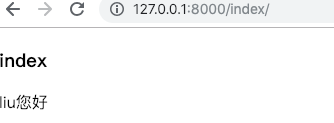
整体流程、
用户访问 》登录成功》获取Cookie》访问index 页面》显示 username 您好
用户访问》登录失败》未获取Cookie》访问index页面 》显示 未登录
访问超时
from django.shortcuts import render,HttpResponse,redirect

# Create your views here.

from app01.models import  User

def login(request):

    if request.method =='POST':

        user = request.POST.get('user')

        pwd = request.POST.get('pwd')

        user_info =User.objects.filter(user=user,pwd=pwd).first()

        if user_info:

            response = HttpResponse('登录成功')

            #从上次访问开始过期时间,不支持ie

            # response.set_cookie('is_login',True,max_age=10)

            import datetime

            times=datetime.datetime(year=2018,month=12,day=21,hour=8,minute=40,second=10)

            #expires 固定过期时间

            response.set_cookie('is_login',expires=times)

            response.set_cookie('username',user)

            return response

    return render(request,'login.html')

def index(request):

    print(request.COOKIES)

    if_login =request.COOKIES.get('is_login')

    if if_login:

        username = request.COOKIES.get('username')

        return render(request,'index.html',locals())

    else:

        return redirect('/login/')

    return HttpResponse('未登录')
指定路径
默认情况下,Cookie 是对根路径下所有的视图函数共享的,但是个别时候不想让个别视图函数使用Cookie,就需要设置Cookie生效的路径
视图
from django.shortcuts import render,HttpResponse,redirect

# Create your views here.

from app01.models import  User

def login(request):

    if request.method =='POST':

        user = request.POST.get('user')

        pwd = request.POST.get('pwd')

        user_info =User.objects.filter(user=user,pwd=pwd).first()

        if user_info:

            response = HttpResponse('登录成功')

            #从上次访问开始过期时间,不支持ie

            # response.set_cookie('is_login',True,max_age=10)

            import datetime

            # times=datetime.datetime(year=2018,month=12,day=21,hour=8,minute=40,second=10)

            #expires 固定过期时间

            # response.set_cookie('is_login',expires=times)

            response.set_cookie('is_login', True)

            #指定可以使用Cookie的路径,如果不设置根路径下的所有视图函数都可以取到。

            response.set_cookie('username',user,path='/index/')

            return response

    return render(request,'login.html')

def index(request):

    print(request.COOKIES)

    if_login =request.COOKIES.get('is_login')

    if if_login:

        username = request.COOKIES.get('username')

        return render(request,'index.html',locals())

    else:

        return redirect('/login/')

def tests(request):

    print('tests------------',request.COOKIES)

    return  HttpResponse('ok')
输出
{'username': 'liu ', 'is_login': 'True'}
tests------------ {'is_login': 'True'}
只有访问 ‘/index/’ 才可以拿到 username 的Cookie 的值,访问tests 无法拿到 Cookie
显示用户上次登录时间
视图
def index(request):

    print(request.COOKIES)

    if_login =request.COOKIES.get('is_login')

    if if_login:

        import  datetime

        now = datetime.datetime.now().strftime('%Y-%m-%d %H:%M:%S')

        last_time =request.COOKIES.get('last_login','')

        username = request.COOKIES.get('username')

        response = render(request,'index.html',locals())

        response.set_cookie('last_login',now)

        return response

    else:

        return redirect('/login/')
流程
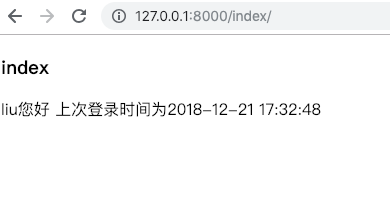
用户登录成功后,先保存当前时间到Cookie中,下次用户登录到时候获取Cookie值,在前端模版进行显示。
Cookie (设置与读取、超时设置、指定路径、显示用户上次登录时间)的更多相关文章
- 使用Cookie实现显示用户上次访问时间
一. 常用Cookie API介绍 1. 获取cookie request.getCookies(); // 返回Cookie[] 2. 创建cookie Cookie(String key, St ...
- Servlet—Cookie(显示用户上次访问时间、显示商品浏览历史)
1 . 什么是会话? 会话可简单理解为:用户开一个浏览器,点击多个超链接,访问服务器多个web资源,然后关闭浏览器,整个过程称之为一个会话. 1.1 会话过程中要解决的一些问题? 每个用户在使用浏览器 ...
- HttpClient代理IP及设置连接读取超时
1.不废话,上代码: public static void main(String[] args) throws Exception { CloseableHttpClient httpClient ...
- cookie案例-显示用户上次访问网站的时间
package cn.itcast.cookie; import java.io.IOException; import java.io.PrintWriter; import java.util.D ...
- Cookie实现--用户上次访问时间
用户上次访问时间
- golang网络通信超时设置
网络通信中,为了防止长时间无响应的情况,经常会用到网络连接超时.读写超时的设置. 本文结合例子简介golang的连接超时和读写超时设置. 1.超时设置 1.1 连接超时 func DialTimeou ...
- org.apache.http.client.HttpClient; HttpClient 4.3超时设置
可用的code import org.apache.commons.lang.StringUtils;import org.apache.http.HttpEntity;import org.apac ...
- HttpClient 3.X 4.3 4.x超时设置
HttpClient 4.3.HttpClient这货和Lucene一样,每个版本的API都变化很大,这有点让人头疼.就好比创建一个HttpClient对象吧,每一个版本的都不一样, 3.X是这样的 ...
- 设置全局context变量 (显示用户登录名)
比如在每个页面的最上面部分需要显示用户的登录名称,如果不登录则显示为Guest.这部分内容在每个页面都会出现,所以可将该部分内容作为一个公共模板(如userauth.html),如然后在其他模板中进行 ...
随机推荐
- 【Linux】中默认文本编辑器 vim 的入门与进阶
Linux 基本操作 vim 篇 vim 简介 vim 是 Linux 上最基本的文本编辑工具,其地位像是 Windows 自带的记事本工具,还要少数的 Linux 系统自带 leafpad 编辑器, ...
- 自动化运维工具-Ansible之5-流程控制
自动化运维工具-Ansible之5-流程控制 目录 自动化运维工具-Ansible之5-流程控制 playbook条件语句 单条件 多条件 多条件运算 示例 playbook循环语句 with_ite ...
- Logstash学习之路(三)Logstash处理时区、类型转换、删除字段的案例配置
#输入 input { file { path => ["文件路径"] #自定义类型 type => "自定义" start_position =& ...
- 【函数分享】每日PHP函数分享(2021-1-11)
str_shuffle() 随机打乱一个字符串. string str_shuffle ( string $str ) 参数描述 str 输入字符串.返回值:返回打乱后的字符串.实例: < ...
- 详解线程池的作用及Java中如何使用线程池
服务端应用程序(如数据库和 Web 服务器)需要处理来自客户端的高并发.耗时较短的请求任务,所以频繁的创建处理这些请求的所需要的线程就是一个非常消耗资源的操作.常规的方法是针对一个新的请求创建一个新线 ...
- HarmonyOS三方件开发指南(4)——Logger组件
目录: 1. Logger功能介绍 2. Logger使用方法 3. Logger开发实现 4. 源码上传地址 1. Logger功能介绍1.1. ...
- GCC 概述:C 语言编译过程详解
Tags: C Description: 关于 GCC 的个人笔记 GCC 概述 对于 GCC 6.1 以及之后的版本,默认使用的 C++ 标准是 C++ 14:使用 -std=c++11 来指定使用 ...
- c++ 参数传递与返回值详解(reference)
pass by value or pass by reference? 我们知道,当函数在传递值的时候,会新建一个变量(没有名字)储存这个值 然后传递.降低程序运行的效率. 如果使用引用(refere ...
- rm: cannot remove `/tmp/localhost-mysql_cacti_stats.txt': Operation not permitted
[root@DBslave tmp]# chown zabbix.zabbix /tmp/localhost-mysql_cacti_stats.txt
- 【Linux】awk想打印制定列以后的所有列
今天偶然研究awk,有一个文件,文件内容是全篇的1 2 3 4 5 6 7 8 9 0 现在想打印除了第一列意外的所有列 文件内容: [root@localhost ~]# cat test.txt ...