
Python Flask框架之页面跳转
IDE用的PyCharm(还是vs强大啊)。
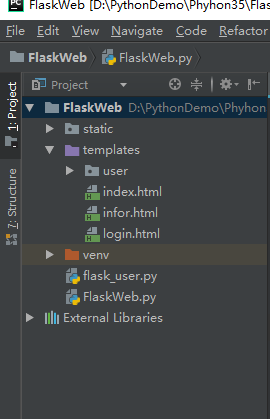
项目结构:

<!doctype html>

<html lang="zh">

<head>

    <meta charset="UTF-8">

    <meta name="viewport" content="width=device-width, initial-scale=1.0">

    <title>用户登录</title><link rel="shortcut icon" href="{{ url_for('static', filename='images/lock.png')}}"/>

</head>

<body>

<div align="center">

    <div>

        <div>

            <h1>Welcome</h1>

            <form class="form" method="post" action="" onsubmit="return Login();">

                <input type="text" placeholder="Username" name="username" id="username">

                <input type="password" placeholder="Password" name="password" id="password">

                <button type="submit" id="login-button">SubmitLogin</button>

                <button type="button" id="btnlogin">ButtonLogin</button>

                <a href="infor">testhtm</a>

            </form>

        </div>

    </div>

</div>

<script type="text/javascript" src="{{ url_for('static', filename='jquery.min.js') }} "></script>

{#<script src="http://cdn.static.runoob.com/libs/jquery/1.10.2/jquery.min.js"></script>#}

<script type="text/javascript">

    function Login() {

        var login = false;

        var  txtname = $("#username").val();

        var txtpsw = $("#password").val();

        $.ajax({

            {#url:  "/py_login",可以#}

            url:"{{url_for("py_login") }}",{# 可以调到后台,路由名称#}

            {#data: "username=" + txtname + "&password=" + txtpsw,#}

            data:{"username":txtname,"userpswd":txtpsw},

            type: 'GET',

            contentType: 'json',{#'application/x-www-form-urlencoded',#}

            async: false,

            success: function (d) {

                alert("success!"+d)

                var status = d.status;

                if (d != "undefined" && d=="success")

                {

                     window.location.href="infor";{# 这里链接的应该是路由中的名称#}

                }

                else

                {

                    alert("登录失败!")

                }

            }

        });

        return login;

    }

</script>

</body>

</html>
3:后台FlaskWeb.py文件。
from flask import Flask, render_template, redirect, request, url_for , send_file

import pymssql

app = Flask(__name__)

# app.debug = True;

# @app.route('/')

@app.route('/')

def index():

    return render_template('login.html') # send_file('index.html')

@app.route('/py_login',methods=['GET','POST'])

def py_login():

    if request.method == 'GET':

        print(request.form)

        txtname = request.args.get('username')

        txtpswd = request.args.get('userpswd')

        if(txtname=="longdb" and txtpswd==""):

            return "success"  # get可以到这里

            print(url_for('/testhtm'))

            # return redirect(url_for('/testhtm'))

        else:

            return "enterfailed"

@app.route('/infor') #页面链接该路由名称

def f_infor():

    return render_template('infor.html')  # send_file('/templates/testhtm.html') #

# 函数

@app.route('/insertdata',methods=['GET','POST'])

def py_insertdata():

    # noinspection PyBroadException

    try:

        # conn = pymssql.connect(server='longdabing',user='sa',password='sasa',database='longtest')

        conn = pymssql.connect('longdabing', 'sa', 'sasa', 'longtest')

        cursor = conn.cursor()

        txtno = request.args.get('hno')

        txtname = request.args.get('hname')

        txtobject = request.args.get('hobject')

        txtscore = request.args.get('hscore')

        sql = "INSERT dbo.infor( no, name, object, score )VALUES ( '"+txtno+"','"+txtname+"','"+txtobject+"','"+txtscore+"')"

        cursor.execute(sql)

        conn.commit()  # 提交数据到数据库,否则不会插入到数据库中

        conn.close()

        return "insertok"

    except Exception as e:

        conn.rollback()  # 回滚操作

        return "insertfailed"

        raise e

    # finally:

    #   conn.close()

def getdata(sql):

    # conn = pymssql.connect(server='longdabing',user='sa',password='sasa',database='longtest')

    conn = pymssql.connect('longdabing', 'sa', 'sasa', 'longtest')

    cursor = conn.cursor()

    cursor.execute(sql)

    row = cursor.fetchone()

    while row:

      print("ID=%d, No=%s, Name=%s, Object=%s, Score=%s" % (row[0], row[1], row[2], row[3], row[4]))

      row = cursor.fetchone()

    conn.close()

    return

if __name__ == '__main__':

    app.run()
注明:运行FlaskWeb.py文件时,路由longin.html页面,进入该页面后,输录入账号和密码,验证通过的话,则通过window.location.href="infor";{# 这里链接是路由中的名称#} 来跳转页面,最终还是由后台加载页面 infor.html。

本来想在用户和密码验证通过后,用 redirect()方法跳转到 infor.html页面的,但是都失败,所以才用了window.location.href。
求大神指点后台直接跳转的方法。
Python Flask框架之页面跳转的更多相关文章
- #3使用html+css+js制作网页 番外篇 使用python flask 框架 (I)
#3使用html+css+js制作网页 番外篇 使用python flask 框架(I 第一部) 0. 本系列教程 1. 准备 a.python b. flask c. flask 环境安装 d. f ...
- Python Flask框架路由简单实现
Python Flask框架路由的简单实现 也许你听说过Flask框架.也许你也使用过,也使用的非常好.但是当你在浏览器上输入一串路由地址,跳转至你所写的页面,在Flask中是怎样实现的,你是否感到好 ...
- #3使用html+css+js制作网页 番外篇 使用python flask 框架 (II)
#3使用html+css+js制作网页 番外篇 使用python flask 框架 II第二部 0. 本系列教程 1. 登录功能准备 a.python中操控mysql b. 安装数据库 c.安装mys ...
- Linux ubantu中安装虚拟/使用环境virtualenv以及python flask框架
今天学习了python flask框架的安装过程以及使用案例,感觉网上讲的东西都没有从我们这种初学者的角度去考虑(哈哈),最后还是奉上心得: 1.安装virtualenv $ sudo apt-get ...
- python flask框架学习——开启debug模式
学习自:知了课堂Python Flask框架——全栈开发 1.flask的几种debug模式的方法 # 1.app.run 传参debug=true app.run(debug=True) #2 设置 ...
- python flask框架学习(二)——第一个flask程序
第一个flask程序 学习自:知了课堂Python Flask框架——全栈开发 1.用pycharm新建一个flask项目 2.运行程序 from flask import Flask # 创建一个F ...
- python flask框架学习(一)——准备工作和环境配置与安装
Flask装备: 学习自:知了课堂Python Flask框架——全栈开发 1.Python版本:3.6 2.Pycharm软件: 3.安装虚拟环境: (1)安装virtualenv: pip ins ...
- python Flask框架mysql数据库配置
我是一个没有笔记习惯的低级程序员,但是我还是喜欢编程,从小学就开始跟着玩电脑,对抓鸡,ddos,跳板刷钻开始了自己的IT 旅程,之后学习了各种语言,但是可惜都不没有达到精通,都是略懂一二,现在想把Py ...
- Python Flask框架
Python有很多Web框架,可谓是百家争鸣,我这里列出几个比较叼的几个框架 Django 市场占有率最高,官方文档几近完美,但是适合比较大的项目,小项目会显得累赘. Tornado ...
随机推荐
- 互联网+大数据解决方案(ppt)
from: 互联网+大数据解决方案(ppt) 导读:大数据(bigdata),或称巨量资料,指的是所涉及的资料量规模巨大到无法透过目前主流软件工具,在合理时间内达到撷取.管理.处理.并整理成为帮助企业 ...
- oracle数据库之分组查询
本章内容和大家分享的是数据当中的分组查询.分组查询复杂一点的是建立在多张表的查询的基础之上,(我们在上一节课的学习中已经给大家分享了多表查询的使用技巧,大家可以自行访问:多表查询1 多表查询2)而在 ...
- 无法解析的外部符号 _WinMain@16(原)
原来的控制台程序,想修改为windows程序时,会出现 无法解析的外部符号 WinMain,该符号在函数 __tmainCRTStartup 中被引用 在链接器->高级->入口点输入:ma ...
- Claims Based Authentication and Token Based Authentication和WIF
基于声明的认证方式,其最大特性是可传递(一方面是由授信的Issuer,即claims持有方,发送到你的应用上,注意信任是单向的.例如QQ集成登录,登录成功后,QQ会向你的应用发送claims.另一方面 ...
- The Suspects——Asia Kaohsiung 2003
原创 The Suspects Time Limit: 1000MS Memory Limit: 20000K Total Submissions: 48698 Accepted: 23286 Des ...
- Django实战之古风博客
感谢 感谢杨青 大大的古风模板,设计的很棒,给个赞. 如有侵权,请联系我 运行环境 python3.6 Django==1.11.4 django-ckeditor==5.4.0 django-js- ...
- java中int转String 固定位数 不足补零
转载自:http://ych0108.iteye.com/blog/2174134 String.format("%010d", 25); //25为int型 0代表前面要补的字符 ...
- 【bzoj2813】 奇妙的Fibonacci数列 线性筛
Description Fibonacci数列是这样一个数列: F1 = 1, F2 = 1, F3 = 2 . . . Fi = Fi-1 + Fi-2 (当 i >= 3) pty忽然对这个 ...
- 18、OpenCV Python 简单实现一个图片生成(类似抖音生成字母人像)
__author__ = "WSX" import cv2 as cv import numpy as np def local_threshold(img): #局部阈值 gra ...
- SDUT OJ 数据结构实验之链表一:顺序建立链表
数据结构实验之链表一:顺序建立链表 Time Limit: 1000 ms Memory Limit: 65536 KiB Submit Statistic Discuss Problem Descr ...