
Android——HelloWorld
今天正式加入实验室做安卓,看上去无从下手,让我想到当年学ACM一样,但是也一直搞过来了,现在又是一个新的起点。
废话不多说~~~
Hello World
安装:
JDK
SDK
Eclipse
参考:http://www.cnblogs.com/rayee/archive/2012/01/31/2332303.html
当然也有比较简单的方案:基于谷歌Android SDK 的简易开发环境搭建方法。
Hello World
哦~~~
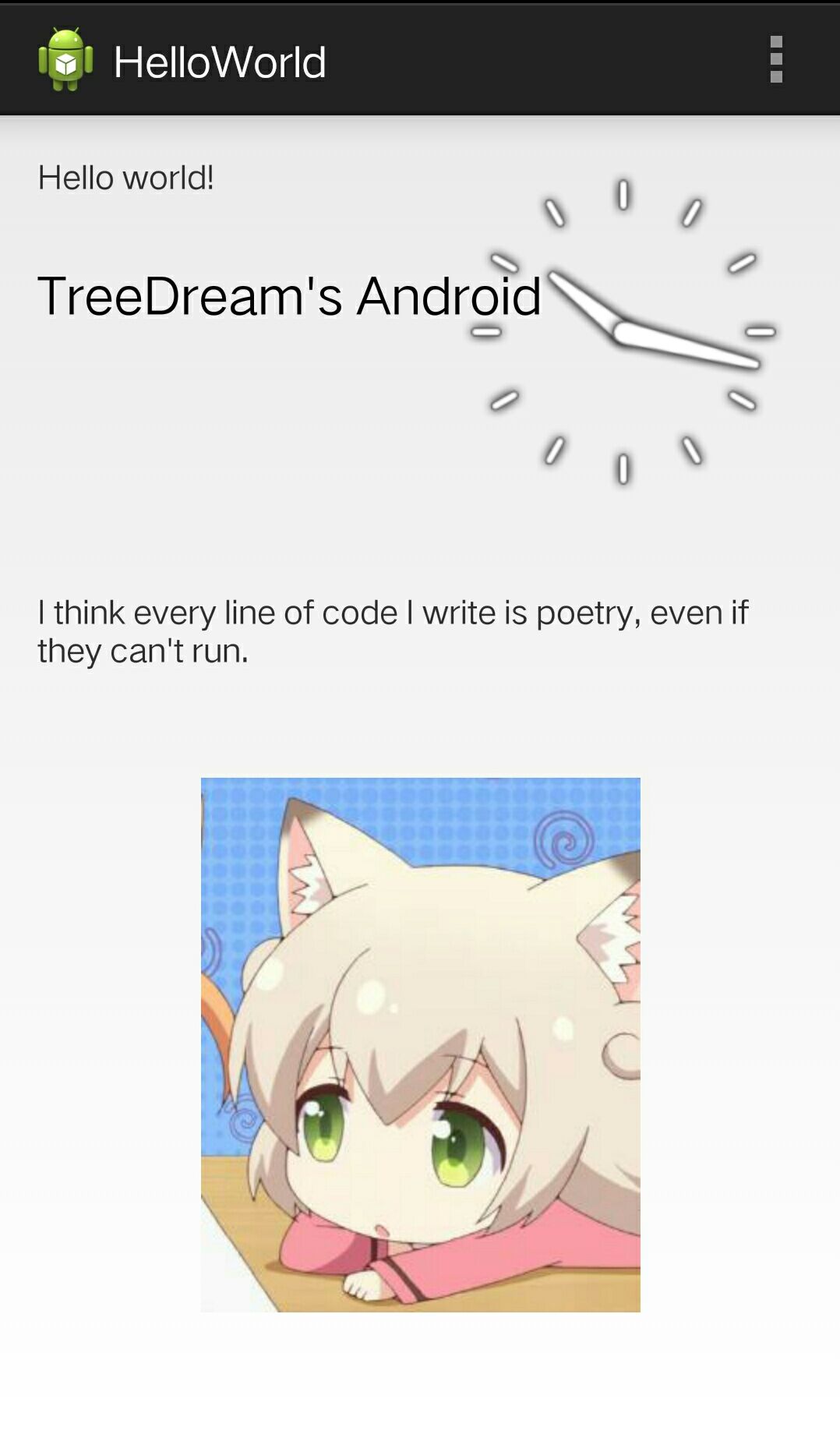
和C#的winform一样可以拖动控件。挺方便的。
插入一张textView和一张图片。
发布一下。
<RelativeLayout xmlns:tools="http://schemas.android.com/tools"
xmlns:android="http://schemas.android.com/apk/res/android"
android:layout_width="match_parent"
android:layout_height="match_parent"
android:paddingBottom="@dimen/activity_vertical_margin"
android:paddingLeft="@dimen/activity_horizontal_margin"
android:paddingRight="@dimen/activity_horizontal_margin"
android:paddingTop="@dimen/activity_vertical_margin"
tools:context=".MainActivity" > <TextView
android:id="@+id/textView2"
android:layout_width="wrap_content"
android:layout_height="wrap_content"
android:text="@string/hello_world" /> <TextView
android:id="@+id/textView1"
android:layout_width="wrap_content"
android:layout_height="wrap_content"
android:layout_alignLeft="@+id/textView2"
android:layout_below="@+id/textView2"
android:layout_marginTop="26dp"
android:text="TreeDream's Android"
android:textAppearance="?android:attr/textAppearanceLarge" /> <RadioGroup
android:id="@+id/radioGroup1"
android:layout_width="wrap_content"
android:layout_height="wrap_content"
android:layout_alignLeft="@+id/textView4"
android:layout_below="@+id/textView4"
android:layout_marginTop="14dp" >
</RadioGroup> <TextView
android:id="@+id/textView3"
android:layout_width="wrap_content"
android:layout_height="wrap_content"
android:layout_above="@+id/imageView1"
android:layout_alignLeft="@+id/textView1"
android:layout_marginBottom="46dp"
android:text="I think every line of code I write is poetry, even if they can't run."
android:textAppearance="?android:attr/textAppearanceSmall" /> <ImageView
android:id="@+id/imageView1"
android:layout_width="wrap_content"
android:layout_height="wrap_content"
android:layout_alignParentBottom="true"
android:layout_centerHorizontal="true"
android:layout_marginBottom="39dp"
android:src="@drawable/x" /> <AnalogClock
android:id="@+id/analogClock1"
android:layout_width="wrap_content"
android:layout_height="wrap_content"
android:layout_alignParentRight="true"
android:layout_alignTop="@+id/textView2" /> </RelativeLayout>
参考:http://www.cnblogs.com/rayee/archive/2012/01/31/2333832.html#3853831
Android——HelloWorld的更多相关文章
- 最简单的基于FFmpeg的移动端样例附件:SDL Android HelloWorld
===================================================== 最简单的基于FFmpeg的移动端样例系列文章列表: 最简单的基于FFmpeg的移动端样例:A ...
- 最简单的基于FFmpeg的移动端样例:Android HelloWorld
===================================================== 最简单的基于FFmpeg的移动端样例系列文章列表: 最简单的基于FFmpeg的移动端样例:A ...
- Android - HelloWorld的Layout内容
Android - HelloWorld的Layout内容 本文地址: http://blog.csdn.net/caroline_wendy 作为最基础的Android程序, HelloWorld的 ...
- cocos2d-x mac os启动 android helloworld
工具环境: mac os, jdk, Android Studio, cocos2d-x-3.13.1, ant, android-ndk. 解压coco2d-x后,根目录下有 setup.py, 命 ...
- Arcgis Android - HelloWorld
概述 虽然esri官网上最新版本是10.2.4,但是例子中实在是很难运行,总是出现各种各样的bug.又因为初学是Android,所以不想太浪费时间弄些配置了.决定先将v2.0.0的Arcgis for ...
- Android零基础入门第8节:HelloWorld,我的第一趟旅程出发点
原文:Android零基础入门第8节:HelloWorld,我的第一趟旅程出发点 经过前面几期的学习,我们知道了Android的前世今生,也大致了解了Android的系统架构和应用组件,然后花了几期来 ...
- Android的常用adb命令
第一部分:1. ubuntu下配置环境anroid变量:在终端执行 sudo gedit /etc/profile 打开文本编辑器,在最后追加#setandroid environment2. 运行E ...
- 一个优秀的Android应用从建项目开始
1.项目结构 现在的MVP模式越来越流行.就默认采用了.如果项目比较小的话: app——Application Activity Fragment Presenter等的顶级父类 config——AP ...
- android 开发必用的开源库
LogReport: https://github.com/wenmingvs/LogReport, 崩溃日志上传框架 wcl-permission-demo:Android 6.0 - 动态权 ...
随机推荐
- Java调度线程池ScheduleExecutorService
如果在一个ScheduleExecutorService中提交一个任务,这个任务的调度周期设置 的时间比任务本身执行的时间短的话会出现什么情况?也就是在线程调度时间已经到了 但是上次的任务还没有做完的 ...
- vue-watch deep 和 immediate
watch 是一个对象,对象就有键,有值. 值可以是函数:就是当你监控的家伙变化时,需要执行的函数,这个函数有两个形参,第一个是变化后的值,第二个是变化前的值. 值也可以是函数名:不过这个函数名要用单 ...
- 解决Input number 框能够能够输入eeeeee 的问题
onKeypress="return (/[\d]/.test(String.fromCharCode(event.keyCode)))" 在input type="n ...
- zookeeper简单命令
bin/zkCli.sh -server ls / create /zk_test my_data get /zk_test set /zk_test admln delete /zk_test ad ...
- Django(5) session登录注销、csrf及中间件自定义、django Form表单验证(非常好用)
一.Django中默认支持Session,其内部提供了5种类型的Session供开发者使用: 数据库(默认) 缓存 文件 缓存+数据库 加密cookie 1.数据库Session 1 2 3 4 5 ...
- js之strict模式
JavaScript在设计之初,为了方便初学者学习,并不强制要求用var申明变量.这个设计错误带来了严重的后果:如果一个变量没有通过var申明就被使用,那么该变量就自动被申明为全局变量: i = 10 ...
- 洛谷P1730 最小密度路径(floyd)
题意 题目链接 Sol zz floyd. 很显然的一个dp方程\(f[i][j][k][l]\)表示从\(i\)到\(j\)经过了\(k\)条边的最小权值 可以证明最优路径的长度一定\(\leqsl ...
- Web前端面试指导(九):盒子模型你是怎么理解的?
问题分析 这道题问得比较宽泛,一定要找准切入点,如果切入点找不准,很容易乱答,甚至答偏,所以找准切入点是非常的重要的. 解答思路 1)盒子模型有两种,W3C和IE盒子模型 (1)W3C定义的盒子模型包 ...
- vim右键粘贴 等杂
putty连上linux,vim编辑个文件,我去,右键不能用用上下面的命令,就好了. set mouse-=a 今天发现mysql倒入utf-8的文件网站显示出来都是乱码,不过用utf-8的控制台看是 ...
- Android 自定义ListView滚动条样式
使用ListView FastScroller,默认滑块和自定义滑块图片的样子: 设置快速滚动属性很容易,只需在布局的xml文件里设置属性即可: <ListView android:id=&qu ...