
Android StateListDrawable资源的使用(文本的高亮显示)
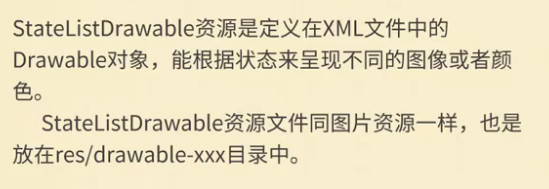
1.介绍
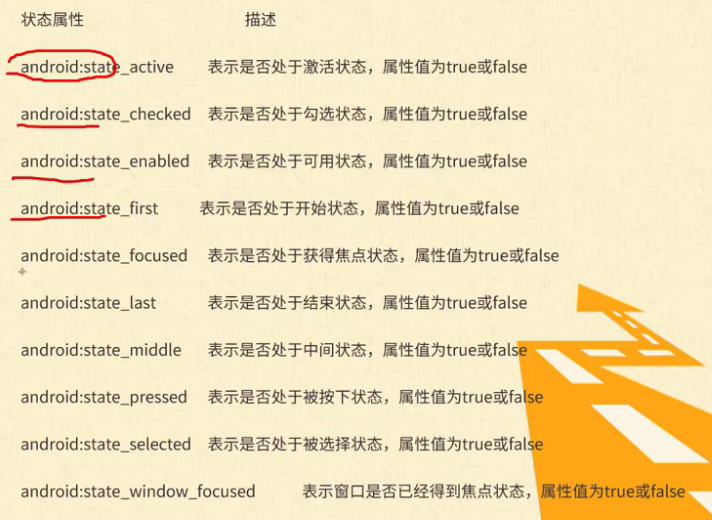
2.xml文件属性介绍
3.实例演示
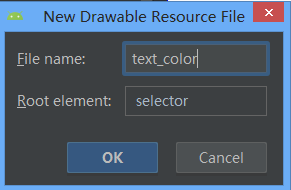
<1>新建drawable文件
app--->src---->main---->res---->drawable ,选中drawable文件夹,右击new--->drawable resource file
<2>源码
(1)主界面
<?xml version="1.0" encoding="utf-8"?>
<LinearLayout xmlns:android="http://schemas.android.com/apk/res/android"
    xmlns:app="http://schemas.android.com/apk/res-auto"
    xmlns:tools="http://schemas.android.com/tools"
    android:layout_width="match_parent"
    android:layout_height="match_parent"
    android:gravity="center"
    android:orientation="vertical"
    tools:context=".MainActivity">

    <LinearLayout
        android:layout_width="wrap_content"
        android:layout_height="wrap_content"
        android:orientation="horizontal">

        <TextView
            android:id="@+id/textView"
            android:layout_width="wrap_content"
            android:layout_height="wrap_content"
            android:layout_weight="1"
            android:text="用户名" />

        <EditText
            android:id="@+id/editText"
            android:textColor="@drawable/text_color"
            android:layout_width="wrap_content"
            android:layout_height="wrap_content"
            android:layout_weight="1"
            android:ems="10"
            android:hint="请输入用户名"
            android:inputType="textPersonName" />
    </LinearLayout>

    <LinearLayout
        android:layout_width="wrap_content"
        android:layout_height="wrap_content"
        android:orientation="horizontal">

        <TextView
            android:id="@+id/textView2"
            android:layout_width="wrap_content"
            android:layout_height="wrap_content"
            android:text="密码" />

        <EditText
            android:id="@+id/editText3"
            android:layout_width="wrap_content"
            android:textColor="@drawable/text_color"
            android:layout_height="wrap_content"
            android:layout_weight="1"
            android:ems="10"
            android:hint="请输入密码"
            android:inputType="textPassword" />
    </LinearLayout>

    <LinearLayout
        android:layout_width="wrap_content"
        android:layout_height="wrap_content"
        android:orientation="horizontal">

        <Button
            android:id="@+id/button"
            android:background="@drawable/background_img"
            android:layout_width="wrap_content"
            android:layout_height="wrap_content"
            android:layout_weight="1"
            android:layout_marginLeft="20dp"
            android:text="登录" />

        <Button
            android:id="@+id/button2"
            android:background="@drawable/background_img"
            android:layout_width="wrap_content"
            android:layout_height="wrap_content"
            android:layout_weight="1"
            android:layout_marginLeft="20dp"
            android:text="取消" />
    </LinearLayout>
</LinearLayout>
(2)background_img.xml文件
<?xml version="1.0" encoding="utf-8"?>
<selector xmlns:android="http://schemas.android.com/apk/res/android">
    <item android:state_pressed="true" android:drawable="@drawable/bgd_008"></item>
    <item android:state_pressed="false" android:drawable="@drawable/bgd_009"></item>
</selector>
(3)text_color.xml文件
<?xml version="1.0" encoding="utf-8"?>
<selector xmlns:android="http://schemas.android.com/apk/res/android">
    <item android:state_focused="true"
        android:color = "#f44"></item>
    <item android:state_focused="false"
        android:color="#000000"></item>
</selector>
Android StateListDrawable资源的使用(文本的高亮显示)的更多相关文章
- 处女男学Android(七)---Android 应用资源之StateListDrawable
前言 本篇Blog将记录关于Android应用资源中最经常使用的一个Drawable资源--StateListDrawable,本来说应当继续写UI方面的内容,突然跳到应用资源这边,主要是由于之前写界 ...
- StateListDrawable 资源
StateListDrawable 用于组织多个 Drawable 对象.当使用 StateListDrawable 作为目标组件 的背景.前景图片时,StateListDrawable 对象所显示的 ...
- 使用(Drawable)资源——StateListDrawable资源
StateListDrawable用于组织多个Drawable对象.当使用StateListDrawable作为目标组件的背景.前景图片时,StateListDrawable对象所显示的Drawabl ...
- 34.Android之资源文件res里drawable学习
我们经常看到android工程资源文件res下drawable如ldpi.mdpi.hdpi.xhdpi.xxhdpi文件,今天我们学习了解下. (1)drawable-hdpi里面存放高分辨率的图片 ...
- Android控件_TextView(显示文本框控件)
一.TextView控件的常用属性 1.android:id——控件的id 2.android:layout_width——设置控件的宽度 wrap_content(包裹实际文本内容) fill ...
- android应用资源预编译,编译和打包全解析
我们知道,在一个APK文件中,除了有代码文件之外,还有很多资源文件.这些资源文件是通过Android资源打包工具aapt(Android Asset Package Tool)打包到APK文件里面的. ...
- Android应用资源
Java刚開始学习的人直接在Java源代码使用"hello" 和123 类型的字符串和整型.但时间长了就会忘记当初定义的原因,有经验的或许会定义字符串常量ResultSet.TYP ...
- Android xml资源文件中@、@android:type、@*、?、@+含义和区别
一.@代表引用资源 1.引用自定义资源.格式:@[package:]type/name android:text="@string/hello" 2.引用系统资源.格式:@andr ...
- android 学习资源总结
http://android-arsenal.com/free 国外的android分类资源网站 http://www.ibm.com/developerworks/cn/topics/ IB ...
随机推荐
- Redis02 Redis客户端之Java、连接远程Redis服务器失败
1 查看支持Java的redis客户端 本博文采用 Jedis 作为redis客户端,采用 commons-pool2 作为连接redis服务器的连接池 2 下载相关依赖与实战 2.1 到 Repos ...
- os.chdir("/deepmatching") OSError: [Errno 2] No such file or directory: '/deepmatching'
#os.chdir("/deepmatching")os.chdir(os.path.dirname(os.path.abspath("deepmatching1&quo ...
- Solidity string to uint
oraclize result以string格式返回,solidity没有uint(string)这样的强制转换功能,如果要解析其中的数字,可以用oraclize提供的parseInt方法: prag ...
- ifcfg-eth0文件参数PREFIX 和 NETMASK的配置不一致问题
ifcfg-eth0文件参数PREFIX 和 NETMASK的配置不一致问题 摘自:https://blog.csdn.net/aikui0621/article/details/9148997 阅读 ...
- [GO]new函数的使用
new函数的作用其实就是动态分配一个空间,我们只需要进行使用,不需要考虑它的内存释放的它的生命周期 package main import "fmt" func main() { ...
- orcad找不到dll
如果运行Capture.exe找不到cdn_sfl401as.dll,如果运行allegro.exe找不到cnlib.dll,(上面俩个库文件都在C:/Cadence/SPB_16.3/tools/b ...
- Kernel的意义
在第7章最后一段讲到Kernel,Kernel就是用向量表示元素的和的乘积. Back in our discussion of linear regression, we had a problem ...
- poj2513 Fence Repair(小根堆)
Description Farmer John wants to repair a small length of the fence around the pasture. He measures ...
- Mono for Android for Visual Studio 2010安装及试用
安装 Mono for Android for Visual Studio 2010 需要下面4个步骤: 1.安装 JDK 下载并安装 Java 1.6 (Java 6) JDK. 2.安装 Andr ...
- webapi put 请求405问题
put 请求的时候 浏览器会像服务器发送两个请求 如何没做任何配置第一个options请求是会报错的 这是需要配置路由给options作响应 这时options请求就通过了,然后你们会看到你的put ...