
XAF实现交叉分析
如何实现如图的交叉分析?
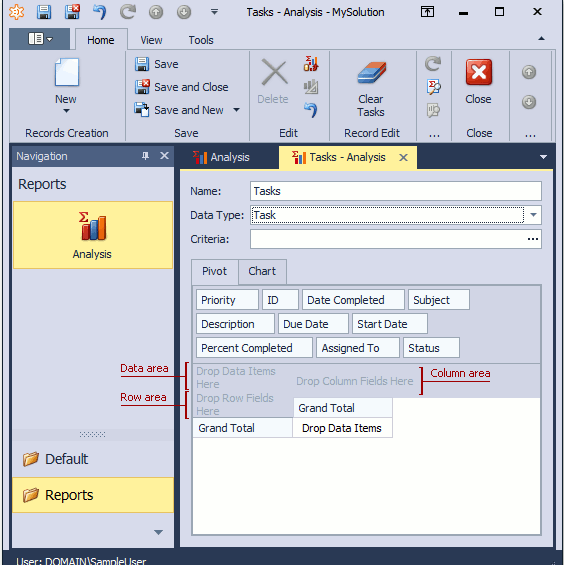
In this lesson, you will learn how to add the Analysis functionality to your application. For this purpose, you will add the Analysis business class and the Pivot Chart Module to your application.
Add the Analysis business class to your MySolution.Module project using the Module Designer. If you are using Entity Framework as your ORM, register the Analysis type in DbContext. Edit the BusinessObjects\MySolutionDbContext.cs (MySolutionDbContext.vb) as follows and then rebuild the solution.
public class MySolutionDbContext : DbContext {

    public DbSet<Analysis> Analysis { get; set; }

}
Invoke it by double-clicking the Module.cs (Module.vb) file within the MySolution.Module project displayed in the Solution Explorer. In the Exported Types section, locate the Referenced Assemblies | DevExpress.Persistent.BaseImpl.v16.1 (DevExpress.Persistent.BaseImpl.EF.v16.1) | Analysis node. Select it and press the Spacebar, or right-click it and choose Use Type in Application in the invoked menu. The node will be marked in bold. This means that the Analysis business class will be added to the Application Model, and this class will take part in the UI construction process.
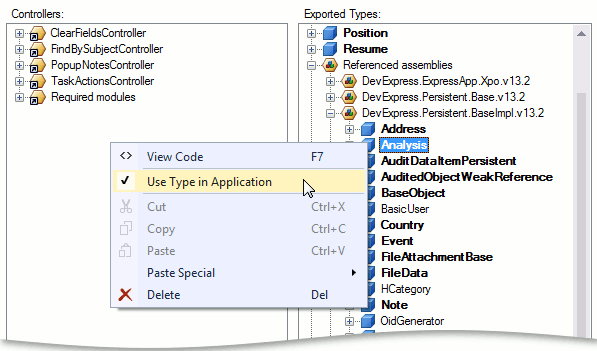
- Rebuild your solution so that the changes made in the Designer are loaded to the Application Model.
The eXpressApp Framework provides the Pivot Chart Module. When this module is referenced, the Self property of the Analysis Detail View is displayed via a special Property Editor. In WinForms applications, this Property Editor uses the PivotGridControl supplied by the Pivot Grid library and the ChartControl from the Chart Control library. In ASP.NET applications, this Property Editor uses the ASP.NET Pivot Grid that is supplied by the ASP.NET Pivot Grid library, and the WebChartControl from the Chart Control library. These controls allow end-users to build summarized reports to analyze large quantities of data quickly and easily. Features like filtering, top value display, hierarchical value arrangement on the axes, and grand and group totals give end-users a wide range of tools to control the data level in detail.
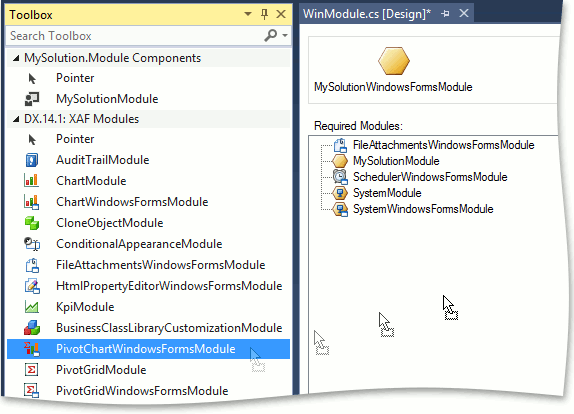
To use the Pivot Chart Module in a WinForms application, add it to the WinForms module project. For this purpose, find the WinModule.cs (WinModule.vb) file in the MySolution.Module.Win project displayed in the Solution Explorer. Double-click this file. The Module Designer will be invoked. In the Toolbox, navigate to the DX.16.1: XAF Modules page. Drag the PivotChartWindowsFormsModule item to the Designer's Required Modules section. Build the project.
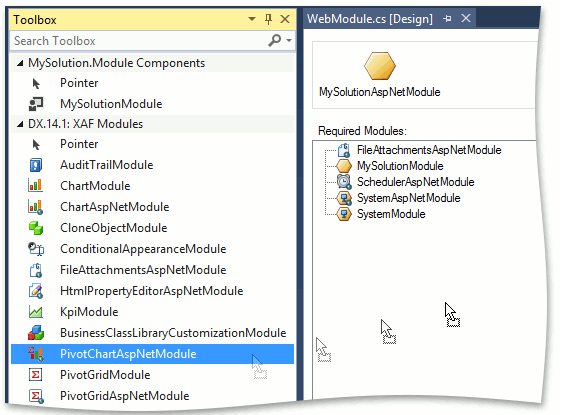
To use the Pivot Chart Module in the ASP.NET application, add it to the ASP.NET module project. For this purpose, double-click the WebModule.cs (WebModule.vb) file, located in the MySolution.Module.Web application project. The Module Designer will be invoked. In the Toolbox, navigate to the DX.16.1: XAF Modules tab, and drag the PivotChartAspNetModule item to the Designer's Required Modules section. Build the project.
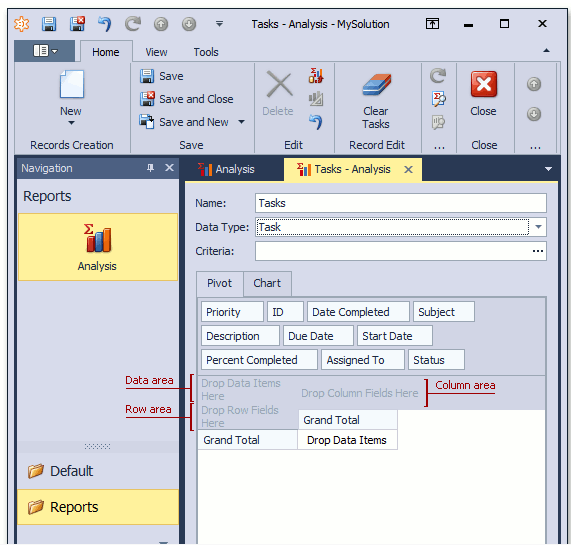
Run the WinForms or ASP.NET application. In the navigation control, select the Reports | Analysis item. An empty Analysis object list will be displayed (called Analysis List View). Create a new Analysis object by clicking the New button. In the invoked Detail View, specify a name for the new Analysis object and the type of objects to be analyzed via a pivot grid and chart control. For instance, assign the "Tasks" value to the Name property and choose "Task" in the Data Type drop-down menu. Click Bind Analysis Data (
). Task objects will be loaded as the data source for the pivot grid.
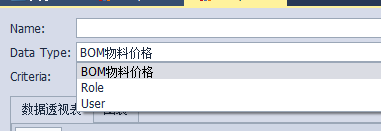
注意:这时候默认自己做的实体不会出现在分析下拉列表里面。
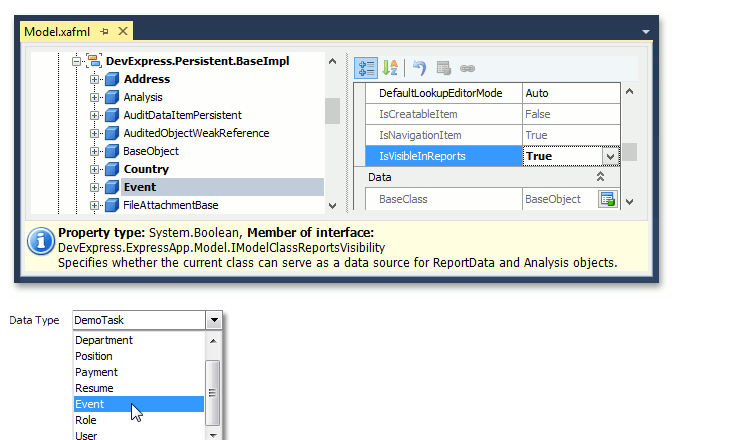
需要在一个地方做配置。
XAF实现交叉分析的更多相关文章
- 11个Visual Studio代码性能分析工具
软件开发中的性能优化对程序员来说是一个非常重要的问题.一个小问题可能成为一个大的系统的瓶颈.但是对于程序员来说,通过自身去优化代码是十分困难的.幸运的是,有一些非常棒的工具可以帮助程序员进行代码分析和 ...
- JTS Geometry关系判断和分析
关系判断 Geometry之间的关系有如下几种: 相等(Equals): 几何形状拓扑上相等. 脱节(Disjoint): 几何形状没有共有的点. 相交(Intersects): 几何形状至少有一个共 ...
- 【转】Linux方向职业分析
引言: 据了解,Linux普通网络管理人员的月薪大约5000元左右,负责编程的Linux软件工程师月薪大约在8000元到12000元之间,Linux嵌入式软件开发人员的月薪大约在12000元以上. 影 ...
- 推荐一个利用 python 生成 pptx 分析报告的工具包:reportgen
reportgen v0.1.8 更新介绍 这段时间,我对 reportgen 进行了大工程量的修改和更新.将之前在各个文章中出现的函数进行了封装,同时也对现有工具包的一些逻辑进行了调整. 1.rep ...
- python 生成 pptx 分析报告的工具包:reportgen
python机器学习-sklearn挖掘乳腺癌细胞( 博主亲自录制) 网易云观看地址 https://study.163.com/course/introduction.htm?courseId=10 ...
- .NET 11 个 Visual Studio 代码性能分析工具
原文地址 软件开发中的性能优化对程序员来说是一个非常重要的问题.一个小问题可能成为一个大的系统的瓶颈.但是对于程序员来说,通过自身去优化代码是十分困难的.幸运的是,有一些非常棒的工具可以帮助程序员进行 ...
- 【Social listening实操】作为一个合格的“增长黑客”,你还得重视外部数据的分析!
本文转自知乎 作者:苏格兰折耳喵 ----------------------------------------------------- 在本文中,作者引出了"外部数据"这一概 ...
- 空间分析开源库GEOS
History of GEOS GEOS中Geometry的结构 GEOS分析功能简介 1.History of GEOS JTS Topology Suite是Ma ...
- 诸葛io | 精细化运营分析解决方案
类型: 定制服务 软件包: business intelligence internet media solution collateral 联系服务商 产品详情 解决方案 概要 数据监测 ? 异常发 ...
随机推荐
- Python名称空间和闭包
一.名称空间 1.定义:又名 name space,顾名思义,就是存放名字的地方.比如:若变量x = 1,1存放在内存中, 而名称空间正是存放名字x与1绑定关系的地方. 2.分类: locals : ...
- Functions & Closures
[Functions] 1.不带返回值的函数: 2.通过tuple返回元素 返回的tuple可按如下方式使用: 3.External Parameter: External parameter的使用: ...
- js确定来源页然后跳转
<script type="text/javascript"> function Navigate() { if(document.referrer == 'http: ...
- Leetcode:Two Sum分析和实现
问题表示提供一个整数数组nums,以及一个目标target,要找到两个下标i与j,使得nums[i] + nums[j] = target. 最简单的思路是两次循环: for a in nums fo ...
- The 'Microsoft Jet OLEDB 4.0 Provider' is not registered on the local machine
在一台Win7 64位的操纵系统上部署的C# Web系统,操作Excel,批量导入数据,报错,提示错误信息: The ‘Microsoft Jet OLEDB 4.0 Provider' is not ...
- Auto Control 001 自动控制的一般概念
自动控制的基本概念 一 . 自动控制系统的组成 自动控制装置:自动控制装置的组成当中涉及到了这样这样一些东西: 第1,需要有被控对象,那么这些被控对象需要有谁来控制呢?一定要有控制器,这些控制器,我们 ...
- 1、python与ipython的下载与安装
1.ipython的下载与安装 下载链接: wget -c https://github.com/downloads/ipython/ipython/ipython-0.13.1.tar.gz ##下 ...
- python pipelines 用法
http://zacstewart.com/2014/08/05/pipelines-of-featureunions-of-pipelines.html http://blog.csdn.net/m ...
- Vue.js 安装及其环境搭建
For me or other first studying vue.js. For Windows PC: 1.先安装node.js 安装官网最新的即可 版本应该要大于6.0版本 nodejs的官网 ...
- JMS-消息中间件的应用02-安装ActiveMQ-来自慕课学习-新手学习
What is ActiveMQ? -----突然好想打英文,好奇怪 请看来自官网的介绍: Apache ActiveMQ ™ is the most popular and powerf ...