
ORACLE_ALIAS
Oracle / PLSQL: ALIASES
website:https://www.techonthenet.com/oracle/alias.php
This Oracle tutorial explains how to use Oracle ALIASES (temporary names for columns or tables) with syntax and examples.
Description
Oracle ALIASES can be used to create a temporary name for columns or tables.
- COLUMN ALIASES are used to make column headings in your result set easier to read.
- TABLE ALIASES are used to shorten your SQL to make it easier to read or when you are performing a self join (ie: listing the same table more than once in the FROM clause(列出相同的表不止一次在那个from从句)).
Syntax
The syntax to ALIAS A COLUMN in Oracle/PLSQL is:
column_name AS alias_name
OR
The syntax to ALIAS A TABLE in Oracle/PLSQL is:
table_name alias_name
Parameters or Arguments
- column_name
- The original name of the column that you wish to alias.
- table_name
- The original name of the table that you wish to alias.
- alias_name
- The temporary name to assign.
Note
- If the alias_name contains spaces, you must enclose(包围) the alias_name in quotes(双引号).
- if the alias_name contains number,you must enclose then alias_name in quotes.(myself addtion)
- It is acceptable to use spaces when you are aliasing a column name. However, it is not generally good practice to use spaces when you are aliasing a table name.
- The alias_name is only valid within the scope of the SQL statement.
Example - ALIAS a column
Generally, aliases are used to make the column headings in your result set easier to read. For example, when concatenating fields together(连接字段), you might alias the result.
For example:
SELECT contact_id, first_name || last_name AS NAME

FROM contacts

WHERE last_name = 'Anderson';
In this example, we've aliased the second column (ie: first_name and last_name concatenated) as NAME. As a result, NAME will display as the heading for the second column when the result set is returned. Because our alias_name did not include any spaces, we are not required to enclose the alias_name in quotes.
However, it would have been perfectly acceptable to write this example using quotes as follows:
SELECT contact_id, first_name || last_name AS "NAME"

FROM contacts

WHERE last_name = 'Anderson';
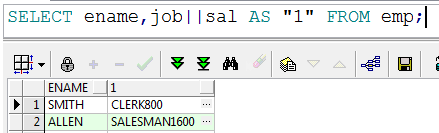
Next, let's look at an example where we are required to enclose the alias_name in quotes.
For example:
SELECT contact_id, first_name || last_name AS "CONTACT NAME"

FROM contacts

WHERE last_name = 'Anderson';
In this example, we've aliased the second column (ie: first_name and last_name concatenated) as "CONTACT NAME". Since there are spaces in this alias_name, "CONTACT NAME" must be enclosed in quotes.
Example - ALIAS a Table
When you create an alias on a table, it is either(任何一个) because you plan to list the same table name more than once in the FROM clause (ie: self join), or you want to shorten the table name to make the SQL statement shorter and easier to read.
Let's look at an example of how to alias a table name in Oracle/PLSQL.
For example:
SELECT p.product_id, p.product_name, categories.category_name
FROM products p
INNER JOIN categories
ON p.category_id = categories.category_id

ORDER BY p.product_name ASC, categories.category_name ASC;
In this example, we've created an alias for the products table called p. Now within this SQL statement, we can refer to the products table as p.
When creating table aliases, it is not necessary to create aliases for all of the tables listed in the FROM clause. You can choose to create aliases on any or all of the tables.
For example, we could modify our example above and create an alias for the categories table as well.
SELECT p.product_id, p.product_name, c.category_name
FROM products p
INNER JOIN categories c
ON p.category_id = c.category_id

ORDER BY p.product_name ASC, c.category_name ASC;
Now we have an alias for categories table called c as well as the alias for the products table called p.
ORACLE_ALIAS的更多相关文章
随机推荐
- ansys 有限元自学手册
李兵.人邮2013.4 实体模型 –> 修正后划分 有限元网格 offset WP 偏移工作平面 模型的建立 将cT轮廓曲线 提取出来输入三维造型软件进行建模的方法,这种方法由于要对 ...
- 剑指offer——面试题15.2:判断两个整数m和n的二进制中相差多少位
#include"iostream" using namespace std; int CountDifferentBit(int m,int n) { ,diff=m^n; wh ...
- Mac上Node环境配置
公司配备Mac笔记本,以前没用过mac开发项目,一开始依然是从node官网下载安装包,后来领导说最好是用brew安装软件,这样比较方便,安装和卸载,只要在命令行输入相应的 install 和 unin ...
- 2.Exadata 硬件体系结构
Exadata 硬件加构: 高性能,低成本 冗余 线性扩展 ,具有超强性能,开箱即用 例 2-2的满配: 8台数据服务器组成(2C 6核) (3-2是10核, 4-2,5-2 是12核 ...
- jquery将日期转换成指定格式的字符串
引用jquery文件,如<script type="text/javascript" src="jquery-1.8.3.min.js"></ ...
- Json化数据-调微信接口
// 先获取用户openid列表 List<String> openids = wxPhotoUpload.getUserOpenIdList(access_token); TreeMap ...
- Java基础25-静态代码块
/* 静态代码块 格式: static{ 静态代码块中执行语句 } 特点:随着类的加载而执行,并且只会执行一次,并且还优先于主函数. 作用:用于给类进行初始化 */ public class Test ...
- net.sf.json.JSONException: There is a cycle in the hierarchy! 转json死循环问题解决
解决上述问题遵照两个原则就可以: 1.页面不需要展示关联数据时 解决:将关联对象属性排除掉 2.页面需要展示关联数据时 解决:将关联对象改为立即加载,并且将关联对象中的属性排除
- c++ MFC图像处理CImage类常用操作代码
原文作者:aircraft 原文地址:https://www.cnblogs.com/DOMLX/p/9598974.html MFC图像处理CImage类常用操作 CImage类头文件为#inclu ...
- Ansible 介绍和使用
简介 Ansible是一个简单的自动化运维管理工具,基于Python语言实现,由Paramiko和PyYAML两个关键模块构建,可用于自动化部署应用.配置.编排task(持续交付.无宕机更新等).主版 ...