
Android Studio 学习(一)
XML给元素定义ID
- 定义id android:id="@+id/button_1"
- 引用id
id/id_name
解决Failed to load Appcompat Actionbar with unknown error
- 在Project 中找到\app\src\main\res\values\styles.xml
- 更改
<style name="AppTheme" parent="Theme.Appcompat.Light.DarkActionBar">
为<style name="AppTheme" parent="Base.Theme.Appcompat.Light.DarkActionBar">
在AndroidManifest.xml文件注册活动为主活动
<activity android:name=".FirstActivity" android:label="This is FirstActivity"//项目的标题> <intent -filter> <action android:name="android.intent.action.Main"/>//主活动 <category android:name="android.intent.category.LAUNCHER"/>//首先启动这个活动 <i/intent-filter> </activity>
在布局中添加按钮
<Button android:id="@+id/button_1"//代码中指定的名字 android:layout_width="match_parent" android:layout_height="wrap_content"//高度随内容而变 android:text="Button1" />
在主活动上 配置按钮的点击事件
Button button1=(Button) findViewById(R.id.button_1); button1.setOnClickListener(new View.OnClickListener()) { @Override public void onClick(View v) { } }
Toast 小提醒
Toast.makeText(FirstActivity.this,"text",Toast.LENGTH_SHORT/LENGTH_LONG).show();
菜单
res->menu->main(Menu resource file) <menu xmln:.. > <item android:id="@+id/add_item" android:title="Add"/> //菜单选项名字 </menu>
ctrl+o 重写onCreateOptionsMenu() 方法
public boolean onCreateOptionsMenu (Menu menu) { getMenuInflater().inflate(R.menu.main,menu); return true; }//显示菜单
重写onOptinsItemSelected 方法
public boolean onOptionsItemSeleted { swith (item.getItemId()) { switch(item.getItemId()) { case R.id.add_item: Toast.makeText(this,"you clicked add",Toast.LENGTH_SHORT).show(); break; } return true; } }
摧毁一个活动
finish();
使用intent切换活动
显式切换
Intent intent =new Intent(FirstActivity.this ,SecondActivity.class); startActivity(intent);- 隐式切换
- Intent intent =new Intent ("com.example.activitytest.ACTION_START");
- intent.addCategory("com.example.activitytest.MY_CATEGORY");
stratActivity(intent);//默认category
<intent -filter>
向下一个活动传递数据
- Intent intent=new Intent(FirstActivity.this ,SecondActivity.class);
intent.putExtra("extra_data",data)
- Intent intent=getIntent();
String data=intent.getStringExtra('extar_data');
返回数据给上一个活动
在第一个活动中
- Intent intent =new Intent (FirstActivity.this,SecondActivity.class);
startActivityForResult(intent,1)//1为请求码
switch(requestCode){//重写onActivityResult方法
case 1:
if(resultCode==RESULT_OK)
{
String returnedData=data.getStringExtra("data_return");
}
}
在第二个活动中
按钮退出
- Intent intent=new intent();
- intent.putExtra("data_return","Hello Fiffff..")
- setResult(RESULT_OK,intent)//对应上面的forresult方法 第一个参数两个值 RESULT_CANCELED
- finash();‘
back退出 重写onBackPressde()方法
内容与上面一样
按钮排列bug
- The layout editor allows you to place widgets anywhere on the canvas, and it records the current position with designtime attributes (such as layout_editor_absoluteX.) These attributes are not applied at runtime。
- 点击这个 infer constraints
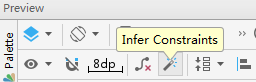
活动回收栈 保存临时数据
- 重写onSaveInstanceState()方法
outState.putString("data_key",tempData);
- 在onCreate方法中有
if (savedInstanceState!=null)
{
String tempData=savedInstanceState.getString("data_key");
}
活动的启动模式
- 四种 standard singleTop singleTask singleInstance
- 在mainfest.xml中注册 android:launchMode="singleTop"
- standard 每次启动都会创建一个新的活动
- singleTop 在栈顶时创建不会创建新的 而是直接用当前的 不在栈顶时创建新的
- singleTask 有活动时 这个活动之上的活动都出栈 没有活动时直接创建
- singleInstance 这个活动会创建新的栈
启动活动的最佳写法
p74
Android Studio 学习(一)的更多相关文章
- Android Studio 学习 - 基本控件的使用;Intent初学
Android Studio学习第三天. 今天主要学习 1. RadioButton.CheckBox.RatingBar.SeekBar等基础控件的使用. 结合Delphi中相类似的控件,在这些基本 ...
- Android Studio 学习笔记(一)环境搭建、文件目录等相关说明
Android Studio 学习笔记(一)环境搭建.文件目录等相关说明 引入 对APP开发而言,Android和iOS是两大主流开发平台,其中区别在于 Android用java语言,用Android ...
- Android Studio学习笔记
转:http://stormzhang.com/devtools/2014/11/25/android-studio-tutorial1 背景 相信大家对Android Studio已经不陌生了,An ...
- Android Studio 学习 - HelloWorld
今天是学习Android Studio的第2天,加油! 1. 首先要记录下使用Android Studio的一个代码自动完成的功能.平常基本上用Delphi,乍一换工具,各种不习惯,或者说不熟悉.按照 ...
- Android Studio 学习 - 程序安装
痛定思痛,从今天开始专心学习AndriodStudio.希望以此为契机,把Java学扎实.更希望自己能坚持下去,不要半途而废. 记录一些日常的工作以及碰到的问题,权当勉励自己.荀子曰:吾尝终日而思矣, ...
- Android Studio 学习笔记(1)
最近从Eclipse转到Android Studio IDE,很多东西需要学习,本文是个记录. 项目结构 在Anroid Studio 中,一个Project 包括多个Module,每个Module下 ...
- Android Studio 学习笔记1.1 创建自己的第一个安卓项目并且打包APK
自从上一次安装完安卓开发工具Android Studio后抽时间看视屏尝试编写自己的第一个安卓项目约两周的时间 每天下班后会花上1~2小时的时间去学习 目前的成果如下:次元宅的我.apk 嘛 总而 ...
- android studio学习----gradle配置
转载地址:http://blog.csdn.net/loongggdroid/article/details/47037413 1.gradle的简单介绍 Gradle是可以用于Android开发的新 ...
- android studio学习---快捷键
快捷键学习 TIPS: 1.异常代码块 或者自定义代码块结构 Ctrl+Alt+T 或者 File | Settings | File and Code Templates When yo ...
- Android Studio 学习笔记(四):Adapter和RecyclerView说明
在现版本中,滚动控件有多种,而相比于ListView,GridView,RecyclerView的用途更广,因此将前两者作为Adapter适配器的引入,再对RecyclerView进行简单讲解. MV ...
随机推荐
- Unity一键设置导入图片格式
前几天由于项目原因,做了一个自动根据模型自动创建动画状态机,然后紧接着做了根据动画状态机和模型一键制作Prefab. 现在因为图片数量或者其它原因需要写一个一键设置图片格式的插件. 至于制作动画状态机 ...
- HTB Linux queuing discipline manual - user guide笔记
1. Introduction HTB is meant as a more understandable, intuitive and faster replacement for the CBQ ...
- 谈谈npm依赖管理
引言 现在的前端开发几乎都离不开nodejs的包管理器npm,比如前端在搭建本地开发服务以及打包编译前端代码等都会用到.在前端开发过程中,经常用到npm install来安装所需的依赖,至于其中的技术 ...
- CSS3新增伪类--好用的:target
问:如果让你实现下图,点击跳转后,让内容1增加一个背景颜色,你会怎么做呢? 可能很多小伙伴第一反应是用JS,给跳转绑定点击事件,然后用DOM获取到内容1,在给其添加css样式. 如果我跟你说用cs ...
- puppet-type
puppet语法-type Table of Contents Custom Source 基本技能要求 Types简介 Type-Documentation Type-Properties Type ...
- pycharm注册码(不断更新)
2019.3.13测试可用 MTW881U3Z5-eyJsaWNlbnNlSWQiOiJNVFc4ODFVM1o1IiwibGljZW5zZWVOYW1lIjoiTnNzIEltIiwiYXNzaWd ...
- JavaScript中的注释问题详解? 部分3
注释:解释代码的含义,浏览器中不执行. 方便其他程序员了解代码 ,也可以注释自己不需要的代码(开发过程中)! 1. 单行注释 // 用于一行代码上面 2.多行注释 /* */ 用于一段代码上面 或者是 ...
- 数据库占用cpu较高的查询
近来看到别人的有关数据库查询cpu占用较高的sql语句(本人sql并不好),所以查询了一下资料,记录一下,便于理解和应用. 首先,将语句贴在这里 SELECT TOP 10 --平均cpu时间 tot ...
- tensorflow 1.0 学习:参数初始化(initializer)
CNN中最重要的就是参数了,包括W,b. 我们训练CNN的最终目的就是得到最好的参数,使得目标函数取得最小值.参数的初始化也同样重要,因此微调受到很多人的重视,那么tf提供了哪些初始化参数的方法呢,我 ...
- 【干货】Jquery.Datables与Bootstrap3的组合使用
官方地址 datatables官方网址:www.datatables.net 下载bootstrap3与datables文件包 引用文件 css:bootstrap.css.dataTables.bo ...