
通过maven-assembly-plugin将Springboot项目打包成tar.gz压缩包,在Linux环境可执行脚本直接安装成系统服务
1、在pom.xml中添加maven-assembly-plugin依赖,同时需将默认生成的spring-boot-maven-plugin依赖删除,否则最终打出的发行包启动会有问题
        <plugin>

                <groupId>org.apache.maven.plugins</groupId>

                <artifactId>maven-assembly-plugin</artifactId>

                <version>3.0.0</version>

                <configuration>

                    <!-- not append assembly id in release file name -->

                    <appendAssemblyId>false</appendAssemblyId>

                    <descriptors>

                        <descriptor>src/main/assembly/release.xml</descriptor>

                    </descriptors>

                </configuration>

                <executions>

                    <execution>

                        <id>make-assembly</id>

                        <phase>package</phase>

                        <goals>

                            <goal>single</goal>

                        </goals>

                    </execution>

                </executions>

            </plugin>
<plugin>

                <groupId>org.springframework.boot</groupId>

                <artifactId>spring-boot-maven-plugin</artifactId>

 </plugin>
2、新增release.xml
在依赖配置中的descriptor标签中定义了一个release.xml文件路径,assembly则通过该配置文件,确定打包的文件类型及其所包含的文件
<assembly xmlns="http://maven.apache.org/plugins/maven-assembly-plugin/assembly/1.1.0"

          xmlns:xsi="http://www.w3.org/2001/XMLSchema-instance"

          xsi:schemaLocation="http://maven.apache.org/plugins/maven-assembly-plugin/assembly/1.1.0 http://maven.apache.org/xsd/assembly-1.1.0.xsd">

    <id>dist</id>

    <formats>

        <format>tar.gz</format>

    </formats>

    <includeBaseDirectory>true</includeBaseDirectory>

    <fileSets>

        <fileSet>

            <directory>src/main/bin</directory>

            <outputDirectory>bin</outputDirectory>

            <directoryMode>0777</directoryMode>

            <includes>

                <include>**/*</include>

            </includes>

            <fileMode>0777</fileMode>

            <lineEnding>unix</lineEnding>

        </fileSet>

        <fileSet>

            <directory>target/classes</directory>

            <outputDirectory>conf</outputDirectory>

            <includes>

                <include>**/*.properties</include>

                <include>**/*.xml</include>

            </includes>

            <excludes>

                <exclude>**/*.class</exclude>

            </excludes>

        </fileSet>

        <fileSet>

            <directory>target</directory>

            <outputDirectory>logs</outputDirectory>

            <excludes>

                <exclude>**/*</exclude>

            </excludes>

        </fileSet>

    </fileSets>

    <dependencySets>

        <dependencySet>

            <outputDirectory>lib</outputDirectory>

            <unpack>false</unpack>

        </dependencySet>

    </dependencySets>

</assembly>
3、添加脚本文件
脚本文件的作用是为了在Linux环境下可直接运行进行服务的安装,所以需要事先将脚本编辑完成
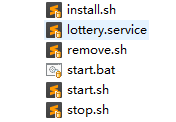
4、打包
执行mvn clean package -Dmaven.test.skip=true命令,在target目录生成 文件,解压后,里面包含bin、conf、lib、logs这四个目录,在release.xml中可以找到对应的配置,以及存放的数据与项目文件的对应关系,都在release.xml中进行设置
5、项目链接
百度云:https://pan.baidu.com/s/1zi1zuKTeZHs8BBjYUxm1fg 密码:rkpc
通过maven-assembly-plugin将Springboot项目打包成tar.gz压缩包,在Linux环境可执行脚本直接安装成系统服务的更多相关文章
- maven将自己的springboot项目打包成jar包后,作为工具包引入其他项目,找不到jar中的类
将springboot项目打包成jar包,作为工具包导入项目后,找不到jar中的类. 原因是:springboot项目使用了自动的打包插件. 原先的插件配置: <build> <pl ...
- 用gradle把springboot项目打包成jar
``` 用gradle把springboot项目打包成jar ```### build.gradle 中添加 buildscript { repositories { mavenLocal() mav ...
- SpringBoot项目打包成jar后,启动脚本
将springboot项目打包成jar后,上传至服务器,每次都需要手敲命令,重新部署项目,可将这些命令写入脚本中,直接运行. 启动脚本(start.sh): CUR_PATH=$(cd "$ ...
- Spring Boot项目使用maven-assembly-plugin根据不同环境打包成tar.gz或者zip
spring-boot-assembly 在spring boot项目中使用maven profiles和maven assembly插件根据不同环境打包成tar.gz或者zip 将spring bo ...
- springboot项目打包成jar/war包
springboot项目打包过程中包含第三方jar 开发IDE是IntelliJ IDEA,数据库是mysql,内置服务器tomcat. 打包步骤: 1. 确定项目调试运行没问题 2. 将第三方jar ...
- Springboot项目打包成jar运行2种方式
最近公司有个项目需要移植到SpringBoot框架上,项目里面又有许多第三方jar包,在linux服务器上最方便的就是用jar的方式来运行SpringBoot项目了,因此我研究了2种打jar包的方式, ...
- IDEA中springboot项目打包成jar
springboot的打包方式有很多种.有打成war的,有打成jar的,也有直接提交到github,通过jekins进行打包部署的.这里主要介绍如何打成jar进行部署.不推荐用war,因为spri ...
- springboot项目打包成jar包在Linux服务器默认80端口运行
springboot项目端口设置 在application.properties文件 server.port=80 在application.yml文件 server: port: 80 然后在ide ...
- 在IDEA中将SpringBoot项目打包成jar包的方法
SpringBoot项目无需依赖tomcat容器(内含)就可以发布,现在将打包步骤记录一下: 1. 打包前确认项目可以正常运行,打开Project Structure 快捷键 Ctrl+Shift+A ...
随机推荐
- Python 递归的练习
递归的练习 递归的了解实例 # 定义一个类(num是需要给出的参数) # 一定要有临界值 # 要有递推的关系 def digui(num): # 打印num print('$'+str(num)) # ...
- (Python基础)集合操作
集合是一个无序的,不重复的数据组合,它的主要作用如下: 去重,把一个列表变成集合,就自动去重了 关系测试,测试两组数据之前的交集.差集.并集等关系 以下代码演示了去重,增删改查,以及关系测试供参考学习 ...
- docker 搭建 web 服务环境
docker容器虽然早就听说过,但是本人还真的没去用过,刚好看到相关的文章,就分享了下,有机会可以实践下...... 做过开发的人对开发环境的安装.配置应该都不会太陌生,不管你做什么开发,对开发环境都 ...
- 检测mysq组复制的脚本
#!/bin/bash PROG_OUT="/root/checkmysql-group.log" # 输出日志到至此文件,建议配置绝对路径 #PROG_OUT="/de ...
- 转:强制关闭.net程序
/// <summary> /// 运行DOS命令 /// DOS关闭进程命令(ntsd -c q -p PID )PID为进程的ID /// </summary> /// & ...
- Java学习前的一些准备
1.JDK - (Java SE Development Kit) JDK是Java开发所需要的环境,就跟我们想玩某个网游一样,玩之前一定是需要先安装相应的程序包的.那这个JDK就是我们准备登陆Jav ...
- Python module ---- abc
python中并没有提供抽象类与抽象方法,但是提供了内置模块abc(abstract base class)来模拟实现抽象类. ABC,Abstract Base Class(抽象基类),主要定义了 ...
- --- Android 设置为A2DP 接收器
http://www.it1352.com/88728.html external/bluetooth/bluedroid/include/bt_target.h: * Enable bluetoot ...
- mount.cifs permission denied
[root@dev ~]# mount.cifs //192.168.9.155/APP /mnt/APP/ -o user=administrator,pass=dsff#$TTT 在检查帐号密码权 ...
- py2neo的使用(转)
转自:https://blog.csdn.net/sinat_26917383/article/details/79901207#24-%E7%B1%BB%E4%BC%BCset%E7%9A%84%E ...