
Android--UI之ScrollView
前言
本篇博客主要讲解ScrollView和HorizontalScrollView两个容器的使用。它们分别代表了垂直滚动以及水平滚动,滚动的内容是它其中包含的View。在本篇会简单介绍ScrollView和HorizontalScrollView的使用以及注意事项,最后以一个简单的Demo来演示一下这两个容器的使用。
ScrollView
ScrollView,通过官方文档的继承关系可以看出,它继承自FrameLayout,所以它是一种特殊类型的FrameLayout,因为它可以使用用户滚动显示一个占据的空间大于物理显示的视图列表。值得注意的是,ScrollView只能包含一个子视图或视图组,在实际项目中,通常包含的是一个垂直的LinearLayout。
值得注意的是,ScrollView不能和ListView一起使用,因为ListView已经对垂直方向的滚动做了处理,它会迫使如果ListView的内容大于物理视图的内容的时候,强制垂直滚动的效果,所以这里使用ScrollView和ListView混合使用是没有意义的,对于ListView的讲解,可以参见我的另外一篇博客:Android--UI之ListView。ScrollView还需要注意EditText自带的多行输入的滚动效果,也是不可以混合使用的,如果在ScrollView中包含了多行的EditText,那EditText中自带的滚动效果将失效。其中心思想就是ScrollView是一个滚动视图的容器,对于一些自带了滚动效果的控件,是无法和它一起被混合使用的。
在Android平台下,与ScrollView类似的还有一个HorizontalScrollView容器,这个容器与ScrollView的作用相反,主要适用于水平滚动,了解了ScrollView就基本上了解了HorizontalScrollView,所以这里着重讲解ScrollView的使用。
示例Demo
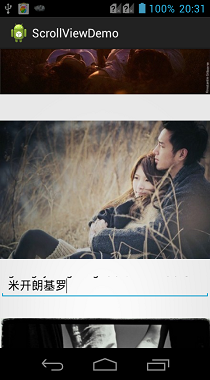
ScrollView其实就是一个布局,所以基本上没有什么太多的自己的方法或者属性需要特别讲解。这里直接展示一个Demo来讲解一下使用以及效果即可,这里提供了十张图片,需要放置在res/drawable-hdpi目录下。
布局代码:
 <?xml version="1.0" encoding="utf-8"?>

 <ScrollView xmlns:android="http://schemas.android.com/apk/res/android"

     android:layout_width="match_parent"

     android:layout_height="match_parent" >

     <LinearLayout

         android:layout_width="match_parent"

         android:layout_height="wrap_content"

         android:orientation="vertical" >

         <TextView

             android:layout_width="match_parent"

             android:layout_height="wrap_content"

             android:text="垂直滚动视图"

             android:textSize="30dp" />

         <ImageView

             android:layout_width="match_parent"

             android:layout_height="wrap_content"

             android:src="@drawable/bmp1" />

         <ImageView

             android:layout_width="match_parent"

             android:layout_height="wrap_content"

             android:src="@drawable/bmp2" />

         <ImageView

             android:layout_width="match_parent"

             android:layout_height="wrap_content"

             android:src="@drawable/bmp3" />

         <EditText

             android:maxLines="2"

             android:layout_width="match_parent"

             android:layout_height="40dp" />

         <ImageView

             android:layout_width="match_parent"

             android:layout_height="wrap_content"

             android:src="@drawable/bmp4" />

         <ImageView

             android:layout_width="match_parent"

             android:layout_height="wrap_content"

             android:src="@drawable/bmp5" />

         <ImageView

             android:layout_width="match_parent"

             android:layout_height="wrap_content"

             android:src="@drawable/bmp6" />

         <ImageView

             android:layout_width="match_parent"

             android:layout_height="wrap_content"

             android:src="@drawable/bmp7" />

         <ImageView

             android:layout_width="match_parent"

             android:layout_height="wrap_content"

             android:src="@drawable/bmp8" />

         <ImageView

             android:layout_width="match_parent"

             android:layout_height="wrap_content"

             android:src="@drawable/bmp9" />

         <ImageView

             android:layout_width="match_parent"

             android:layout_height="wrap_content"

             android:src="@drawable/bmp10" />

     </LinearLayout>

 </ScrollView>
效果展示:

HorizontalScrollView
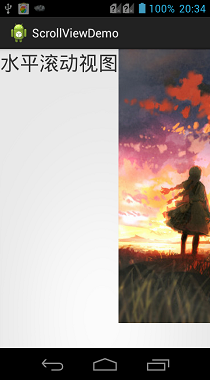
对于HorizontalScrollView而言,其实所有的思想都与ScrollView类似,唯一的区别是HorizontalScrollView是支持水平滚动的。在上面的实例中,只需要改变一下外围的ScrollView为HorizontalScrollView,再把其中包裹的LinearLayout的android:orientation属性设置为horizontal即可实现水平滚动的效果。因为没有什么新的技术含量,这里就不再展示Demo代码了。
效果展示:

总结
对于现在的Android开发,大部分应用中,需要用到滚动效果的时候,比如说滑动的展示新闻的效果,都会直接使用ListView来装载数据。但是ScrollView还是有一定用处的,比如一些软件的属性的设置,就可以放在一个ScrollView中。核心思想就是对于一些动态的效果展示,就使用ListView,对于固定的一些效果展示,就使用ScrollView包裹即可。
请支持原创,尊重原创,转载请注明出处。谢谢。

Android--UI之ScrollView的更多相关文章
- Android UI系列-----ScrollView和HorizontalScrollView
本篇随笔将讲解一下Android当中比较常用的两个布局容器--ScrollView和HorizontalScrollView,从字面意义上来看也是非常的简单的,ScrollView就是一个可以滚动的V ...
- Android UI基础教程 目录
从csdn下载了这本英文版的书之后,又去京东搞了一个中文目录下来.对照着看. 话说,这本书绝对超值.有money的童鞋看完英文版记得去买中文版的~~ Android UI基础教程完整英文版 pdf+源 ...
- Android UI设计
Android UI设计--PopupWindow显示位置设置 摘要: 当点击某个按钮并弹出PopupWindow时,PopupWindow左下角默认与按钮对齐,但是如果PopupWindow是下图的 ...
- [Android] Android最简单ScrollView和ListView滚动冲突解决方案
[Question]问题描述: 单独的ListView列表能自动垂直滚动,但当将ListView嵌套在ScrollView后,会和ScrollView的滚动滑块冲突,造成ListView滑块显示不完整 ...
- Android UI设计的基本元素有哪些
在android app开发如火如荼的今天,如何让自己的App受人欢迎.如何增加app的下载量和使用量....成为很多android应用开发前,必须讨论的问题.而ui设计则是提升客户视觉体验度.提升下 ...
- 腾讯开源的Android UI框架——QMUI Android
各位同学,早上好,我是你们的老朋友D_clock爱吃葱花,前些天忙着发版本,最近也在看各种各样的新知识,有好多东西想写啊啊啊啊啊.嗯,先冷静捋一下,卖个关子.扯回正题,今天继续为大家推荐一个Githu ...
- 各种Android UI开源框架 开源库
各种Android UI开源框架 开源库 转 https://blog.csdn.net/zhangdi_gdk2016/article/details/84643668 自己总结的Android开源 ...
- iPhone/iPad/Android UI尺寸规范 UI尺寸规范,UI图标尺寸,UI界面尺寸,iPhone6尺寸,iPhone6 Plus尺寸,安卓尺寸,iOS尺寸
iPhone/iPad/Android UI尺寸规范 UI尺寸规范,UI图标尺寸,UI界面尺寸,iPhone6尺寸,iPhone6 Plus尺寸,安卓尺寸,iOS尺寸 iPhone界面尺寸 设备 分辨 ...
- Android ui 测试课堂笔记
开始接触Android ui测试了,笔记如下 模拟器 Genemotion , the fastest android simulator in the world Android ui 测试工具 S ...
- Android UI 绘制过程浅析(五)自定义View
前言 这已经是Android UI 绘制过程浅析系列文章的第五篇了,不出意外的话也是最后一篇.再次声明一下,这一系列文章,是我在拜读了csdn大牛郭霖的博客文章<带你一步步深入了解View> ...
随机推荐
- 上传本地文件到github
第一步:创建新的仓库 勾选Initialize this repository with a README选项,自动创建REAMDE.md文件. 第二步: $ git config --global ...
- 《数学之美》--第一章:文字和语言 vs 数字和信息
PDF下载 第一章 文字和语言 vs 数字和信息 数字.文字和自然语言一样,都是信息的载体,它们之间原本有着天然的联系.语言和数学的产生都是为了同一个目的-记录和传播信息.但是,直到半个多世纪前香农博 ...
- 初入pygame——贪吃蛇
一.问题利用pygame进行游戏的编写,做一些简单的游戏比如贪吃蛇,连连看等,后期做完会把代码托管. 二.解决 1.环境配置 python提供一个pygame的库来进行游戏的编写.首先是安装pygam ...
- 89、instancetype和id的区别
1>instancetype在类型表示上,跟id一样,可以表示任何对象类型 2>instancetype只能用在返回值类型上,不能像id一样用在参数类型上 3>instancetyp ...
- 软件测试---测试模型(V、W、H)
一.V测试模型 1.V模型示意图: 单元测试:又叫模块测试,针对软件设计中的最小单位—>程序模块 集成测试:又叫组装测试,通常在单元测试的基础上,将所有程序模块进行有序.递增测试. 系统测试:把 ...
- restful状态码常用
在进行后端接口API封装的过程中,需要考虑各种错误信息的输出.一般情况下,根据相应问题输出适合的HTTP状态码,可以方便前端快速定位错误,减少沟通成本. HTTP状态码有很多,每个都有对应的含义,下面 ...
- Lambda表达式遍历和泛型ForEach遍历方式
lambda表态式 DataTable dtAllItems = policySecurity.GetUserAccessTypeOnAllItems(userID); List<DataRow ...
- linux 最为常用的命令
系统信息 arch 显示机器的处理器架构(1) uname -m 显示机器的处理器架构(2) uname -r 显示正在使用的内核版本 cat /proc/cpuinfo 显示CPU info的信息 ...
- LeetCode刷题:第七题 整数翻转 第九题 回文数
第七题题目描述: 给出一个 32 位的有符号整数,你需要将这个整数中每位上的数字进行反转. 示例 1: 输入: 123 输出: 321 示例 2: 输入: -123 输出: -321 示例 3: 输入 ...
- JS自定义鼠标右击菜单
自定义鼠标右击菜单要素: 禁止页面默认右击事件 设置右击菜单的样式以及菜单出现的位置(通过捕获鼠标点击位置来确定菜单的位置) 鼠标在指定控件(区域)上右击时显示菜单(默认菜单隐藏,点击鼠标右键时显示) ...