
HTML5 前端将 dom 元素转化为 Word,EXCEL 或者图片 并实现下载
< 一 > word
1,依赖于 jquery.html.word.js 插件 => https://blog-static.cnblogs.com/files/lovling/jquery.html.word.js
2,该插件依赖于 jquery,需要先引入 jquery , 使用方式如下
<!DOCTYPE html>

<html lang="zh">

<head>

    <meta charset="UTF-8">

    <title>jQuery 之 HTML 生成 Word 文档</title>

    <script src="https://cdn.bootcss.com/jquery/3.3.0/jquery.min.js"></script>

    <script src="https://blog-static.cnblogs.com/files/lovling/jquery.html.word.js"></script>

</head>

<body>

    <div id="box">

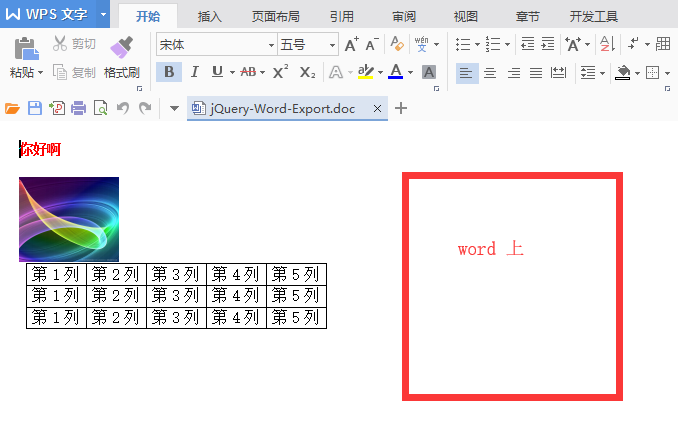
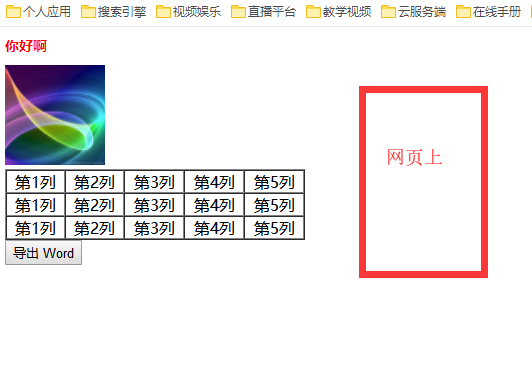
        <h1 style="font-size: 14px; color: red;">你好啊</h1>

        <img src="./123.jpg" width="100" height="100" />

        <table width="300" border="1" cellspacing="0" cellpadding="0">

            <tr style="text-align: center;">

                <td>第1列</td>

                <td>第2列</td>

                <td>第3列</td>

                <td>第4列</td>

                <td>第5列</td>

            </tr>

            <tr style="text-align: center;">

                <td>第1列</td>

                <td>第2列</td>

                <td>第3列</td>

                <td>第4列</td>

                <td>第5列</td>

            </tr>

            <tr style="text-align: center;">

                <td>第1列</td>

                <td>第2列</td>

                <td>第3列</td>

                <td>第4列</td>

                <td>第5列</td>

            </tr>

        </table>

    </div>

    <button id="leading-out">导出 Word</button>

</body>

<script type="text/javascript">

    /**

     * 支持各种标签, 支持行间样式, 不支持全局样式

     * 图片不支持 style 样式, 支持标签本身属性,不支持不同域名的图片

     * 支持表格, 支持表格行间样式

     * 不支持 form 表单

     */

    $("#leading-out").click(function() {

        $("#box").wordExport();

    });

</script>

</html>
3,效果,可能会有些许偏差
< 二 > excel
1,依赖于 jquery.table.excel.js 插件 => https://blog-static.cnblogs.com/files/lovling/jquery.table.excel.js
2,该插件依赖于 jquery,需要先引入 jquery , 使用方式如下
<!doctype html>

<html>

<head>

    <meta charset="UTF-8">

    <title>jQuery 之 TABLE 生成 Excel 文档</title>

    <script src="https://cdn.bootcss.com/jquery/3.3.0/jquery.min.js"></script>

    <script src="https://blog-static.cnblogs.com/files/lovling/jquery.table.excel.js"></script>

</head>

<style type="text/css">

    .box {

        width: 600px;

    }

    td {

        text-align: center;

        vertical-align: middle;

    }

    #btn {

        width: 600px;

        height: 50px;

        line-height: 50px;

        text-align: center;

        font-size: 16px;

        color: red;

    }

</style>

<body>

    <div class="box">

        <table width="600" height="400px" border="1">

            <tr class="no">

                <td>该行不会被输出到excel中</td>

                <td>该行不会被输出到excel中</td>

            </tr>

            <tr>

                <td>这一行会被导出到excel中</td>

                <td>这一行会被导出到excel中</td>

            </tr>

            <tr>

                <td>单元格1-1</td>

                <td>单元格1-2</td>

            </tr>

            <tr>

                <td>单元格2-1</td>

                <td>单元格2-2</td>

            </tr>

            <tr>

                <td>单元格3-1</td>

                <td>单元格3-2</td>

            </tr>

            <tr>

                <td colspan="2">123</td>

            </tr>

        </table>

        <button id="btn">点击这里将表格内容导出到excel中</button>

    </div>

</body>

<script type="text/javascript">

    $("#btn").click(function() {

        $(".box").table2excel({

            exclude: ".no",          // 不被生成的行

            filename: "myFileName",  // 生成的文件名称

            exclude_img: true,       // 是否过滤图片

            exclude_links: true,     // 是否过滤 a 标签

            exclude_inputs: true     // 是否过滤表单

        });

    });

</script>

</html>
< 三 > IMG
1,依赖于 html.canvas.js 插件 => https://blog-static.cnblogs.com/files/lovling/html.canvas.js
2,使用方式
<!DOCTYPE html>

<html>

<head>

    <meta charset="UTF-8">

    <title>页面截屏</title>

    <script src="https://cdn.bootcss.com/jquery/3.3.0/jquery.min.js"></script>

    <script src="https://blog-static.cnblogs.com/files/lovling/html.canvas.js"></script>

</head>

<style type="text/css">

    #box {

        width: 360px;

    }

    .dom-area {

        width: 360px;

        background: white;

    }

    .dom-area-line {

        height: 44px;

        font-size: 0;

        border-bottom: 1px solid #e5e5e5;

    }

    .dom-area-line > span {

        display: inline-block;

        vertical-align: top;

        line-height: 44px;

        width: 60px;

        font-size: 14px;

        text-indent: 14px;

    }

    .dom-area-line > input {

        display: inline-block;

        vertical-align: top;

        border: none;

        height: 42px;

        line-height: 42px;

        width: 300px;

        outline: none;

    }

    .cut-button {

        font-size: 0;

        height: 44px;

        background: #000000;

    }

    .cut-button > a {

        display: inline-block;

        width: 180px;

        line-height: 44px;

        font-size: 16px;

        color: #ffffff;

        text-align: center;

        text-decoration: none;

    }

    .cut-area {

        width: 360px;

    }

    .cut-area > canvas {

        width: 360px;

    }

</style>

<body>

<div id="box">

    <div class="dom-area">

        <div class="dom-area-line">

            <span>姓名:</span>

            <input type="text" />

        </div>

        <div class="dom-area-line">

            <span>性别:</span>

            <input type="text" />

        </div>

        <div class="dom-area-line">

            <span>生日:</span>

            <input type="text" />

        </div>

    </div>

    <div class="cut-button">

        <a id="cuts-outs">截屏</a>

        <a id="down-load">下载</a>

    </div>

    <div class="cut-area"></div>

</div>

</body>

<script type="text/javascript">

    var domArea = $('.dom-area');

    var cutArea = $('.cut-area');

    var downLoad = $("#down-load");

    $("#cuts-outs").on("click", function (ev) {

        html2canvas(domArea, {

            onrendered: function (canvas) {

                // 将生成的 canvas 放入到 dom 中, 这里可以做画布操作

                cutArea.append(canvas);

                // 将操作完成的画布转化为 base64 编码的文件

                dataURL = canvas.toDataURL("image/png");

                console.log(dataURL);

                // 将文件设置到下载区, 点击就能下载了

                downLoad.attr("href", dataURL);

                downLoad.attr("download", 'myjobdeer.png');

            }

        });

    });

</script>

</html>
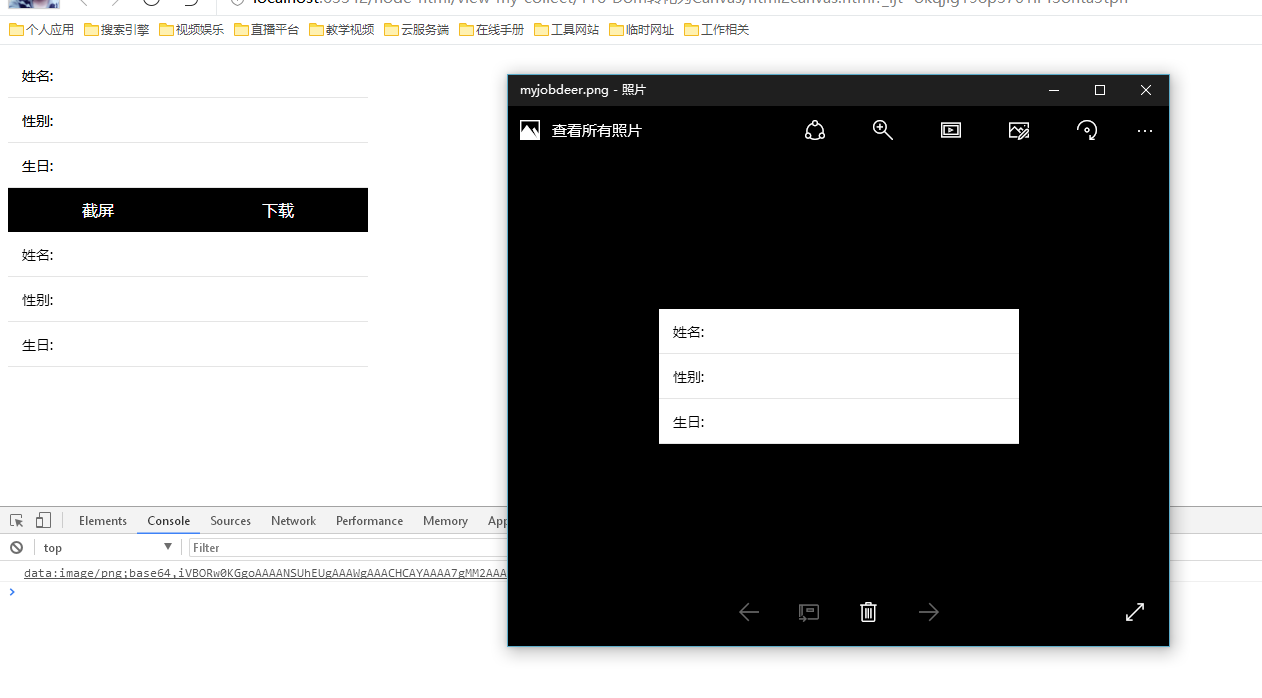
3,效果如下
HTML5 前端将 dom 元素转化为 Word,EXCEL 或者图片 并实现下载的更多相关文章
- jQuery.sort对DOM元素进行排序
实例: 每个tr的第三列显示的都是数字,我们就以这数字列作为排序依据,方法就是利用jquery的sort()方法. 首先,利用jquery选择器获取每个tr元素,获取回来是一个数据: var $trs ...
- 2、Python djang 框架下的word Excel TXT Image 等文件的下载
2.python实现文件下载 (1)方法一.直接用a标签的href+数据库中文件地址,即可下载.缺点:word excel是直接弹框下载,对于image txt 等文件的下载方式是直接在新页面打开. ...
- HTML5中DOM元素的querySelector/querySelectorAll的工作机制
在HTML5中,提供了强大的DOM元素选择API querySelector/querySelectorAll,允许使用JavaScript代码来完成类似CSS选择器的DOM元素选择功能.通常情况下, ...
- HTML DOM元素的Dragdrop
在前端web页面中,为了提高用户体验,通常会希望将页面中的元素设计成可dragdop的,简化用户操作.这一设计特性在缺少鼠标的触摸屏设备上,显得更为重要. 在早期的应用中,我们通常需要借助第三方的ja ...
- 返本求源——DOM元素的特性与属性
抛砖引玉 很多前端类库(比如dojo与JQuery)在涉及dom操作时都会见到两个模块:attr.prop.某天代码复查时,见到一段为某节点设置文本的代码: attr.set(node, 'inner ...
- OriDomi – 像折叠纸张一样折叠 DOM 元素
Web 原本是扁平化的,但是现在你可以折起来.OriDomi 是一个开源的 JavaScript 库,使得 DOM 元素能够实现像纸折一样折叠的效果.在创建你所看到的场景背后,OriDomi 做了大量 ...
- HTML5前端(移动端网站)性能优化指南
HTML5是一种最新发布网页构架的普遍模型,是构建对程序.对用户都更有价值的数据驱动的Web的前端技术框架,它的价值在于融合CSS/javaScript/flash等众多前端开发技术,更多的体现在对交 ...
- HTML5学堂 全新的HTML5/前端技术分享平台
HTML5学堂 全新的HTML5/前端技术分享平台 HTML5学堂是做什么的? HTML5学堂~http://www.h5course.com~由多名热爱H5的讲师们组成的一个组织.致力于构建一个前端 ...
- html table表格导出excel的方法 html5 table导出Excel HTML用JS导出Excel的五种方法 html中table导出Excel 前端开发 将table内容导出到excel HTML table导出到Excel中的解决办法 js实现table导出Excel,保留table样式
先上代码 <script type="text/javascript" language="javascript"> var idTmr; ...
随机推荐
- REST SOAP Thrift 对比
别人的REST SOAP Thrift对比: 单项分数越高越好 项目 REST SOAP Thrift Extensibility 5 3 1 Neutrality 2 4 3 Independenc ...
- 20175202 《Java程序设计》迭代和JDB
一.任务详情 二.设计过程的问题及解决 1.程序编译时一直提示编译出现错误. 原因及解决:本以为声明对象和创建对象一起进行时,可以直接采用如zhubajie = new Xiyoujirenwu(); ...
- [tomcat]tomcat 9.0.x 控制台中文乱码解决办法
根本原因,tomcat 输出的东西,与cmd控制台或者IDE控制台编码不一致. 修改tomcat输出内容的编码,%CATALINA_HOME%/conf/logging.properties 9.0. ...
- C# 生成海报,文本区域指定和换行,图片合成
protected void Page_Load(object sender, EventArgs e) { if (!IsPostBack) { string path = Server.MapPa ...
- docker的windows环境设置
1.下载docker-install.exe安装VirtualBox.Git.Boot2Docker for Windows 2.设置环境变量,启动boot2docker Core Linux. 可以 ...
- CentOS 6 update curl
touch /etc/yum.repos.d/city-fan.repo vi /etc/yum.repos.d/city-fan.repo add the following: [CityFan] ...
- python基础知识4--数据类型与变量
阅读目录 一.变量 二.数据类型 2.1 什么是数据类型及数据类型分类 2.2 标准数据类型: 2.2.1 数字 2.2.1.1 整型: 2.2.1.2 长整型long: 2.2.1.3 布尔bool ...
- 语音通信中终端上的时延(latency)及减小方法
时延是语音通信中的一个重要指标,当端到端(end2end)的时延(即one-way-delay,单向时延)低于150Ms时人感觉不到,当端到端的时延超过150Ms且小于450Ms时人能感受到但能忍受不 ...
- Spring Cloud Turbine微服务集群实时监控
本文代码下载地址: https://gitlab.com/mySpringCloud/turbine SpringBoot版本:1.5.9.RELEASE (稳定版) SpringCloud版本:Ed ...
- uWSGI的配置与发布
参考: https://www.cnblogs.com/pyyu/p/9481344.html 一.什么是wsgi, uwsgi, uWSGI wsgi 全称web server gateway ...